1. Introduction
This user manual provides comprehensive instructions for the installation, operation, maintenance, and troubleshooting of your Casta Diva Smart Toilet. Please read this manual thoroughly before using the product to ensure safe and efficient operation. Keep this manual for future reference.

Figure 1: Casta Diva Smart Toilet (Model CD-Y080)
2. Safety Information
Always adhere to the following safety guidelines to prevent injury or damage to the product:
- Ensure the toilet is installed by a qualified professional in accordance with local plumbing and electrical codes.
- Connect to a 120V power supply with a grounded outlet.
- Do not immerse the product in water or spray water directly onto electrical components.
- Keep children and pets away from the toilet's moving parts, especially during automatic operations.
- Do not attempt to repair or modify the product yourself. Contact qualified service personnel for assistance.
- Avoid using abrasive cleaners or harsh chemicals, as they may damage the surface or internal components.
3. Package Contents
Verify that all components are present before beginning installation:
- Casta Diva Smart Toilet Unit
- Remote Control (requires 2 AAA batteries, not included)
- T-valve
- Water Hoses
- Sealing Flange
- Wax Ring
- Mounting Brackets
- User Manual (this document)
4. Setup and Installation
The installation process for the Casta Diva Smart Toilet is similar to standard floor-mounted toilets. Ensure your bathroom meets the following requirements:
- Rough-in: Minimum 12 inches.
- Power Supply: A 120V grounded electrical outlet must be available nearby. The power cord length is approximately 3.93 feet (1.2 meters).
- Water Supply: Standard water connection.
Follow these general steps for installation:
- Prepare the floor drain and water supply line.
- Install the sealing flange and wax ring.
- Carefully position the toilet unit over the flange.
- Secure the toilet to the floor using the provided mounting brackets.
- Connect the T-valve and water hoses to the water supply.
- Plug the power cord into the grounded 120V outlet.
- Perform a test flush to check for leaks and proper operation.
This product is ETL and CUPC listed, ensuring compliance with safety and quality standards.

Figure 2: Product Dimensions and Rough-in Requirement
5. Operating Instructions
Your Casta Diva Smart Toilet offers a range of automated and customizable features for enhanced comfort and hygiene.
5.1 Automatic Functions
- Auto Open/Close Lid: The lid automatically opens when you approach the toilet and closes after you leave.
- Auto Wet Toilet Bowl: The toilet bowl is automatically pre-wetted when you are seated.
- Auto Flush: The toilet flushes automatically (1.28 GPF) after you leave.
- Auto On/Off Night Light: A gentle night light illuminates the bowl for easy visibility in the dark.
- Auto Deodorization: The built-in deodorizer activates automatically to neutralize odors.

Figure 3: Automatic Lid Opening and Closing
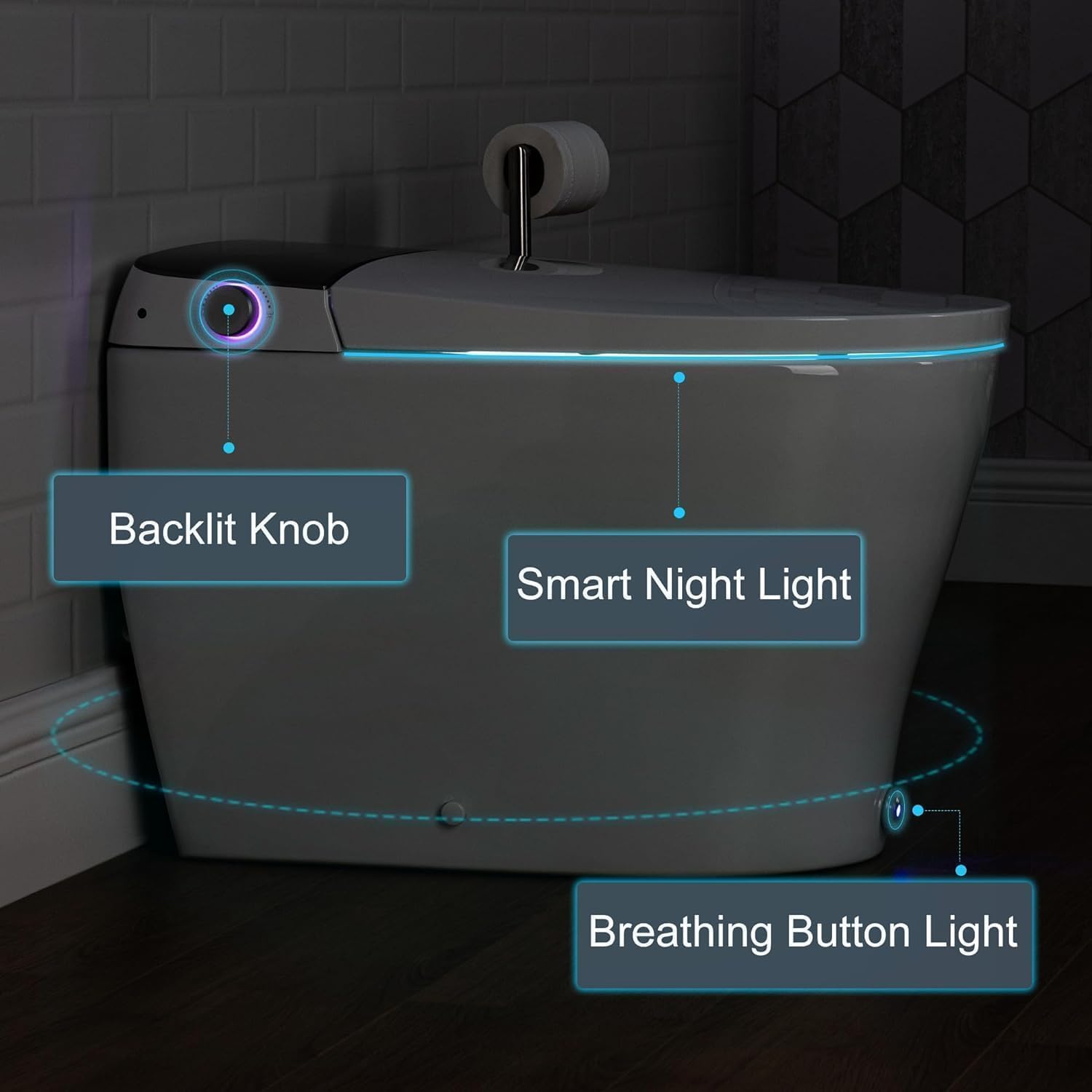
Figure 4: Smart Night Light Feature
5.2 Bidet Functions
The integrated bidet offers warm water cleansing and a warm air dryer. All temperatures (water, seat, air) are adjustable via the remote control.
- Front and Rear Cleansing: Dedicated nozzles for feminine and posterior wash.
- Adjustable Nozzle Position: Customize the spray angle for optimal cleaning.
- Adjustable Water Pressure: Control the intensity of the water spray.
- Warm Air Dryer: Reduces the need for toilet paper.
- Heated Seat: Provides warmth and comfort, especially in colder environments.

Figure 5: Comfort and Hygiene Features
5.3 Remote Control Operation
The remote control allows you to manage all bidet and toilet settings. Refer to the diagram below for button functions.
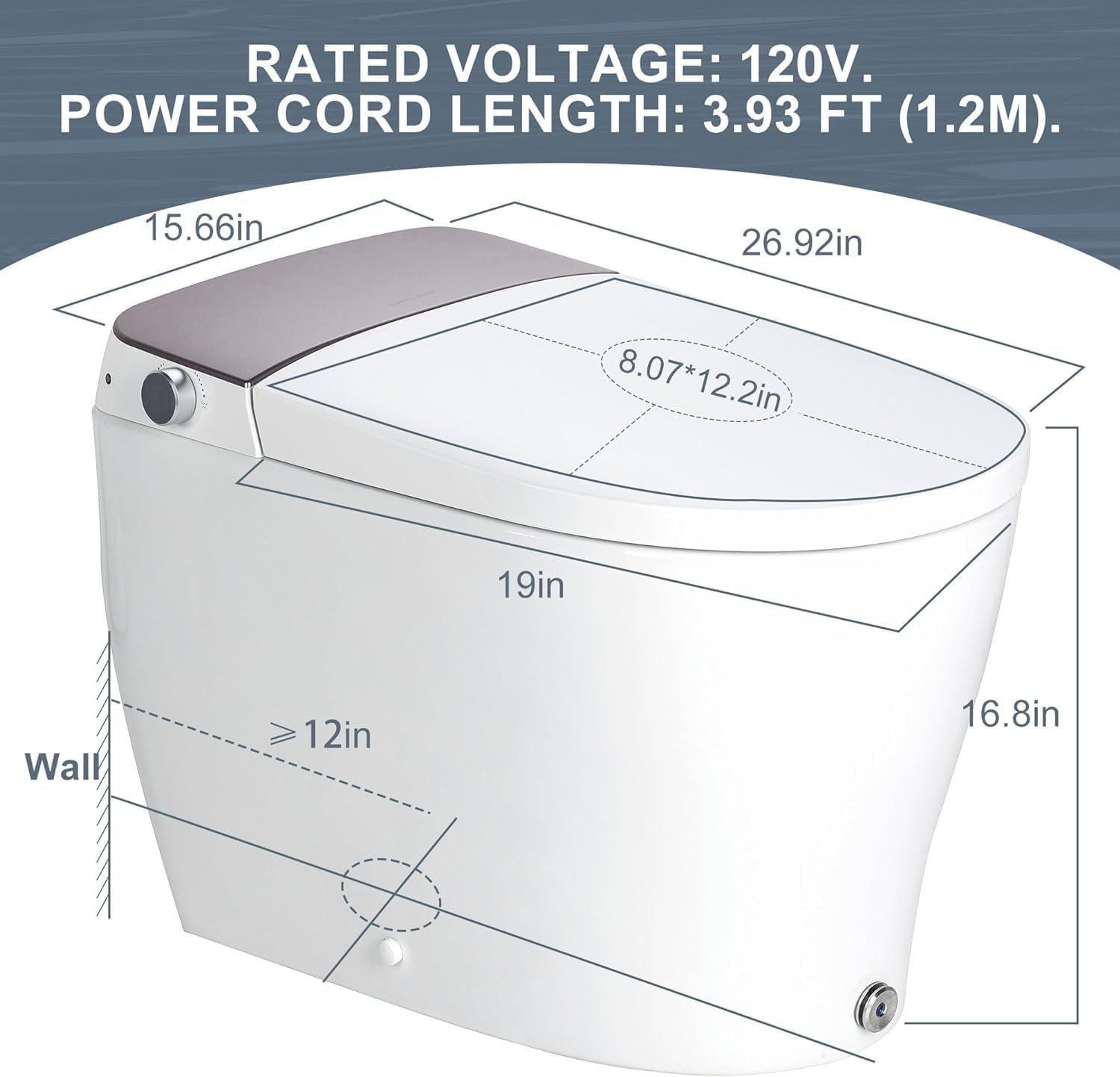
Figure 6: Remote Control Layout and Functions
- Mute Operation: Long press 'H/C Massage' on the remote control to turn off all functional prompt tones (except Alert) for a quieter experience.
- ECO Mode: Long press 'Nozzle Clean' to activate Energy-Saving mode.
- Disable Auto-Opening: Press 'Nozzle Clean' and 'H/C Massage' together to turn off the auto-opening function.
5.4 Additional Smart Features
- Foot Kick Button: A convenient foot kick button allows you to flip the seat, flush, and close the toilet without using your hands.
- Backup Battery: In case of a power outage, the built-in backup battery ensures over 300 flushes.
5.5 Bidet Functions Overview Video
Watch this video for a visual demonstration of the bidet's key functions, including feminine wash, self-rinsing, oscillating wash, and nozzle/pressure adjustments.
Video 1: Bidet Functions Overview. This video demonstrates the feminine wash, self-rinsing before use, oscillating wash, and how to adjust nozzle position and water pressure using the remote control.
6. Maintenance
Regular cleaning and maintenance will ensure the longevity and hygienic operation of your smart toilet.
- Nozzle Cleaning: The bidet nozzle features a self-cleaning function for improved hygiene. The nozzle is also detachable for thorough manual cleaning.
- Exterior Cleaning: Wipe the exterior surfaces with a soft, damp cloth and mild, non-abrasive cleaner.
- Bowl Cleaning: Clean the toilet bowl regularly using standard toilet bowl cleaners. Avoid cleaners that may damage plastic or electronic components.
- Filter Maintenance: Periodically check and clean any water filters if applicable (refer to the full PDF manual for detailed instructions).

Figure 7: Self-cleaning and Detachable Nozzle for Easy Maintenance
7. Troubleshooting
If you encounter any issues with your Casta Diva Smart Toilet, refer to the table below for common problems and solutions. If the problem persists, contact customer support.
| Problem | Possible Cause | Solution |
|---|---|---|
| Toilet does not flush automatically. | Sensor obstruction, power issue, or auto-flush disabled. | Ensure sensor is clear. Check power connection. Verify auto-flush is enabled via remote. |
| Bidet water is not warm. | Water heater issue, temperature setting too low. | Adjust water temperature setting on remote. Check power supply to the toilet. |
| Lid does not open/close automatically. | Auto-opening function disabled, sensor obstruction. | Ensure auto-opening is enabled via remote (press 'Nozzle Clean' and 'H/C Massage' together to toggle). Clear any obstructions around the sensor. |
| Weak flush. | Low water pressure, partial clog, or installation issue. | Check water supply valve is fully open. Clear any visible obstructions in the bowl. Consult a plumber if issue persists. |
| Remote control not responding. | Dead batteries, remote not paired. | Replace AAA batteries. Re-pair the remote control (refer to remote control pairing instructions in Figure 6). |
8. Specifications
| Feature | Detail |
|---|---|
| Model Number | CD-Y080 |
| Brand | CASTA DIVA |
| Color | Grey White |
| Product Dimensions (D x W x H) | 24.5"D x 14.1"W x 27.5"H |
| Material | Polypropylene (PP) |
| Installation Type | Floor Mounted |
| Item Weight | 98.8 pounds |
| Power Supply | 120V |
| Power Cord Length | 3.93 ft (1.2m) |
| Flush Volume | 1.28 GPF |
| Certifications | ETL, CUPC Listed |
9. Warranty and Support
For warranty information and customer support, please refer to the documentation included with your purchase or visit the official CASTA DIVA website. It is recommended to retain your proof of purchase for warranty claims.
The toilet includes a backup battery feature that provides over 300 flushes during a power outage, ensuring continued functionality.
For additional assistance, you may also refer to the User Manual (PDF) available online.