1. Introduction
This manual provides detailed instructions for the setup, operation, and maintenance of your KOQICALL Queue Calling System. This wireless system is designed to efficiently manage customer queues in various environments such as restaurants, cafes, clinics, and banks. Please read this manual thoroughly before using the product to ensure proper function and longevity.

Figure 1: Overview of the KOQICALL Queue Calling System components.
2. Product Components
The KOQICALL Queue Calling System includes the following main components:
- Host Display: A 3-digit LED display screen that shows the current number being served.
- Call Button: A wireless transmitter with 'LAST', 'NEXT', and 'RECALL' functions to manage the queue.
- Ticket Dispenser: A device for customers to take a numbered ticket.
- Ticket Paper Rolls: Two rolls, each with 2000 tickets (3-digit numbers from 000-999).
- Ticket Dispenser Stand: For mounting the ticket dispenser on a table or counter.
- Power Adaptor: For the host display.
- Remote Control: For adjusting display settings and volume.
- English Manual: This document.
3. Setup Instructions
Follow these steps to set up your queue calling system:
- Unpack Components: Carefully remove all items from the packaging.
- Assemble Ticket Dispenser: Attach the ticket dispenser to its stand using the provided screw. Place it in an accessible location for customers. Insert a ticket paper roll into the dispenser.
- Position Host Display: The host display can be wall-mounted or placed on a table. Choose a location where it is clearly visible to waiting customers.
- Connect Power: Plug the power adaptor into the host display and then into a standard electrical outlet. The display requires continuous power to operate.
- Call Button Battery: The call button comes with a pre-installed 12V 23A battery. Ensure it is properly seated.
- Initial Power-On: Once powered, the display will show a default number. The system is designed for plug-and-play operation, requiring no complex network setup or wiring.
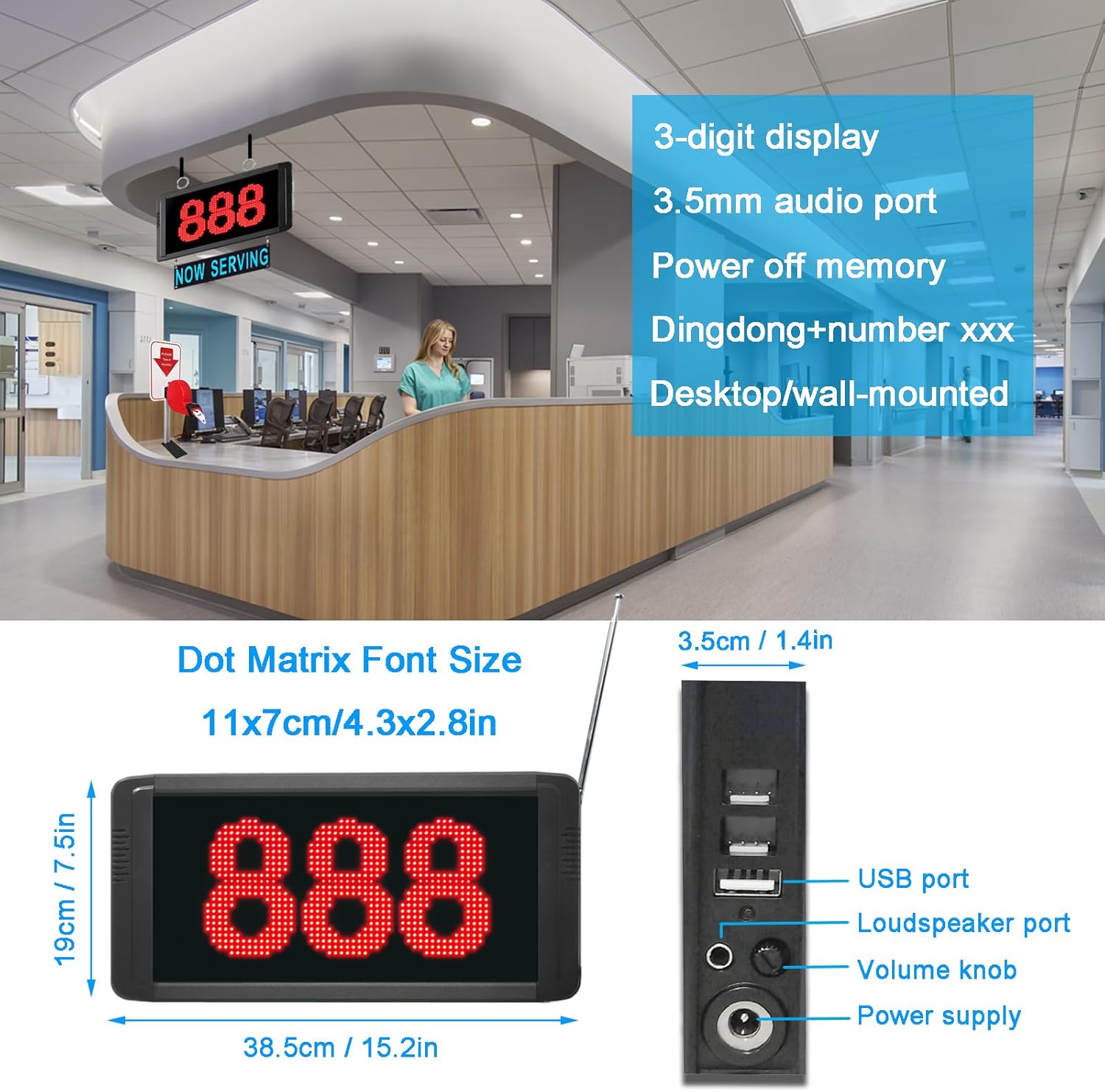
Figure 2: Host Display dimensions and connection ports.
4. Operating Instructions
Operating the KOQICALL Queue Calling System is straightforward:
- Customer Takes a Number: Customers take a numbered ticket from the ticket dispenser.
- Calling the Next Customer: When it is time to serve the next customer, press the NEXT button on the call button transmitter. The host display will show the next sequential number and broadcast it audibly.
- Recalling a Number: If a customer misses their call, press the RECALL button to re-display and re-broadcast the last called number.
- Calling the Previous Number: To call the previous number, press the LAST button.
- Adjusting Volume: The volume can be adjusted by spinning the volume knob located on the right side of the display screen. Alternatively, use the UP/DOWN keys on the remote control to adjust the volume (0-30 levels).
- Resetting the Number: To reset the displayed number to zero, press the VOL- and VOL+ buttons on the remote control simultaneously for 3 seconds.
- Power-off Memory: The system features power-off memory. If power is interrupted, the system will store the last called number. Upon reconnection, the call sequence will resume from "last number + 1".

Figure 3: Simple and practical usage of the calling system.

Figure 4: Example workflow in a service environment.

Figure 5: Wireless range and remote control functions.
5. Maintenance
To ensure optimal performance and longevity of your KOQICALL Queue Calling System, consider the following maintenance guidelines:
- Cleaning: Wipe the display screen and call button with a soft, dry cloth. Avoid using abrasive cleaners or solvents.
- Call Button Battery: The call button's 12V 23A battery typically lasts 6-10 months. Replace it when the indicator light dims or responsiveness decreases.
- Ticket Paper Rolls: Replace the ticket paper roll in the dispenser when it runs out. Ensure the new roll is inserted correctly.
- Environmental Conditions: Operate the system within recommended temperature and humidity ranges. The call button is IP55 waterproof, offering protection against dust and low-pressure water jets, but avoid submerging it.

Figure 6: Call Button Transmitter features and specifications.
6. Troubleshooting
This section addresses common questions and issues you might encounter:
- Q: Is the system wired?
A: No, the system is wireless. The number display unit requires continuous power via the included adaptor and does not have an internal battery for operation. - Q: Can multiple numbers be entered or displayed simultaneously?
A: This specific calling system is designed to display and broadcast one number at a time. It cannot enter or display multiple numbers concurrently. - Q: How can I mute the system or adjust the volume?
A: To adjust the volume, spin the volume knob located on the right side of the display screen. Alternatively, use the UP/DOWN keys on the remote control to adjust the volume from 0 to 30 levels. To completely mute, turn the volume knob to its lowest setting or reduce the volume to 0 using the remote. - Q: The display is not turning on.
A: Ensure the power adaptor is securely connected to both the display unit and a working electrical outlet. Verify that the outlet is receiving power. - Q: The call button is not responding.
A: Check the battery in the call button. If the indicator light is dim or non-responsive, replace the 12V 23A battery. Ensure the call button is within the operational wireless range of the display unit.
7. Specifications
Call Button Specification:
- Keys: LAST, NEXT, RECALL
- Signal Distance: 300ft (approx. 91m) in open areas; 150ft (approx. 45m) in obstructed areas
- Material: PC and waterproof silicone
- Dimension: 60 x 60 x 22mm (2.36 x 2.36 x 0.87 inches)
- Color: Black
- Battery: 12V 23A (included), estimated life 6-10 months
- Waterproof Rating: IP55
Number Screen (Host Display) Specification:
- Cover Material: High strength ABS + Metal
- Mounting: Wall mounted or tabletop
- Display Type: Dot matrix display, shows one group number
- Digits: 3-digits, range from 001-999 or NO.001-NO.999
- Dimension: 385 x 190 x 35mm (15.2 x 7.5 x 1.4 inches)
- Dot Matrix Font Size: 11 x 7cm (4.3 x 2.8 inches)
- Ports: USB port, Loudspeaker port, 3.5mm audio port, Power supply port
- Features: Power-off memory, Adjustable voice mode, volume, number of prompts, and text color (via computer software).
Ticket Dispenser Specification:
- Includes: Ticket Dispenser unit, Ticket Paper Rolls, Ticket Dispenser Stand, Screw for fixing.
- Ticket Paper Rolls: Total 2000 tickets per roll. 3-digit numbers from 000-999, 2 groups.
General Product Specifications:
- Package Dimensions: 17 x 8 x 5 inches
- Item Weight: 5.44 pounds
- Model Number: D100+O3-N+TDS
- Manufacturer: quanzhou koqi electronic co., ltd
- Date First Available: July 16, 2022
8. Warranty and Support
For specific warranty information, please refer to the documentation provided at the time of purchase or contact your retailer. For technical support or inquiries regarding software for advanced display adjustments, please contact KOQICALL customer service. Contact details can typically be found on the product packaging or the official KOQICALL website.


