1. Product Overview
The TOPXCDZ Bluetooth 30A LED Controller is designed to manage 5050 and 3528 RGB LED light strips. It offers smart control via a smartphone application, enabling users to adjust brightness, color, and dynamic modes. Key features include a timer function, music synchronization, and microphone mode for responsive lighting.
Key Features:
- Bluetooth Connectivity: Control your LED lights wirelessly via a smartphone app (iOS 6.0+ / Android 4.3+).
- Timer Function: Schedule specific times for your LED lights to turn on or off.
- Rich Color Modes: Access 16 million colors and various dynamic modes with adjustable brightness and speed.
- Music Sync & Mic Mode: Lights can change color and rhythm in sync with music played on your phone or ambient sounds captured by the microphone.
- High Load Capacity: Supports up to 10A per channel (30A total) with DC5-24V input.

Image 1.1: Front view of the TOPXCDZ Bluetooth 30A LED Controller, showing power input and RGB output terminals.
2. Technical Specifications
| Specification | Value |
|---|---|
| Transport Protocol | Bluetooth 4.0 or above |
| Supported Mobile OS | iOS 6.0 or above, Android 4.3 or above |
| Software Language | English, Chinese |
| Power Input | DC5-24V |
| Max Load Current | 10A/CH (Channel) |
| Control Distance | Up to 20 meters |
| Working Temperature | -20 ℃ to 85 ℃ |
| Dimensions (Approx.) | 88mm (L) x 66mm (W) x 22mm (H) |

Image 2.1: Dimensions of the Bluetooth LED Controller, showing approximate length, width, and height.
3. Package Contents
Please verify that all items are present in the package:
- 1x TOPXCDZ Bluetooth 30A LED Controller
- 1x User Manual (this document)
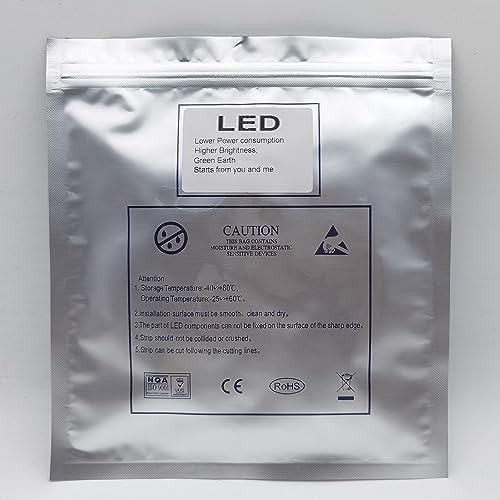
Image 3.1: Example packaging for the LED controller, indicating contents and handling instructions.
4. Safety Information
To ensure safe operation and prevent damage, please observe the following safety guidelines:
- Ensure the power input voltage (DC5-24V) matches the requirements of both the controller and the LED strip. Incorrect voltage can cause damage.
- Do not exceed the maximum load current of 10A per channel or 30A total.
- Install the controller in a dry environment, away from moisture and extreme temperatures.
- Avoid direct exposure to sunlight or heat sources.
- Do not attempt to disassemble or modify the controller. This will void the warranty and may lead to electrical hazards.
- Keep out of reach of children.
5. Installation and Setup
5.1. Download the Control Application
To control your LED lights, you need to download the companion application. Scan the QR code below with your smartphone or visit the provided link:
Image 5.1: The Bluetooth LED Controller, featuring a QR code for easy access to the control application download.
5.2. Wiring the Controller
Follow these steps to correctly wire the LED controller to your power supply and LED strip:
- Connect Power Input: Connect your DC5-24V power supply to the 'POWER' terminals on the controller. Ensure correct polarity: '+' to '+V' and '-' to '-V'.
- Connect LED Strip: Connect your RGB LED light strip to the output terminals. Match the 'V+' terminal on the controller to the common positive wire of your LED strip. Connect 'R' to the red channel, 'G' to the green channel, and 'B' to the blue channel of your LED strip.
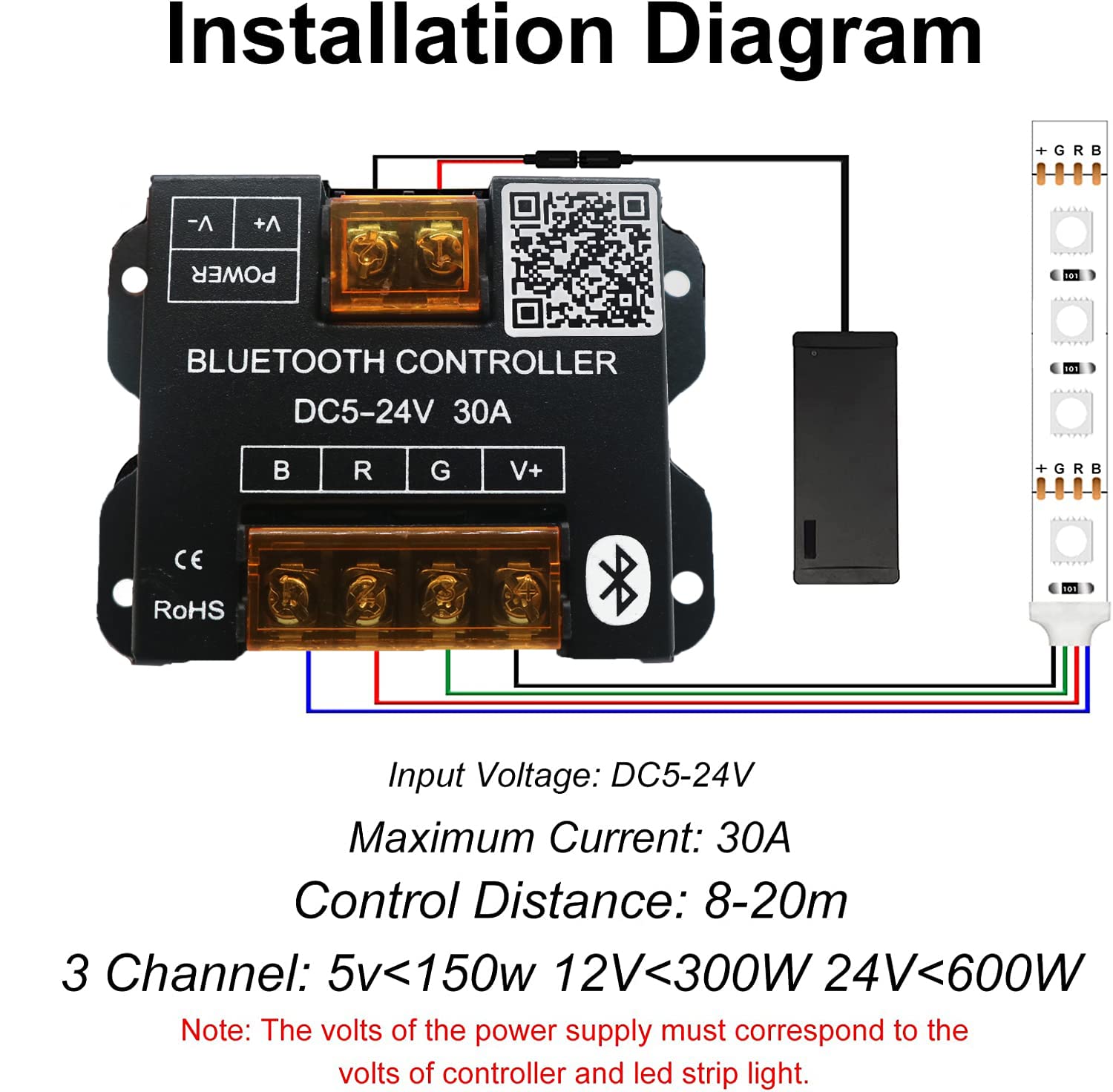
Image 5.2: Detailed installation diagram showing connections for power input and RGB LED strip output to the controller.
Important Notes:
- The input voltage of the power supply must correspond to the voltage requirements of both the controller and the LED strip (e.g., 12V power supply for 12V LED strip).
- Ensure all connections are secure to prevent flickering or malfunction.
5.3. Power On and Bluetooth Pairing
Once wired, apply power to the controller. The LED indicator (if present) should light up. Open the HappyLighting application on your smartphone. The app should automatically detect and connect to the controller via Bluetooth. If not, ensure Bluetooth is enabled on your phone and refresh the device list within the app.
6. Operating Instructions
The HappyLighting app provides comprehensive control over your LED strip. Below are the primary functions:
6.1. App Interface Overview
- Color Palette: Select from 16 million colors to customize your lighting.
- Brightness Control: Adjust the intensity of the light.
- Dynamic Modes: Choose from various pre-programmed lighting effects and adjust their speed.
- DIY Mode: Create and save your own custom color sequences and effects.
- Timer Function: Set schedules for automatic on/off operations.
- Music Mode: Synchronize lights with music from your phone.
- Microphone Mode: Lights react to ambient sounds.
6.2. Basic Control
Within the app, tap the power icon to turn the lights on or off. Use the color wheel or preset color options to change the light color. A slider typically controls brightness levels.
6.3. Timer Function
Navigate to the 'Timer' section in the app. You can set multiple timers for specific times of day to activate or deactivate the LED lights. This function operates even without an active network connection once set.
6.4. Music Sync & Microphone Mode
In the 'Music' or 'Mic' section of the app, enable these features. For Music Sync, play music on your smartphone, and the lights will respond to the rhythm. For Microphone Mode, the lights will react to sounds detected by your phone's microphone, creating a dynamic visual experience.

Image 6.1: Examples of how the Bluetooth LED controller can be widely used with different types of LED lighting, including strip lights, panel lights, and string lights.
7. Care and Maintenance
Proper care ensures the longevity of your TOPXCDZ LED Controller:
- Cleaning: Use a dry, soft cloth to clean the controller. Do not use liquid cleaners or solvents.
- Storage: If storing for an extended period, disconnect power and store in a cool, dry place.
- Environment: Avoid installing the controller in areas with high humidity, dust, or corrosive gases.
8. Troubleshooting Guide
If you encounter issues with your controller, refer to the following table for common problems and solutions:
| Problem | Possible Solution |
|---|---|
| Controller not powering on | Check power supply connections. Ensure the power supply is functional and providing the correct DC5-24V output. |
| Cannot connect via Bluetooth | Ensure Bluetooth is enabled on your smartphone. Verify the HappyLighting app is open and has Bluetooth permissions. Try restarting both the controller (by unplugging and replugging power) and the app. Ensure you are within the 20-meter control distance. |
| LED strip not lighting correctly or at all | Check all wiring connections between the controller and the LED strip for correct polarity and secure contact. Ensure the LED strip is functional and matches the controller's RGB type. Verify the power supply is adequate for the length and type of LED strip. |
| Lights flicker or change erratically | This can indicate an unstable power supply or loose connections. Check power supply stability and all wiring. Ensure the total current draw of the LED strip does not exceed the controller's maximum load. |
| Timer function not working | Ensure the timer settings are correctly configured and saved within the HappyLighting app. Verify the controller has continuous power. |
9. Warranty and Customer Support
9.1. Warranty Information
This TOPXCDZ product is covered by a limited warranty against defects in materials and workmanship. The warranty period typically begins from the date of purchase. Please retain your proof of purchase for warranty claims. The warranty does not cover damage caused by improper installation, misuse, unauthorized modifications, or external factors such as power surges.
9.2. Customer Support
For further assistance, technical support, or warranty inquiries, please contact your retailer or visit the official TOPXCDZ website for contact information. When contacting support, please provide your product model number and a detailed description of the issue.


