
1. Introduction
Thank you for choosing the AUNA Sound Maître Kitchen Radio. This device is designed to provide high-quality audio entertainment in your kitchen environment. It features DAB+ and FM radio tuners for a wide range of stations, Bluetooth connectivity for wireless audio streaming, a clear TFT color display, and integrated LED lighting. This manual provides essential information for safe operation, setup, and maintenance of your device.
2. Safety Instructions
- Read all instructions carefully before using the device.
- Keep this manual for future reference.
- Do not expose the device to dripping or splashing water. Do not place objects filled with liquids, such as vases, on the device.
- Ensure proper ventilation. Do not block any ventilation openings.
- Place the device on a stable, flat surface. Avoid placing it near heat sources or in direct sunlight.
- Only use the power adapter supplied with the device.
- Unplug the device during lightning storms or when unused for long periods.
- Do not attempt to repair the device yourself. Refer all servicing to qualified personnel.
- Keep the device away from children.
3. Package Contents
Please check that all items are present and in good condition:
- 1 x AUNA Sound Maître Kitchen Radio
- 1 x Power Supply Unit
- 1 x Multi-language Operating Instructions (digital version provided here)
4. Product Overview
Familiarize yourself with the main components and controls of your AUNA Sound Maître Kitchen Radio.

Figure 4.1: Front view of the AUNA Sound Maître Kitchen Radio, showing the TFT display, volume knob, navigation buttons, and preset buttons.

Figure 4.2: Detailed view of the TFT color display, showing radio station information and time.
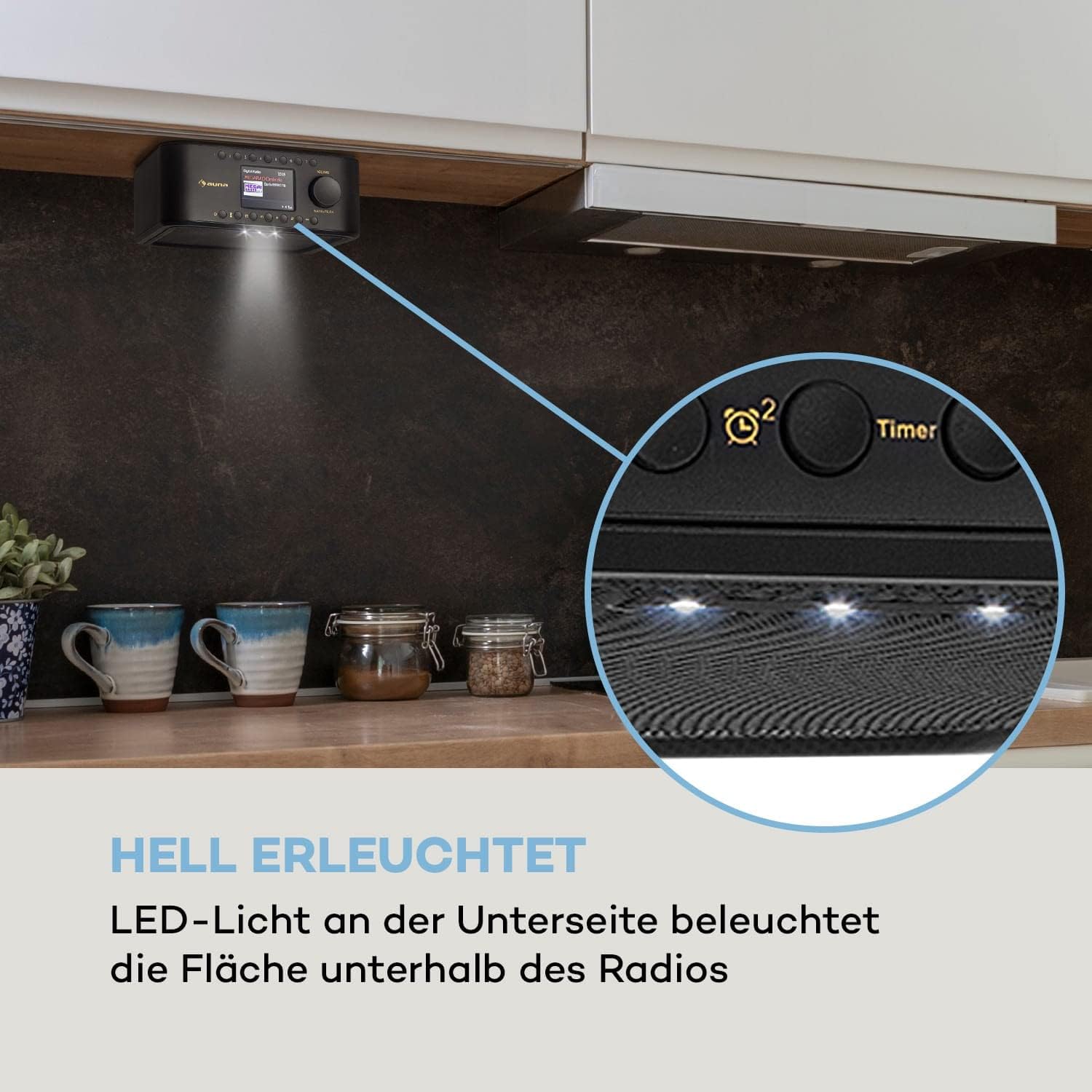
Figure 4.3: View of the radio's underside, highlighting the integrated LED lights for illuminating the area below.
Controls and Connections:
- Power Button: Turns the device on/off.
- Mode Button: Switches between DAB+, FM, Bluetooth, and AUX modes.
- Preset Buttons (1-7): Quick access to your favorite radio stations.
- Volume Knob: Adjusts the audio output level. Press to confirm selections.
- Navigation Buttons: For menu navigation and station tuning.
- Timer Button: Activates and sets the kitchen timer.
- LED Light Button: Controls the integrated LED illumination.
- AUX Input (3.5mm): For connecting external audio devices.
- Headphone Jack (3.5mm): For private listening.
5. Setup
5.1 Power Connection
- Connect the supplied power adapter to the DC IN port on the back of the radio.
- Plug the power adapter into a standard wall outlet (100-240 V ~ | 50/60 Hz).
- The radio will power on or enter standby mode.
5.2 Under-Cabinet Mounting
The AUNA Sound Maître is designed for under-cabinet installation to save counter space.
- Identify a suitable location under a kitchen cabinet or shelf. Ensure there is enough space for the radio (approx. 20 x 8 x 21.5 cm WxHxD) and access to controls.
- Detach the mounting plate from the top of the radio.
- Hold the mounting plate against the underside of the cabinet in the desired position. Mark the four screw holes.
- Drill pilot holes if necessary.
- Secure the mounting plate to the cabinet using appropriate screws (not included). Ensure the screws have a flat, wide head to fit securely into the plate's recesses.
- Slide the radio onto the mounted plate until it clicks securely into place.
5.3 Antenna
For optimal DAB+ and FM reception, ensure the integrated antenna is positioned correctly. Extend it fully if possible and adjust its direction to improve signal strength.
6. Operating Instructions
6.1 Power On/Off
Press the Power button to turn the radio on or off (standby mode).
6.2 Mode Selection
Press the Mode button repeatedly to cycle through available modes: DAB+, FM, Bluetooth, AUX.
6.3 DAB+ Radio
- Select DAB+ mode using the Mode button.
- The radio will automatically scan for available DAB+ stations upon first use. If not, initiate a scan through the menu.
- Use the Navigation buttons to browse through the list of available stations.
- Press the Volume/OK knob to select a station.
- To save a station as a preset, press and hold one of the Preset (1-7) buttons until the display confirms. You can store up to 198 stations in memory.
6.4 FM Radio
- Select FM mode using the Mode button.
- Use the Navigation buttons to manually tune to a frequency or press and hold them to auto-scan for the next available station.
- To save a station as a preset, press and hold one of the Preset (1-7) buttons until the display confirms.
6.5 Bluetooth Pairing
- Select Bluetooth mode using the Mode button. The display will show 'Pairing' or similar.
- Activate Bluetooth on your smartphone or tablet and search for available devices.
- Select 'AUNA Sound Maître' from the list of devices.
- Once paired, you can stream audio wirelessly from your device to the radio.
6.6 AUX Input
- Connect an external audio device (e.g., MP3 player) to the AUX Input using a 3.5mm audio cable.
- Select AUX mode using the Mode button.
- Audio from the external device will now play through the radio's speakers.
6.7 Volume Control
Rotate the Volume/OK knob to adjust the listening volume.
6.8 Kitchen Timer
- Press the Timer button.
- Use the Navigation buttons and Volume/OK knob to set the desired countdown time.
- The timer will sound an alert when the time expires.
6.9 LED Illumination
Press the LED Light button to turn the integrated LED lights on or off, providing illumination for your workspace.
7. Maintenance
7.1 Cleaning
- Always unplug the device from the power outlet before cleaning.
- Use a soft, dry cloth to wipe the exterior surfaces.
- Do not use abrasive cleaners, waxes, or solvents as they may damage the finish.
- Avoid getting moisture into any openings.
7.2 General Care
- Store the radio in a cool, dry place when not in use for extended periods.
- Protect the display from scratches.
8. Troubleshooting
If you encounter issues with your AUNA Sound Maître Kitchen Radio, please refer to the following common problems and solutions:
| Problem | Possible Cause | Solution |
|---|---|---|
| No power | Power adapter not connected; Power outlet faulty | Ensure power adapter is securely connected and plugged into a working outlet. |
| Poor radio reception (DAB+/FM) | Weak signal; Antenna not extended/positioned correctly | Extend and adjust the antenna. Try repositioning the radio. Perform a new station scan. |
| Bluetooth not pairing | Radio not in pairing mode; Device too far; Bluetooth off on external device | Ensure radio is in Bluetooth mode. Move devices closer. Check Bluetooth settings on your external device. |
| No sound from AUX | Cable not connected; Incorrect mode selected; External device volume low | Check AUX cable connection. Ensure AUX mode is selected. Increase volume on both radio and external device. |
| Display not working | Device off; Display settings | Ensure device is powered on. Check display brightness settings in the menu. |
If the problem persists after trying these solutions, please contact customer support.
9. Specifications
- Model: AUNA Sound Maître
- Connections: 1 x AUX Input (3.5mm), 1 x Headphone Jack (3.5mm)
- RMS Power: 2 x 1 Watt
- Radio Tuners: DAB+, FM
- Presets: 7 quick dial buttons, up to 198 memory locations
- Display: TFT Color Display
- Features: Kitchen Timer, LED Illumination, Bluetooth Connectivity
- Power Supply: 100-240 V ~ | 50/60 Hz
- Dimensions (WxHxD): Approx. 20 x 8 x 21.5 cm
- Power Cable Length: Approx. 150 cm
- Weight: Approx. 800 g (0.8 kg)
10. Warranty and Support
Your AUNA Sound Maître Kitchen Radio comes with a manufacturer's warranty. Please refer to the warranty card included with your purchase for specific terms and conditions. For technical support, troubleshooting beyond this manual, or warranty claims, please contact your retailer or the AUNA customer service department.