
1. Product Overview
The Ovsuqu Steel CNC 6090 is a 4-axis 2200W engraving machine designed for precision milling and engraving tasks. It features a robust steel structure, an XHC control board with auto-checking functionality, and a 2200W water-cooled spindle. The machine utilizes ball screw drives for high precision and integrates a high-speed microcomputer intelligent control chip. It supports Mach3 software and is compatible with Windows 7, 8, and 10 operating systems.
This machine is suitable for engraving materials with a hardness below 45, including steel, aluminum, brass, copper, stone, and granite.
Key Features:
- High Precision: Features a heavy steel structure and high-quality accurate ball screw drives for enhanced engraving precision and a long lifespan.
- Powerful Spindle: Equipped with a 2.2KW water-cooled VFD spindle for stable and durable operation, suitable for extended use and engraving on hard materials like aluminum alloy and hardwood.
- Integrated Control: Built-in frequency converter and an integrated high-speed microcomputer intelligent control chip.
- Software Compatibility: Operates with Mach3 software, supporting Windows 7, Windows 8, and Windows 10 via a USB port connection.

Figure 1: Ovsuqu Steel CNC 6090 Engraving Machine with key dimensions indicated. The image shows the overall structure of the machine, including the spindle, work area, and control unit.
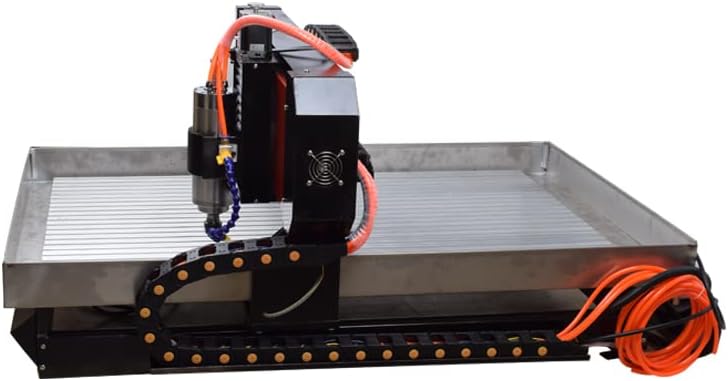
Figure 2: Side view of the Ovsuqu Steel CNC 6090 Engraving Machine, highlighting the robust frame and cable management system.
2. Setup and Installation
Careful setup is crucial for optimal performance and safety. Follow these steps for initial installation and software configuration.
2.1 Unpacking and Placement
- Carefully unpack all components and verify against the packing list.
- Place the machine on a stable, level surface capable of supporting its weight. Ensure adequate space around the machine for operation and maintenance.
- Connect all necessary cables according to the provided wiring diagrams (refer to the physical manual included with the machine).
2.2 Software Installation
The machine operates using Mach3 software. A CD containing the Mach3 software is included with the machine. Ensure your computer meets the following requirements:
- Operating System: Windows 7, Windows 8, or Windows 10. A stable and properly configured operating system is essential for software functionality.
- Interface: USB port for connection to the machine's control board.
Install Mach3 software from the provided CD. For detailed installation instructions, parameter files, and software installation videos, please contact the seller directly. They can provide comprehensive guidance and support.

Figure 3: Front view of the Ovsuqu Steel CNC 6090 Engraving Machine, showing the spindle and work area. This perspective highlights the robust construction and accessible work surface.
3. Operating Instructions
This section outlines the general procedures for operating the Ovsuqu Steel CNC 6090 engraving machine.
3.1 Material Preparation
Ensure the material to be engraved or milled is securely fastened to the work surface. The machine can process materials with a hardness below 45, including:
- Metals: Steel, aluminum, brass, copper.
- Stones: Granite, other suitable stone types.
- Plastics: Acrylic, PVC board, plastic molding materials.
- Wood: Hardwood, MDF board.
- Composites: Aluminum-plastic plate, aluminum honeycomb panels, artificial stone.
3.2 Software Operation (Mach3)
- Launch the Mach3 software on your connected computer.
- Load your desired G-code file into the software.
- Set the workpiece origin (zero point) within the Mach3 interface.
- Verify tool paths and machine settings.
- Initiate the engraving or milling process. Monitor the machine closely during operation.
For detailed Mach3 operation, refer to the Mach3 software documentation and any operational videos provided by the seller.
3.3 Applications
The machine is suitable for a wide range of applications, including:
- Woodworking: Sculpture, round carving, general wooden handicraft processing.
- Advertising: Logo making, cutting acrylic, plastic molding, creating various advertising decorative products, cutting LED and neon letters, making plastic light box models.
- Art & Craft: Shadow-carved and general sculpture for the gift industry.
- Metalworking: Aluminum cutting, 3D engraving processes on suitable metals.

Figure 4: Comparison of linear guide and round guide machine test results on aluminum. This image illustrates the precision capabilities of the machine, showing test accuracy for different guide types.
4. Maintenance
Regular maintenance ensures the longevity and optimal performance of your engraving machine.
4.1 General Cleaning
- After each use, clean the work surface and surrounding areas to remove dust, chips, and debris.
- Use a soft brush or vacuum cleaner for dry debris. For stubborn residue, use appropriate cleaning agents that will not damage machine components.
4.2 Spindle Cooling System
The machine features a water-cooled spindle. Regularly check the water cooling system to ensure proper circulation and adequate coolant levels. A well-maintained cooling system is critical for the spindle's stability and durability during long operating periods.
4.3 Lubrication
Periodically lubricate the ball screws and linear guides according to the recommendations in the detailed physical manual to ensure smooth movement and prevent wear.
5. Troubleshooting
This section provides basic troubleshooting steps for common issues. For complex problems, contact technical support.
5.1 Machine Not Responding
- Check all power connections to the machine and control unit.
- Verify the USB connection between the computer and the control board.
- Ensure Mach3 software is running correctly and the machine is recognized.
- Check for any emergency stop button engagement.
5.2 Poor Engraving Quality
- Ensure the workpiece is securely clamped and not vibrating.
- Check the sharpness and condition of the engraving tool. Replace if dull or damaged.
- Verify spindle speed and feed rates are appropriate for the material being processed.
- Inspect ball screws and guides for debris or lack of lubrication.
5.3 Spindle Overheating
- Check the water cooling system for proper water flow and coolant levels.
- Ensure the water pump is functioning correctly.
- Clean any blockages in the cooling lines or radiator.
6. Specifications
| Feature | Detail |
|---|---|
| Model Number | Steel CNC 6090 |
| Spindle Power | 2200W (Water-cooled) |
| Axes | 4-axis (XYZ Linear Guide) |
| Control Board | XHC with auto-checking function |
| Control Software | Mach3 |
| Communication Interface | USB Port |
| Compatible OS | Windows 7 / Windows 8 / Windows 10 |
| Structure | Steel structure |
| Product Dimensions | 54.72 x 42.13 x 33.07 inches (139 x 107 x 84 cm) |
| Manufacturer | ChinaCNCzone |
| Date First Available | July 15, 2022 |

Figure 5: Ovsuqu Steel CNC 6090 Engraving Machine with detailed dimensions. This image provides specific measurements for the machine's footprint and height.
7. Warranty and Support
The Ovsuqu Steel CNC 6090 machine is CE approved, indicating compliance with European safety standards.
For any technical assistance, detailed English manuals, parameter files, installation software, software installation videos, control box debugging videos, or detailed operation videos, please contact the seller directly. Support inquiries are typically responded to within 12 hours.
Regarding returns, a 30-day refund/replacement policy is generally available from the date of purchase. Please refer to your purchase agreement for specific terms and conditions.
8. Additional Resources
No official product videos from the seller were found in the provided data. For additional support and resources, please contact the seller directly as mentioned in the Warranty and Support section.