
1. Introduction
Thank you for choosing the pouseayar 3 Tier Swivel Floor TV Stand. This stand is designed to accommodate 32-inch to 65-inch flat or curved screen televisions, offering a versatile and space-saving solution for your entertainment needs. Its robust construction, featuring tempered glass shelves and a durable metal frame, ensures stability and longevity. This manual provides comprehensive instructions for assembly, operation, maintenance, and safety to ensure optimal performance and user satisfaction.

Image 1.1: The pouseayar 3 Tier Swivel Floor TV Stand with a television mounted, showcasing its design and functionality.
2. Safety Information
Please read all safety warnings and instructions carefully before assembly and use. Failure to follow these instructions may result in property damage, serious injury, or death.
- Read Assembly Manual: Always read this assembly manual carefully and ensure all parts and hardware are present before beginning installation. Keep this manual for future reference.
- Two-Person Movement: Move this stand gently with 2 persons to prevent injury or damage.
- Protect Finishes: Protect finishes by placing furniture pieces on a soft carpeted surface during assembly.
- Glass Care: Do not place very hot/cold objects on top of any surface. Always use a coaster or mat. Never leave liquids on the surface. Clean immediately with a mild soap and a damp cloth. Never use scouring powder-based cleanser. Do not touch the glass surface with a hard/acute object; it may cause the glass to shatter.
- Child Safety: DO NOT ASSUME CHILD SAFETY WITH ANY PIECE OF FURNITURE! Do not allow children to climb on furniture. Improper use can cause death or serious injury. If you are placing a TV on top, use safety straps on your TV to prevent the risk of a toppling television. Furniture straps fastened to a wall can also be used to help ensure safety.
- Correct Assembly: Damaged parts or furniture put together incorrectly can lead to serious injuries. Make sure to follow instructions correctly.

Image 2.1: Important safety notices and service information for the product.
3. Package Contents
Before beginning assembly, ensure all parts listed in the assembly diagram are present and undamaged. The package typically includes:
- Main support column
- Tempered glass shelves (top, middle, bottom)
- TV mounting bracket and arms
- Support tubes/legs for shelves
- All necessary screws, bolts, washers, and tools for assembly
- Instruction manual

Image 3.1: An exploded view diagram illustrating all components and hardware included in the product package.
4. Setup and Assembly
Assembly is designed to be straightforward. Follow these steps carefully:
- Unpack and Identify Parts: Carefully unpack all components and lay them out on a soft, clean surface to prevent scratches. Identify each part using the provided parts list.
- Assemble Base: Attach the bottom tempered glass shelf to the main support column using the designated screws and tools. Ensure it is securely fastened.
- Install Middle and Top Shelves: Secure the middle and top tempered glass shelves to the support tubes and main column as per the diagram.
- Attach TV Mounting Bracket: Secure the TV mounting bracket to the top of the main support column. Ensure all bolts are tightened.
- Attach TV Arms to TV: Secure the TV mounting arms to the back of your television using the appropriate VESA screws. Refer to the TV compatibility section for VESA patterns.
- Mount TV: Carefully lift your television with the attached arms and hook it onto the mounting bracket on the stand. Secure it with the safety screws or clips provided.

Image 4.1: Step-by-step assembly diagram for the TV stand.

Image 4.2: Detailed illustrations guiding through the assembly process of the stand.
5. Operating Instructions
The pouseayar TV stand offers several features for enhanced viewing and organization:
5.1. Swivel Function
The TV mounting bracket allows for a +/-45° swivel rotation. This feature enables you to adjust the viewing angle of your television without moving the entire stand, providing optimal viewing from various positions in the room.

Image 5.1: Illustration of the TV mount's 90-degree rotation capability, allowing for flexible viewing angles.
5.2. Height Adjustment
The TV mounting bracket offers height adjustment. You can set the TV at your preferred viewing height by adjusting the position of the mounting arms on the main column during assembly or by re-adjusting them later. This design helps you find the best height for your viewing comfort.

Image 5.2: Diagram illustrating the height adjustment feature of the TV mounting bracket.
5.3. Cable Management
The stand includes a plug line control feature on the main column to help arrange and conceal complex wires, contributing to a tidy and organized entertainment space.

Image 5.3: Overview of the stand's features, including cable management, thickened glass, and stable foot design.
6. Maintenance
To ensure the longevity and appearance of your TV stand, follow these maintenance guidelines:
- Cleaning: Clean the glass surfaces immediately with a mild soap and a damp cloth. Avoid using harsh chemicals or abrasive cleaners.
- Avoid Scratches: Do not use scouring powder-based cleansers. Do not touch the glass surface with hard or acute objects, as this may cause the glass to shatter or scratch.
- Heat and Liquids: Do not place very hot or cold objects directly on the glass surfaces. Always use coasters or mats to protect the finish. Never leave liquids on the surface.
- Regular Checks: Periodically check all screws and connections to ensure they remain tight and secure.
7. Troubleshooting
If you encounter any issues with your pouseayar TV stand, please consider the following:
- Instability: Ensure all screws and bolts are fully tightened. Verify that the stand is placed on a flat, level surface.
- TV Not Level: Check that the TV mounting arms are installed symmetrically and that the TV is properly seated on the bracket. Adjust as necessary.
- Missing Parts: If you find any parts missing or damaged upon opening the package, do not proceed with assembly. Contact customer support immediately for assistance.
For any problems not addressed here, please refer to the Warranty and Support section for contact information.
8. Specifications
| Feature | Detail |
|---|---|
| Brand | pouseayar |
| Model Number | B0B6P5H94F |
| Mounting Type | Floor Mount |
| Movement Type | Swivel (+/-45°) |
| Material | Tempered Glass, Metal |
| Color | Black |
| Compatible TV Sizes | 32 - 65 Inches |
| Maximum VESA Compatibility | 23.6" x 15.7" (600x400mm) |
| Mount Bracket Capacity | 110 lbs (50 kg) |
| Top Shelf Capacity | 88 lbs (40 kg) |
| Middle/Bottom Shelf Capacity | 55 lbs (25 kg) each |
| Overall Dimensions (WxDxH) | Approx. 43" x 15.7" x 47"-52" (adjustable height) |
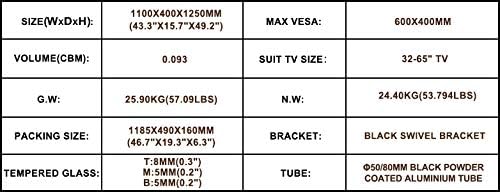
Image 8.1: A table summarizing key product specifications and dimensions.
9. Warranty and Support
We strive to make sure each item you get is perfect and ensure all parts and hardware are included in our package. However, if you are experiencing a shortage of any parts or hardware, PLEASE do not return the product to any local store directly. Try to contact us, we will do our best to solve your problem and expedite the missing item to you as soon as possible from our local customer service center.
For product problems or support inquiries, please contact pouseayar customer service. Your satisfaction is our service aim.