1. Introduction
Thank you for choosing the KOSCHEAL Wireless Microphone. This device is designed to provide high-quality audio recording for mobile phones, compatible with both iOS and Android systems. It is ideal for various applications including vlogging, YouTube content creation, TikTok videos, interviews, live streaming, and professional video production. This manual provides detailed instructions on how to set up, operate, and maintain your wireless microphone system.

Image 1.1: KOSCHEAL Wireless Microphone in various usage scenarios.
2. Package Contents
Please check the package to ensure all components are present:
- Wireless Microphone Transmitter(s)
- Receiver (Type-C)
- Charging Case
- iOS Adapter (Lightning)
- Charging Cable
- User Manual

Image 2.1: Overview of the KOSCHEAL Wireless Microphone components.
3. Product Overview
The KOSCHEAL Wireless Microphone system consists of one or two microphone transmitters, a receiver, and a portable charging case. The transmitters are equipped with high-sensitivity condenser microphones and intelligent noise cancellation chips. The receiver connects directly to your mobile device.

Image 3.1: Detailed view of the microphone transmitter, receiver, and charging case.
4. Setup Instructions
The KOSCHEAL Wireless Microphone features a plug-and-play design for easy setup:
- Charge the Devices: Ensure both the microphone transmitter(s) and the charging case are fully charged before first use.
- Connect the Receiver: Plug the receiver into your mobile device's charging port (Type-C for Android, use the provided Lightning adapter for iOS). The receiver will automatically power on.
- Power On Transmitter: Take the microphone transmitter(s) out of the charging case. They will automatically power on and pair with the receiver. The blue indicator light on the transmitter will flash during pairing and become solid blue once connected.
- OTG Setting (for some Android devices): For certain Android phones, you may need to enable the 'OTG' function in your phone's settings to ensure proper microphone recognition.
- Start Recording: Open your preferred recording or video application and begin recording. The microphone will capture audio directly.

Image 4.1: Step-by-step guide for connecting the wireless microphone.
5. Operating Instructions
The KOSCHEAL Wireless Microphone offers advanced features for optimal audio capture:
- 360° Omnidirectional Sound Pickup: The microphone is designed to capture sound from all directions, ensuring comprehensive audio coverage without dead angles.
- Intelligent Noise Reduction: Equipped with a professional-grade active noise cancellation chip, the microphone effectively identifies and reduces ambient noise. It features 3 adjustable levels of noise reduction to suit different environments.
- Adjustable Modes: The microphone allows for adjustments to mute, noise reduction, and reverberation modes via dedicated buttons, enabling adaptation to various recording conditions.
- Wireless Transmission: Enjoy clear sound quality within a 20-meter (65 feet) range with ultra-low latency of 0.009 seconds, ensuring real-time audio synchronization.
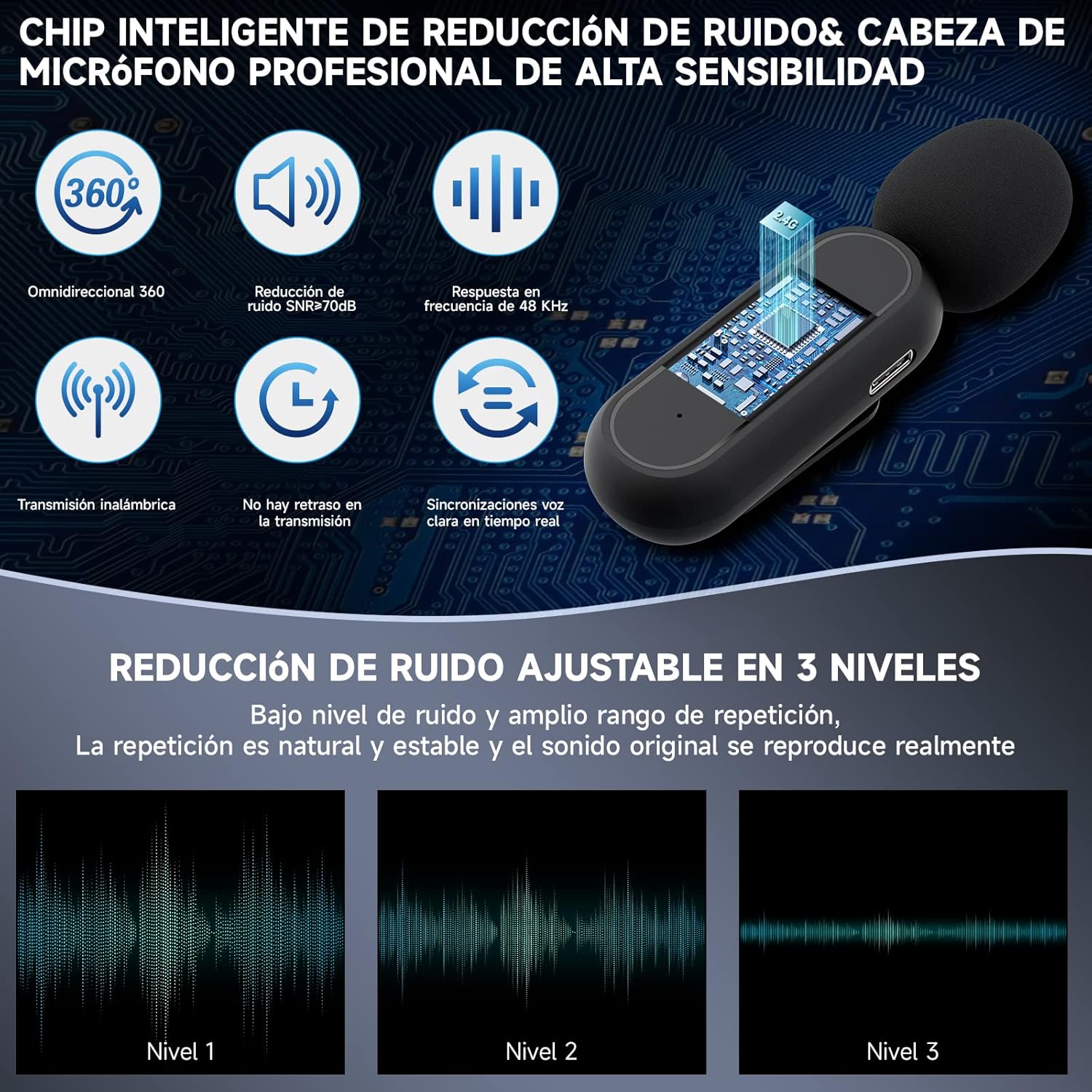
Image 5.1: Features of the intelligent noise reduction and sound pickup.
6. Charging and Battery Life
The KOSCHEAL Wireless Microphone system is designed for extended use:
- Microphone Battery: Each microphone transmitter can operate continuously for approximately 8 hours on a full charge.
- Charging Case: The portable charging case has a high-capacity 120mAh battery, providing approximately 36 hours of additional battery life for the microphones. This allows for multiple recharges on the go.
- Charging Indication: The charging case typically has LED indicators to show its battery level and charging status.
7. Compatibility
The KOSCHEAL Wireless Microphone is broadly compatible with a range of devices and platforms:
- Mobile Devices: Fully compatible with Android smartphones (via Type-C receiver) and iOS devices including iPhones and iPads (via the provided Lightning adapter).
- Other Devices: Can also be used with laptops and computers that support external microphone input via the appropriate adapter.
- Applications: Suitable for use with popular platforms such as YouTube, Zoom, Facebook, TikTok, Instagram, Line, and other video recording or live streaming applications.

Image 7.1: Broad compatibility with devices and applications.
8. Maintenance
To ensure the longevity and optimal performance of your KOSCHEAL Wireless Microphone, follow these maintenance guidelines:
- Cleaning: Use a soft, dry cloth to clean the microphone transmitters, receiver, and charging case. Avoid using liquids or abrasive cleaners.
- Storage: Store the device in a cool, dry place away from direct sunlight and extreme temperatures. Always store the microphones in their charging case when not in use.
- Avoid Moisture: Do not expose the device to water or high humidity, as this can damage internal components.
- Handle with Care: Avoid dropping or subjecting the device to strong impacts.
9. Troubleshooting
If you encounter issues with your KOSCHEAL Wireless Microphone, refer to the following common solutions:
- No Sound/Microphone Not Detected:
- Ensure the receiver is fully plugged into your device's port.
- Verify the microphone transmitter is powered on and paired (solid blue light).
- For Android devices, check if the 'OTG' function is enabled in your phone's settings.
- Confirm your recording application is set to use the external microphone.
- Check battery levels of both transmitter and receiver.
- Poor Audio Quality/Static:
- Ensure you are within the 20-meter operating range.
- Minimize obstructions between the transmitter and receiver.
- Adjust the noise reduction level on the microphone to suit your environment.
- Avoid strong electromagnetic interference sources.
- Microphone Not Charging:
- Ensure the charging cable is securely connected to the charging case and a power source.
- Place the microphone transmitters correctly into the charging case.
- Try a different charging cable or power adapter.
10. Specifications
| Feature | Specification |
|---|---|
| Brand | KOSCHEAL |
| Model | K60, K61 |
| Connectivity Technology | Wireless (Auxiliary) |
| Connector Type | USB Type-C (with iOS Lightning adapter) |
| Polar Pattern | Unidirectional (Omnidirectional pickup mentioned in features) |
| Special Feature | Voice Activated Recording, Noise Reduction |
| Compatible Devices | Smartphone, Laptop |
| Power Source | Battery (Lithium Polymer) |
| Microphone Battery Life | Approx. 8 hours (continuous use) |
| Charging Case Capacity | 120mAh (approx. 36 hours additional battery life) |
| Wireless Range | Up to 20 meters (65 feet) |
| Latency | 0.009 seconds |
| Dimensions (Package) | 9.7 x 9.7 x 3.2 cm |
| Weight (Product) | 120 g |
11. Warranty and Support
For warranty information, technical support, or any inquiries regarding your KOSCHEAL Wireless Microphone, please refer to the contact details provided with your purchase or visit the official KOSCHEAL website. Keep your proof of purchase for warranty claims.


