
eppfun 792933358470
Contents
eppfun Professional Bluetooth 5.2 Transmitter User Manual
Model: 792933358470
Introduction
The eppfun Professional Bluetooth 5.2 Transmitter is a versatile wireless audio adapter designed to provide a seamless audio experience, especially in environments like airplanes. It allows you to connect your Bluetooth headphones or earbuds to non-Bluetooth audio sources, such as in-flight entertainment systems, computers, and fitness equipment. Featuring dual connection capability, aptX Low Latency, and aptX HD support, this transmitter ensures high-quality audio with minimal delay.
Product Overview
Key Features
- Flight Specific Adapter: Designed for in-flight entertainment systems with a foldable socket suitable for both traditional single port and common dual port sockets.
- Long Battery Life: Equipped with Bluetooth 5.2 technology, offering higher stability, faster transmission, and lower power consumption. Provides up to 12 hours of playtime on a single charge.
- Switchable Audio Encoding and Decoding: Supports aptX Adaptive, aptX LL, aptX, aptX HD, and SBC codecs. Users can select desired encoding by double-clicking the multifunction button.
- Unique Design: Features two 3.5mm plugs that can rotate, allowing use with both dual and single 3.5mm audio jacks.
- Easy to Operate: Simple connection and pairing process.
- Wide Compatibility: Compatible with 3.5mm audio devices including onboard entertainment systems, computers, cars, and fitness equipment.
- Dual Stream Function: Transmit audio to two headphones simultaneously.
Package Contents
- eppfun Professional Bluetooth 5.2 Transmitter
- Charging Cable
- User Manual (this document)
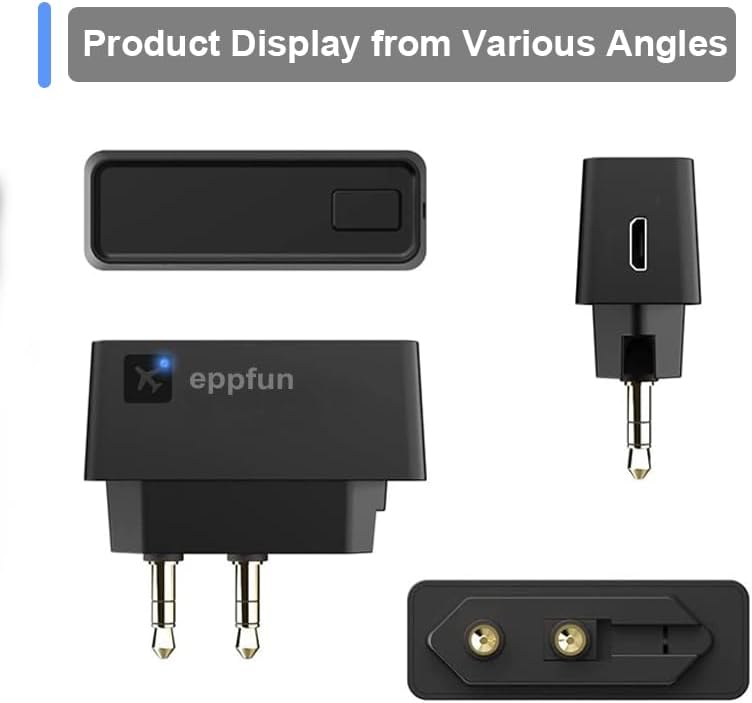
Product Diagram
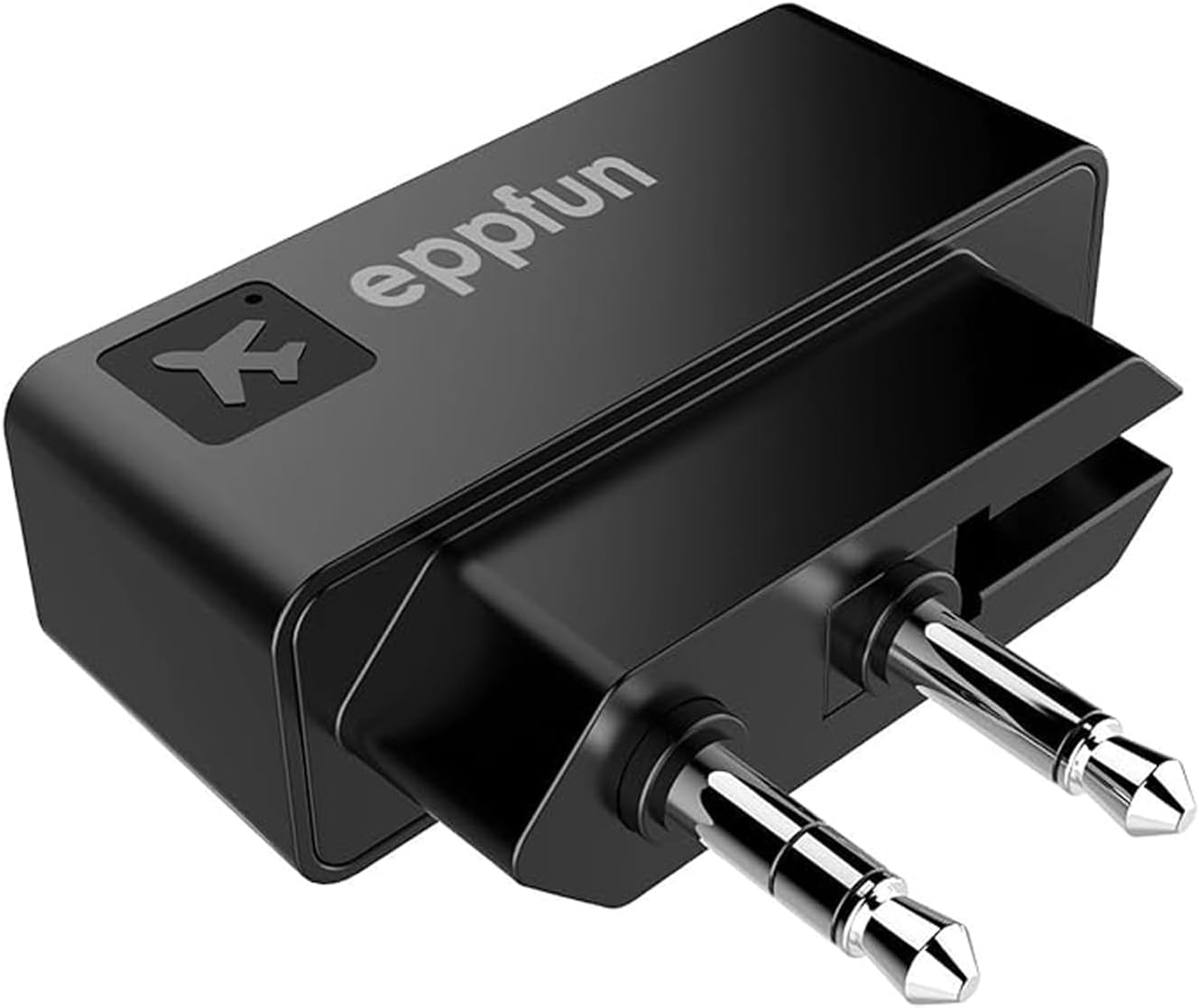

Setup
1. Charging the Device
Before first use, fully charge the eppfun Bluetooth Transmitter. Connect the provided charging cable to the transmitter's charging port and a USB power source (e.g., computer USB port, wall adapter). The indicator light will show charging status and turn off when fully charged.

2. Connecting to an Audio Source
The transmitter features a unique foldable plug design to accommodate various audio jacks.
- For Dual 3.5mm Jacks (e.g., older airplane entertainment systems): Extend both 3.5mm plugs and insert them into the corresponding audio output ports.
- For Single 3.5mm Jack (e.g., modern airplane systems, computers, fitness equipment): Fold one of the 3.5mm plugs back into the transmitter body, leaving only one plug extended. Insert the single extended plug into the audio output port.

Operating Instructions
1. Pairing with Headphones/Earbuds
- Ensure the eppfun transmitter is connected to an audio source and powered on. The indicator light will flash, indicating it's in pairing mode.
- Put your Bluetooth headphones or earbuds into pairing mode. (Refer to your headphone's manual for specific instructions. For some headphones with a reset button, they might need to be placed in their charging case and the button held to enter pairing mode.)
- Place the headphones close to the transmitter. They should automatically connect.
- Once successfully paired, the indicator light on the transmitter will change to a solid color (depending on the active codec) or flash slowly.
- Important: When pairing in an airplane environment, it is recommended to turn off nearby Bluetooth devices such as mobile phones to avoid interference.


2. Codec Selection
The eppfun transmitter supports multiple audio codecs to optimize sound quality and latency. If your headphones support the same encoding and decoding, you can manually select the desired codec.
- To switch codecs: Double-click the multifunction button on the AK3046E Pro transmitter.
- The indicator LED will change color to show the active codec:
- Orange: aptX Adaptive
- Green: aptX HD (for high-quality audio)
- White: aptX LL (Low Latency, ideal for video/gaming)
- Cyan: aptX
- Blue: SBC

3. Dual Stream Function
The transmitter supports connecting to two Bluetooth headphones simultaneously, allowing two people to share audio from a single source.
- Pair the first headphone as described above.
- Once the first headphone is connected, put the second headphone into pairing mode.
- The transmitter will automatically search for and connect to the second headphone.
- Both headphones will now receive audio from the transmitter.
Maintenance
Cleaning
- Wipe the device with a soft, dry cloth.
- Do not use liquid cleaners or aerosol sprays.
Storage
- Store the transmitter in a cool, dry place away from direct sunlight and extreme temperatures.
- When not in use for extended periods, charge the device periodically to maintain battery health.
Troubleshooting
| Problem | Solution |
|---|---|
| Cannot pair with headphones. |
|
| No audio or poor audio quality. |
|
| Short battery life. |
|
Specifications
| Feature | Detail |
|---|---|
| Model Number | 792933358470 |
| Bluetooth Version | 5.2 |
| Supported Codecs | aptX Adaptive, aptX LL, aptX, aptX HD, SBC |
| Battery Life | Up to 12 hours |
| Product Dimensions | 1.77 x 1.42 x 0.31 inches |
| Item Weight | 1.44 ounces |
| Connector Type | Auxiliary (3.5mm) |
| Compatible Devices | Headphones, Speakers, AirPods Pro, In-flight entertainment systems, Computers, Cars, Fitness equipment |
Warranty and Support
Warranty Information
eppfun products are covered by a limited warranty from the date of purchase. Please retain your proof of purchase for warranty claims. For specific warranty terms and conditions, refer to the warranty card included with your product or visit the official eppfun website.
Customer Support
For technical assistance, troubleshooting, or general inquiries, please contact eppfun customer support. Contact information can typically be found on the eppfun official website or on the product packaging. Please have your model number and purchase details ready when contacting support.
Ask a question about this manual
Ask about setup, troubleshooting, compatibility, parts, safety, or missing instructions. Manuals+ will review the question and use this page’s manual context to help answer it.