Introduction
Thank you for purchasing the OISE ART STORE Portable Electric Pinball Table Game, model Q-YX30. This manual provides essential information for the safe and enjoyable use of your new pinball game. Please read these instructions carefully before setup and operation, and retain them for future reference.
Product Overview
The OISE ART STORE Q-YX30 is a portable electric pinball game designed for tabletop play. It features a space-themed playfield, electronic scoring, lights, and sounds to enhance the gaming experience.

Figure 1: Angled view of the OISE ART STORE Portable Electric Pinball Game, showcasing the main playfield, flippers, plunger, and the electronic scoreboard at the top.
Key Components:
- Playfield: The main game area with targets, bumpers, and scoring zones.
- Flippers: Two levers controlled by buttons to propel the ball.
- Plunger: Used to launch the ball into play.
- Electronic Scoreboard: Displays the current score.
- Lights and Sounds: Integrated features for an immersive experience.
- On/Off Switch: Controls power to the unit.
- Battery Compartment: Located on the underside for power source.
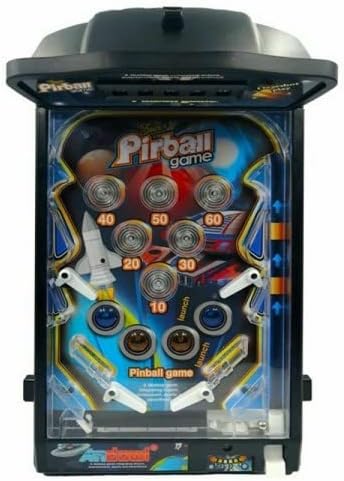
Figure 2: Top-down view of the pinball game's playfield, highlighting the various scoring targets, bumpers, and the path the ball takes.
Setup
- Unpacking: Carefully remove all components from the packaging. Ensure all parts are present and undamaged.
- Battery Installation:
- Locate the battery compartment on the underside of the pinball game.
- Using a screwdriver (not included), open the battery compartment cover.
- Insert 6 x AA batteries (not included) according to the polarity indicators (+/-) inside the compartment.
- Replace the battery compartment cover and secure it with the screw.
- Important: Ensure batteries are inserted correctly. Do not mix old and new batteries, or different types of batteries.
- Placement: Place the pinball game on a stable, flat surface, such as a table or desk.

Figure 3: Rear view of the pinball game, illustrating the location of the battery compartment and the speaker for sound effects.
Operating Instructions
- Power On: Locate the On/Off switch, usually on the side or back of the unit, and switch it to the "On" position. The scoreboard should light up, and you may hear an initial sound effect.
- Launch Ball: Pull back the plunger located on the right side of the game and release it to launch the pinball onto the playfield.
- Play the Game: Use the flipper buttons (typically on the sides of the unit) to control the flippers and keep the ball in play, aiming for scoring targets.
- Scoring: As the ball hits various targets and bumpers, points will be added to your score, displayed on the electronic scoreboard. Lights and sounds will activate accordingly.
- Game Over: The game ends when all balls have been lost (fallen into the drain). The final score will be displayed.
- Power Off: When finished playing, switch the On/Off switch to the "Off" position to conserve battery life.
Maintenance
- Cleaning:
- Wipe the surface of the pinball game with a soft, dry cloth.
- For stubborn marks, a slightly damp cloth can be used, followed by immediate drying.
- Do not use abrasive cleaners or solvents, as these may damage the plastic.
- Storage:
- When not in use for extended periods, remove the batteries to prevent leakage.
- Store the game in a cool, dry place, away from direct sunlight and extreme temperatures.
- Ball Care: Ensure the pinball is clean and free of debris to maintain smooth gameplay.
Troubleshooting
| Problem | Possible Cause | Solution |
|---|---|---|
| Game does not power on. |
|
|
| Lights and sounds are not working. |
|
|
| Ball does not launch properly. |
|
|
Specifications
- Model: Q-YX30
- Brand: OISE ART STORE
- Dimensions (Approximate): 41 cm (L) x 24 cm (W) x 6 cm (H)
- Power Source: 6 x AA Batteries (not included)
- Material: Plastic
- Features: Electronic Scoreboard, Lights, Sounds, On/Off Switch
- Recommended Age: 3 years and up
Warranty and Support
Information regarding specific warranty terms for the OISE ART STORE Portable Electric Pinball Table Game Q-YX30 is not available in this manual. For warranty claims, technical support, or replacement parts, please contact the retailer or manufacturer directly using the contact information provided at the point of purchase.
Always refer to the original packaging or purchase documentation for the most accurate and up-to-date support information.


