
Fasizi LP-838USB
Fasizi LP-838USB Digital Amplifier User Manual
Model: LP-838USB
1. Product Overview
The Fasizi LP-838USB is a compact and versatile 2.1 channel digital amplifier designed for high-fidelity audio playback. It features Bluetooth 5.0 connectivity, USB playback for lossless music, and dedicated controls for bass and treble, along with a subwoofer output. This amplifier is ideal for enhancing your home audio experience with its powerful and clear sound output.

Figure 1: Fasizi LP-838USB Digital Amplifier with included remote control.
2. Package Contents
Please check the package carefully to ensure all items are present and in good condition:
- 1 x Fasizi LP-838USB Digital Amplifier
- 1 x Remote Control
- 1 x 12V 3A Power Adapter
- 1 x Audio Cable (RCA to RCA)
- 1 x Subwoofer Transmission Plug (Green Terminal Block)
- 1 x Operating Manual (this document)

Figure 2: All items included in the Fasizi LP-838USB package.
3. Specifications
| Feature | Specification |
|---|---|
| Model Number | LP-838USB (ELA26349) |
| Rated Power Output | 15W x 2 RMS (Stereo) + 20W x 1 RMS (Subwoofer) |
| Channel Configuration | 2.1 Channels |
| Frequency Response | 20 Hz ~ 20 kHz |
| Distortion Rate | < 0.4% |
| Signal-to-Noise Ratio | ≥ 75 dB |
| Bluetooth Version | 5.0 |
| Input Voltage | 12V DC |
| Speaker Impedance | 4-8Ω |
| Dimensions (L x W x H) | Approx. 15.4 cm x 12.9 cm x 3.9 cm |
| Weight | Approx. 490 g |
4. Setup
4.1 Rear Panel Connections
Before powering on the amplifier, ensure all connections are made correctly.

Figure 3: Rear Panel Connection Diagram.
- Audio Input (RCA L/R): Connect your audio source (e.g., smartphone, CD player, TV) to the "AUDIO INPUT" RCA jacks (Red for Right, White for Left).
- Super Bass Output: If you have a passive subwoofer, connect it to the "SUPER BASS" terminal block. Ensure correct polarity (+ to +, - to -).
- Speaker Outputs: Connect your passive stereo speakers to the "SPEAKER IMPEDANCE 4-8Ω" terminals. Connect the right speaker to R+ and R-, and the left speaker to L+ and L-. Observe polarity.
- DC 12V 3A Power Input: Connect the included 12V 3A power adapter to this port. Only use the provided power adapter or one with identical specifications.
4.2 Initial Power On
- Ensure all audio and speaker connections are secure.
- Plug the power adapter into a wall outlet.
- The power indicator light on the front panel will illuminate, indicating the unit is powered on.
5. Operating Instructions
5.1 Front Panel Functions
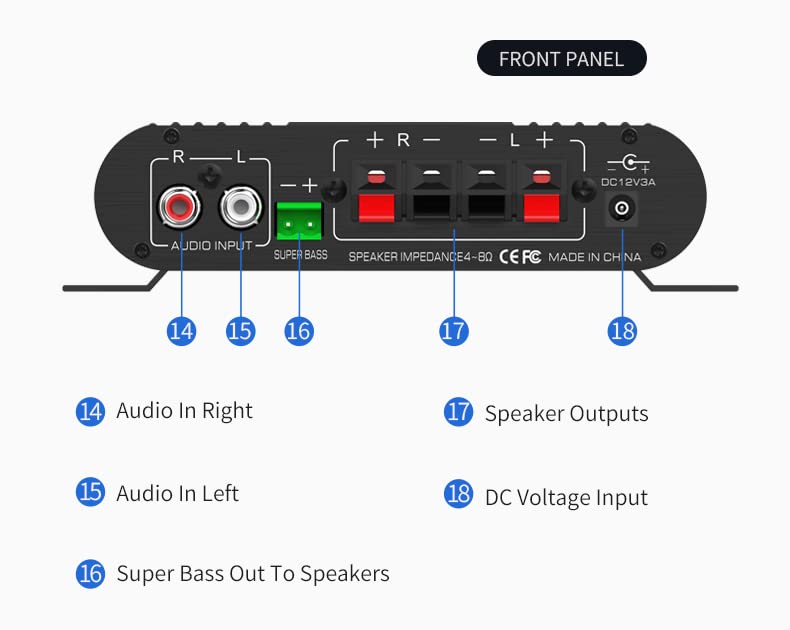
Figure 4: Front Panel Controls.
- Mode Switching / Power Switch: Press to cycle through input modes (Bluetooth, USB, AUX). Long press to power the unit on/off.
- Previous Track / Volume Down: Short press for previous track (USB/Bluetooth). Long press to decrease volume.
- Play / Pause: Press to play or pause playback (USB/Bluetooth).
- Next Track / Volume Up: Short press for next track (USB/Bluetooth). Long press to increase volume.
- Remote Control Sensor: Infrared receiver for the remote control.
- Treble Adjustment: Rotate to adjust the high-frequency output.
- Bass Adjustment: Rotate to adjust the low-frequency output for stereo speakers.
- Master Volume Control: Rotate to adjust the overall output volume.
- USB Socket: Insert a USB flash drive for music playback.
- Power Indicator: Illuminates when the amplifier is powered on.
- USB Indicator: Illuminates when a USB drive is detected and active.
- Bluetooth Indicator: Flashes when pairing, solid when connected.
- Subwoofer Volume Control: Rotate to adjust the volume level of the connected subwoofer.
5.2 Bluetooth Pairing
To connect your device via Bluetooth:
- Power on the amplifier.
- Press the "Mode" button on the front panel or remote until the Bluetooth indicator (12) flashes, indicating it's in pairing mode.
- On your mobile device, enable Bluetooth and search for available devices.
- Select "LP-838USB" from the list of devices.
- Once connected, the Bluetooth indicator will become solid. You can now play audio from your device.
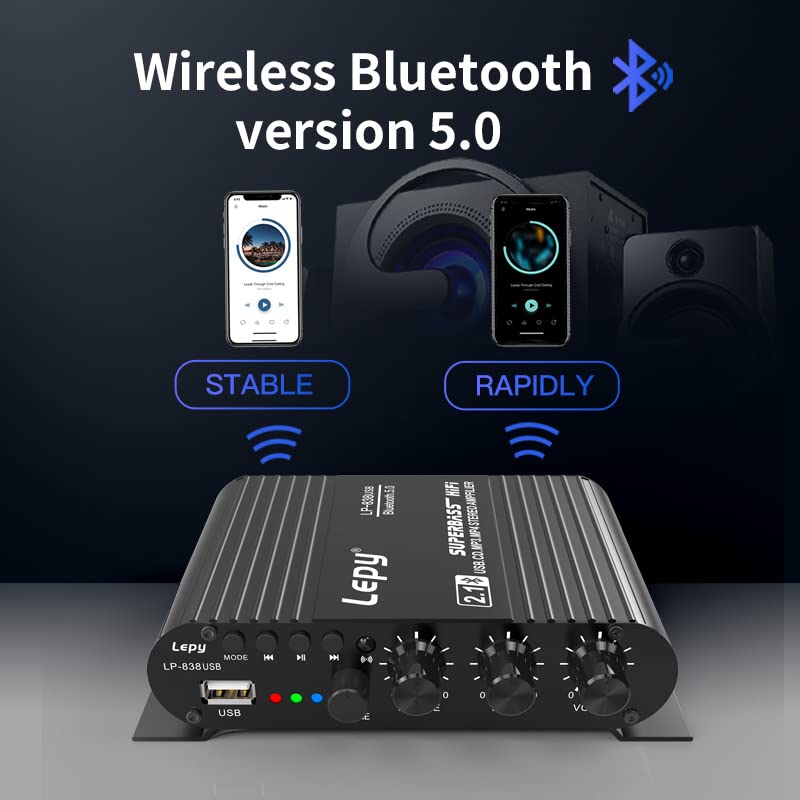
Figure 5: Bluetooth 5.0 Connectivity.
5.3 USB Playback
The amplifier supports USB flash drives for direct music playback:
- Insert a USB flash drive containing audio files (e.g., MP3, WAV, APE) into the USB socket (9) on the front panel.
- The amplifier will automatically switch to USB mode, and the USB indicator (11) will illuminate.
- Playback should begin automatically. Use the playback controls (2, 3, 4) on the front panel or remote to manage your music.

Figure 6: USB / U Disk Playback.
5.4 Remote Control Usage
The included remote control provides convenient access to various functions:

Figure 7: Remote Control.
- Power Button: Turns the amplifier on or off.
- Mode Button: Cycles through input modes (Bluetooth, USB, AUX).
- Volume Up/Down: Adjusts the master volume.
- Previous/Next Track: Skips to the previous or next track during USB or Bluetooth playback.
- Play/Pause: Starts or pauses music playback.
Ensure the remote control is pointed towards the infrared sensor (5) on the front panel for optimal operation.
6. Maintenance
- Cleaning: Use a soft, dry cloth to clean the amplifier's surface. Do not use liquid cleaners or abrasive materials.
- Ventilation: Ensure the amplifier has adequate ventilation. Do not block the heat sinks or place the unit in an enclosed space.
- Storage: When not in use for extended periods, disconnect the power adapter and store the unit in a cool, dry place.
- Power Supply: Only use the original power adapter or a certified replacement with identical specifications (12V 3A DC).
7. Troubleshooting
| Problem | Possible Cause | Solution |
|---|---|---|
| No power | Power adapter not connected or faulty. | Check power adapter connection to amplifier and wall outlet. Ensure outlet is active. |
| No sound output | Incorrect input mode selected; Volume too low; Speaker connections loose; Audio source issue. | Press "Mode" button to select correct input. Increase master volume. Check speaker wire connections. Verify audio source is playing and its volume is up. |
| Bluetooth not pairing | Amplifier not in pairing mode; Device too far; Interference. | Ensure Bluetooth indicator is flashing. Move device closer to amplifier. Turn off other Bluetooth devices nearby. |
| USB playback not working | USB drive not inserted correctly; Unsupported file format; Corrupted USB drive. | Reinsert USB drive. Ensure files are MP3, WAV, or APE. Try a different USB drive or reformat the current one. |
| Distorted sound | Volume too high; Speaker impedance mismatch; Poor audio source quality. | Reduce volume. Ensure speakers are 4-8Ω. Try a different audio source. |
8. Warranty and Support
This product is covered by a standard manufacturer's warranty. Please refer to your purchase documentation for specific warranty terms and duration. For technical support, troubleshooting assistance, or warranty claims, please contact your retailer or the manufacturer directly. Keep your proof of purchase for any warranty-related inquiries.
For general inquiries, you may refer to the contact information provided by your seller or on the official Fasizi website.
Ask a question about this manual
Ask about setup, troubleshooting, compatibility, parts, safety, or missing instructions. Manuals+ will review the question and use this page’s manual context to help answer it.