
Introduction
Welcome to the user manual for your new Amkette Pocket Blast 5-in-1 FM Radio. This versatile device combines an FM radio, Bluetooth speaker, MP3 player, voice recorder, and FM song recorder into a compact and portable unit. Please read this manual carefully to understand the features and operation of your device and ensure optimal performance.

Figure 1: Amkette Pocket Blast 5-in-1 FM Radio
Package Contents
Please check the box for the following items:
- 1 x Amkette Pocket Blast Unit
- 1 x User Manual
- 1 x Charging Cable (Type-C)
- 1 x AUX Cable
Product Features
The Amkette Pocket Blast is designed for versatile audio entertainment and utility.
- 5-in-1 Functionality: FM Radio, Bluetooth Speaker, MP3 Player (USB/SD/AUX), Voice Recorder, and FM Song Recorder.
- Superior Sound Quality: Equipped with a 6W speaker for clear audio with well-defined bass and pleasing vocals.
- Easy Navigation: Full number pad for direct song and FM station selection.
- Long Playback: Over 7 hours of battery life on Bluetooth mode.
- Built-in Microphone: For voice recording and hands-free calls when connected via Bluetooth.
- Type-C Charging: Modern and reliable charging port.
- External Antenna: For improved FM reception.

Figure 2: Key Features of the Pocket Blast

Figure 3: Compact Size with Powerful Audio
Controls and Ports
Familiarize yourself with the buttons and ports on your Amkette Pocket Blast for seamless operation.
Front Panel (Number Pad and Display)
- Number Pad (0-9): Used for direct input of FM frequencies or song numbers in MP3 mode.
- REC Button: Initiates voice or FM recording.
- DEL Button: Deletes recorded files.
- M (Mode) Button: Switches between FM, Bluetooth, USB, SD, and AUX modes.
- Play/Pause Button: Controls playback.
- Previous/Next Track Buttons: Navigates through songs or FM stations.
- Volume Up/Down Buttons: Adjusts audio volume.
- LCD Display: Shows current mode, FM frequency, track number, etc.
Side Panel (Ports)
- ON/OFF Switch: Powers the device on or off.
- DC 5V (Type-C) Port: For charging the device.
- USB Port: For USB flash drives (MP3 playback, recording storage).
- TF (Micro SD) Card Slot: For Micro SD cards (MP3 playback, recording storage).
- AUX Input: For connecting external audio devices via a 3.5mm audio cable.
- External Antenna: Extendable antenna for improved FM reception.

Figure 4: Number Pad for Direct Selection

Figure 5: Multi Playback Options
Setup
Initial Charging
Before first use, fully charge your Amkette Pocket Blast.
- Connect the provided Type-C charging cable to the DC 5V port on the device.
- Connect the other end of the cable to a USB power adapter (not included) or a computer's USB port.
- The charging indicator on the device will illuminate. It will turn off or change color once fully charged.
- A full charge typically takes approximately 2 hours.
Powering On/Off
Slide the ON/OFF switch located on the side of the device to power it on or off.
Operating Instructions
Bluetooth Mode
Connect your smartphone or other Bluetooth-enabled devices to the Pocket Blast for wireless audio streaming and hands-free calls.
- Power on the Pocket Blast. It will automatically enter Bluetooth pairing mode (indicated by a flashing Bluetooth icon or voice prompt).
- On your device, enable Bluetooth and search for available devices.
- Select "Amkette Pocket Blast" from the list.
- Once paired, the device will confirm the connection. You can now play audio from your connected device.
- To answer/end calls, press the Play/Pause button. Use the built-in microphone for communication.
FM Radio Operation
Enjoy your favorite FM radio stations with clear reception.
- Press the M (Mode) button until "FM" mode is displayed.
- Extend the external antenna for optimal reception.
- Auto Scan: Long press the Play/Pause button to automatically scan and save available FM stations.
- Manual Tuning: Use the Previous/Next Track buttons to fine-tune the frequency.
- Direct Frequency Input: Use the number pad to directly enter the desired FM frequency (e.g., 94.3 for 94.3 MHz).
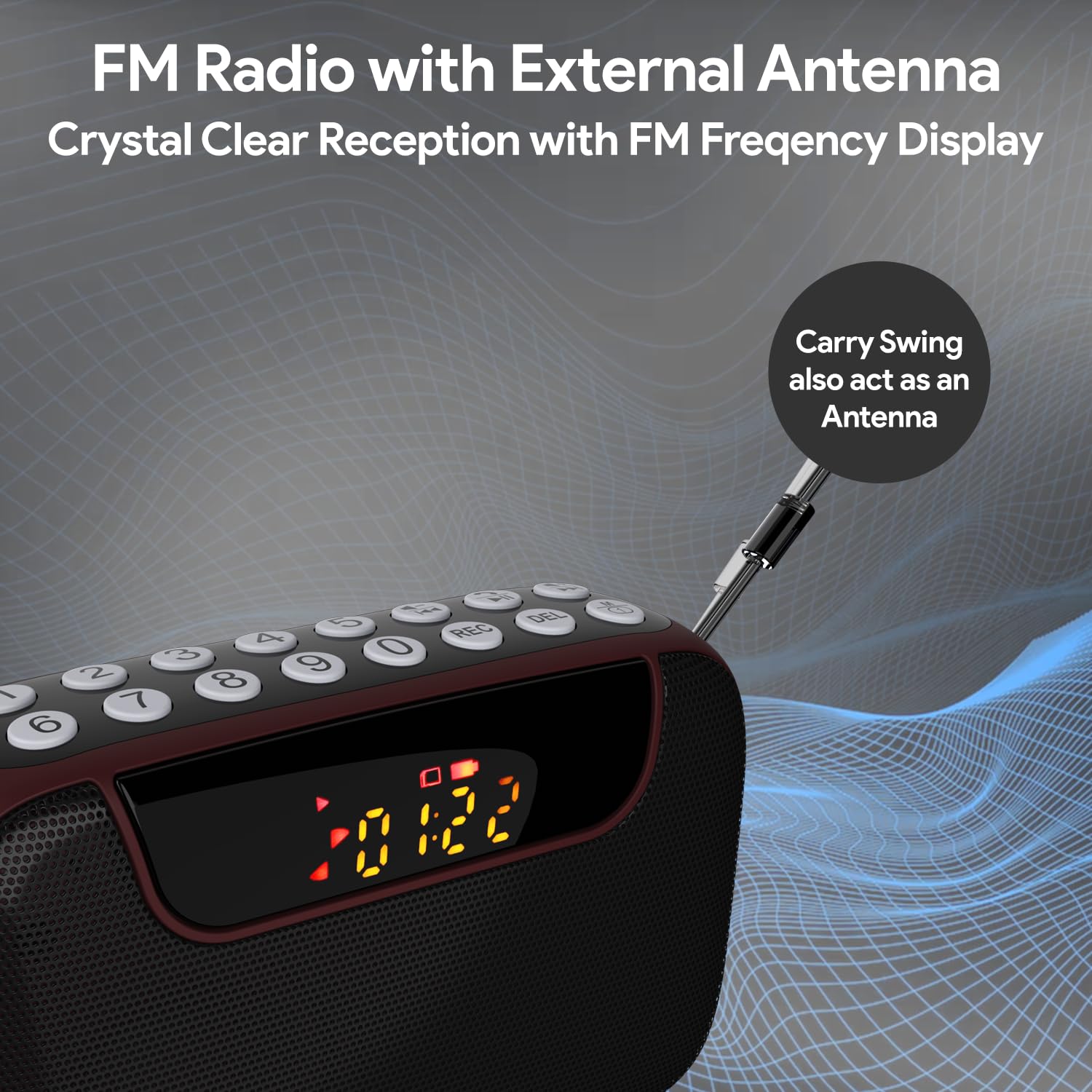
Figure 6: FM Radio with External Antenna
MP3 Playback (USB/SD/AUX)
Play music from USB drives, Micro SD cards, or external audio devices.
- USB/SD Card: Insert a USB flash drive or Micro SD card (with MP3 files) into the corresponding port. The device will automatically switch to USB/SD mode and begin playback. If not, press the M (Mode) button to select the correct mode.
- AUX Input: Connect an external audio device (e.g., smartphone, laptop) to the AUX port using the provided 3.5mm audio cable. Press the M (Mode) button to select AUX mode.
- Use the Play/Pause and Previous/Next Track buttons to control playback.
- Use the number pad for direct song selection (e.g., enter "007" for the 7th song).

Figure 7: MP3 Player with Track Selection
Voice Recording
Record voice notes directly onto a connected USB drive or Micro SD card.
- Ensure a USB drive or Micro SD card is inserted into the device.
- Press the REC button to start recording. The display will show a recording indicator.
- Speak clearly into the built-in microphone.
- Press the REC button again to stop and save the recording.
- To play back recordings, switch to USB/SD mode and navigate to the recorded files.
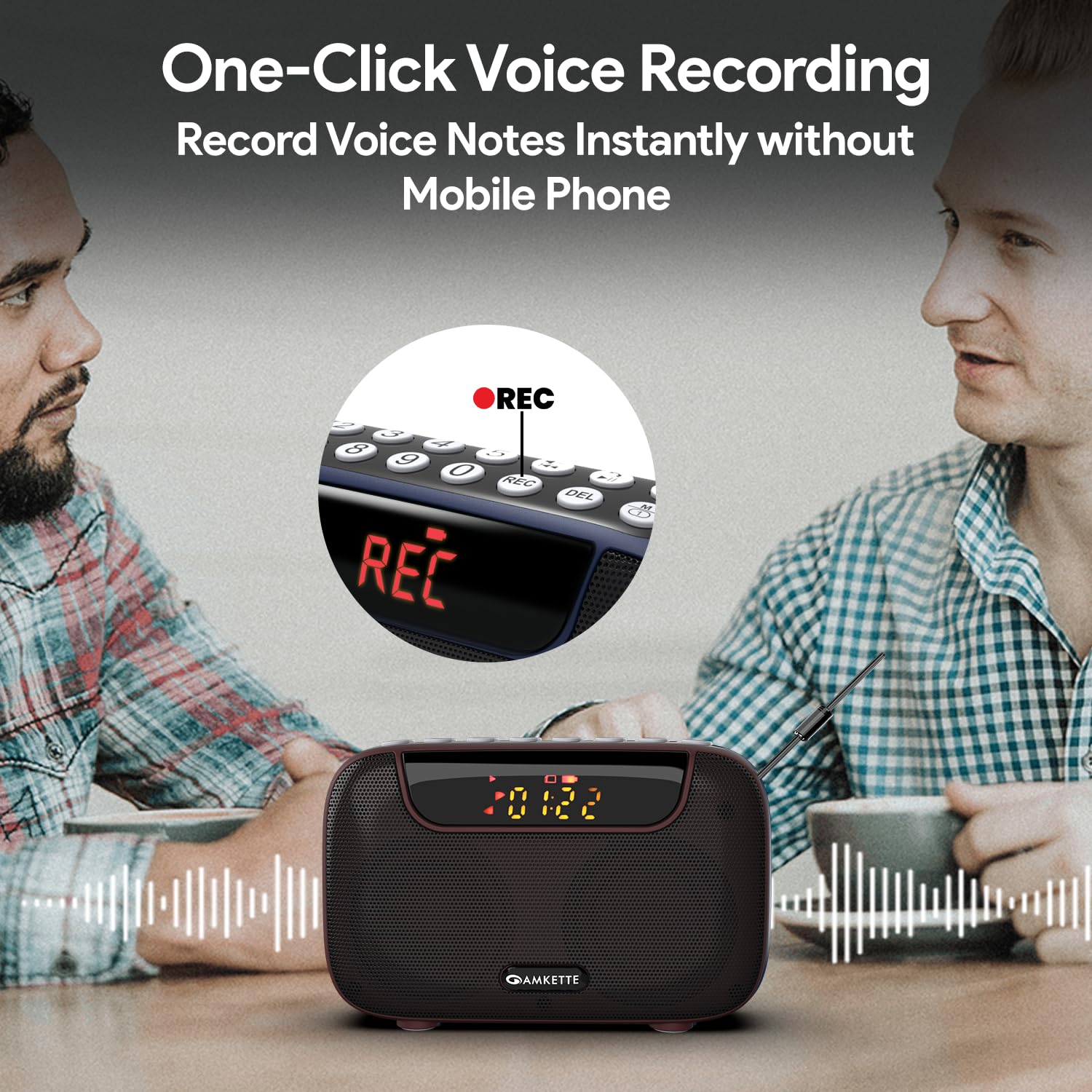
Figure 8: One-Click Voice Recording
FM Song Recording
Capture your favorite FM radio programs or songs directly from the radio.
- Ensure a USB drive or Micro SD card is inserted into the device.
- Switch to FM mode and tune to the desired station.
- Press the REC button to start recording the FM broadcast. The display will show a recording indicator.
- Press the REC button again to stop and save the recording.
- Recorded FM songs will be saved on the inserted storage device.

Figure 9: Built-in FM Song Recorder
Charging
The Amkette Pocket Blast is equipped with a rechargeable Lithium Ion battery.
- Use only the provided Type-C charging cable.
- Connect to a standard USB power source (5V/1A recommended).
- Avoid using damaged cables or chargers.
- Do not charge in extreme temperatures.
- The device offers over 7 hours of playback on a full charge (Bluetooth mode).

Figure 10: Extended Playback Time
Maintenance
To ensure the longevity and optimal performance of your device, follow these maintenance guidelines:
- Keep the device dry. Avoid exposure to water or excessive humidity.
- Clean the device with a soft, dry cloth. Do not use abrasive cleaners or solvents.
- Store the device in a cool, dry place when not in use.
- Avoid dropping or subjecting the device to strong impacts.
- Do not attempt to disassemble or repair the device yourself. This will void the warranty.
Troubleshooting
If you encounter any issues with your Amkette Pocket Blast, refer to the following common problems and solutions:
| Problem | Possible Cause | Solution |
|---|---|---|
| Device does not power on. | Low battery; Power switch is off. | Charge the device fully; Ensure the ON/OFF switch is in the "ON" position. |
| No sound. | Volume too low; Incorrect mode selected; Device not paired (Bluetooth). | Increase volume; Press "M" button to select correct mode; Re-pair Bluetooth device. |
| Poor FM reception. | Antenna not extended; Weak signal area. | Fully extend the external antenna; Try moving to a location with better signal. |
| Cannot record. | No USB/SD card inserted; Storage full; Card format issue. | Insert a compatible USB/SD card; Delete old files or use a new card; Ensure card is formatted correctly (FAT32). |
| Bluetooth disconnects frequently. | Device too far from Pocket Blast; Obstructions; Interference. | Keep devices within 10 meters (33 feet); Remove obstructions; Avoid strong electromagnetic interference. |
Specifications
Detailed technical specifications for the Amkette Pocket Blast.
| Feature | Detail |
|---|---|
| Brand | Amkette |
| Model Name | Pocket Blast |
| Product Dimensions | 12 x 4.1 x 7.8 cm |
| Item Weight | 264 g |
| Speaker Output Power | 6 Watts |
| Power Source | Battery Powered |
| Battery Type | Lithium Ion (included) |
| Battery Life (Average) | 7+ Hours (Bluetooth) |
| Charging Port | Type-C (DC 5V) |
| Connectivity | Bluetooth, USB, SD Card, AUX |
| Tuner Technology | FM |
| Display Type | LCD |
| Country of Origin | China |
Warranty and Support
Your Amkette Pocket Blast comes with a 1-Year Manufacturing Warranty.
For any issues, queries, or support, please contact our customer support team.
- Customer Support: Please Call or WhatsApp our customer support team in case of any issues.
- Warranty Claims: Keep your purchase receipt as proof of purchase for warranty claims.
