1. Introduction
The Belkin BoostCharge Magnetic Wireless Power Bank (Model BPD004) provides portable power for your compatible devices. Featuring MagSafe technology, a 5000 mAh battery capacity, and a built-in kickstand, it offers convenient wireless charging on the go. This manual provides essential information for safe and effective use of your power bank.
2. Package Contents
Ensure all items are present in your package:
- Belkin BoostCharge Magnetic Wireless Power Bank 5000 mAh
- 3.3ft USB-C to USB-C Charging Cable
- User Manual (this document)
3. Setup
Initial Charging of the Power Bank
Before first use, fully charge your Belkin BoostCharge Magnetic Wireless Power Bank.
- Connect the included USB-C to USB-C cable to the USB-C port on the power bank.
- Connect the other end of the cable to a compatible USB-C power adapter (not included).
- The LED indicator lights on the side of the power bank will illuminate to show charging progress. All four LEDs will be solid when fully charged.
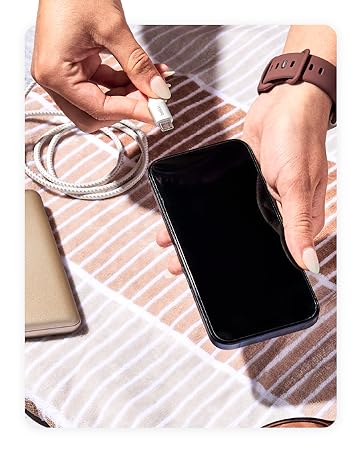
Figure 1: Connecting the USB-C cable to the power bank for charging.
4. Operating Instructions
Attaching to Your Device (MagSafe)
The power bank uses MagSafe technology for secure attachment and wireless charging.
- Ensure your device is MagSafe compatible (iPhone 12 series or newer) or has a MagSafe compatible case.
- Align the power bank with the back of your device. The magnets will automatically snap it into place.
- Wireless charging will begin automatically. The LED indicator lights on the power bank will show its remaining charge.

Figure 2: Magnetic attachment of the power bank to a compatible iPhone.
Using the Built-in Kickstand
The integrated pop-up kickstand allows for hands-free viewing while charging.
- With the power bank attached to your device, gently pull out the kickstand from the back of the power bank.
- Position your device vertically or horizontally for optimal viewing.

Figure 3: Device standing vertically using the power bank's kickstand.

Figure 4: Device standing horizontally using the power bank's kickstand.
Pass-Through Charging
The power bank supports pass-through charging, allowing you to charge both the power bank and your device simultaneously.
- Attach the power bank to your MagSafe-compatible device.
- Connect the USB-C to USB-C cable to the power bank's USB-C port and a power source.
- Both the power bank and your device will charge.
Video 1: Official product video demonstrating features including pass-through charging and kickstand functionality.
LED Indicator Lights
The LED lights on the side of the power bank indicate its charge level:
- 4 Solid LEDs: 75-100% charged
- 3 Solid LEDs: 50-75% charged
- 2 Solid LEDs: 25-50% charged
- 1 Solid LED: 0-25% charged
5. Compatibility
The Belkin BoostCharge Magnetic Wireless Power Bank is compatible with a wide range of devices:
- iPhones: iPhone 17, iPhone Air, iPhone 17 Pro, iPhone 17 Pro Max, iPhone 16 Pro Max, iPhone 16 Pro, iPhone 16 Plus, iPhone 16, iPhone 15 Pro Max, iPhone 15 Pro, iPhone 15 Plus, iPhone 15, iPhone 14 Pro Max, iPhone 14 Pro, iPhone 14 Plus, iPhone 14.
- Apple Accessories: AirPods Pro, AirPods.
- Google Pixel: Google Pixel 10 Pro XL, Google Pixel 10 Pro Fold, Google Pixel 10 Pro, Google Pixel 10.
- Cases: Compatible with official MagSafe cases.
6. Safety Information
Your Belkin BoostCharge Magnetic Wireless Power Bank is designed with multiple safety features:
- Advanced Safety Testing: Undergoes rigorous 16-point testing for hardware design, including temperature protection, overcharge protection, drop test, and plug and unplug test.
- Dual-Chip Protection: Equipped with two intelligent safety chips to prevent damage from overvoltage, overcurrent, and other faults.
- Carry-On Safe: The power bank features 18.5 Wh (watt-hours) to be fully compliant with 100 Wh-limit TSA carry-on requirements for air travel.
Figure 5: Carry-On Safe features of the power bank.
7. Maintenance
To ensure the longevity and optimal performance of your power bank:
- Keep the device dry and away from moisture.
- Avoid extreme temperatures.
- Clean the device with a soft, dry cloth. Do not use harsh chemicals or abrasive materials.
- Store in a cool, dry place when not in use.
8. Troubleshooting
If you encounter issues with your power bank, refer to the following common solutions:
- Device not charging wirelessly: Ensure your device is MagSafe compatible and properly aligned with the power bank. Remove any non-MagSafe cases that may interfere with the magnetic connection.
- Power bank not charging: Verify that the USB-C cable is securely connected to both the power bank and a functioning power adapter. Try a different cable or power adapter.
- Slow charging: Ensure you are using a compatible power adapter for optimal charging speed. Wireless charging (7.5W) is generally slower than wired charging (12W via USB-C).
- LED indicators not working: Press the power button on the side of the power bank to activate the LED indicators. If they still do not light up, the power bank may be fully depleted or require service.
9. Specifications
| Feature | Detail |
|---|---|
| Model Number | BPD004 |
| Battery Capacity | 5000 mAh |
| Wireless Charging Output | 7.5W (MagSafe compatible) |
| Wired Charging Output/Input | USB-C (up to 12W) |
| Dimensions (L x W x H) | 3.69 x 2.5 x 0.65 inches |
| Item Weight | 5.3 ounces |
| Special Features | LED Indicator Lights, Pass-Through Charging, Wireless Charging, Built-in Kickstand |
| Color | White |
10. Warranty and Support
Belkin stands by the quality of its products. Your Belkin BoostCharge Magnetic Wireless Power Bank comes with:
- 2-Year Limited Warranty: Covers defects in materials and workmanship under normal use.
- $2,500 Connected Equipment Warranty (CEW): Provides coverage for connected electronic devices damaged by an electrical surge while properly connected to the power bank.
For detailed terms and conditions, please visit the official Belkin website or contact Belkin customer support.
Figure 6: Belkin offers a range of charging solutions and accessories.