1. Product Overview
The Sun King Home 200X is a comprehensive solar lighting and power system designed for reliable off-grid illumination and device charging. It integrates an efficient solar panel, a robust battery control unit, and multiple LED tube lights to provide a sustainable energy solution for homes and various applications.
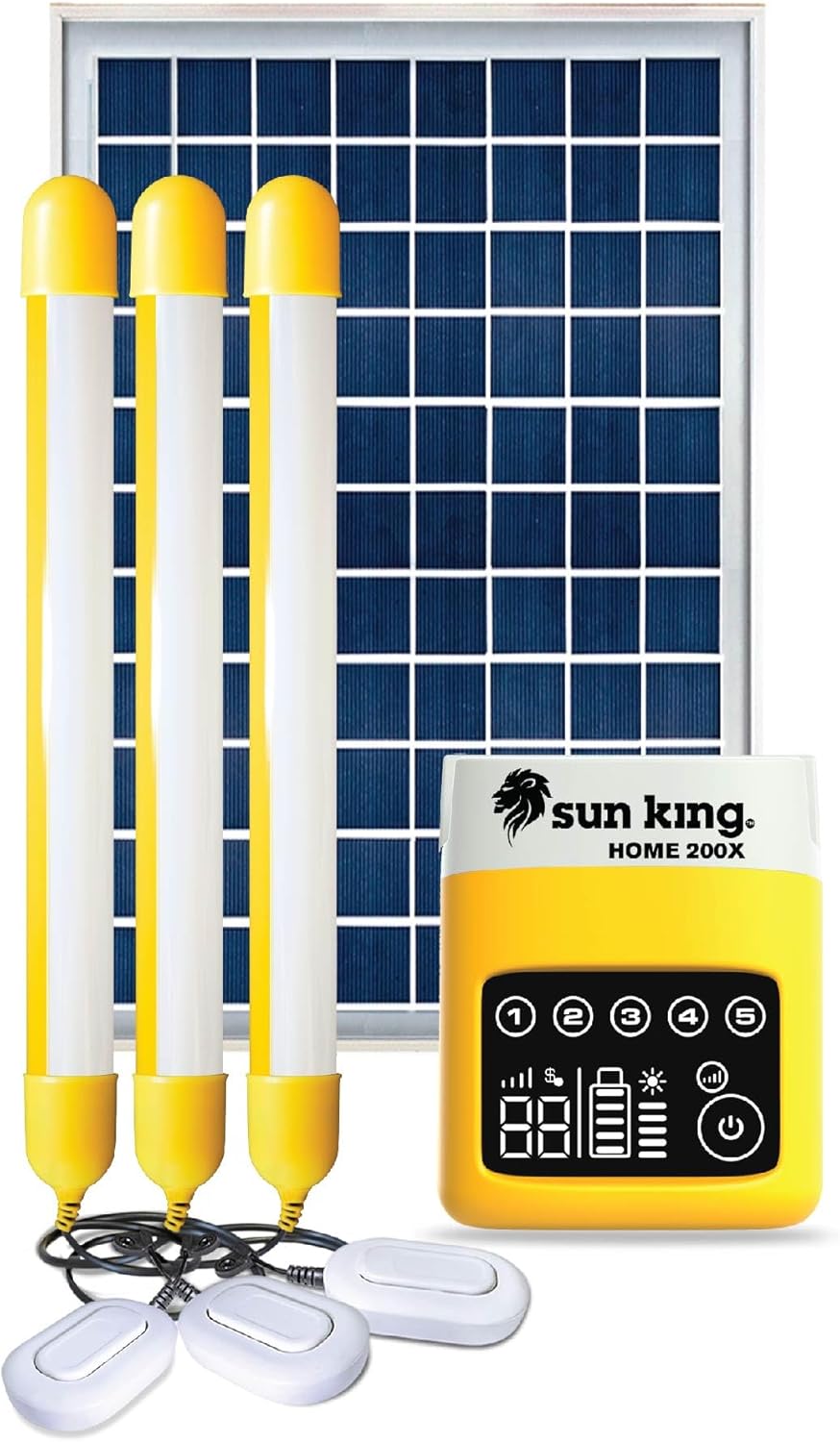
Image: The complete Sun King Home 200X system, showcasing the solar panel, battery control unit, and three tube lights with their switches.
Key features include:
- Three 200-lumen tube lights for optimal room illumination.
- Individual wall-mountable switches for each light.
- Integrated USB port for mobile phone charging.
- Durable construction with a polycarbonate shell and industrial-grade aluminum-framed solar panel.
- Long-lasting, quality-tested components.

Image: Visual representation of key product features, highlighting brightness, battery life, and capacity.
2. What's in the Box
Upon unpacking your Sun King Home 200X system, please verify that all the following components are present:
- 11-watt Solar Panel
- Battery Control Unit (28.3Wh)
- Three Tube Lights with Wall-Mountable Switches
- Cable Junction Box
- USB Cable for Mobile Phone Charging
- Wall Mounting Tube Light Clips (for tube lights)
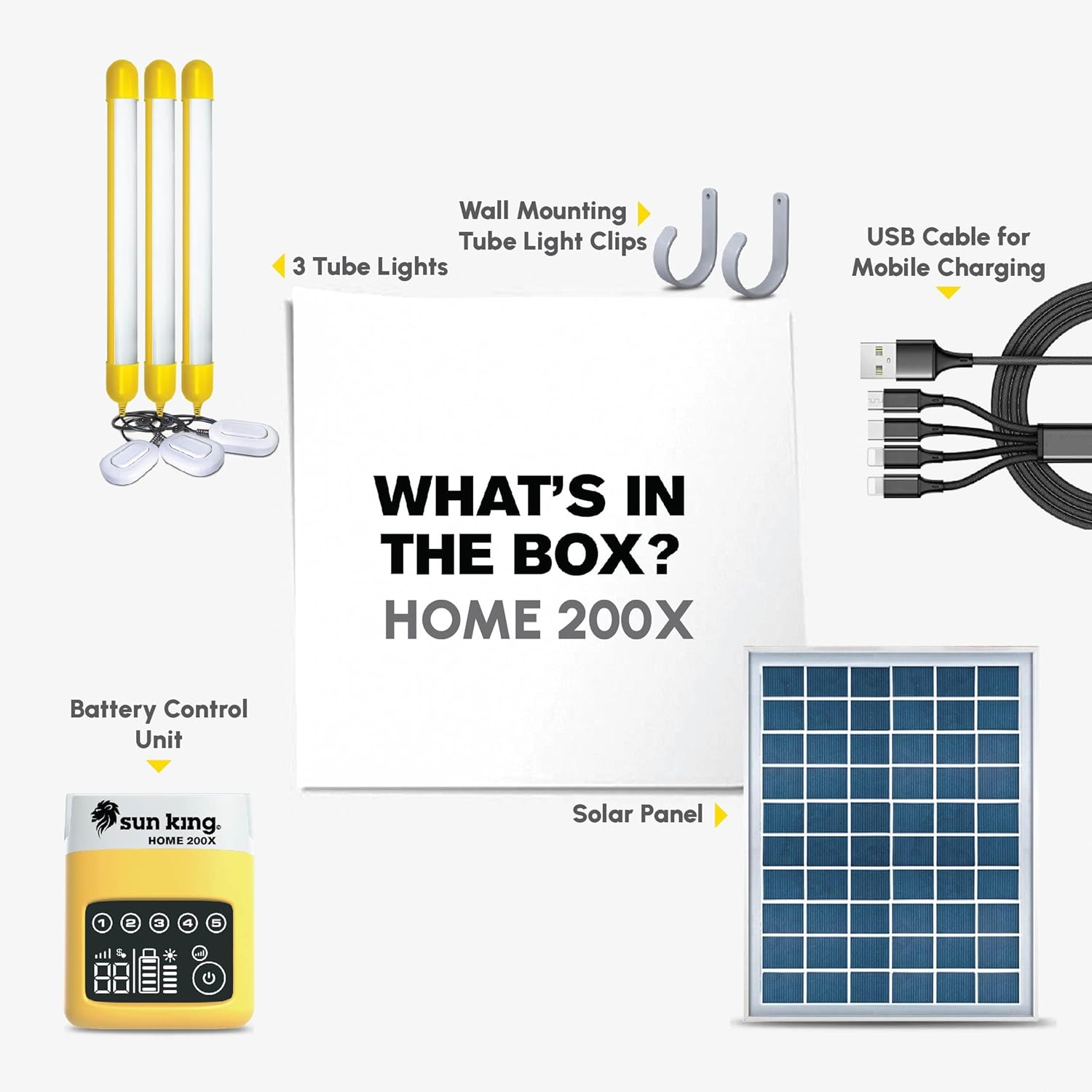
Image: An illustration detailing the contents of the Sun King Home 200X package.
3. Setup Instructions
Follow these steps to set up your Sun King Home 200X system:
- Solar Panel Placement: Position the 11-watt solar panel in an outdoor location where it receives maximum direct sunlight throughout the day. Ensure no shadows obstruct the panel, as this will reduce charging efficiency. Secure the panel to prevent displacement by wind or other factors.
- Connect Solar Panel to Control Unit: Connect the cable from the solar panel to the designated solar input port on the Battery Control Unit. Ensure the connection is firm and secure.
- Connect Tube Lights: Plug the cables from the three tube lights into the output ports on the Battery Control Unit. Each light has an individual switch for independent operation. Use the provided wall-mountable clips to secure the tube lights in desired indoor locations.
- Initial Charging: Allow the system to charge under direct sunlight for at least 8-10 hours before first use to ensure the battery is fully charged. The battery indicator on the control unit will show the charging status.
4. Operating Instructions
Operating your Sun King Home 200X system is straightforward:
- Turning Lights On/Off: Use the individual switches located on each tube light's cable to turn them on or off.
- Adjusting Brightness: The system may offer different brightness modes. Refer to the control unit's interface for options to cycle through brightness levels.
- Charging Mobile Devices: Connect your mobile phone or other USB-powered devices to the USB charging port on the Battery Control Unit using the provided USB cable or your device's charging cable. The system will automatically begin charging.
- Battery Indicator: Monitor the battery level indicator on the Battery Control Unit to understand the remaining charge and when recharging is necessary.
5. Maintenance
Regular maintenance ensures the longevity and optimal performance of your solar system:
- Solar Panel Cleaning: Periodically clean the surface of the solar panel with a soft, damp cloth to remove dust, dirt, or debris that may accumulate and reduce charging efficiency. Do not use abrasive cleaners.
- Battery Care: Avoid fully discharging the battery frequently. Recharge the system regularly, especially after extended periods of use. Store the system in a cool, dry place if not in use for a long time, ensuring the battery has some charge.
- Component Inspection: Regularly inspect all cables and connections for any signs of wear, damage, or corrosion. Ensure all connections remain secure.
6. Troubleshooting
If you encounter issues with your Sun King Home 200X, refer to the following common problems and solutions:
| Problem | Possible Cause | Solution |
|---|---|---|
| Lights not turning on | Low battery charge; Loose connection; Light switch off | Charge the system under direct sunlight; Check all cable connections; Ensure individual light switches are in the 'ON' position. |
| Mobile device not charging | Low battery charge; Faulty USB cable; Device not compatible | Ensure the system battery is sufficiently charged; Try a different USB cable; Verify device compatibility with USB charging. |
| System not charging from solar panel | Insufficient sunlight; Solar panel dirty or obstructed; Loose panel connection | Relocate panel to direct sunlight; Clean panel surface; Check solar panel cable connection to control unit. |
7. Specifications
Detailed specifications for the Sun King Home 200X system:
| Feature | Detail |
|---|---|
| Brand | SUN KING |
| Model | Sun King Home P1 / Home 200X |
| Material | Aluminum, Polycrystalline Silicon (Solar Panel) |
| Product Dimensions (Control Unit) | 3.94"L x 7.09"W x 1.57"H |
| Item Weight | Approximately 1 Pound (System) |
| Efficiency | High Efficiency |
| Connector Type | USB Type-C (for charging output) |
| Maximum Voltage | 12 Volts |
| Maximum Power (Solar Panel) | 11 Watts |
| Included Components | 11W solar panel, 3 tube lights with wall-mountable switches, Battery control unit, Cable junction box, USB cable for phone charging |
| Special Feature | Pay-as-you-go technology (if activated) |
| UPC | 851438003688 |
8. Warranty and Support
The Sun King Home 200X system comes with a 2-year warranty from the date of purchase. This warranty covers manufacturing defects and ensures the product meets its specified performance standards under normal use.

Image: An overview of the system's core components and the 2-year warranty.
For warranty claims, technical support, or any inquiries regarding your product, please refer to the contact information provided at the point of purchase or on the official SUN KING website.


