1. Introduction
Thank you for choosing the Maclean MC-891 Electric TV Wall Mount. This manual provides essential information for the safe and correct installation, operation, and maintenance of your new TV mount. Please read these instructions thoroughly before installation and keep them for future reference.
This motorized wall mount is designed to securely hold flat-panel televisions ranging from 37 to 70 inches, with a maximum weight capacity of 35 kg. It features remote-controlled height adjustment, manual swivel and tilt capabilities, and an integrated cable management system for a clean setup.

Figure 1: Maclean MC-891 Electric TV Wall Mount and Remote Control.
2. Safety Information
WARNING: Failure to read and follow all instructions may result in personal injury, property damage, or voiding of warranty. The manufacturer is not responsible for damage or injury caused by incorrect assembly or use.
- Ensure the mounting surface can safely support the combined weight of the mount and the TV.
- Do not exceed the maximum load capacity of 35 kg (77 lbs).
- This product is intended for indoor use only.
- Use only the provided mounting hardware. If any parts are missing or damaged, contact customer support.
- Always use a qualified professional for installation if you are unsure about the process.
- Keep children and pets away from the installation area.
- Avoid placing fingers or other objects near moving parts during operation.
- Ensure all cables are properly routed and secured to prevent pinching or damage.
3. Package Contents
Please verify that all components are present and undamaged before proceeding with installation. If any parts are missing or defective, contact your retailer for assistance.
- Electric TV Wall Mount Assembly
- Remote Control
- Mounting Hardware Kit (screws, anchors, washers)
- Power Adapter
- User Manual
4. Specifications
| Model | MC-891 |
| Screen Size Compatibility | 37" - 70" |
| VESA Compatibility | 200x100, 200x200, 200x400, 300x200, 300x300, 400x200, 400x300, 400x400, 600x400 mm |
| Maximum Load Capacity | 35 kg (77 lbs) |
| Height Adjustment (Electric) | Max. 540 mm (upwards) |
| Wall Distance (Min-Max) | 153 mm - 485 mm |
| Swivel (Manual) | ± 25° |
| Tilt (Manual) | ± 3° |
| Material | Metal Structure |
| Color | Black (Powder Coating) |
| Features | Remote Control with 2 Memory Slots, Integrated Cable Management |
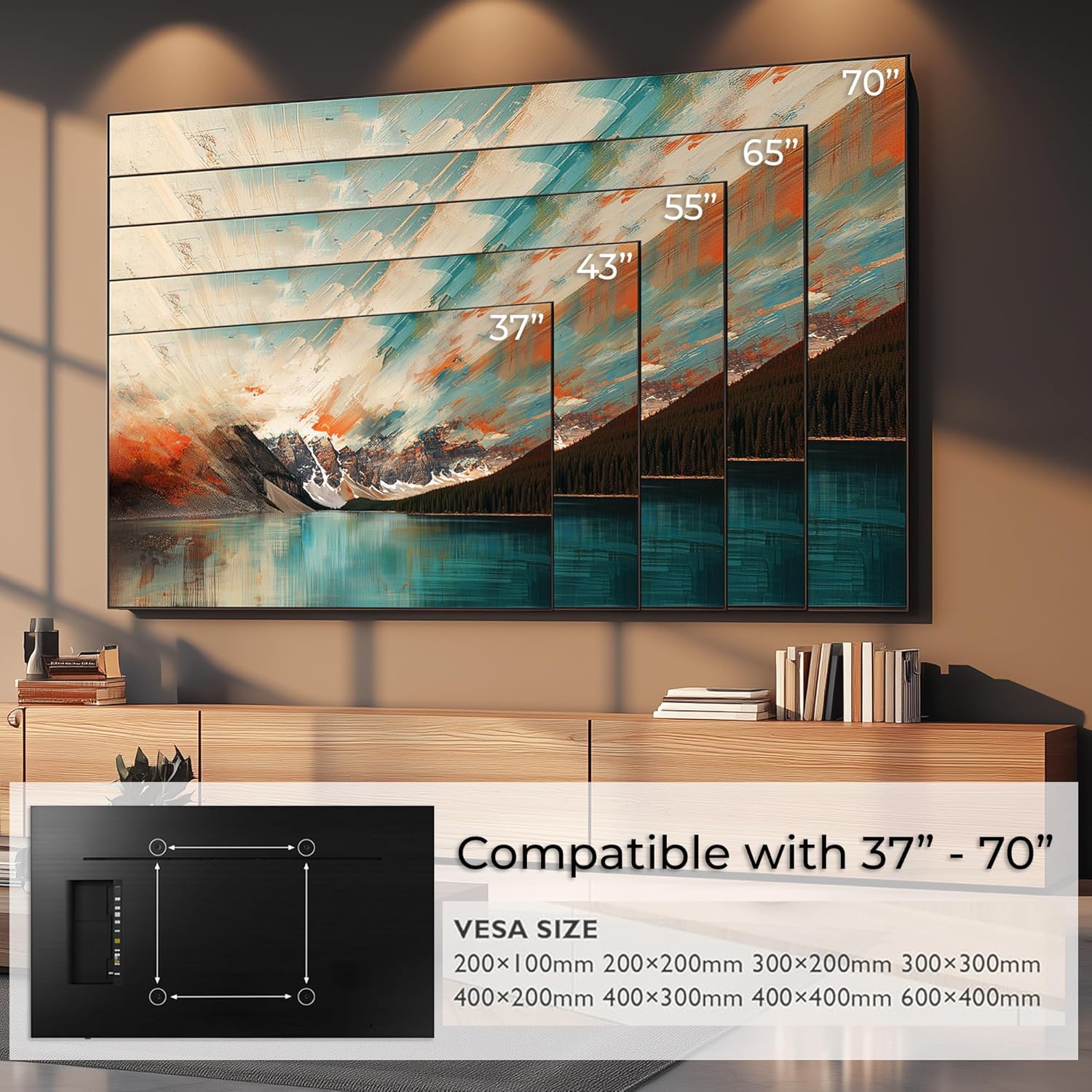
Figure 2: Compatible TV sizes (37"-70") and VESA mounting patterns.

Figure 3: Detailed dimensions and movement ranges of the MC-891 mount.
5. Installation and Setup
Important: Before installation, ensure you have the necessary tools (drill, level, stud finder, etc.) and understand your wall type. Always consult a professional if you are unsure.
5.1 Wall Preparation
- Locate wall studs or ensure the concrete/brick wall is suitable for mounting.
- Determine the desired mounting height. Consider the TV's center at eye level when seated, and account for the mount's height adjustment range.
- Use a level to mark the drilling points accurately.

Figure 4: Example installation above a fireplace, showing the mount's position.
5.2 Mounting the Wall Plate
- Drill pilot holes at the marked locations.
- Attach the wall plate securely using the appropriate screws and anchors for your wall type. Ensure it is level.
5.3 Attaching TV Brackets
- Identify the VESA mounting holes on the back of your TV.
- Attach the TV brackets to the back of your TV using the provided screws and spacers. Ensure the brackets are centered and securely fastened.

Figure 5: VESA mounting points on the back of a television.
5.4 Hanging the TV and Cable Management
- Carefully lift the TV and hook the attached brackets onto the wall mount. Ensure it is securely seated.
- Connect the power adapter to the mount and plug it into a power outlet.
- Route all TV and power cables through the integrated cable management system on the mount to maintain a tidy appearance.

Figure 6: Integrated cable management system for organized wiring.
6. Operation
6.1 Remote Control Functions
The included remote control allows for electric height adjustment and saving preferred positions.
- Up/Down Arrows: Adjust the TV height electrically. The mount can move up to 540 mm vertically.
- SET Button: Used to save memory positions.
- 1 / mem1 Button: Recall or save the first memory position.
- 2 / mem2 Button: Recall or save the second memory position.
- OK Button: Returns the TV to its fully retracted (highest) position.
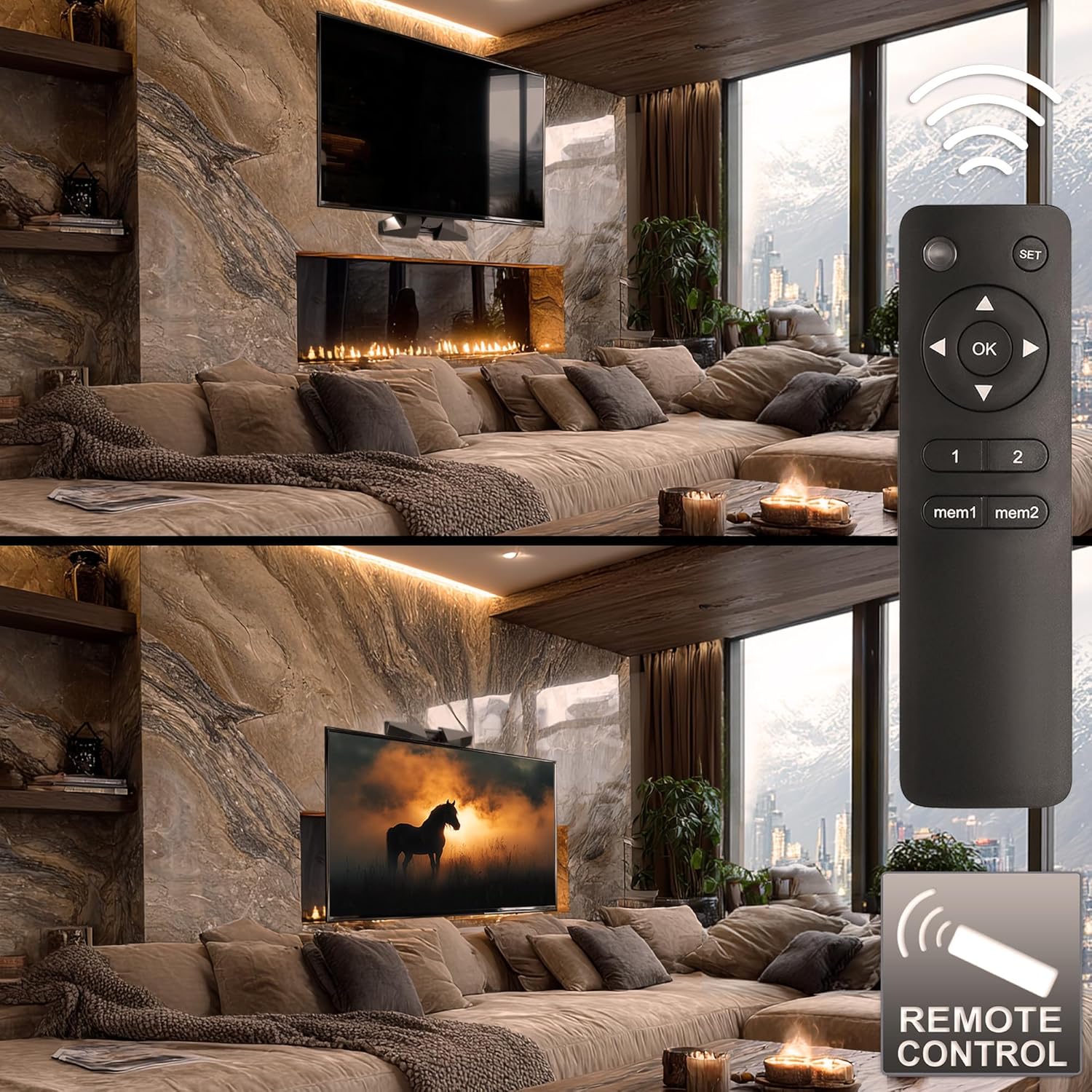
Figure 7: Remote control in use, adjusting TV height for optimal viewing.
6.2 Saving Memory Positions
- Adjust the TV to your desired height using the Up/Down arrows.
- Press the SET button once.
- Within 3 seconds, press either the 1 or 2 button to save the current position to that memory slot.
6.3 Manual Swivel and Tilt
The mount allows for manual swivel of ±25° and tilt of ±3°. Gently adjust the TV to the desired angle. Do not force the movement beyond its limits.
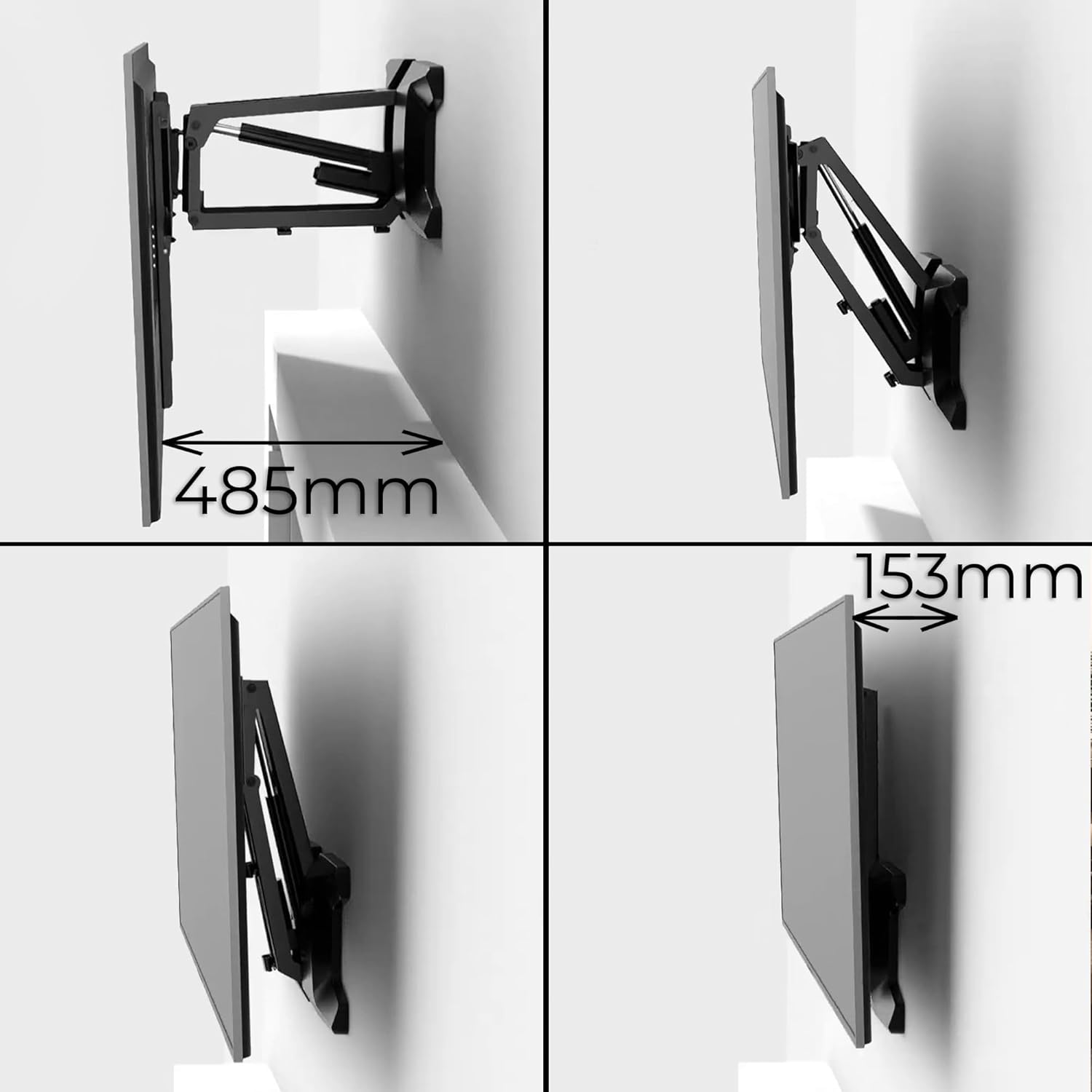
Figure 8: The mount's extended and retracted positions, illustrating wall distance.
7. Maintenance
- Regularly check all screws and connections to ensure they remain tight and secure.
- Clean the mount with a soft, dry cloth. Avoid abrasive cleaners or solvents.
- Inspect cables for any signs of wear or damage. Replace damaged cables immediately.
- Do not lubricate any parts of the mount unless specifically instructed by the manufacturer.
8. Troubleshooting
| Problem | Possible Cause | Solution |
|---|---|---|
| Mount does not move. | No power; Remote control battery low/dead; Motor malfunction. | Check power connection; Replace remote control batteries; Contact customer support. |
| Remote control not responding. | Batteries dead or incorrectly inserted; Obstruction between remote and mount. | Replace batteries, ensure correct polarity; Remove obstructions. |
| TV is not level. | Installation error; Manual tilt adjustment needed. | Re-check installation steps; Manually adjust tilt (±3°). |
| Unusual noises during operation. | Loose components; Obstruction in mechanism. | Inspect for loose parts and tighten; Check for obstructions and remove. If noise persists, contact support. |
9. Warranty and Customer Support
Maclean products are designed and manufactured to the highest quality standards. For warranty information, please refer to the documentation provided with your purchase or visit the official Maclean website.
If you encounter any issues or have questions regarding your MC-891 Electric TV Wall Mount, please contact Maclean customer support. You can find contact details on the official Maclean website or through your retailer.
For more information about Maclean products, visit the Maclean Brand Store.


