1. Introduction
Thank you for choosing the POSEIDON Wireless Tattoo Machine Kit. This comprehensive kit is designed for both beginners and experienced artists, offering a complete solution for your tattooing needs. Featuring a powerful wireless tattoo pen, high-quality cartridge needles, and essential accessories, this manual will guide you through the setup, operation, and maintenance of your new equipment to ensure optimal performance and longevity.
Please read this manual thoroughly before using the product to ensure safe and effective operation.
2. Package Contents
Verify that all items listed below are included in your POSEIDON Tattoo Pen Kit:
- 1 x POSEIDON Wireless Tattoo Pen
- 40 x Tattoo Cartridges Needles (1205RL*10, 1207RL*10, 1209RS*10, 1007RM*10)
- 1 x Self-Cohesive Tattoo Grip Cover
- 1 x Wireless Tattoo Power Supply (integrated with pen)
- 1 x TYPE-C Charging Cable
- 40 x Ink Caps
- 2 x Practice Skin
- 2 x Transfer Paper
- 10 x 5ml Tattoo Ink
- 1 x 30ml Black Tattoo Ink
- 1 x Tattoo Gloves
- 1 x Instruction Manual

Figure 2.1: Overview of the POSEIDON Tattoo Pen Kit contents, including the tattoo pen, cartridge needles, power supply, and various accessories.
3. Setup
3.1 Assembling the Tattoo Pen
- Identify Components: Familiarize yourself with the main parts of the tattoo pen: the battery, RCA jack, motor holder, transmission frame, non-slip handle, and cartridge connection area.
- Connect Battery: Ensure the wireless tattoo power supply (battery) is securely screwed onto the top of the tattoo pen's motor holder.
- Attach Cartridge Needle: Gently push a sterile cartridge needle into the front opening of the tattoo pen until it clicks into place. Ensure it is firmly seated.

Figure 3.1: Exploded view illustrating the main components of the POSEIDON Tattoo Pen, including the battery, motor holder, and cartridge connection.
3.2 Charging the Wireless Power Supply
The wireless power supply has a 1200mAH capacity. Before first use, fully charge the battery.
- Connect Charging Cable: Insert the TYPE-C charging cable into the charging port on the wireless power supply.
- Power Source: Connect the other end of the TYPE-C cable to a suitable USB power adapter (not included) or a computer USB port.
- Charging Indicator: The indicator lights on the power supply will show charging progress. A full charge typically takes 3.5-4 hours.

Figure 3.2: The Type-C charging interface located on the wireless power supply for convenient recharging.
4. Operating Instructions
4.1 Powering On/Off and Voltage Adjustment
The wireless power supply features intuitive button functions:
- Power On/Off: Long press the power button for 2 seconds to turn the device on or off.
- Display Voltage: Quickly press the power button once to display the current voltage setting.
- Switch Voltage: Double-click the power button to cycle through the available voltage settings (6V, 7V, 8V, 9V, 11V). The blue indicator lights represent the current voltage.
- Battery Display: After the battery is turned on for more than 2 seconds without pressing any key, it will automatically jump to the battery display (20%, 40%, 60%, 80%, 100%).

Figure 4.1: Detailed view of the mini wireless power supply, showing button functions and LED indicators for voltage and battery level.
4.2 Adjusting Needle Length
To adjust the needle protrusion (length), twist the area indicated on the pen. This allows for precise control over needle depth for various tattooing techniques.
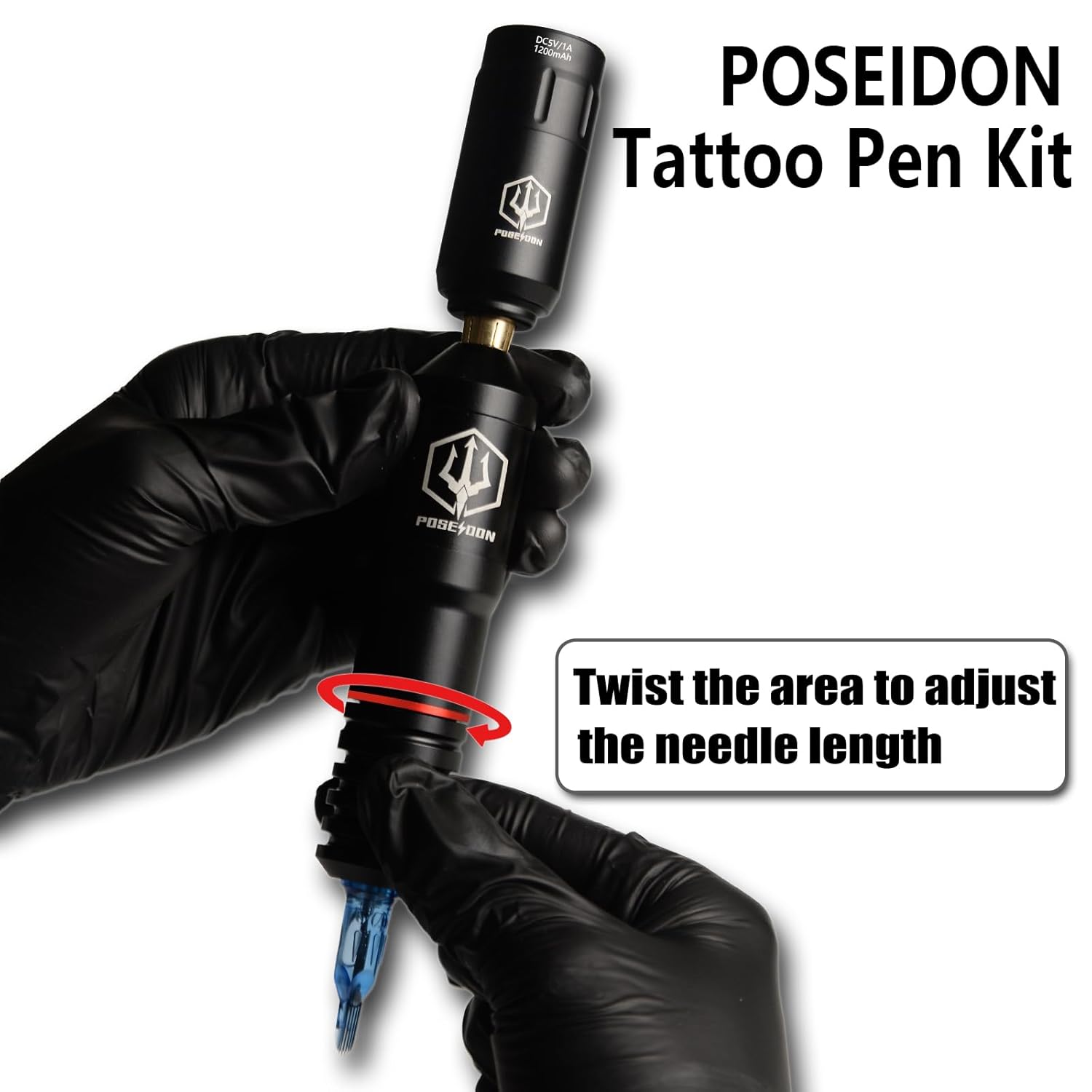
Figure 4.2: Illustration demonstrating how to twist the pen body to adjust the needle length for optimal tattooing.
4.3 Performance Characteristics
The POSEIDON tattoo pen features a powerful custom motor and advanced gear system, ensuring reliable and quiet operation. It is designed for low vibration and high power output, compatible with all cartridge needles.
- Operating Voltage: 6V-11V
- Stroke Length: 3.5mm
- Speed: Up to 10000 RPM at 8V
- Battery Life: Fully charged battery lasts 3-6 hours depending on your voltage and motor usage.

Figure 4.3: Diagram highlighting the high-quality motor of the POSEIDON Tattoo Pen, emphasizing its power, quiet operation, and low vibration.
5. Maintenance
5.1 Cleaning and Sterilization
Proper cleaning and sterilization are crucial for hygiene and the longevity of your equipment. Always follow industry-standard sterilization protocols for all components that come into contact with skin or ink.
- Tattoo Pen: After each use, wipe down the exterior of the tattoo pen with a disinfectant wipe. Do not immerse the pen in liquid.
- Cartridge Needles: All POSEIDON cartridge needles are single-use and pre-sterilized by EO gas. Dispose of used needles safely in a sharps container immediately after use. Do not reuse.
- Grip Cover: The self-cohesive grip cover is disposable. Replace it as needed.
5.2 Storage
Store the tattoo kit in a clean, dry, and cool environment, away from direct sunlight and extreme temperatures. Keep all components organized in their original packaging or a dedicated storage case to prevent damage.
6. Troubleshooting
If you encounter any issues with your POSEIDON Tattoo Machine Kit, refer to the following common problems and solutions:
- Battery Not Charging or Holding Charge:
Ensure the TYPE-C charging cable is securely connected to both the power supply and a working power source. Verify the power source is active. If the issue persists, the battery may be faulty. Contact customer service for assistance.
- Pen Not Turning On:
Ensure the battery is fully charged. Perform a long press (2 seconds) on the power button. If the pen still does not turn on, check for any loose connections between the battery and the pen body.
- Loose Battery Connection:
If the battery connection feels loose or the pen intermittently loses power, ensure the battery is screwed on tightly to the motor holder. Avoid overtightening, but ensure a firm connection.
- Needle Not Moving or Inconsistent:
Check if the cartridge needle is properly seated and clicked into place. Ensure the voltage setting is appropriate for the needle type and task. Verify there are no obstructions in the needle mechanism.
- Excessive Vibration or Noise:
While the pen is designed for low vibration, excessive vibration or unusual noise may indicate a loose component or a damaged cartridge needle. Re-seat the needle or try a new one. If the issue persists, inspect the pen for any visible damage.
If these troubleshooting steps do not resolve your issue, please contact UPTATSUPPLY customer service for further assistance.
7. Specifications
| Feature | Specification |
|---|---|
| Model | TK018 |
| Brand | UPTATSUPPLY (POSEIDON) |
| Operating Voltage | 6V-11V |
| Battery Capacity | 1200mAH |
| Charging Time | 3.5-4 hours (full charge) |
| Operating Time | 3-6 hours (depending on voltage/motor) |
| Stroke Length | 3.5mm |
| Motor Speed | Up to 10000 RPM (at 8V) |
| Material | Premium Aluminum Alloy |
| Color | Black |
| Water Resistance Level | Not Water Resistant |
| Package Dimensions | 8.35 x 7.87 x 3.94 inches |
| Package Weight | 2.14 Pounds |
8. Safety Information
For your safety and the safety of others, please adhere to the following guidelines:
- Keep this product out of reach of children.
- Do not expose the product to high temperatures or direct sunlight for extended periods.
- This product is not water resistant. Avoid contact with water or other liquids.
- Always use sterile, single-use cartridge needles.
- Ensure proper hygiene and sterilization practices are followed before and after each use.
- Consult with a professional or seek proper training before performing tattoos on human skin. Practice on practice skin provided.
9. Warranty and Support
UPTATSUPPLY is committed to providing high-quality products and excellent customer service. Your POSEIDON Tattoo Machine Kit comes with a satisfaction guarantee.
- Customer Satisfaction: UPTATSUPPLY offers a 100% satisfaction guarantee. If you are not fully satisfied, you are eligible for a replacement or a full refund. No reason is needed, ensuring a smooth and simple process.
- Returns and Refunds: The product is eligible for a refund or replacement within 30 days of purchase.
- Contact Support: For any questions, concerns, or support needs, please contact UPTATSUPPLY customer service directly. Refer to the contact information provided with your purchase or visit the official UPTATSUPPLY store page on Amazon.