
SILENT KNIGHT VLF-500-00
Vesda VLF-500-00 Aspirating Smoke Detector User Manual
Model: VLF-500-00 | Brand: SILENT KNIGHT
1. Introduction and Overview
The VESDA VLF-500 detector is a very early warning smoke detector designed to protect small, business-critical environments of less than 500 m2 (5,380 sq. ft.). This advanced system continually draws air into sampling holes within a pipe network. The collected air is then filtered and passed into a detection chamber where sophisticated light scattering technology accurately identifies the presence of even minute amounts of smoke. Detector status information is clearly communicated on the device's display and can also be transmitted via relays or optional interface cards, ensuring timely alerts and system integration.
2. Safety Information
Please read and understand all safety instructions before installing, operating, or maintaining the Vesda VLF-500-00 detector. Failure to follow these instructions may result in property damage, injury, or death.
- Electrical Safety: Installation and servicing must be performed by qualified personnel only. Disconnect all power before servicing. Ensure proper grounding.
- System Compatibility: Ensure the detector is compatible with your existing fire alarm control panel and other system components.
- Environmental Conditions: Do not expose the detector to extreme temperatures, humidity, or corrosive environments beyond its specified operating range.
- Maintenance: Regular maintenance and testing are crucial for optimal performance. Refer to the maintenance section for details.
- Disposal: Dispose of the product in accordance with local regulations for electronic waste.
3. Package Contents
Verify that all items listed below are present and undamaged upon unpacking your Vesda VLF-500-00 detector.
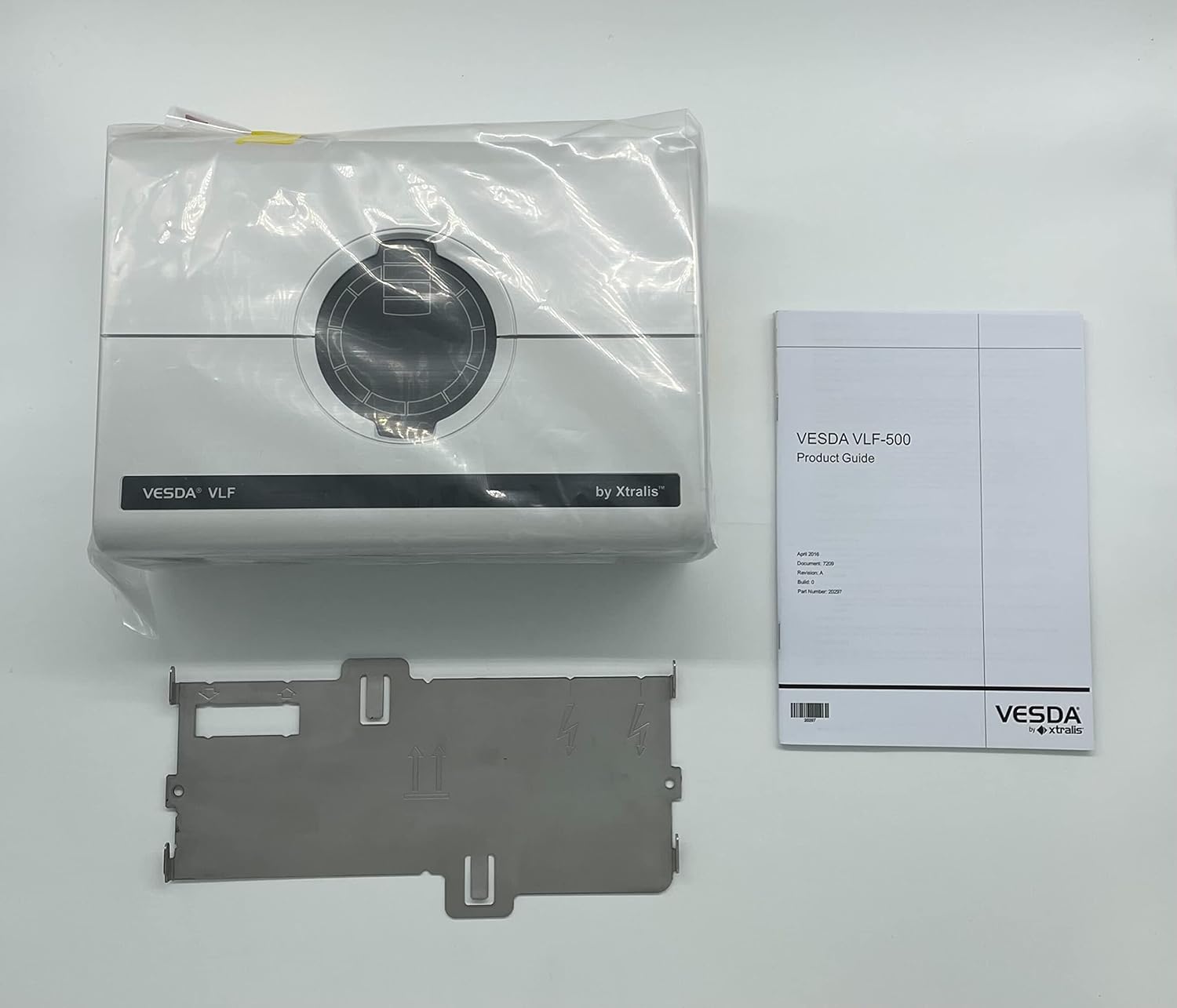
Figure 3.1: The Vesda VLF-500-00 detector, still in its protective plastic, alongside its product guide and a metal mounting bracket. This image shows the main components included in the package.

Figure 3.2: A top-down view of the Vesda VLF-500-00 detector, still sealed in its clear plastic packaging. The central circular air intake is visible.

Figure 3.3: A close-up of the product label on the Vesda VLF-500-00, detailing its model number (VLF-500-00), serial number (B9939174), sensitivity range, working voltage, power, current, and various certifications (UL, FM, FC, CE, VDS, LPCB). It also indicates manufacturing details and compliance standards.

Figure 3.4: A detailed view of the metal mounting bracket, showing its various cutouts and bends designed for secure installation of the detector. The part number 20449 is visible on a barcode sticker.

Figure 3.5: The underside of the metal mounting bracket, revealing its structural design and attachment points.

Figure 3.6: A shipping box label for the Vesda VLF-500-00, displaying the model number VLF-500-00, unit serial number B9939174, and description "VLF-500-00 ENGLISH DIS & EURO1". It also shows manufacturing date (June 2022) and importer information.
List of Contents:
- Vesda VLF-500-00 Aspirating Smoke Detector Unit
- Product Guide / User Manual
- Metal Mounting Bracket (Part Number: 20449)
- Accessory Bag (may contain screws, anchors, etc.)
4. Setup and Installation
Proper installation is critical for the effective operation of the Vesda VLF-500-00 detector. Refer to the detailed installation instructions provided in the separate Product Guide for specific wiring diagrams and pipe network design guidelines.
4.1 Mounting the Detector
- Select Location: Choose a suitable location that complies with local fire codes and provides optimal air sampling coverage for the protected area. Consider accessibility for maintenance.
- Secure Mounting Bracket: Use appropriate fasteners to securely attach the metal mounting bracket to a solid surface. Ensure the bracket is level.
- Attach Detector: Carefully mount the Vesda VLF-500-00 detector onto the secured bracket, ensuring it clicks firmly into place.
4.2 Pipe Network Installation
The detector operates by drawing air through a network of sampling pipes. The design and installation of this pipe network are paramount for accurate and early smoke detection.
- Design: Follow the manufacturer's guidelines for pipe sizing, length, and sampling hole placement to ensure balanced air flow and optimal sensitivity.
- Assembly: Connect the sampling pipes to the detector's inlet port(s) and route them throughout the protected area. Seal all joints to prevent air leaks.
- Termination: Ensure the pipe network is properly terminated and any unused ports are sealed.
4.3 Electrical Connections
All electrical wiring must conform to local and national electrical codes.
- Power Supply: Connect the detector to a stable 18-30 VDC power source. The nominal power consumption is 3.0W, increasing to 11.7W in alarm. Nominal current is 410mA, increasing to 490mA in alarm.
- Relay Outputs: Connect the alarm and fault relays to your fire alarm control panel or building management system as required.
- Interface Cards (Optional): If using optional interface cards, follow their specific wiring instructions.
- Grounding: Ensure the detector is properly grounded to prevent electrical interference and ensure safety.
5. Operating the Detector
Once installed and powered, the Vesda VLF-500-00 operates continuously to monitor the air quality in the protected environment.
5.1 Power-Up Sequence
Upon initial power-up, the detector will perform a self-diagnostic test. The display will show status indicators during this process. Allow a few minutes for the system to stabilize and enter normal monitoring mode.
5.2 Normal Operation
In normal operation, the detector continuously draws air through the sampling pipe network. The internal fan operates quietly, and the display will typically show a 'Normal' or 'Monitoring' status, along with current smoke levels if configured.
5.3 Alarm Conditions
The Vesda VLF-500-00 is designed to detect very early signs of smoke. When smoke levels exceed pre-set thresholds, the detector will activate alarms:
- Warning/Alert: Indicates a slight increase in smoke, prompting investigation.
- Alarm: Indicates a significant smoke presence, triggering connected fire alarm systems.
- Fire: Highest alarm level, indicating a confirmed fire condition.
The detector's display will show the specific alarm level, and corresponding relays will activate to notify the fire alarm control panel.
6. Maintenance
Regular maintenance ensures the long-term reliability and performance of your Vesda VLF-500-00 detector.
6.1 Routine Checks (Monthly)
- Visual Inspection: Check the detector and pipe network for any visible damage, blockages, or loose connections.
- Status Indicators: Verify that the detector's display shows a 'Normal' status and no fault indicators are present.
- Airflow Check: Listen for the fan operation and ensure there are no unusual noises.
6.2 Filter Replacement (Annually or as Needed)
The Vesda VLF-500-00 contains an air filter to prevent dust and debris from entering the detection chamber. The filter should be replaced annually or more frequently in dusty environments, or if a 'Filter Fault' is indicated.
- Disconnect power to the detector.
- Open the detector's enclosure according to the product guide.
- Carefully remove the old filter.
- Insert a new, genuine Vesda replacement filter.
- Close the enclosure and restore power.
- Reset any filter fault indicators on the detector.
6.3 System Testing (Annually)
A full system test, including smoke introduction into the pipe network, should be conducted annually by a qualified technician to ensure the detector and connected systems respond correctly.
7. Troubleshooting
This section provides guidance for common issues. For complex problems, contact qualified service personnel.
| Problem | Possible Cause | Solution |
|---|---|---|
| Detector not powering on | No power supply; incorrect wiring; blown fuse. | Check power connections; verify voltage; inspect wiring; replace fuse if necessary. |
| "Filter Fault" indication | Clogged air filter. | Replace the air filter as per maintenance instructions. |
| False alarms | Dusty environment; high humidity; incorrect sensitivity settings; air leaks in pipe network. | Clean the environment; check humidity levels; adjust sensitivity (consult manual); inspect pipe network for leaks. |
| No alarm during smoke test | Blocked sampling holes; fan failure; detection chamber issue; incorrect wiring to FACP. | Check sampling holes; verify fan operation; contact service for internal issues; check FACP wiring. |
8. Specifications
| Feature | Detail |
|---|---|
| Model Number | VLF-500-00 (VLF-500-00) |
| Brand | SILENT KNIGHT |
| Manufacturer | AHST |
| Product Dimensions | 11.5 x 9.5 x 5.5 inches |
| UPC | 808236730834 |
| Serial Number | B9939174 (from product label) |
| Sensitivity Range | 0.001 dB/m to 0.969 dB/m (0.025 %/m - 20 %/m or 0.008 %/ft - 6.25 %/ft) |
| Working Voltage | 18-30 VDC |
| Power Consumption | 3.0W nominal, 11.7W in alarm (at 24 VDC) |
| Current Consumption | 410mA nominal, 490mA in alarm (at 24 VDC) |
| Certifications | UL, FM Approved, FC, CE, VDS, LPCB |
| Hazardous Locations | Suitable for Class I, Division 2 Groups A, B, C, D |
| Compliance | Complies with 21 CFR 1040.10, Conforms to AS 7240-20 |
9. Warranty and Support
For specific warranty terms and conditions, please refer to the documentation provided with your purchase or contact the authorized distributor or manufacturer directly. Warranty coverage typically includes defects in materials and workmanship under normal use.
For technical support, troubleshooting assistance beyond this manual, or to inquire about replacement parts, please contact your product supplier or the manufacturer, AHST / SILENT KNIGHT.
Manufacturer: AHST
Brand: SILENT KNIGHT
Related documentsVLF-500-00


Ask a question about this manual
Ask about setup, troubleshooting, compatibility, parts, safety, or missing instructions. Manuals+ will review the question and use this page’s manual context to help answer it.