
1. Introduction
This manual provides essential information for the safe and efficient operation, assembly, and maintenance of your LAGTOM Heavy Duty 4 Wheel Mobility Scooter. Please read this manual thoroughly before using the scooter to ensure proper understanding of its features and functions.

Figure 1: LAGTOM Heavy Duty 4 Wheel Mobility Scooter (Red)
2. Safety Guidelines
Your safety is paramount. Always adhere to the following guidelines:
- Always wear a safety belt when operating the scooter.
- Ensure all lights (headlights, taillights, turn signals) are functional, especially during low-light conditions.
- Utilize the rear wheel anti-tippers for enhanced stability, particularly on uneven terrain or inclines.
- Familiarize yourself with the electronic braking system for effective stopping.
- Avoid exceeding the maximum weight capacity of 500 lbs.
- Exercise caution when adjusting speed, especially in crowded areas or on challenging surfaces.

Figure 2: Rear view of the scooter showing anti-tip wheels and lighting system.
3. Assembly and Setup
The LAGTOM Mobility Scooter arrives 98% pre-assembled. Follow these steps for final setup:
- Unpacking: Carefully remove the scooter from its packaging. Retain all packaging materials until assembly is complete and the scooter is confirmed to be in working order.
- Attach Rearview Mirrors: Align the mirror's mounting bracket with the pre-drilled hole on your scooter's handlebar and secure it.
- Install Headrest: Press the buckles on the scooter seat that secure the headrest. Slide the headrest's metal pole into the designated slot. Push down gently until it clicks into place.
- Install Rear Box: Place the rear box on the scooter's rear rack. Secure it using the included screws, nuts, and tools.
- Switch the Breaker On: Locate the main power breaker (often under the seat or in a battery compartment) and switch it to the 'ON' position.

Figure 3: Assembly steps for rearview mirror, headrest, and rear box.
Video 1: All-terrain scooter installation and analysis by Seller linruijiaju. This video demonstrates the assembly process.
4. Controls and Operation
Familiarize yourself with the scooter's controls before riding:
- Ignition: Insert the key into the ignition slot and turn to power on the scooter.
- Speed Control: Use the variable speed control dial to adjust your speed from 1 mph to 15 mph.
- Throttle: The intuitive twist-throttle controls acceleration.
- Braking: The front and rear electronic braking system ensures stable stopping.
- Lighting System: Operate LED headlights (high/low beam), rear lights, and turn signals using the designated switches. Emergency flashers are also available.
- Remote Key: Use the remote key to turn the scooter on/off, lock/unlock, and activate the anti-theft alarm.
- Seat Adjustment: The deluxe reclining captain's seat can be adjusted forward/backward for optimal comfort.
- Steering Column Adjustment: Adjust the steering column to your preferred height and angle.
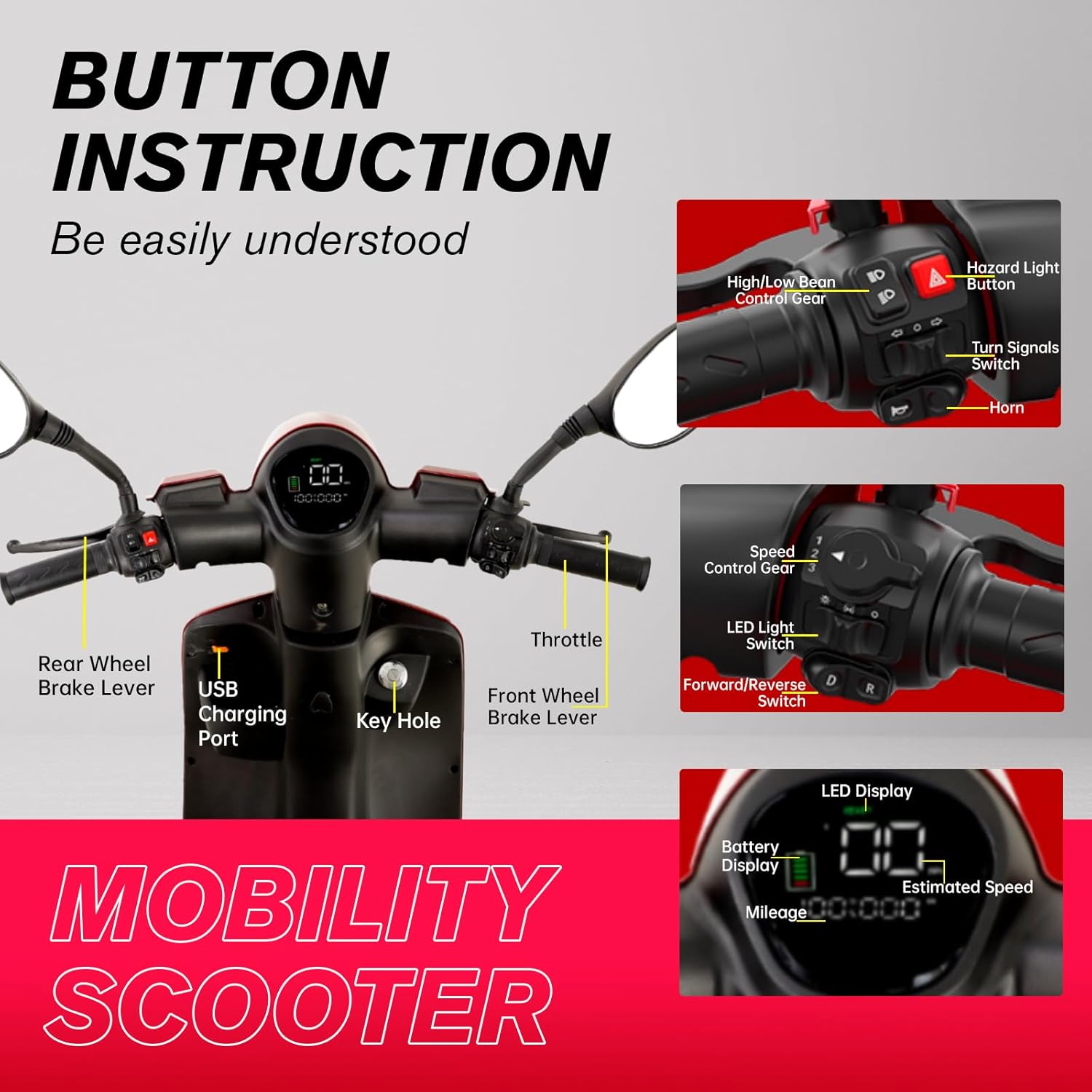
Figure 4: Detailed button instructions for scooter operation.
Video 2: Heavy Duty Mobility Scooters by Mobility Master Direct. This video demonstrates various operational aspects and features.
5. Key Features and Comfort
- Powerful Motor: Equipped with an 800 Watt motor for robust performance.
- Long-Range Battery: Features a 60V 20Ah extended battery, offering a 25-31 mile range on a single charge.
- All-Terrain Capability: Large 16-inch tubeless, puncture-resistant tires and two rear shock absorbers provide a smooth ride over various terrains including sand, snow, grass, and muddy roads.
- Suspension System: Front independent suspension and four spring suspensions ensure comfort and stability.
- Storage: Includes a locking glove compartment, a huge rear basket, and under-the-seat storage for your belongings.
- Convenience: Built-in USB charger and cup holder keep you connected and refreshed.
- Security: A digital anti-theft alarm system protects your scooter.
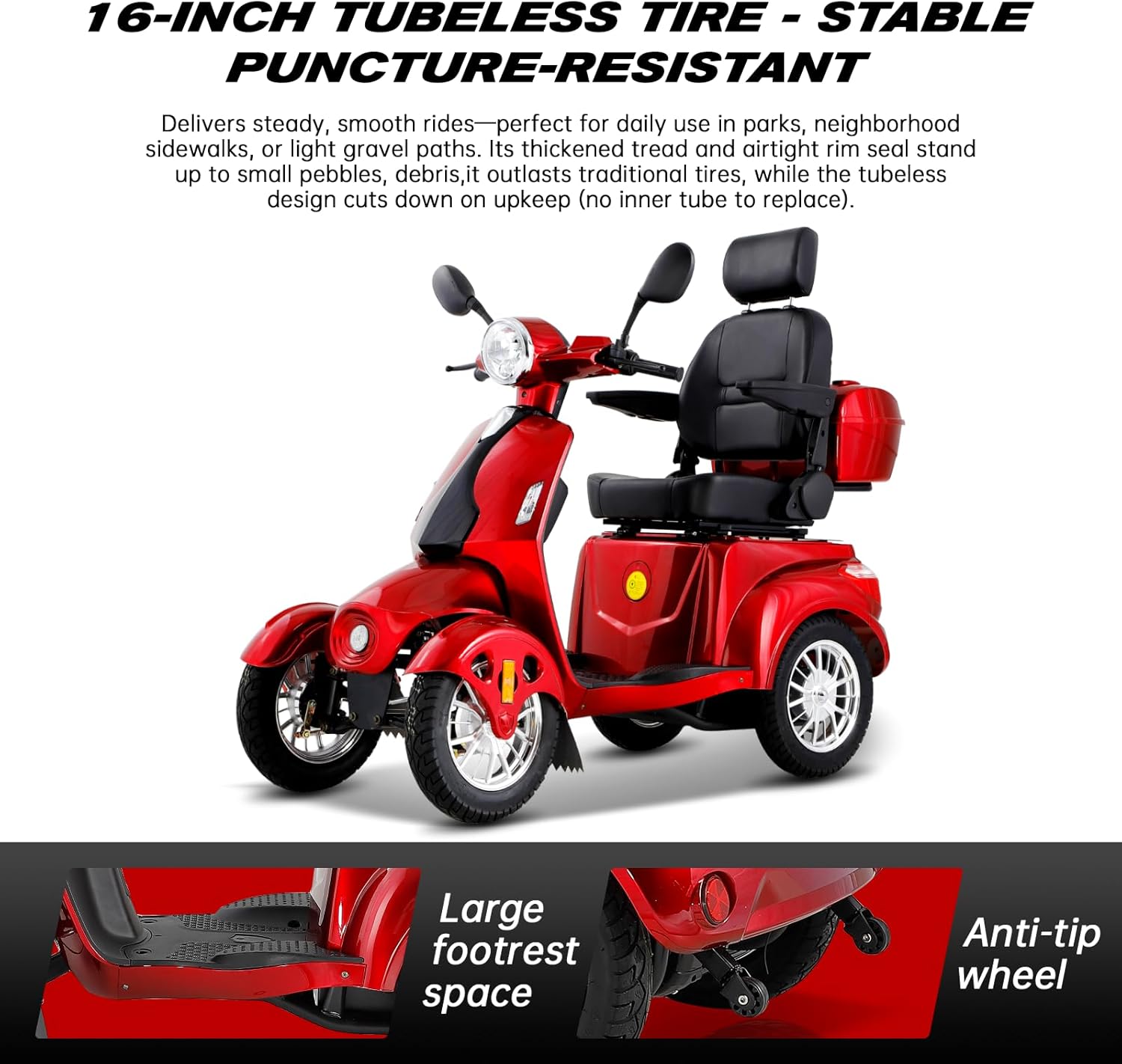
Figure 5: Tubeless tires and anti-tip wheel for enhanced safety and durability.
Video 3: Fat Tire Mobility Scooters for Adults by Mobility Master Direct. This video showcases the scooter's features and capabilities.
6. Maintenance
Regular maintenance ensures the longevity and optimal performance of your scooter:
- Battery Care: For lead-acid batteries, regular maintenance is crucial. Charge the battery after each use. Store the battery fully charged and recharge every 1-2 months if not in use to prevent performance degradation.
- Tire Pressure: Periodically check the tire pressure to ensure it matches the recommended levels for optimal ride quality and safety.
- Cleaning: Clean the scooter regularly with a damp cloth. Avoid using harsh chemicals or high-pressure water jets directly on electrical components.
- Brake Inspection: Regularly inspect the electronic braking system for any signs of wear or malfunction.
- General Check: Periodically check all nuts, bolts, and connections to ensure they are secure.
7. Troubleshooting
If you encounter any issues with your scooter, please refer to the following common troubleshooting tips:
- Scooter Not Powering On: Check if the main power breaker is in the 'ON' position. Ensure the battery is charged and properly connected.
- Reduced Range/Power: This often indicates a low battery charge. Ensure the battery is fully charged before use. Battery performance can degrade over time; consider battery replacement if issues persist after proper charging.
- Unusual Noises: Inspect for loose components, worn tires, or issues with the motor or suspension. Contact customer support if the noise persists.
- Braking Issues: If braking feels unresponsive or inconsistent, check the brake levers and the electronic braking system. Do not operate the scooter if brakes are not functioning correctly.
For complex issues or repairs, please contact LAGTOM customer service.
8. Specifications

Figure 6: Mobility Scooter Dimensions.
| Feature | Specification |
|---|---|
| Brand | LAGTOM |
| Model | B0B68XB4NR |
| Motor Power | 800W |
| Battery | 60V 20Ah Lead Acid |
| Max Speed | 15 MPH |
| Range per Charge | 25-31 miles |
| Weight Capacity | 500 lbs |
| Climbing Ability | Up to 20 degrees (depending on weight and battery charge) |
| Tires | 16-inch Tubeless, Puncture-Resistant |
| Suspension | Front Independent Suspension, 4 Spring Suspensions |
| Brakes | Front and Rear Electronic Braking System |
| Product Dimensions | 62.6"D x 27.2"W x 42.1"H |
| Item Weight | 275 Pounds |
| Color | Red |
9. Warranty and Support
Your LAGTOM Mobility Scooter comes with a one-year support warranty. Our professional team is always ready to provide assistance and address any inquiries you may have regarding your purchase.
For customer service and support, please refer to the contact information provided with your purchase documentation or visit the official LAGTOM website.