1. Product Overview
The SULMILE AZ-7752 is an indoor air quality meter designed to accurately measure carbon dioxide (CO2) concentration and temperature. It utilizes Non-Dispersive Infrared (NDIR) waveguide technology for CO2 sensing, ensuring reliable and precise readings. This device helps assess indoor ventilation performance by indicating CO2 levels, which can impact air quality and occupant well-being.
Key Features:
- NDIR (Non-Dispersive Infrared) waveguide technology sensor for CO2 measurement.
- Displays 8-hour Time-Weighted Average (TWA) and 15-minute Short-Term Exposure Limit (STEL) values.
- Housing designed with ventilation rails for quick and accurate response.
- Dual display for simultaneous CO2 and temperature readings.
- Audible carbon dioxide level warning alarm.
- Large LCD display with high resolution and backlight for dark areas.
- Power supply via battery or AC adapter.
- PC connectivity via USB interface (P/N: USBAZM) for online data analysis.
- Auto-sleep function and low battery indicator.
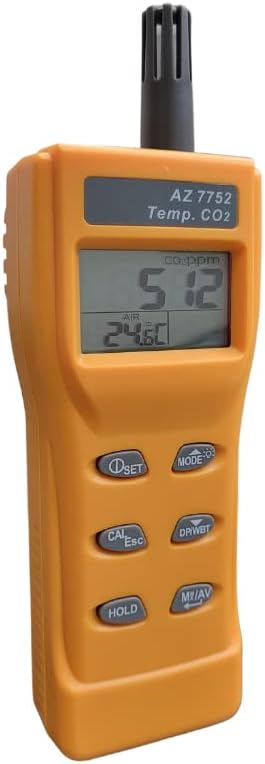
Figure 1: Front view of the SULMILE AZ-7752 Carbon Dioxide Detector, showing the display and control buttons.
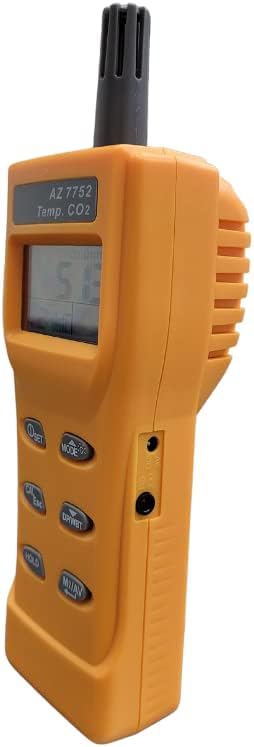
Figure 2: Side view of the SULMILE AZ-7752 Carbon Dioxide Detector, illustrating the ventilation design and ports.
2. Setup Instructions
2.1 Powering the Device
The AZ-7752 can be powered using batteries or an AC adapter.
- Battery Installation: Open the battery compartment located on the back of the device. Insert the required batteries, ensuring correct polarity. Close the compartment securely.
- AC Adapter: Connect the AC adapter to the device's power input port and plug it into a standard electrical outlet.
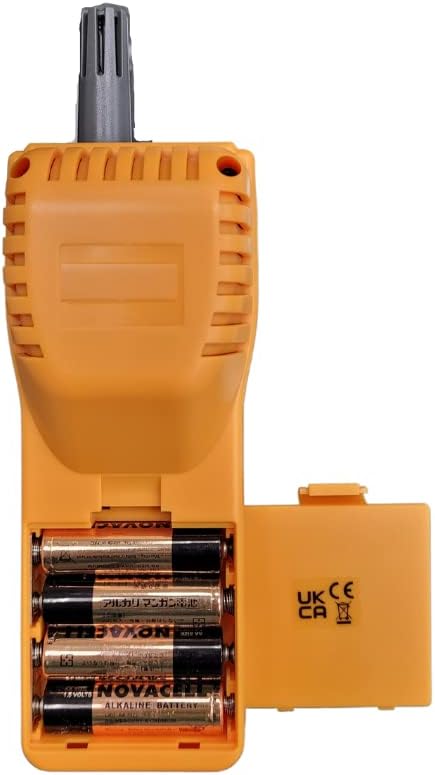
Figure 3: Rear view of the SULMILE AZ-7752, showing the open battery compartment for battery installation.
2.2 Initial Calibration
For accurate readings, it is recommended to perform an initial calibration in fresh outdoor air. The device can be easily calibrated for CO2 in an environment with approximately 380-420 ppm (parts per million) of CO2, which is typical for fresh outdoor air. Refer to the detailed calibration steps in the full manual for precise instructions.
2.3 Placement Considerations
Place the CO2 meter in an area representative of the indoor air quality you wish to monitor. Avoid placing it directly next to vents, windows, or in direct sunlight, as this can affect temperature and CO2 readings. For public spaces, strategic placement helps monitor overall ventilation effectiveness.


Figure 4: Examples of environments where the CO2 meter can be effectively used to monitor air quality.
3. Operating Instructions
3.1 Basic Operation
- Power On/Off: Press and hold the power button (usually labeled 'ON/OFF' or similar) to turn the device on or off.
- Reading Display: Once powered on, the device will display current CO2 concentration in parts per million (ppm) and temperature.
- Backlight: Activate the backlight feature for improved visibility in low-light conditions by pressing the designated button.
- Audible Alarm: The device features an audible alarm that activates when CO2 levels exceed a predefined threshold, indicating poor ventilation.
3.2 Advanced Features
- TWA & STEL: The meter can display 8-hour Time-Weighted Average (TWA) and 15-minute Short-Term Exposure Limit (STEL) values, providing insights into average and peak exposure levels over time.
- PC Connectivity: Connect the device to a PC using a USB interface (P/N: USBAZM) to transfer data for online analysis and logging.
3.3 Important Usage Note
ATTENTION: Do not exhale directly into the CO2 meter.
Human breath contains high concentrations of CO2, which will cause false and significantly elevated readings. Ensure the device is measuring ambient air for accurate results.

Video 1: An informational video demonstrating the importance of indoor air quality monitoring with CO2 meters, including a demonstration of how exhaling into the meter can cause false readings and suitable environments for placement.
4. Maintenance
4.1 Calibration
Regular calibration ensures the accuracy of your CO2 meter. Calibrate the device in a known fresh air environment (approximately 380-420 ppm CO2) as per the instructions in the full product manual. Frequent calibration is recommended for critical applications.
4.2 Battery Replacement
When the low battery indicator appears on the display, replace the batteries promptly to ensure continuous operation and accurate readings. Refer to Section 2.1 for battery installation details.
4.3 Cleaning
Clean the exterior of the device with a soft, dry cloth. Do not use abrasive cleaners or solvents. Ensure the ventilation rails are free from dust or obstructions to maintain proper airflow for accurate sensor operation.
5. Troubleshooting
- Inaccurate CO2 Readings: Ensure the device is not placed near sources of CO2 (e.g., human breath, combustion sources) or in areas with poor air circulation. Perform a fresh air calibration if readings appear consistently off.
- High CO2 Levels: If the meter consistently shows high CO2 values and the alarm sounds, it indicates poor indoor ventilation. Increase fresh air exchange by opening windows or improving HVAC system performance. Prolonged exposure to high CO2 can lead to discomfort and health issues.
- No Display/Power: Check battery levels and ensure they are correctly installed. If using an AC adapter, verify the connection and power source.
- PC Connection Issues: Ensure the correct USB cable (P/N: USBAZM) is used and drivers are installed if required. Refer to the software instructions for data logging.
6. Specifications
| Specification | Value |
|---|---|
| Brand | SULMILE |
| Model Number | AZ7752 |
| Part Number | AZ7752 |
| Sensor Type | Non-Dispersive Infrared (NDIR) |
| Power Source | Battery Powered / AC Adapter |
| Alarm | Audible |
| Item Package Quantity | 1 |
| Manufacturer | HENGXIN |
| Date First Available | July 11, 2022 |
7. Warranty and Support
7.1 Warranty Information
For detailed warranty information, please refer to the documentation included with your product or contact the seller directly. Warranty terms typically cover manufacturing defects for a specified period from the date of purchase.
7.2 Technical Support
If you encounter any issues or have questions regarding the operation, maintenance, or troubleshooting of your SULMILE AZ-7752, please contact the manufacturer or your point of purchase for technical assistance. Ensure you have your product model number (AZ7752) and purchase details available when seeking support.