
1. Introduction
Thank you for purchasing the MOOGOLE Wireless Controller. This manual provides detailed instructions for setting up, operating, and maintaining your controller. Please read this manual carefully before use to ensure optimal performance and longevity of your device.

Image 1: MOOGOLE Wireless Controller with Colorful Arrows design and included USB-C charging cable.
2. Product Features
- Wide Compatibility: Compatible with PlayStation 4 (PS4), PS4 Slim, PS4 Pro consoles, and PC (Windows).
- Enhanced Performance: Equipped with an updated chip for greater response and sensitivity.
- Precise Control: Features 360° non-slip joysticks designed to prevent delay and drift.
- Immersive Feedback: Supports motion sensing via a built-in 6-axis gyro and dual vibration feedback through dual motors.
- Innovative Play: Includes a multi-touch pad, integrated light bar, and built-in speaker for new interactive experiences.
- Audio Connectivity: A 3.5mm audio jack allows connection of supported headsets.
- Content Sharing: Seamlessly capture and share content using the dedicated Share button.
- Long-lasting Battery: Built-in 1000mAh high-capacity battery provides 15-20 hours of playtime.
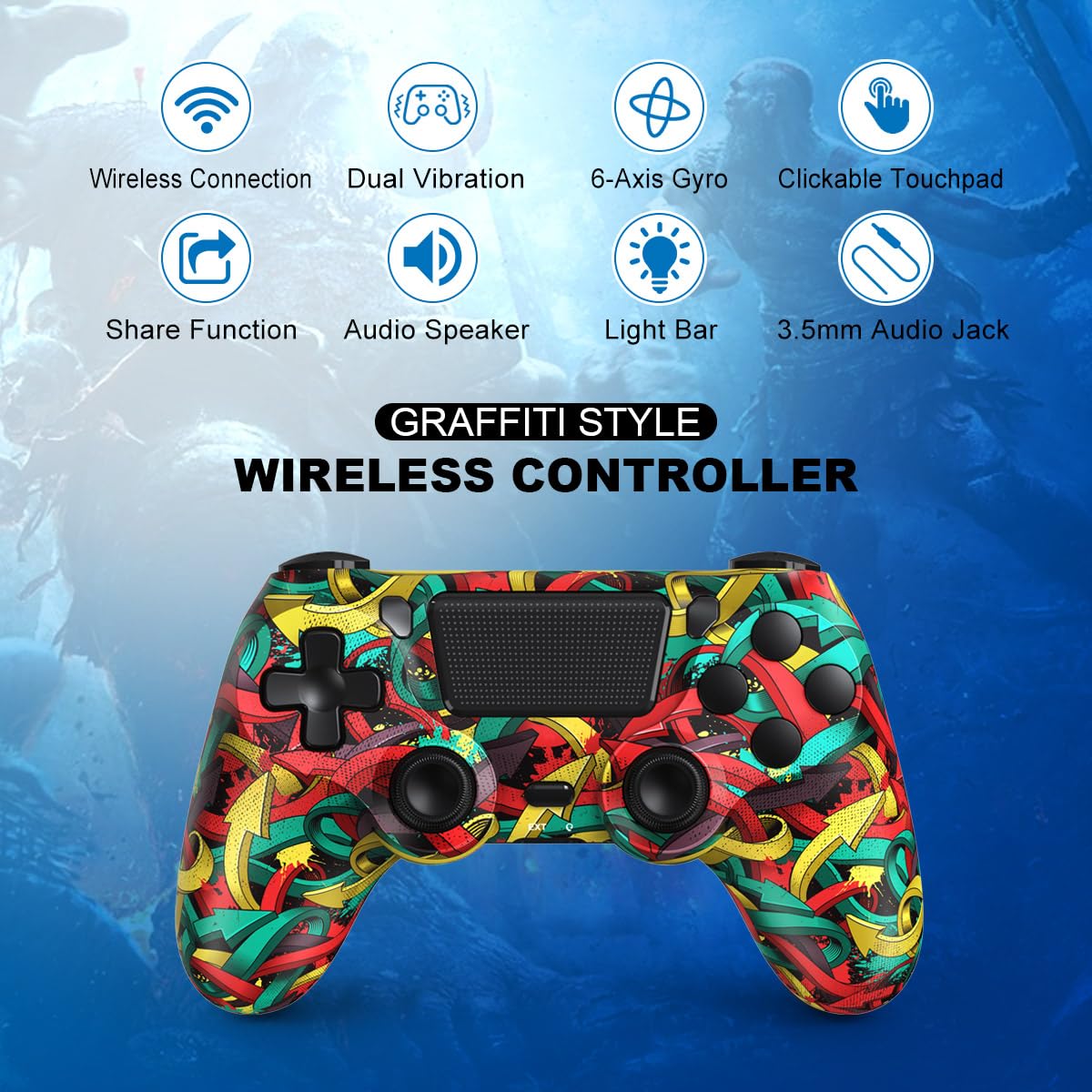
Image 2: Overview of the MOOGOLE Wireless Controller's key features.
3. Package Contents
Ensure all items are present upon unboxing:
- MOOGOLE Wireless Controller
- USB-C Charging Cable
- User Manual (this document)
4. Setup
4.1 Initial Connection to PS4 Console
- For the first connection to your PS4 console, use the included USB-C charging cable.
- Connect the USB-C end of the cable to the controller and the USB-A end to an available USB port on your PS4 console.
- Press the PS button on the controller to activate and pair it with the console.
- Once activated, the controller can be used wirelessly.
4.2 Connecting to PC via Bluetooth
- Ensure your PC's Bluetooth is turned on.
- On your PC, navigate to Bluetooth settings and select "Add device".
- On the MOOGOLE Wireless Controller, press and hold the "Share" button and the "Home" (PS) button simultaneously for approximately 3 seconds until the light bar starts flashing rapidly.
- On your PC's Bluetooth device list, select "Wireless Controller" when it appears to establish the connection.

Image 3: The controller is compatible with PS4 consoles and Windows PCs.
5. Operating Instructions
5.1 Charging the Controller
The controller features a built-in 1000mAh battery. To charge:
- Connect the included USB-C cable to the controller's charging port.
- Connect the other end of the cable to a USB power source (e.g., PS4 console, PC, USB wall adapter).
- The light bar will indicate charging status. A full charge typically takes approximately 2-3 hours and provides 15-20 hours of playtime.
Image 4: Battery capacity and estimated charging/playtime.
5.2 Using the 3.5mm Audio Jack
Plug any supported headset into the 3.5mm audio jack located at the bottom of the controller for in-game audio and chat functionality.
5.3 Share Button Functionality
Press the "Share" button to access options for capturing screenshots, recording gameplay videos, and sharing content with friends or social media platforms.
6. Maintenance
- Cleaning: Use a soft, dry cloth to clean the controller. Avoid using harsh chemicals or abrasive materials.
- Storage: Store the controller in a cool, dry place away from direct sunlight and extreme temperatures.
- Handling: Avoid dropping the controller or subjecting it to strong impacts, as this can damage internal components.
7. Troubleshooting
| Issue | Possible Solution |
|---|---|
| Controller does not turn on. | Ensure the controller is charged. Connect it to a power source using the USB-C cable. |
| Controller does not connect wirelessly to PS4. | For the first connection, ensure you activate it by connecting with the USB-C cable and pressing the PS button. If already paired, try resetting the controller (small button on the back) and re-pairing. |
| Controller does not connect to PC via Bluetooth. | Ensure PC Bluetooth is on. Hold "Share" + "Home" buttons for 3 seconds until the light bar flashes. Select "Wireless Controller" in PC Bluetooth settings. |
| Joystick drift or unresponsiveness. | Ensure the controller is fully charged. Try resetting the controller. If the issue persists, contact customer support. |
| No audio from 3.5mm jack. | Ensure the headset is fully plugged in and functional. Check audio settings on your console/PC. |
8. Specifications
- Model: B0B67PQ6HR
- Manufacturer: MOOGOLE
- Product Dimensions: 6 x 2 x 4 inches
- Item Weight: 9.1 ounces
- Battery: 1000mAh (1 9V battery included)
- Connectivity: Wireless (Bluetooth), USB-C
- Input/Output: USB-C port, 3.5mm audio jack
9. Warranty and Support
For any product inquiries, technical support, or warranty claims, please contact MOOGOLE customer service through the retailer where the product was purchased or visit the official MOOGOLE website for contact information.