
Makita UC002GM101
Makita UC002GM101 40V Wireless Chainsaw Instruction Manual
Model: UC002GM101
1. Introduction
This instruction manual provides essential information for the safe and efficient operation, maintenance, and troubleshooting of your Makita UC002GM101 40V Wireless Chainsaw. Please read this manual thoroughly before using the chainsaw to ensure proper handling and to prevent injury or damage.
The Makita UC002GM101 is a powerful 40V wireless chainsaw designed for various cutting tasks. It features a robust design and is powered by a 40V Lithium-Ion battery.
2. Safety Information
Always prioritize safety when operating power tools. Failure to follow safety instructions can result in serious injury or death.
2.1 General Safety Rules
- Read the entire manual: Understand all warnings and instructions before operation.
- Wear appropriate personal protective equipment (PPE): Always wear safety glasses, hearing protection, gloves, and sturdy footwear. Consider a hard hat and leg protection (chaps) when felling or limbing.
- Maintain a firm grip: Hold the chainsaw with both hands, keeping thumbs and fingers encircling the handles.
- Be aware of kickback: Avoid contact of the guide bar tip with any object, as this can cause kickback.
- Keep work area clear: Ensure no bystanders or obstacles are in the cutting path.
- Inspect before use: Check the chainsaw for damaged parts, loose fasteners, or any other condition that may affect its safe operation.
- Do not operate in wet conditions: Avoid using the chainsaw in rain or damp environments.
- Store properly: Store the chainsaw in a dry, secure place out of reach of children.
2.2 Battery Safety
- Use only Makita recommended batteries and chargers.
- Do not expose batteries to water or excessive heat.
- Do not short-circuit battery terminals.
- Dispose of batteries responsibly according to local regulations.
3. Components and Features
Familiarize yourself with the parts of your Makita UC002GM101 Chainsaw.
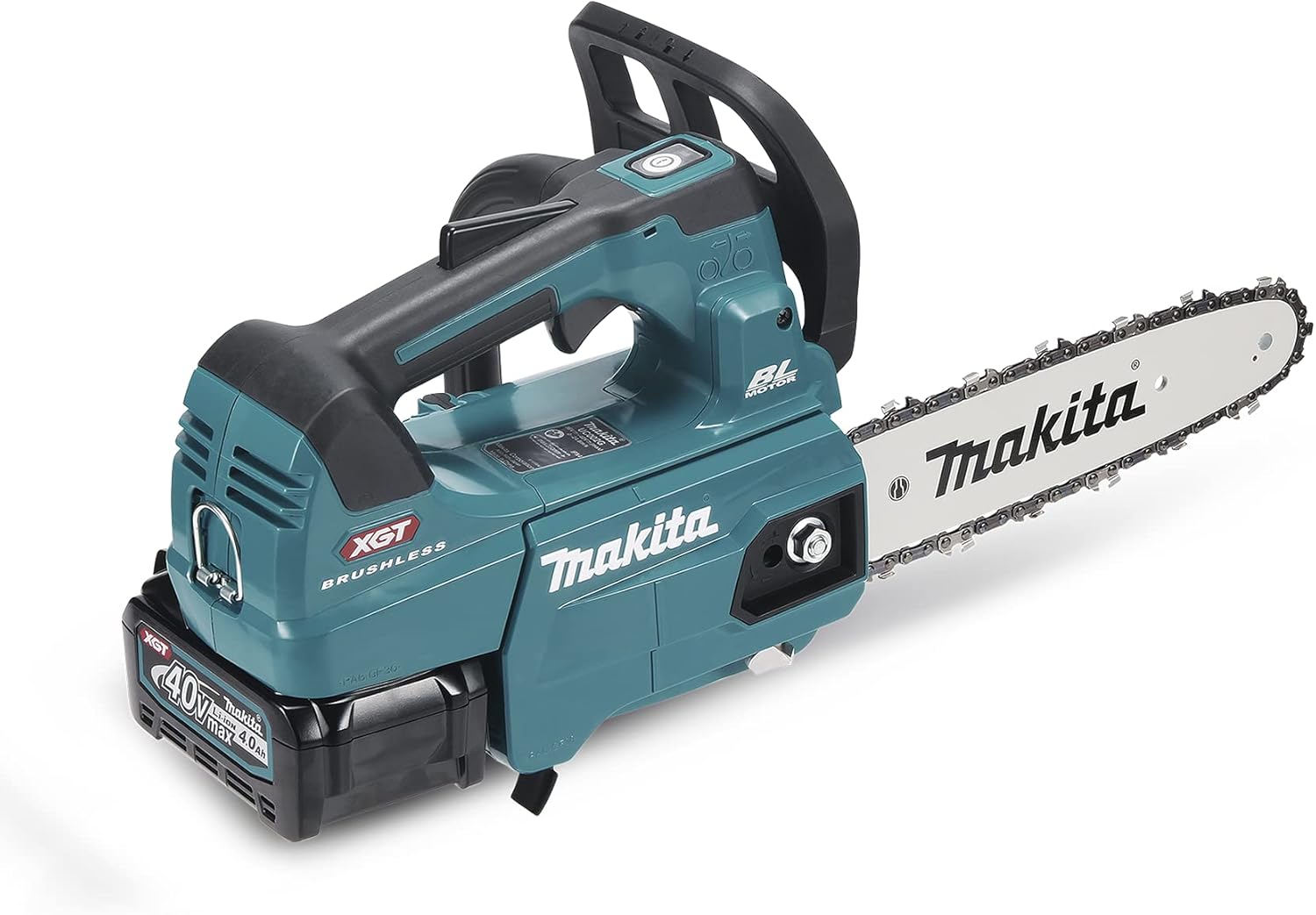
Figure 3.1: Overview of the Makita UC002GM101 40V Wireless Chainsaw. This image displays the main body of the chainsaw, including the motor housing, handle, guide bar, and chain, with a 40V battery pack inserted at the base.
- Front Handle: For stable two-hand operation.
- Rear Handle: Contains the trigger switch.
- Chain Brake Lever: Engages the chain brake for safety.
- Guide Bar: Supports and guides the saw chain.
- Saw Chain: The cutting element.
- Oil Tank Cap: For filling chain oil.
- Battery Compartment: Houses the 40V Lithium-Ion battery.
- Trigger Switch: Activates the motor.
- Lock-off Button: Prevents accidental starting.
4. Setup and Assembly
Before first use, some assembly and preparation are required.
4.1 Installing the Guide Bar and Saw Chain
- Ensure the battery is removed from the chainsaw.
- Remove the chain cover by loosening the nuts.
- Place the saw chain around the sprocket and guide bar. Ensure the cutting edges of the chain are facing the correct direction.
- Fit the guide bar onto the chainsaw body, aligning the holes with the mounting bolts.
- Replace the chain cover and hand-tighten the nuts.
- Adjust chain tension (see 4.2).
- Fully tighten the nuts.
4.2 Adjusting Chain Tension
Proper chain tension is crucial for safe and efficient operation. The chain should be snug against the guide bar but still able to be pulled around by hand.
- Loosen the chain cover nuts slightly.
- Turn the chain tensioning screw (usually located on the side of the chainsaw) clockwise to tighten the chain, or counter-clockwise to loosen it.
- Lift the tip of the guide bar and check the tension. The chain should not sag on the underside of the guide bar.
- Once tension is correct, fully tighten the chain cover nuts.
4.3 Filling Chain Oil
The chainsaw requires chain oil for lubrication of the guide bar and chain. Use only high-quality chain and bar oil.
- Place the chainsaw on a level surface.
- Unscrew the oil tank cap.
- Carefully pour chain oil into the tank, avoiding spillage.
- Do not overfill.
- Securely replace the oil tank cap.
4.4 Charging and Installing the Battery
The Makita UC002GM101 uses a 40V Lithium-Ion battery.
- Connect the battery charger to a power outlet.
- Insert the battery pack into the charger. The charger indicator lights will show charging status.
- Once fully charged, remove the battery from the charger.
- To install, slide the charged battery pack into the battery compartment on the chainsaw until it clicks into place.
- To remove, press the release button and slide the battery out.
5. Operating Instructions
Always ensure you have read and understood the safety information before operating the chainsaw.
5.1 Starting the Chainsaw
- Ensure the chain brake is disengaged (pulled back towards the front handle).
- Hold the chainsaw firmly with both hands.
- Press the lock-off button with your thumb.
- Squeeze the trigger switch to start the motor. The chain will begin to rotate.
- Release the lock-off button once the motor is running.
5.2 Basic Cutting Techniques
Always maintain a stable stance and good balance.

Figure 5.1: Example of cutting a tree trunk. The operator is shown wearing full protective gear, demonstrating a safe cutting posture on a large tree trunk.
- Limbing: Remove branches from a fallen tree. Work from the bottom up, cutting small branches first.
- Bucking: Cutting a fallen log into shorter sections. Be aware of pinching and rolling logs.
- Felling: (Advanced) Cutting down a standing tree. Requires significant training and experience. Always plan your escape route and ensure no one is in the felling zone.

Figure 5.2: Example of cutting a fallen branch. This image illustrates the chainsaw being used to cut through a smaller, fallen tree branch, highlighting the tool's maneuverability for limbing tasks.
5.3 Stopping the Chainsaw
Release the trigger switch. The chain brake can be engaged by pushing the chain brake lever forward.
6. Maintenance
Regular maintenance ensures the longevity and safe operation of your chainsaw.
6.1 Chain Sharpening
A sharp chain is essential for efficient cutting and safety. Sharpen the chain regularly or replace it when dull.
6.2 Guide Bar Maintenance
Clean the guide bar groove and oil holes regularly. Flip the guide bar periodically to ensure even wear.
6.3 Cleaning
After each use, clean sawdust and debris from the chainsaw, especially around the chain, guide bar, and motor housing. Ensure the battery compartment is free of debris.
6.4 Chain Oil Level
Always check the chain oil level before each use and refill as necessary.
7. Troubleshooting
| Problem | Possible Cause | Solution |
|---|---|---|
| Chainsaw does not start | Battery not charged or not inserted correctly; Chain brake engaged; Lock-off button not pressed. | Charge battery and reinsert; Disengage chain brake; Press lock-off button before trigger. |
| Chain does not move | Chain brake engaged; Chain tension too tight; Chain jammed. | Disengage chain brake; Adjust chain tension; Clear any obstructions. |
| Poor cutting performance | Dull chain; Incorrect chain tension; Insufficient chain oil. | Sharpen or replace chain; Adjust chain tension; Refill chain oil. |
| Excessive vibration | Damaged chain or guide bar; Loose components. | Inspect and replace damaged parts; Tighten all fasteners. |
8. Specifications
| Feature | Detail |
|---|---|
| Model Number | UC002GM101 |
| Brand | Makita |
| Power Source | Battery-powered (40V Lithium-Ion) |
| Voltage | 40 Volts |
| Horsepower | 3 hp |
| Item Weight | 15.5 pounds |
| Product Dimensions (L x W x H) | 17.56 x 12.01 x 10.55 inches |
| Batteries Required | Yes (1 Lithium Ion battery included) |
| Manufacturer | Makita |
| UPC | 088381751889 |
Note: Specifications are subject to change without notice for product improvement.
9. Warranty and Support
For detailed warranty information, please refer to the warranty card included with your product or visit the official Makita website. Makita provides customer support for product inquiries, service, and parts.
Makita Official Website: www.makitatools.com
For service or technical assistance, please contact Makita customer service or an authorized service center.
Related documentsUC002GM101


Ask a question about this manual
Ask about setup, troubleshooting, compatibility, parts, safety, or missing instructions. Manuals+ will review the question and use this page’s manual context to help answer it.