
1. Introduction
Thank you for purchasing the ROADSTAR RS-3760BR Car CD Player. This manual provides essential information for the proper installation, operation, and maintenance of your new car audio system. Please read this manual thoroughly before using the product to ensure safe and optimal performance. Keep this manual for future reference.
2. Safety Information
- Installation: Professional installation is highly recommended. Incorrect wiring can cause damage to the unit or your vehicle.
- Power Supply: This unit is designed for 12V DC negative ground systems only.
- Volume Control: Keep the volume at a level where you can still hear outside traffic sounds. Excessive volume can impair your ability to hear emergency vehicles or other warnings.
- Moisture: Do not expose the unit to moisture or water to prevent electric shock or fire.
- Cleaning: Use a soft, dry cloth for cleaning. Do not use abrasive cleaners or solvents.
- CD Handling: Handle CDs by their edges. Do not touch the playing surface.
3. Package Contents
Verify that all items are present in the package:
- ROADSTAR RS-3760BR Car CD Player Unit
- Remote Control
- Wiring Harness
- User Manual (this document)
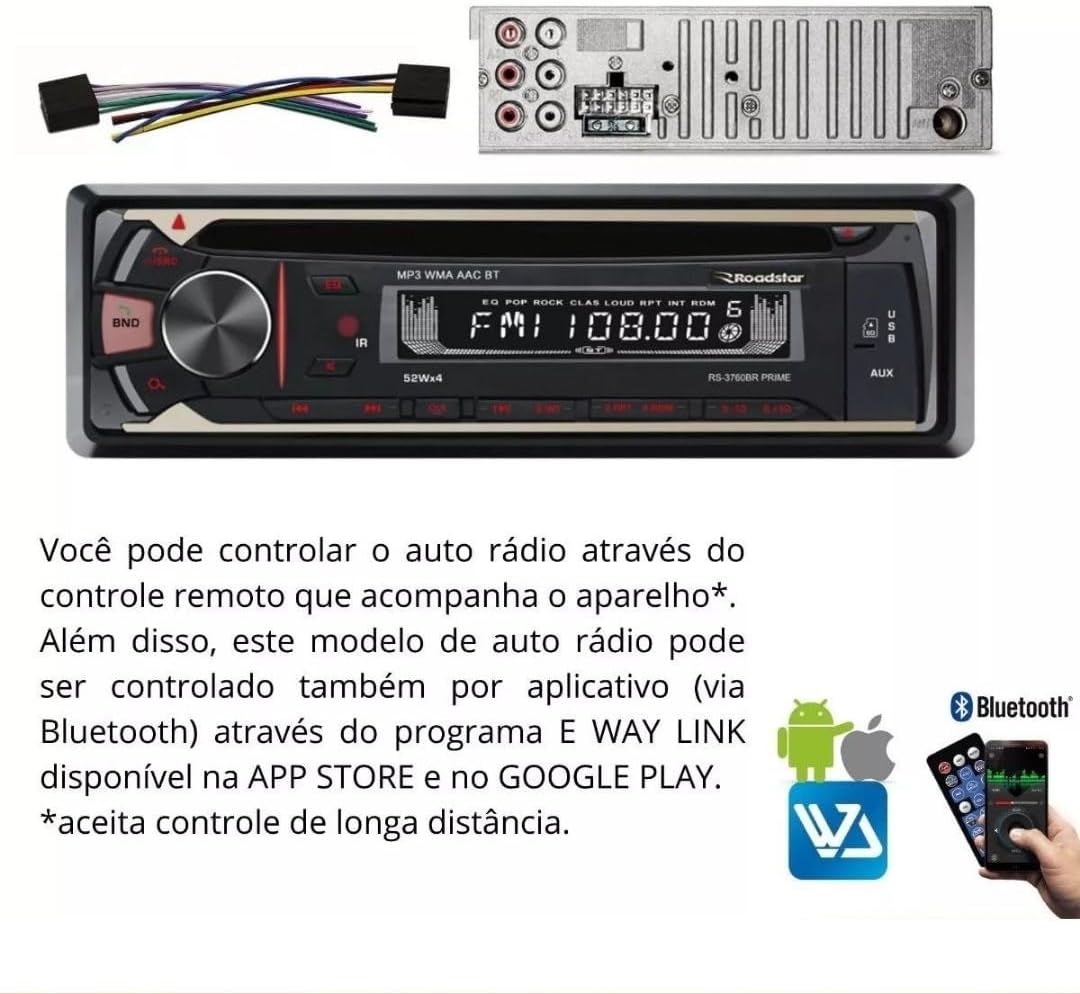
Image: The RS-3760BR unit, its wiring harness, and the included remote control.
4. Product Features
The ROADSTAR RS-3760BR is a versatile car audio system designed to enhance your driving experience with multiple playback options and convenient controls.
- CD Player: Supports playback of audio CDs and MP3/WMA files on CD-R/RW discs.
- AM/FM Radio: Digital tuner with memory for 18 FM and 12 AM stations.
- Bluetooth Connectivity: For hands-free calling and wireless audio streaming from compatible devices.
- USB Input: Frontal USB port for MP3/WMA file playback and folder browsing.
- SD Card Slot: Frontal SD card slot for MP3/WMA file playback and folder browsing.
- Auxiliary Input: Frontal 3.5mm auxiliary input for connecting external audio devices.
- RCA Outputs: 4 RCA outputs for connecting external amplifiers.
- Display: LED display with 7 selectable illumination colors (blue, light blue, white, yellow, red, purple, green).
- Controls: Bass, Treble, and Balance adjustments.
- Remote Control: Includes a physical remote control and supports app control via Bluetooth (E WAY LINK app).
- Power Output: 4 channels x 52 Watts RMS.

Image: Visual representation of the unit's key features including CD, Bluetooth, USB, and remote control.
5. Setup and Installation
Proper installation is crucial for the performance and longevity of your car stereo. If you are unsure about any steps, consult a professional installer.
5.1 Wiring Diagram
Refer to the wiring harness provided with your unit. Each wire is color-coded and labeled for specific connections. Ensure all connections are secure and properly insulated to prevent short circuits.
- Yellow: Constant 12V (Battery)
- Red: Switched 12V (Ignition/ACC)
- Black: Ground
- Blue: Power Antenna / Amplifier Remote Turn-On
- Speaker Wires: Typically white, gray, green, purple (with black stripes for negative). Connect to corresponding vehicle speakers.
5.2 Mounting the Unit
The RS-3760BR is a single-DIN unit. Use the included mounting sleeve and hardware to secure the unit in your vehicle's dashboard opening. Ensure adequate space for wiring and ventilation.

Image: Front view of the RS-3760BR car stereo with its remote control, showing the unit's dimensions.
6. Operating Instructions
This section details the basic functions and operations of your RS-3760BR car stereo.
6.1 Front Panel Overview

Image: Close-up of the RS-3760BR front panel, indicating the CD slot, USB input, and Auxiliary input.
- Power/Volume Knob: Press to turn on/off. Rotate to adjust volume.
- MODE Button: Press to cycle through sources (CD, USB, SD, AUX, FM, AM, Bluetooth).
- BAND Button: In radio mode, press to switch between FM1, FM2, FM3, AM1, AM2 bands.
- EQ Button: Press to select preset equalizer settings.
- Display: Shows current mode, frequency, track information, etc.
- USB Port: Connect USB flash drives for media playback.
- SD Card Slot: Insert SD cards for media playback.
- AUX Input: Connect external audio devices using a 3.5mm cable.
6.2 Radio Operation (AM/FM)
- Press the MODE button to select FM or AM radio.
- Press the BAND button to select the desired band (FM1, FM2, FM3, AM1, AM2).
- Automatic Search: Press and hold the TUNE UP/DOWN buttons (forward/backward arrows) to automatically search for the next strong station.
- Manual Search: Briefly press the TUNE UP/DOWN buttons to manually tune the frequency step by step.
- Store Presets: To store a station, tune to the desired frequency, then press and hold one of the numeric preset buttons (1-6) until you hear a beep.
6.3 CD/USB/SD Playback
- CD: Insert an audio CD or a CD with MP3/WMA files into the CD slot. The unit will automatically switch to CD mode and begin playback.
- USB: Insert a USB flash drive into the front USB port. The unit will switch to USB mode and begin playback.
- SD: Insert an SD card into the front SD card slot. The unit will switch to SD mode and begin playback.
- Play/Pause: Press the PLAY/PAUSE button (usually the volume knob press) to pause or resume playback.
- Track Skip: Press the NEXT/PREVIOUS buttons (forward/backward arrows) to skip tracks.
- Folder Navigation: For MP3/WMA files, press and hold the NEXT/PREVIOUS buttons for two seconds to navigate between folders.
6.4 Bluetooth Pairing and Operation
- Enable Bluetooth: Press the MODE button to select Bluetooth mode. The display will show "BT" or "PAIRING".
- Pairing: On your mobile device, enable Bluetooth and search for available devices. Select "ROADSTAR RS-3760BR" (or similar) from the list. If prompted for a password, enter "0000".
- Audio Streaming: Once paired, you can play audio from your device, and it will stream through the car stereo. Use the unit's controls or your device to manage playback.
- Hands-Free Calling: When a call comes in, the unit will display the caller ID. Press the CALL button (often the green phone icon on the remote) to answer, or the END CALL button (red phone icon) to reject.
6.5 App Control (E WAY LINK)
The RS-3760BR can be controlled via a smartphone app called E WAY LINK, available on the App Store and Google Play. This allows for convenient control of various functions from your phone.
- Download App: Search for "E WAY LINK" in your device's app store and install it.
- Connect: Ensure your phone is paired with the RS-3760BR via Bluetooth.
- Launch App: Open the E WAY LINK app. It should automatically connect to the car stereo.
- Control: Use the app interface to control functions such as source selection, volume, radio tuning, track skipping, and equalizer settings.

Image: The RS-3760BR unit's display, technical specifications, and a visual guide to controlling the unit via the E WAY LINK app on a smartphone.
7. Maintenance
Regular maintenance helps ensure the longevity and optimal performance of your car stereo.
- Cleaning the Unit: Use a soft, dry cloth to wipe the front panel. For stubborn dirt, dampen the cloth lightly with water. Never use harsh chemicals, solvents, or abrasive cleaners.
- CD Player Maintenance: Avoid inserting dirty, scratched, or warped CDs. If the CD player malfunctions, try using a CD lens cleaner disc.
- Connections: Periodically check all wiring connections to ensure they are secure and free from corrosion.
- Firmware Updates: Check the Roadstar official website periodically for any available firmware updates for your model.
8. Troubleshooting
If you encounter problems with your RS-3760BR, refer to the following common issues and solutions before contacting support.
| Problem | Possible Cause | Solution |
|---|---|---|
| No power | Blown fuse; Incorrect wiring; Loose power connection | Check vehicle's fuse box and unit's fuse; Verify wiring connections (Yellow, Red, Black); Ensure power cables are securely connected. |
| No sound | Volume too low; Mute activated; Incorrect speaker wiring; Amplifier not powered (if applicable) | Increase volume; Deactivate mute; Check speaker connections; Verify external amplifier power. |
| CD/USB/SD not playing | Disc/device not inserted correctly; Incompatible file format; Damaged disc/device | Re-insert disc/device; Ensure files are MP3/WMA; Try a different disc/device. |
| Bluetooth pairing failure | Bluetooth not enabled on device/unit; Device too far; Interference | Ensure Bluetooth is active on both devices; Bring devices closer; Restart both devices. |
| Poor radio reception | Antenna not connected; Weak signal area; Damaged antenna | Check antenna connection; Move to an area with better signal; Inspect antenna for damage. |
9. Specifications
Detailed technical specifications for the ROADSTAR RS-3760BR.
- Model: RS3760BR
- Panel Type: Fixed with 7-color illumination buttons (blue, light blue, white, yellow, red, purple, green)
- Display: LED
- Radio: AM/FM with 18 FM and 12 AM station memory
- Controls: Bass, Treble, Balance
- Connections: Bluetooth, Frontal SD, Frontal USB, Frontal Auxiliary Input, 2 RCA Audio Inputs
- Outputs: 4 RCA Outputs
- Remote Control: Physical remote and App control (E WAY LINK)
- Power Output: 4 x 52 Watts RMS
- Compatible Devices: Portable computer, Smartphone, Tablet (for Bluetooth/App control)
- Supported Audio Formats: MP3, WMA (from CD, USB, SD)
- Product Dimensions: 9 x 23 x 27 cm (approx. 3.5 x 9 x 10.6 inches)
- Product Weight: 1.5 kg (approx. 3.3 lbs)
- Certification: Anatel Homologation: 05898-19-12378
10. Warranty and Support
10.1 Warranty Information
The ROADSTAR RS-3760BR comes with a 1-year manufacturer's warranty. This warranty covers defects in materials and workmanship under normal use. It does not cover damage caused by improper installation, accident, misuse, abuse, neglect, unauthorized modification, or normal wear and tear. Please retain your proof of purchase for warranty claims.
10.2 Customer Support
For technical assistance, warranty claims, or further inquiries, please contact Roadstar customer support through their official website or the contact information provided with your purchase documentation. Before contacting support, please ensure you have reviewed the troubleshooting section of this manual.

