
1. Introduction
This manual provides essential information for the safe and efficient operation, maintenance, and troubleshooting of your Coway Airmega 240 True HEPA Air Purifier. Please read this manual thoroughly before using the appliance and retain it for future reference.
Video: Life with the Airmega 240. This video provides a brief overview of the air purifier's presence and function in a home environment.
2. Safety Information
To reduce the risk of fire, electric shock, or injury, always follow basic safety precautions:
- Ensure the power cord is not damaged and is properly plugged into a suitable electrical outlet.
- Do not operate the unit with a damaged cord or plug.
- Keep the appliance away from water or other liquids.
- Do not insert objects into any openings.
- Unplug the air purifier before cleaning or performing any maintenance.
- This appliance is not intended for use by persons (including children) with reduced physical, sensory, or mental capabilities, or lack of experience and knowledge, unless they have been given supervision or instruction concerning use of the appliance by a person responsible for their safety.
3. Product Overview
The Coway Airmega 240 is designed to provide clean air through its advanced filtration system and smart features.
Key Features:
- HyperCaptive Filtration System: A 3-stage system including a Washable Pre-filter, Activated Carbon filter, and Green True HEPA filter.
- Air Quality Monitoring: Real-time air quality indicator.
- Auto Mode: Automatically adjusts fan speed based on air quality.
- Filter Replacement Indicator: Notifies when filters need cleaning or replacement.
- Easy Touch Display: Intuitive controls for fan speed, power, light, and filter reset.
- Silent Operation: Operates as low as 20.6 dB(A).
- Coverage: Cleans spaces up to 403 sq. ft. in 12.5 minutes or up to 975 sq. ft. in 30 minutes.

Image: Coway Airmega 240 showcasing its main features like coverage, filtration, smart modes, and indicators.
Filtration System Details:
The HyperCaptive Filtration System effectively reduces 99.999% of 0.01-micron particles and 99% of volatile organic compounds and odors.
- Washable Pre-filter: Traps larger particles like hair, pet hair, large dust, and dander.
- Activated Carbon Filter: Reduces food smells, cigarette fumes, pet odor, and VOCs.
- Green True HEPA Filter: Captures fine dust, dust mites, pollen, aerosols, bacteria, mold, viruses, and germs.

Image: Exploded view diagram illustrating the three layers of the HyperCaptive Filtration System: Pre-Filter, Activated Carbon Filter, and Max2 Filter (Green True HEPA).
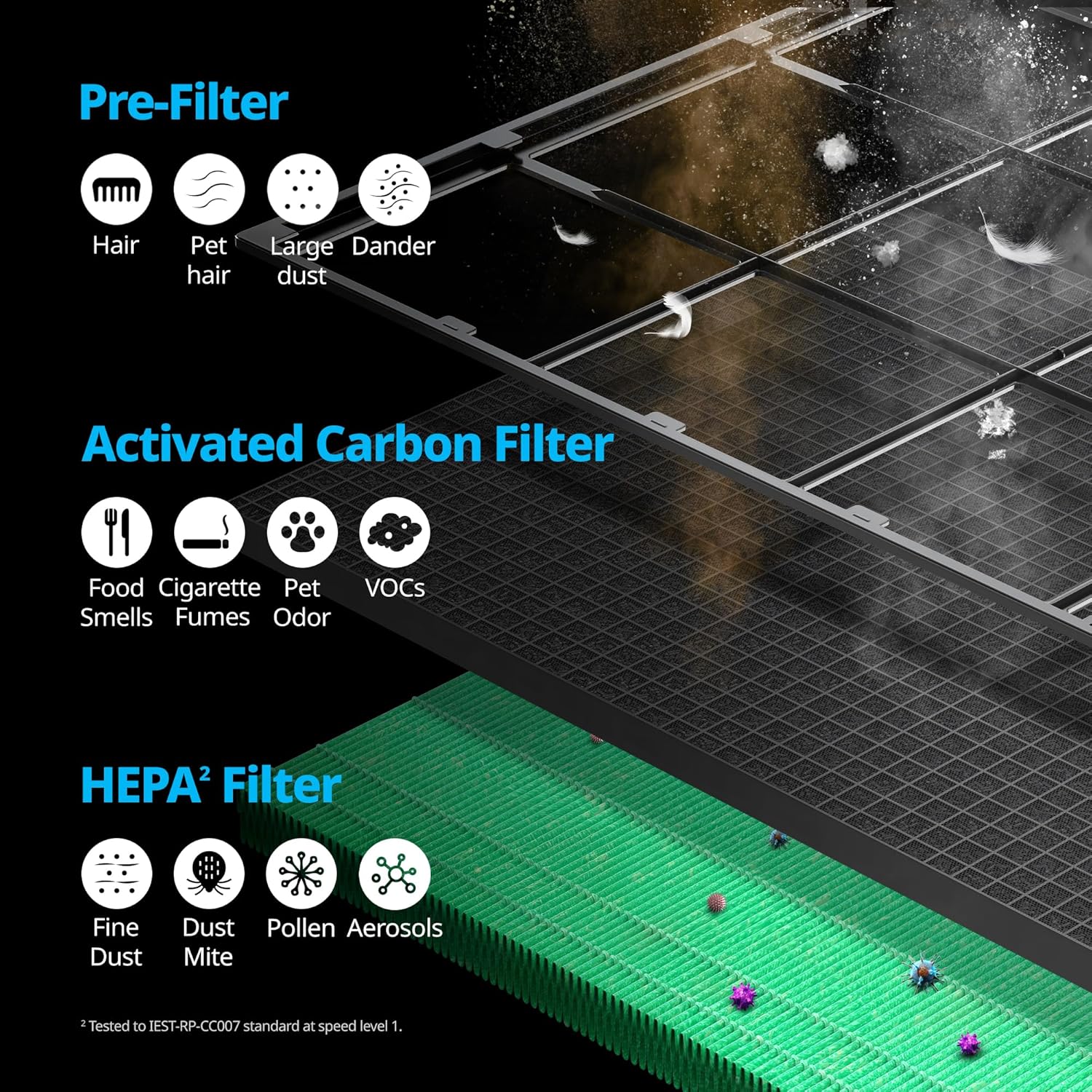
Image: Detailed illustration showing the types of particles each filter layer (Pre-Filter, Activated Carbon Filter, HEPA Filter) is designed to capture.
4. Setup
Follow these steps to set up your Airmega 240 for the first time:
- Unboxing: Carefully remove the air purifier from its packaging.
- Filter Installation:
- Open the front cover of the unit.
- Remove the plastic packaging from the Activated Carbon filter and the Green True HEPA filter (Max2 Filter).
- Insert the Max2 Filter into the unit, followed by the Activated Carbon filter.
- Ensure the Washable Pre-filter is clean and properly seated.
- Close the front cover securely.
- Placement: Place the air purifier on a flat, stable surface, ensuring adequate space around the unit for optimal airflow.
- Power Connection: Plug the power cord into a standard electrical outlet.
Video: Airmega 240 Overview. This video demonstrates the unboxing and initial filter setup of the air purifier.
5. Operating Instructions
Your Airmega 240 features an intuitive touch display for easy control.
Controls:
- Power Button: Press to turn the unit on or off.
- Fan Speed: Cycle through manual fan speeds (1, 2, 3) or select Smart Mode.
- Smart Mode: The unit automatically adjusts its fan speed based on real-time air quality.
- Sleep Mode: Reduces fan speed and turns off indicator lights for quiet operation during sleep.
- Timer: Set the unit to operate for 1, 4, or 8 hours before automatically turning off.
- Light On/Off: Controls the illumination of the display and air quality indicator.
- Lock Function: Press and hold for 3 seconds to lock/unlock the control panel.
Air Quality Indicator (AQI):
The rounded LED indicator on the top of the unit displays the current indoor air quality:
- Blue: Good air quality
- Green: Moderate air quality
- Yellow: Unhealthy air quality
- Red: Very unhealthy air quality
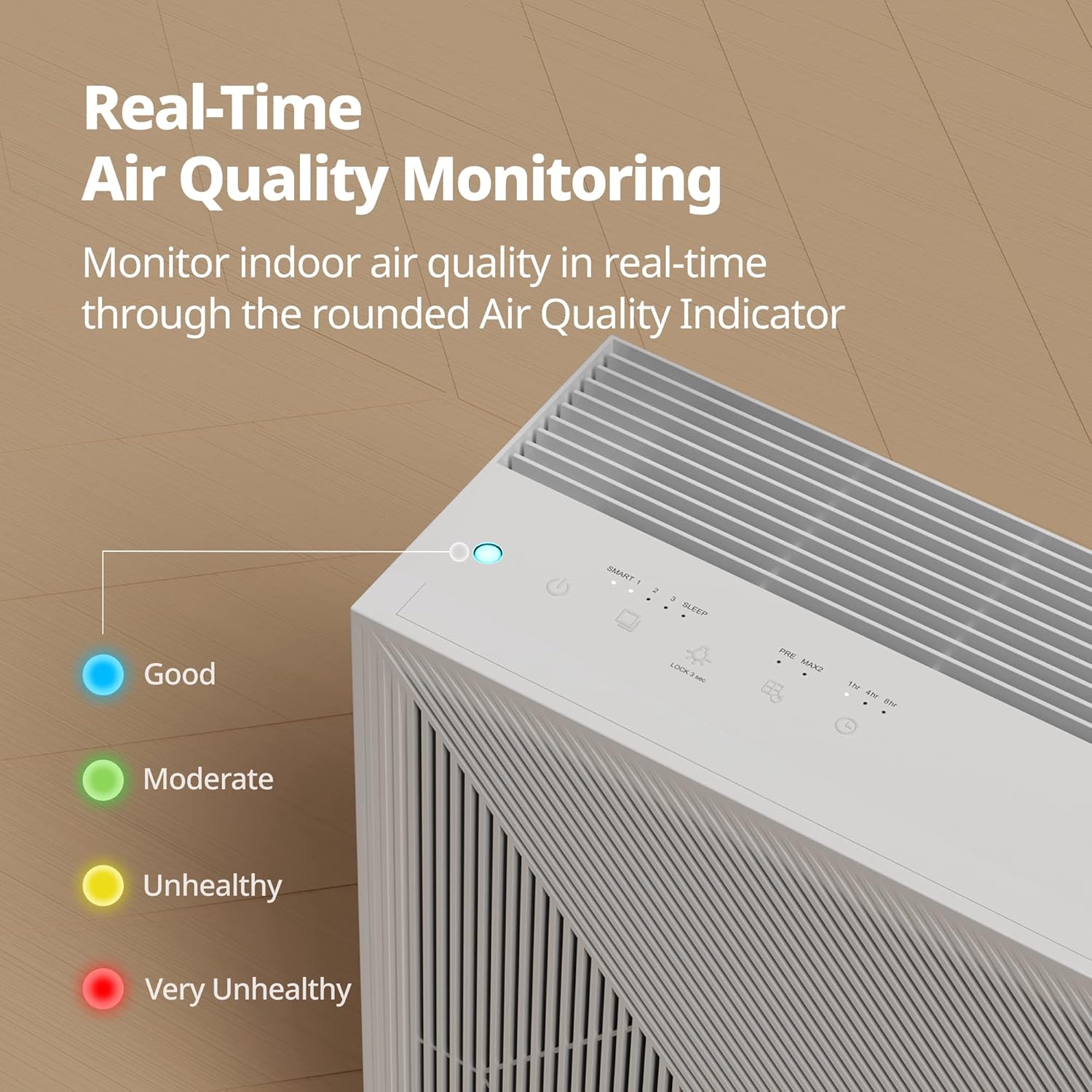
Image: Close-up of the Coway Airmega 240's control panel and the Air Quality Indicator, showing different color meanings.
Video: What Triggers the Airmega AQI? This video demonstrates how various airborne elements can trigger changes in the air quality indicator.
6. Maintenance
Regular maintenance ensures optimal performance and longevity of your air purifier.
Washable Pre-filter Cleaning:
The reusable pre-filter should be cleaned regularly (e.g., every 2-4 weeks, depending on usage and air quality).
- Pull the EZ-Release Pre-filter out from the top of the unit.
- Vacuum to remove dust or rinse with water.
- Hang to speed dry completely before re-installing.
- Press and hold the Pre-filter indicator button for 3 seconds to reset.

Image: Visual guide for removing, cleaning, and resetting the washable pre-filter.
Max2 Filter (Activated Carbon + Green True HEPA) Replacement:
The Max2 Filter should be replaced approximately every 12 months, depending on usage and air quality. Use only genuine Coway filters for optimal performance.
- Open the front cover and remove the used Max2 Filter.
- Assemble the new Max2 Filter into the unit.
- Close the front cover.
- Press and hold the Max2 filter replacement button for 3 seconds to reset.

Image: Visual guide for replacing the Max2 filter and resetting its indicator.

Image: Reminder to use only genuine Coway filters for superior performance.
7. Troubleshooting
If you encounter issues with your Airmega 240, refer to the following common solutions:
| Problem | Possible Cause | Solution |
|---|---|---|
| Unit does not turn on | Power cord unplugged; Power outage; Front cover not closed properly. | Check power connection; Restore power; Ensure front cover is securely latched. |
| No airflow or weak airflow | Filters are clogged; Air intake/outlet blocked. | Clean or replace filters; Ensure no obstructions around the unit. |
| Unusual noise | Foreign object inside; Unit not on a stable surface. | Unplug and check for foreign objects; Place on a stable, level surface. |
| Air Quality Indicator always red/yellow | High level of pollutants; Sensor is dirty. | Allow unit to run longer in Auto Mode; Clean the air quality sensor (refer to full manual for location). |
8. Specifications
| Feature | Detail |
|---|---|
| Model Number | Airmega 240(W) |
| Coverage Area | Up to 975 sq. ft. (30 min) / 403 sq. ft. (12.5 min) |
| Filtration System | 3-stage HyperCaptive (Washable Pre-filter, Activated Carbon, Green True HEPA) |
| Particle Retention Size | 0.01 Micron (99.999% reduction) |
| Noise Level | As low as 20.6 Decibels |
| Power Source | Corded Electric |
| Wattage | 60 watts |
| Control Method | Touch |
| Product Dimensions (D x W x H) | 8.3"D x 16.7"W x 22.8"H |
| Item Weight | 20.5 Pounds |
| Special Features | Air Quality Monitor, Filter Life Indicator, Smart Mode, Sleep Mode, Timer |
| Certifications | CARB Certified, ETL Certified, Energy Star Certified |

Image: Diagram showing the dimensions of the Coway Airmega 240.
9. Warranty and Support
Warranty Information:
The Coway Airmega 240 comes with a 3-year manufacturer's limited warranty. Please refer to the warranty card included with your product for full terms and conditions.
Customer Support:
For technical assistance, troubleshooting beyond this manual, or to purchase genuine replacement filters, please contact Coway Customer Support:
- Website: www.coway.com
- Phone: Refer to your product packaging or Coway's official website for regional contact numbers.


