
1. Introduction
The Garmin Fusion Signature Series 3i Marine Coaxial Speakers are engineered to deliver high-quality audio performance in demanding marine environments. These 7.7-inch, 280-watt speakers feature a robust design with marinized connectors and a redesigned grille for enhanced durability and protection against harsh conditions. Utilizing CURV® Cone Technology, they provide clear sound definition at higher volumes. Select sports style models also include CRGBW LED illumination for customizable ambiance.
2. What's in the Box
Verify that all components are present before beginning installation.
- One pair of speakers (specific model may vary)
- 12 x Phillips stainless steel mounting screws – 4.2 mm x 40 mm (8 gauge x 1.6”)
- 2 x water-resistant cable assemblies with 2-pin connector (150 mm / 5.9”)
- 2 x water-resistant cable assemblies with 6-pin connector (150 mm / 5.9”) (for sports style with LED models only)
- Documentation
3. Setup and Installation
Proper installation is crucial for optimal performance and longevity. Consult a professional marine installer if you are unsure about any steps.
3.1 Mounting Location
Select a mounting location that provides adequate space behind the speaker for proper clearance and ventilation. Ensure the surface is flat and sturdy enough to support the speakers.

Figure 1: Front view of a Garmin Fusion Signature Series 3i Marine Coaxial Speaker. This image shows the speaker's grille and cone design.

Figure 2: Side view of a Garmin Fusion Signature Series 3i Marine Coaxial Speaker, illustrating the required mounting depth.
3.2 Cutting the Mounting Hole
Use the provided template (if applicable, or refer to the dimensions in the specifications section) to mark and cut the mounting hole. Ensure the hole is smooth and free of debris.
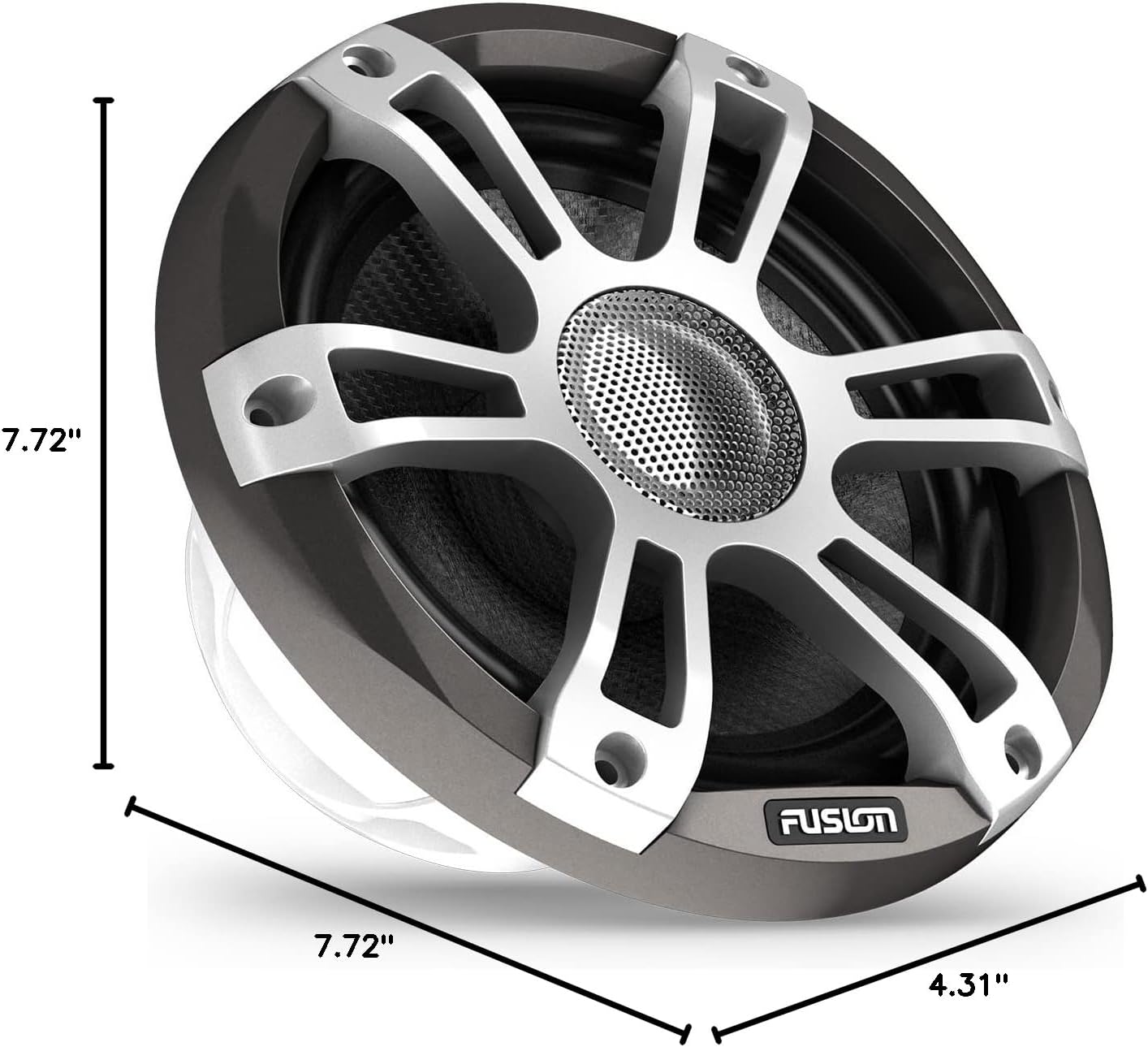
Figure 3: Detailed dimensions of the Garmin Fusion Signature Series 3i Marine Coaxial Speaker, including diameter and mounting depth.
3.3 Wiring Connections
Connect the speaker wires to your marine stereo system or amplifier using the water-resistant cable assemblies. Ensure correct polarity (+ to + and – to –) for optimal sound performance. For models with CRGBW LED illumination, connect the 6-pin cable assembly to the appropriate LED controller (sold separately).
- Audio Connection: Use the 2-pin water-resistant cable assembly.
- LED Connection (Sports Style Models): Use the 6-pin water-resistant cable assembly for CRGBW LED control.
These speakers are designed to work optimally with Fusion stereo systems and amplifiers that support custom Digital Signal Processing (DSP) profiles. This integration requires the Fusion-Link smart-device app for setup and configuration.
4. Operation
4.1 Audio Playback
Once installed and connected to a compatible marine stereo system or amplifier, the speakers will reproduce audio from your source. Adjust volume and audio settings via your stereo system.
4.2 CRGBW LED Illumination (Sports Style Models Only)
For sports style models equipped with CRGBW LEDs, the illumination can be controlled via a compatible Fusion stereo system or a dedicated LED controller (sold separately). This allows for customization of color and brightness to match your preference or the mood of your music.
5. Maintenance
The Fusion Signature Series 3i speakers are built for the marine environment, but regular maintenance ensures their longevity and performance.
- Cleaning: Periodically clean the speaker grilles and surrounds with a soft, damp cloth. Avoid abrasive cleaners or solvents.
- Inspection: Regularly inspect all connections and mounting hardware for signs of corrosion or loosening.
- Water Resistance: The speakers have an IP65 rating, meaning they are dust-tight and protected against low-pressure jets of water. Ensure all connections are properly sealed to maintain water resistance.
6. Troubleshooting
If you experience issues with your speakers, consider the following common troubleshooting steps:
- No Sound:
- Check all audio cable connections at both the speaker and the stereo/amplifier.
- Ensure the stereo/amplifier is powered on and the volume is up.
- Verify the audio source is playing correctly.
- Distorted Sound:
- Reduce the volume on your stereo/amplifier.
- Check for loose wiring connections.
- Ensure the speakers are not overdriven.
- LEDs Not Working (Sports Style Models):
- Verify the 6-pin LED cable assembly is correctly connected to the LED controller.
- Ensure the LED controller is powered on and configured correctly via the Fusion-Link app.
For further assistance, refer to the Garmin support website or contact customer service.
7. Specifications
| Feature | Specification |
|---|---|
| Model Name | Fusion® Signature Series 3i Marine Coaxial Speakers |
| Model Number | 010-02772-21 |
| Speaker Type | Coaxial |
| Speaker Size | 7.7 Inches |
| Woofer Diameter | 7.7 Inches |
| Speaker Maximum Output Power | 280 Watts |
| Impedance | 4 Ohm |
| Input Voltage | 12 Volts |
| Audio Output Mode | Stereo |
| Connectivity Technology | Coaxial |
| Wireless Communication Technology | Bluetooth (for app control, not audio streaming directly to speakers) |
| Control Method | App (Fusion-Link) |
| Compatible Devices | Smartphone, Tablet, Television (via connected stereo system) |
| Product Dimensions (D x W x H) | 7.72"D x 4.31"W x 7.72"H |
| Item Weight | 3.88 Pounds |
| Is Waterproof | TRUE (IP65 rated) |
| Specific Uses For Product | Marine use |
| UPC | 753759314354 |
8. Warranty and Support
8.1 Warranty Information
The Garmin Fusion Signature Series 3i Marine Coaxial Speakers come with a 3-year limited warranty from the date of purchase. This warranty covers defects in materials and workmanship under normal use. For full warranty terms and conditions, please refer to the documentation included with your product or visit the official Garmin website.
8.2 Customer Support
For technical assistance, troubleshooting, or warranty claims, please contact Garmin customer support. You can find contact information and additional resources on the official Garmin support website: