
1. Introduction
This manual provides detailed instructions for the installation, operation, and maintenance of the POOLEX PC-QBC050 Q-Line 5 Full Inverter 5kW Pool Heat Pump. It covers essential information for heating and cooling pool water, utilizing EcoSilent mode, and managing defrost functions to ensure efficient and reliable performance. Please read this manual thoroughly before installation and operation to ensure proper use and to prevent damage.
2. Safety Information
Always observe the following safety precautions to reduce the risk of injury, electric shock, fire, or damage to the product.
- Electrical Safety: Ensure the heat pump is connected to a properly grounded electrical outlet. Do not operate the unit with damaged power cords or plugs. All electrical work must be performed by a qualified electrician.
- Water Safety: Do not immerse the heat pump in water. Keep all electrical connections dry. Ensure proper water flow through the unit during operation.
- Placement: Install the heat pump in a well-ventilated area, away from flammable materials and direct sunlight. Maintain adequate clearance around the unit for proper airflow.
- Children and Pets: Keep children and pets away from the heat pump during operation.
- Maintenance: Disconnect power before performing any maintenance or cleaning. Refer to the maintenance section for detailed instructions.
- Repairs: Do not attempt to repair the unit yourself. Contact qualified service personnel for all repairs.
3. Product Overview
The POOLEX PC-QBC050 Q-Line 5 is a Full Inverter pool heat pump designed for efficient heating and cooling of swimming pools. Its compact design and advanced technology ensure quiet operation and energy savings.
3.1 Key Features
- Full Inverter Technology: Optimizes compressor and fan speed for precise temperature control and energy efficiency.
- Heating and Cooling Modes: Capable of both heating and cooling pool water to maintain desired temperatures.
- EcoSilent Mode: Operates at a reduced fan and compressor speed for quieter operation and optimized energy consumption.
- Automatic Defrost: Ensures reliable operation in colder conditions.
- Compact Design: Space-saving vertical airflow design.
- Smart Control: Features a digital display and can be controlled via a mobile application (as indicated by product imagery).
3.2 Product Components and Views

Figure 3.2.1: Front view of the POOLEX PC-QBC050 Q-Line 5 Full Inverter Pool Heat Pump. This image shows the main body of the heat pump, including the front grille, digital display, and control buttons.
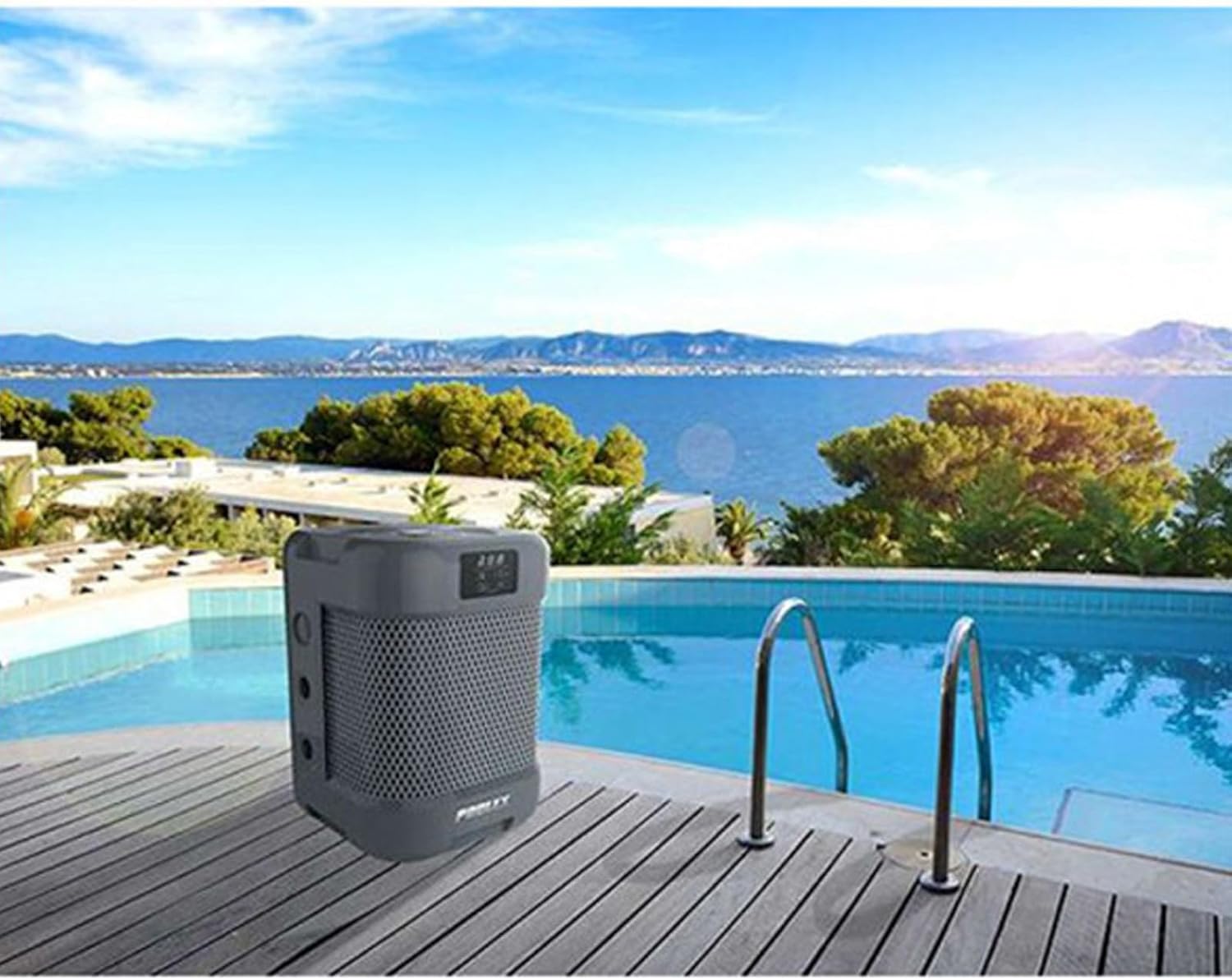
Figure 3.2.2: The POOLEX PC-QBC050 Q-Line 5 Pool Heat Pump positioned next to a swimming pool. This illustrates a typical installation scenario, highlighting the compact footprint of the unit in a poolside environment.

Figure 3.2.3: Diagram explaining Full Inverter technology with variable speed fan and compressor, showing up to 35% energy savings compared to On/Off heat pumps. Below, a hand holds a smartphone displaying the mobile application interface for controlling the heat pump, indicating smart control capabilities.
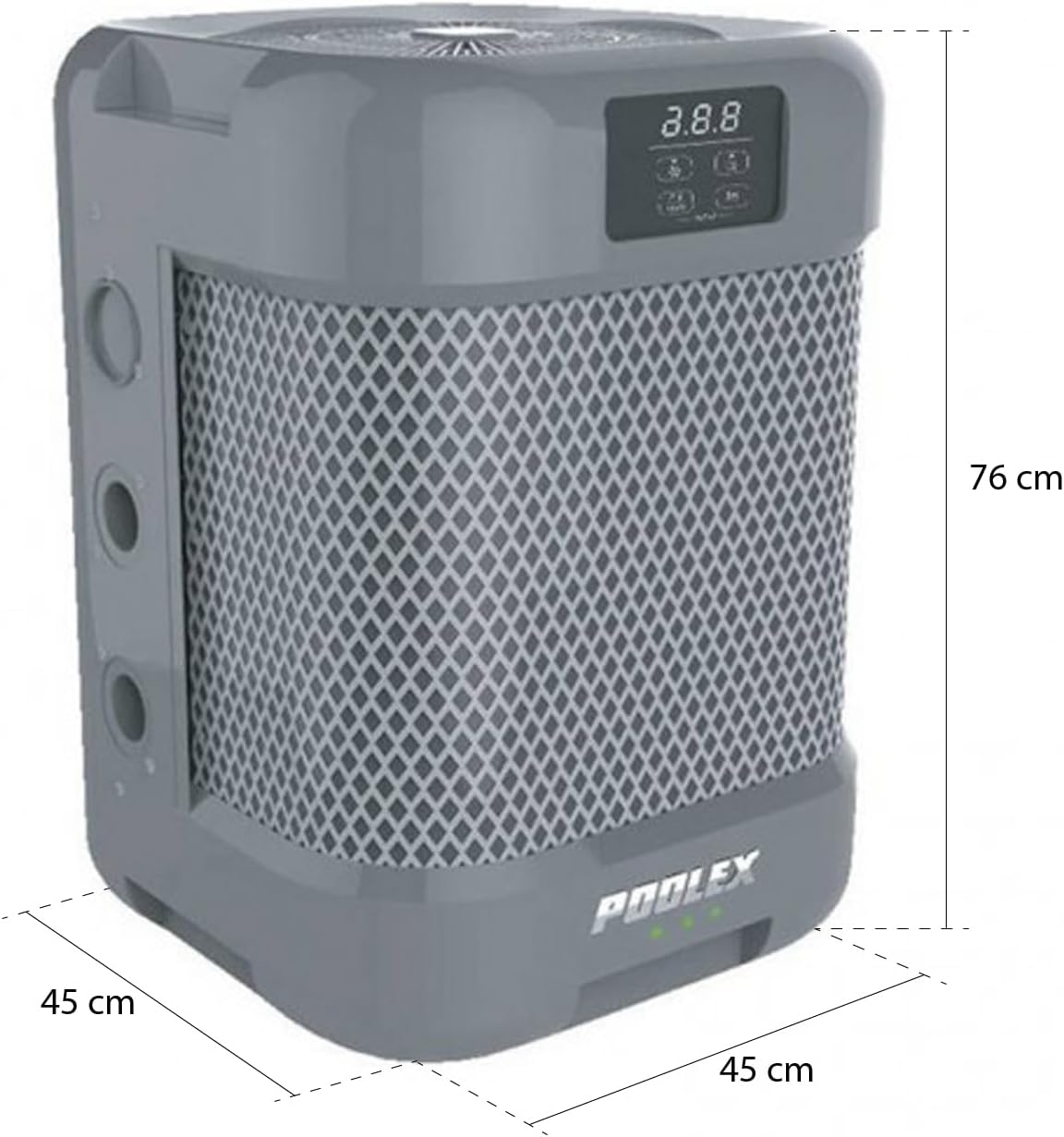
Figure 3.2.4: Dimensional drawing of the POOLEX PC-QBC050 Q-Line 5 Pool Heat Pump. The image indicates a height of 76 cm and a base dimension of 45 cm by 45 cm, providing essential measurements for installation planning.

Figure 3.2.5: Airflow diagram for the POOLEX PC-QBC050 Q-Line 5 Pool Heat Pump. Red arrows indicate air intake from the sides, and blue arrows show warm air exhaust from the top, illustrating the vertical airflow design.
4. Setup & Installation
Proper installation is crucial for the efficient and safe operation of your heat pump. It is recommended that installation be performed by a qualified professional.
4.1 Site Selection
- Location: Place the heat pump on a stable, level surface, preferably concrete or a reinforced pad, near the pool.
- Clearance: Ensure adequate clearance around the unit for proper airflow. Refer to Figure 3.2.5 for airflow direction. Maintain at least 50 cm (20 inches) from any walls or obstructions on the intake sides and sufficient vertical clearance for exhaust.
- Drainage: Position the unit where condensate water can drain away freely without causing damage or creating slip hazards.
4.2 Plumbing Connections
- Connect the heat pump to your pool's filtration system after the filter and before any chemical feeders.
- Use appropriate plumbing fittings (e.g., 32/38mm connectors) to ensure a watertight seal.
- Install bypass valves to allow for isolation of the heat pump for maintenance without interrupting pool circulation.
4.3 Electrical Connections
- The heat pump requires a dedicated electrical circuit with appropriate voltage and amperage. Consult the specifications section for details.
- Ensure the power supply is equipped with a Residual Current Device (RCD) or Ground Fault Circuit Interrupter (GFCI) for safety.
- All electrical connections must comply with local electrical codes.
4.4 Initial Startup
- After plumbing and electrical connections are complete, ensure the pool pump is running and water is flowing through the heat pump.
- Turn on the electrical power to the heat pump.
- Follow the on-screen prompts on the digital display or use the mobile app to configure initial settings.
5. Operating Instructions
The POOLEX PC-QBC050 can be operated via its integrated digital display or through a dedicated mobile application.
5.1 Digital Display and Controls
The digital display provides real-time information and allows for direct control of the unit. Refer to the display on the unit (Figure 3.2.1) for button layout.
- Power On/Off: Press the power button to turn the unit on or off.
- Mode Selection: Use the mode button to cycle through available operating modes:
- Heating: Heats pool water to the set temperature.
- Cooling: Cools pool water to the set temperature.
- EcoSilent: Operates at a reduced fan and compressor speed for quieter operation and optimized energy consumption.
- Temperature Adjustment: Use the up/down arrows to set your desired pool water temperature.
- Defrost Function: The unit features an automatic defrost function that activates as needed in low ambient temperatures to prevent ice buildup on the evaporator coil.
5.2 Mobile Application Control
The POOLEX PC-QBC050 can be controlled remotely via a smartphone application. (Refer to Figure 3.2.3).
- Download the official POOLEX control application from your device's app store.
- Follow the in-app instructions to connect your heat pump to your home Wi-Fi network.
- Once connected, you can monitor the pool temperature, adjust settings, change operating modes, and set timers from your smartphone.
Note: Ensure your Wi-Fi signal is strong at the heat pump's location for reliable app control.
6. Maintenance
Regular maintenance ensures the longevity and efficient operation of your POOLEX heat pump.
6.1 Routine Cleaning
- Exterior: Periodically wipe down the exterior casing with a soft, damp cloth. Do not use harsh chemicals or abrasive cleaners.
- Air Intake/Exhaust: Keep the air intake grilles (sides) and exhaust fan (top) free from leaves, debris, and other obstructions. Blocked airflow can reduce efficiency and damage the unit.
- Condensate Drain: Ensure the condensate drain is clear and not blocked.
6.2 Seasonal Maintenance
- Winterization: Before freezing temperatures, disconnect the heat pump from the pool plumbing and drain all water from the unit. Store the unit in a dry, protected area or cover it with a breathable, protective cover if left outdoors. Disconnect electrical power.
- Pre-Season Check: Before starting the unit for the swimming season, inspect all plumbing and electrical connections for wear or damage. Ensure the area around the unit is clear.
7. Troubleshooting
This section addresses common issues you might encounter with your POOLEX PC-QBC050 heat pump. For problems not listed here, or if solutions do not resolve the issue, contact customer support.
| Problem | Possible Cause | Solution |
|---|---|---|
| Heat pump does not start or operate. | No power; circuit breaker tripped; insufficient water flow. | Check power supply and circuit breaker. Ensure pool pump is running and water is flowing through the heat pump. Verify all electrical connections. |
| Pool water not heating/cooling effectively. | Incorrect temperature setting; dirty coils; insufficient run time; ambient temperature too low/high. | Verify desired temperature setting. Clean air intake and exhaust areas. Allow sufficient time for the unit to heat/cool the water. Ensure proper sizing for your pool volume and local climate. |
| Unit is unusually noisy (e.g., metallic rattling). | Loose internal components; fan obstruction. | Turn off the unit and disconnect power. Inspect for any visible obstructions in the fan area. If noise persists, contact customer support; internal components may require professional inspection. |
| Mobile app control is unreliable or not connecting. | Weak Wi-Fi signal; app synchronization issue; incorrect setup. | Ensure strong Wi-Fi signal at the heat pump location. Restart the heat pump and your mobile device. Re-pair the device with the app if necessary. Check for app updates. |
| Unit enters standby and does not restart automatically. | Software or control logic issue. | This may indicate a firmware or control system anomaly. Try power cycling the unit (disconnect from power for a few minutes, then reconnect). If the issue persists, contact POOLEX customer support for potential software updates or service. |
8. Specifications
The following are the technical specifications for the POOLEX PC-QBC050 Q-Line 5 Full Inverter Pool Heat Pump:
| Feature | Detail |
|---|---|
| Model Number | PC-QBC050 |
| Brand | Poolex |
| Product Dimensions (L x W x H) | 45 x 45 x 61.5 cm |
| Weight | 40 kg |
| Power Source Type | Hydraulically powered (Note: This likely refers to the water circulation, actual power is electrical. Consult product label for electrical specifics.) |
| ASIN | B0B63B3H3G |
| First Available Date | 11 July 2022 |
Note: Performance specifications such as heating/cooling capacity (e.g., 5kW), recommended pool volume (20-35 m³), and COP values are typically found on the product packaging or a separate technical data sheet. Always refer to the official product documentation for complete and up-to-date specifications.
9. Warranty & Support
For warranty information, technical support, or service inquiries, please contact POOLEX customer service or your authorized dealer. Keep your purchase receipt and product model number (PC-QBC050) handy when contacting support.
POOLEX is committed to providing reliable products and support. Do not attempt to open or repair the unit yourself, as this may void your warranty and pose safety risks.


