
OSOTEK S11
OSOTEK S11 Cordless Vacuum Cleaner User Manual
Model: S11
1. Important Safety Information
Please read all instructions carefully before using this appliance. Retain this manual for future reference.
- Do not operate the vacuum cleaner with a damaged cord or plug.
- Do not use the vacuum cleaner to pick up flammable or combustible liquids, such as gasoline, or use in areas where they may be present.
- Do not pick up anything that is burning or smoking, such as cigarettes, matches, or hot ashes.
- Keep hair, loose clothing, fingers, and all parts of body away from openings and moving parts.
- Use only as described in this manual. Use only manufacturer's recommended attachments.
- Turn off all controls before unplugging.
- Exercise extreme care when cleaning on stairs.
- Do not use without dust cup and/or filters in place.
- This appliance is for household use only.
2. Package Contents
Verify that all components are present and in good condition upon unpacking.
- Main Motor Unit (Handheld Vacuum)
- Extension Wand
- Anti-winding Floor Brush
- Electric Mite Brush
- Brush Nozzle
- Crevice Brush
- Power Adapter
- Wall-mounted Docking Station
- User Manual

Image: Complete set of OSOTEK S11 vacuum components and accessories.
3. Product Overview
The OSOTEK S11 is a versatile cordless stick vacuum cleaner designed for efficient cleaning across various surfaces. It features a powerful motor, multi-stage filtration, and an intuitive LED display.

Image: The OSOTEK S11 vacuum in various configurations, highlighting its adaptability.
LED Display Features

Image: The LED display provides real-time information on battery level, dust heap value, and current suction power.
- Battery Level Indicator: Shows remaining battery percentage.
- Suction Power Indicator: Displays current suction mode.
- Dust Status Indicator: Provides feedback on dust accumulation.
- Charging Indicator: Illuminates during charging.
4. Assembly
Follow these steps to assemble your OSOTEK S11 vacuum cleaner:
- Attach the Extension Wand: Insert the top end of the extension wand into the main motor unit until it clicks securely.
- Attach the Floor Brush: Connect the anti-winding floor brush to the bottom end of the extension wand, ensuring it clicks into place.
- Install Wall-mounted Docking Station: Choose a suitable location near a power outlet. Secure the docking station to the wall using the provided screws and anchors. Ensure it is at a height that allows the vacuum to hang freely.

Image: Visual guide for connecting the main unit with different accessories.
Attaching Accessories
The OSOTEK S11 comes with several attachments for specialized cleaning:
- Electric Mite Brush: Ideal for cleaning sofas, beds, and plush toys.
- Brush Nozzle: Suitable for keyboards, tables, and curtains.
- Crevice Brush: Perfect for narrow spaces like crevices, window tracks, and car interiors.

Image: Overview of specialized cleaning tools and their applications.
5. Charging
Before first use, fully charge the vacuum cleaner. The battery is removable for convenient charging.
- Connect the power adapter to the charging port on the main motor unit or the wall-mounted docking station.
- Plug the adapter into a power outlet.
- The LED display will show the charging status. A full charge typically takes approximately 4-5 hours.
- The vacuum offers up to 60 minutes of runtime on a single charge, depending on the power mode used.

Image: The vacuum being placed on its wall-mounted charging dock.

Image: The LED display indicating a full charge and up to 60 minutes of runtime.
6. Operating Instructions
The OSOTEK S11 is designed for powerful and efficient cleaning.
Power On/Off and Suction Modes
- Press the power button to turn the vacuum on or off.
- Use the mode selection button (if available) to switch between different suction power levels (e.g., Eco, Standard, Max). The LED display will indicate the current mode.
Cleaning Different Surfaces
The vacuum is suitable for hardwood floors, short pile carpets, and pet hair. Its powerful 33000Pa suction ensures thorough cleaning.
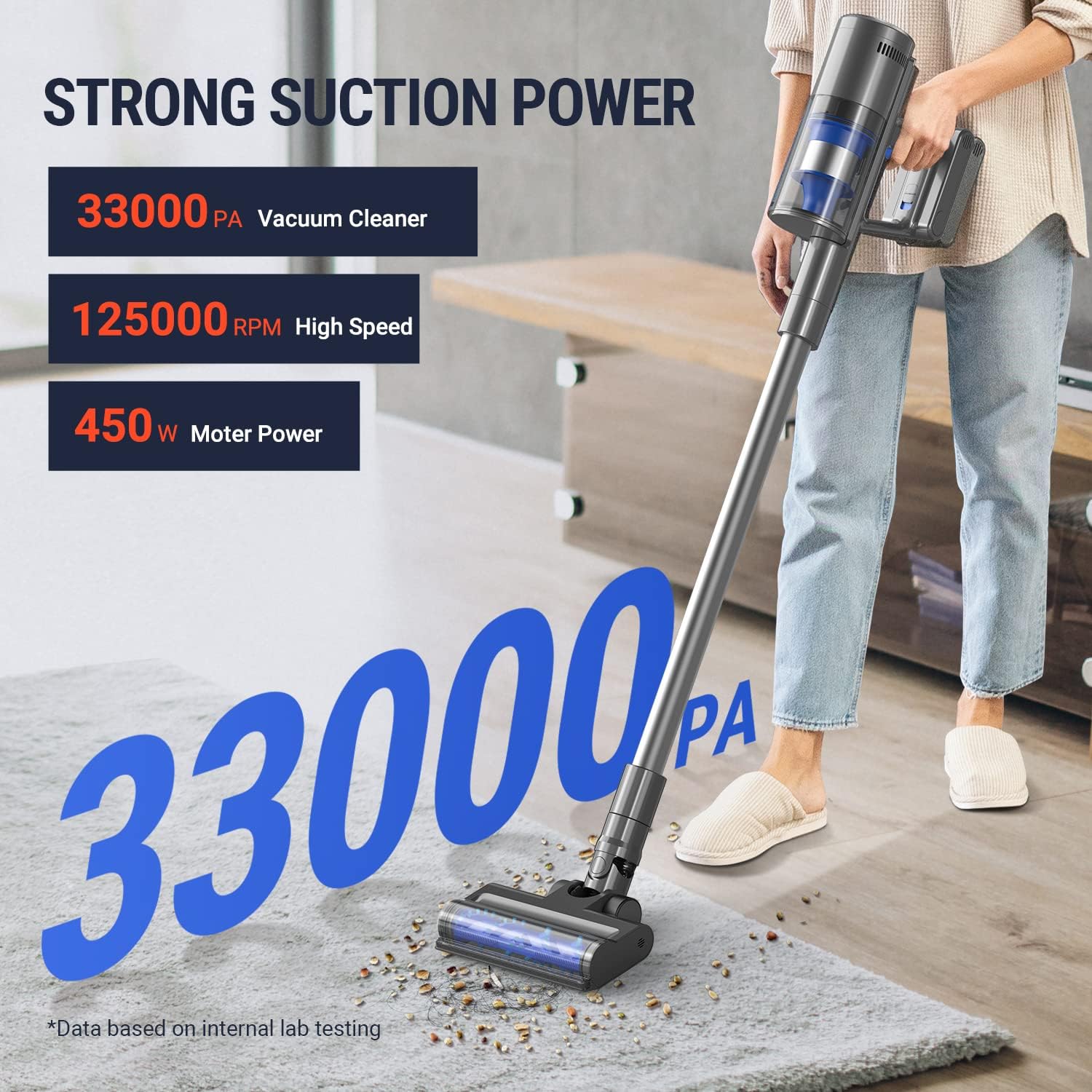
Image: Demonstrating the powerful suction of the OSOTEK S11 on carpet.

Image: The vacuum's versatility for cleaning various surfaces and hard-to-reach areas.
Special Features
- Anti-Winding Technology: The main floor brush features a design that actively cuts hair, preventing tangles and ensuring consistent performance.
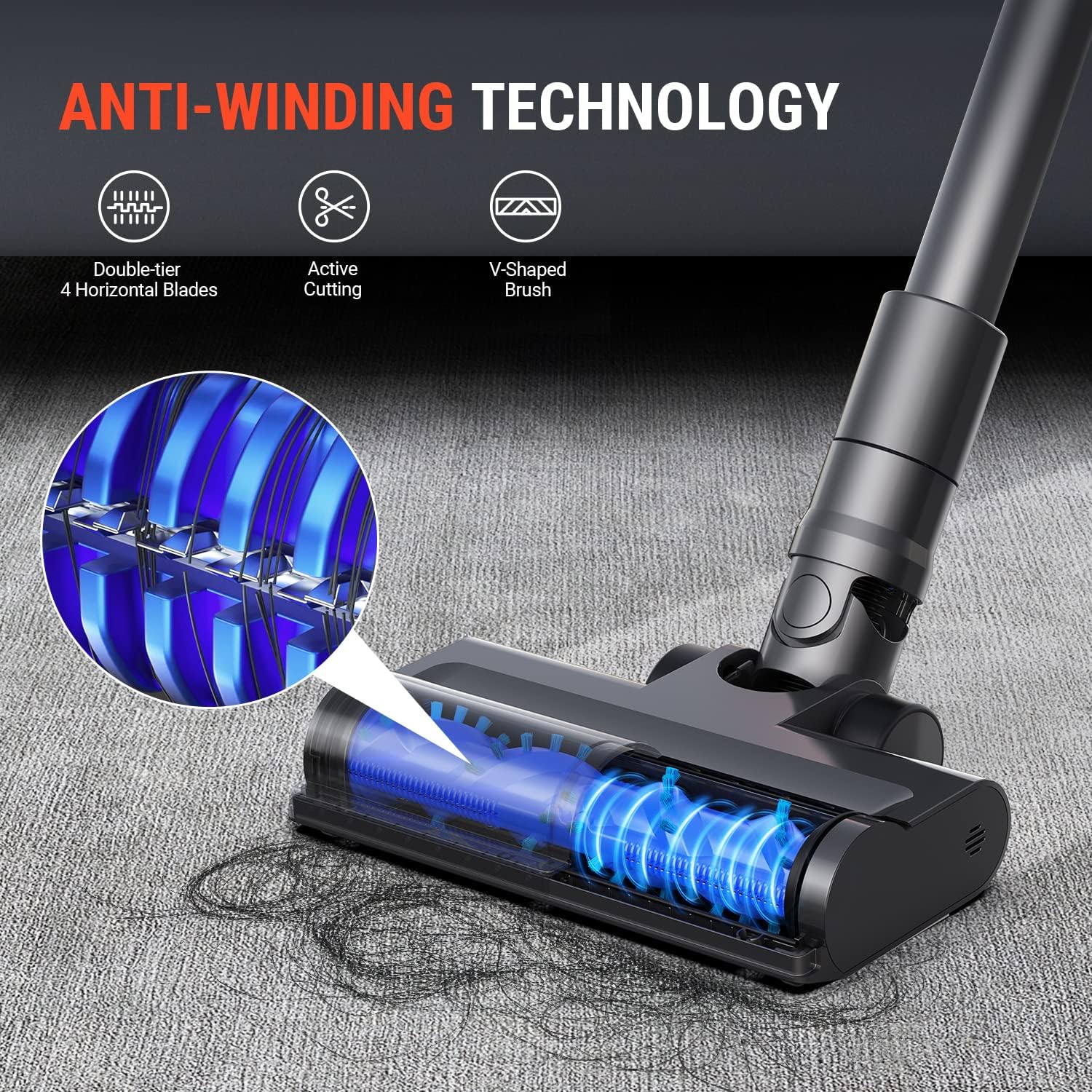
Image: Close-up of the anti-winding brush roll with hair cutting mechanism.

Image: Animation demonstrating the hair cutting feature of the brush roll.
- Mite Killing Rate: The electric mite brush attachment is designed to effectively remove mites, hair, scurf, and mold from fabrics, achieving a 99.9% mite killing rate.

Image: The mite brush attachment targeting microscopic particles and allergens.
Official Product Video
Video: Official product demonstration of the OSOTEK S11 Cordless Vacuum Cleaner, showcasing its features and cleaning capabilities.
7. Maintenance
Regular maintenance ensures optimal performance and extends the lifespan of your vacuum cleaner.
Emptying the Dustbin
- To empty the dustbin, press the one-click release button located on the dustbin.
- Hold the dustbin over a trash can and press the button to release collected debris.

Image: One-click dustbin emptying mechanism.
Cleaning the Filters
The OSOTEK S11 features a 5-layer H12 HEPA filtration system that captures 99.9% of dust and particles as small as 0.3 microns.
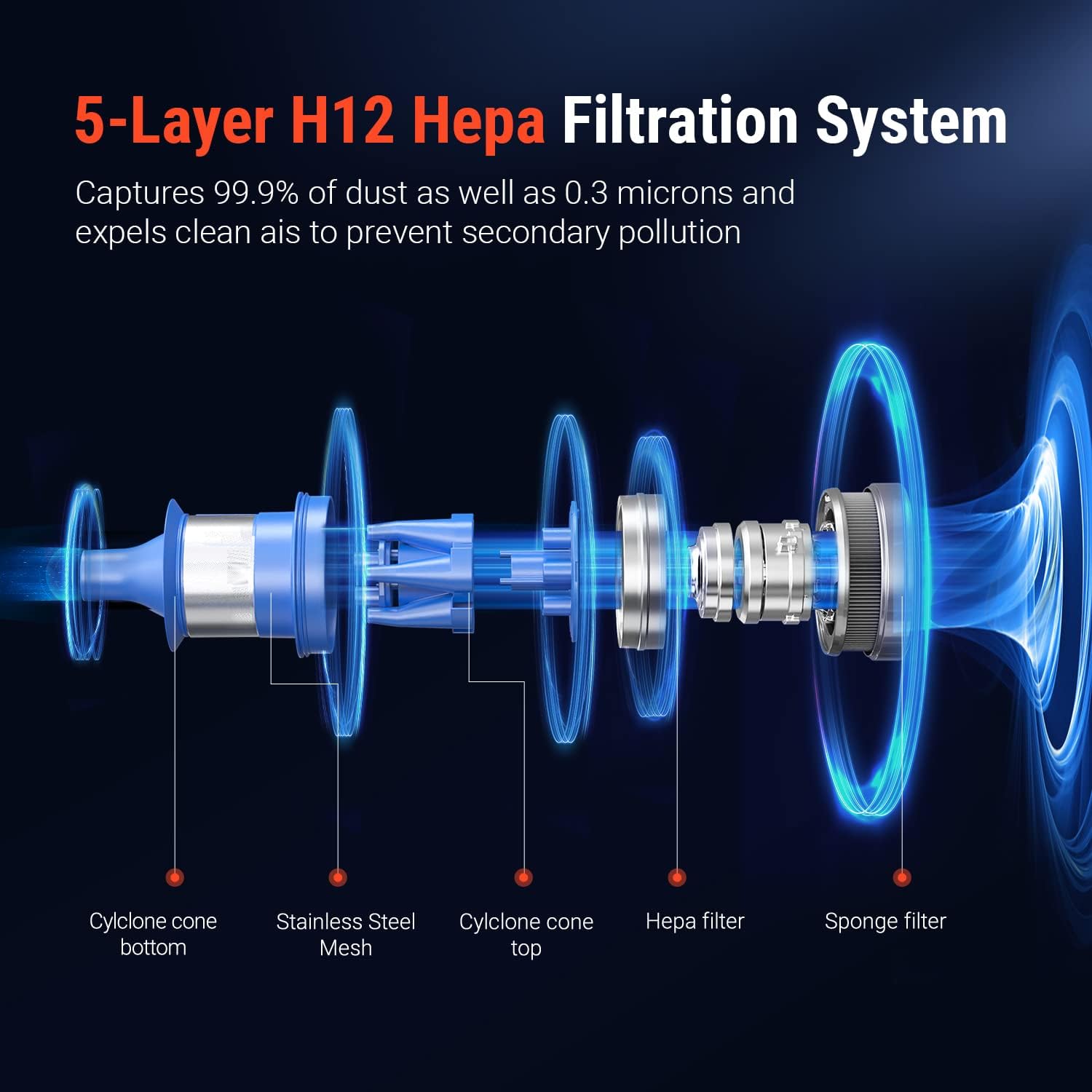
Image: Exploded view of the 5-layer H12 HEPA filtration system.
- Regularly check and clean the filters to maintain suction power.
- Twist and pull to remove the filter components from the dustbin.
- Tap off loose dirt or rinse with cold water. Ensure filters are completely dry before reassembling.
Cleaning the Brush Roll
- To remove the brush roll for cleaning, locate the release tab on the side of the floor brush head.
- Press the tab and slide out the brush roll.
- Remove any tangled hair or debris. The anti-winding feature minimizes this, but occasional checks are recommended.
- Reinsert the brush roll until it clicks into place.

Image: Removing the brush roll for maintenance.
8. Troubleshooting
If you encounter issues with your OSOTEK S11, refer to the following common problems and solutions:
| Problem | Possible Cause | Solution |
|---|---|---|
| Vacuum not turning on | Battery is depleted; Battery not properly installed. | Charge the battery; Ensure battery is securely clicked into place. |
| Low suction power | Dustbin is full; Filters are clogged; Brush roll is tangled. | Empty the dustbin; Clean or replace filters; Clear any tangles from the brush roll. |
| Brush roll not spinning | Brush roll is jammed; Brush roll not properly installed. | Remove any obstructions; Reinstall the brush roll correctly. |
| Unusual noise | Obstruction in the air path; Damaged component. | Check for blockages in the nozzle, wand, or dustbin; Contact customer support if noise persists. |
For issues not listed here, please contact OSOTEK customer support.
9. Specifications
| Feature | Detail |
|---|---|
| Brand | OSOTEK |
| Model Name | S11 Rollclean |
| Special Feature | Bagless, Anti-winding Technology |
| Filter Type | Cartridge (5-Layer H12 HEPA Filtration System) |
| Is Cordless? | Yes |
| Runtime | Up to 60 minutes |
| Recommended Uses | Carpet, Hardwood, Home |
| Form Factor | Stick |
| Color | Gray |
| Battery Description | Lithium-Ion |
| Noise Level | 75 dB (Reduced Noise) |
| Motor Horsepower | 0.59645 horsepower |
| Control Method | Touch / Push Button |
| Product Dimensions | 30.12 x 12.32 x 5.43 inches |
| Item Weight | 12.77 pounds |
10. Warranty and Support
OSOTEK products are manufactured to the highest quality standards. For warranty information and customer support, please refer to the warranty card included in your product packaging or visit the official OSOTEK website.
For technical assistance, troubleshooting, or to inquire about replacement parts, please contact OSOTEK customer service through the contact information provided with your purchase or on the brand's official channels.
Online Resources:
- Visit the OSOTEK Store on Amazon for product information and updates.