
Introduction
This manual provides essential information for the safe and efficient operation, installation, and maintenance of your Brio Moderna Self-Cleaning Touchless Bottleless Water Cooler Dispenser. Please read this manual thoroughly before installation and use, and retain it for future reference.
The Brio Moderna dispenser offers advanced 3-stage filtration, personalized temperature adjustment for both cold and hot water, and a hygienic touchless dispensing system. It is designed to provide clean, refreshing water directly from your plumbed water line.
Important Safety Information
To reduce the risk of injury or property damage, observe the following safety precautions:
- Always connect the dispenser to a grounded electrical outlet.
- Do not operate the dispenser if the power cord is damaged.
- Ensure the dispenser is placed on a level, stable surface.
- Keep the dispenser away from direct sunlight and heat sources.
- Do not block ventilation openings.
- Unplug the dispenser before cleaning or performing any maintenance.
- This appliance is not intended for use by persons (including children) with reduced physical, sensory or mental capabilities, or lack of experience and knowledge, unless they have been given supervision or instruction concerning use of the appliance by a person responsible for their safety.
- Children should be supervised to ensure that they do not play with the appliance.
Product Components
Your Brio Moderna water cooler dispenser comes with the following main components:
- Water Cooler Dispenser Unit (Black)
- 3-Stage Water Filter Kit (Sediment, Pre-Carbon, Post-Carbon Filters)
- Installation Kit (including necessary tubing and connectors for plumbed setup)
- Drip Tray
- Power Cord
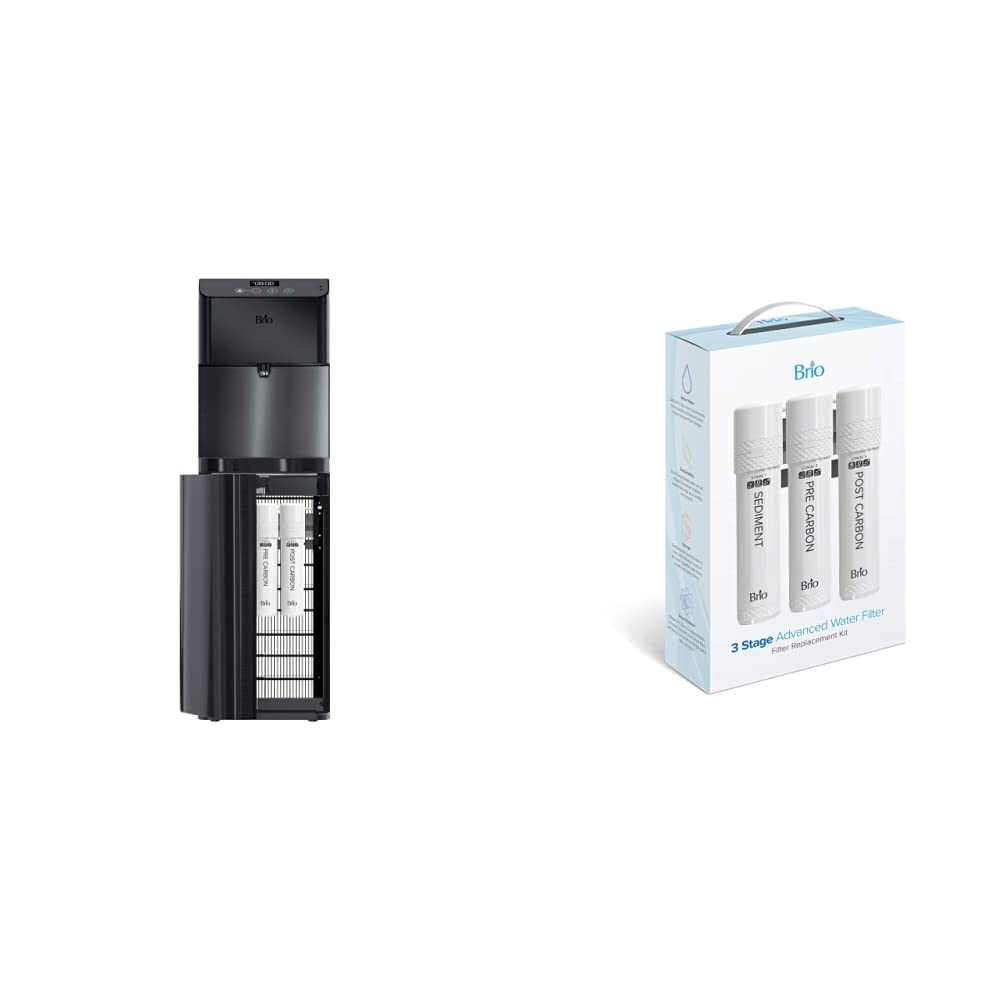
Image showing the Brio Moderna water cooler dispenser with its side panel open, revealing the filter compartments, alongside the boxed 3-stage filter replacement kit.
Setup and Installation
1. Unpacking and Placement
- Carefully remove all packaging materials.
- Place the dispenser on a flat, stable, and level surface. Ensure there is at least 4 inches of clearance from walls for proper ventilation.
- The dispenser is designed for indoor use only.
2. Filter Installation
- Open the filter compartment door, typically located on the lower front or side of the unit.
- Insert the Sediment, Pre-Carbon, and Post-Carbon filters into their respective slots. Ensure they are securely twisted or pushed into place according to the markings.
- Close the filter compartment door.
3. Water Line Connection (Plumbed Installation)
- Locate a cold water supply line near the dispenser's intended location.
- Turn off the main water supply.
- Using the provided installation kit, connect the dispenser to the cold water supply line. Follow the specific instructions provided with the installation kit for proper connection to avoid leaks.
- Ensure all connections are tight and secure.
- Slowly turn on the main water supply and check for any leaks.
4. Initial Flush
- Before first use, dispense several cups of water from both the cold and hot spouts to flush the system and filters. Discard this water.
- Continue flushing until the water runs clear and free of air bubbles.
5. Power Connection
- Plug the dispenser into a grounded electrical outlet.
- Allow approximately 15-30 minutes for the water to reach optimal cold and hot temperatures.
Operating Instructions
Dispensing Water (Touchless Operation)
- Place your cup or container under the desired dispensing spout (cold or hot).
- Wave your hand approximately 1-2 inches in front of the motion sensor located above the dispensing area.
- Water will begin to dispense. Wave your hand again to stop the flow.
- Note: The motion sensor feature is primarily designed for cold water dispensing. For hot water, a safety button or lever may need to be pressed in conjunction with the sensor or a manual button. Refer to the specific controls on your unit.
Temperature Adjustment
Your Brio Moderna dispenser allows for personalized temperature settings for both cold and hot water. Controls are typically located on the back or inside a panel of the unit.
- Cold Water Temperature: Use the cold water thermostat dial to adjust the temperature. Turning the dial towards 'colder' will decrease the temperature.
- Hot Water Temperature: Use the hot water thermostat dial or button to adjust the temperature. Exercise caution when adjusting hot water settings.
Maintenance
Filter Replacement
The 3-stage filters should be replaced periodically to ensure optimal water quality. Filter life depends on water usage and local water quality, but generally, filters should be replaced every 6-12 months.
- Unplug the dispenser from the power outlet.
- Turn off the water supply to the dispenser.
- Open the filter compartment.
- Twist or pull out the old filters. Be prepared for a small amount of water to drip.
- Insert new Brio replacement filters, ensuring they are securely seated.
- Close the filter compartment.
- Turn on the water supply and plug in the dispenser.
- Flush the new filters by dispensing several cups of water from both spouts.
Cleaning the Dispenser
- Exterior Cleaning: Wipe the exterior surfaces with a soft, damp cloth. Do not use abrasive cleaners or solvents.
- Drip Tray: Regularly remove and empty the drip tray. Wash it with mild soap and water, then rinse and dry thoroughly before replacing.
- Self-Cleaning Function: Your dispenser features a self-cleaning function. Refer to the specific instructions on your unit for activating this cycle. This typically involves pressing a dedicated button or sequence of buttons, which uses UV light or ozone to sanitize the water tanks.
Troubleshooting
| Problem | Possible Cause | Solution |
|---|---|---|
| No water dispensing | Water supply off; clogged filter; airlock in system; dispenser unplugged. | Check water supply valve; replace filters; flush system; ensure dispenser is plugged in. |
| Water not cold/hot enough | Temperature setting too high/low; insufficient time to cool/heat; ventilation blocked. | Adjust temperature settings; allow more time; ensure proper ventilation around unit. |
| Leaking | Loose water line connection; damaged O-ring; cracked component. | Check all connections for tightness; inspect O-rings and components for damage. Contact support if leak persists. |
| Unusual noise | Compressor cycling; air in system; loose component. | Normal operation may include compressor noise; flush system to remove air; check for loose parts. |
Specifications
- Model: CLPOU720UVF3XB
- Brand: Brio
- Color: Black
- Installation Type: Plumbed (Bottleless)
- Access Location: Bottom (for filter access)
- Filtration: 3-Stage (Sediment, Pre-Carbon, Post-Carbon)
- Dispensing: Touchless (Motion Sensor)
- Temperature Control: Adjustable Cold & Hot
- Self-Cleaning: Yes
Warranty and Support
For warranty information, product registration, or technical support, please refer to the warranty card included with your product or visit the official Brio website. You can also contact Brio customer service directly for assistance with troubleshooting or parts replacement.
Online Support: Visit the Brio Store on Amazon


