Introduction
This manual provides comprehensive instructions for the AIDITIYMI RC002CD replacement remote control. This remote is designed to operate various Marantz CD Player models, offering a direct replacement for your original unit. Please read this manual carefully before use to ensure proper operation and longevity of your remote control.
1. Setup
1.1 Battery Installation
The RC002CD remote control requires two (2) AAA alkaline batteries (not included) for operation. Follow these steps to install the batteries:
- Locate the battery compartment cover on the back of the remote control.
- Press down on the tab and slide the cover downwards to open the compartment.
- Insert two new AAA alkaline batteries, ensuring the positive (+) and negative (-) terminals match the diagrams inside the compartment.
- Slide the battery compartment cover back into place until it clicks securely.

Figure 1: Battery compartment on the back of the remote control.
1.2 Initial Use
The AIDITIYMI RC002CD remote control is a pre-programmed replacement unit. No additional programming or pairing is required. Once the batteries are correctly installed, the remote is ready for immediate use with your compatible Marantz CD Player.
Note: Ensure there are no obstructions between the remote control and the infrared receiver on your CD player.
2. Operating the Remote Control
The RC002CD remote control provides full functionality for your Marantz CD Player. Point the remote directly at your CD player's infrared sensor and press the desired button.
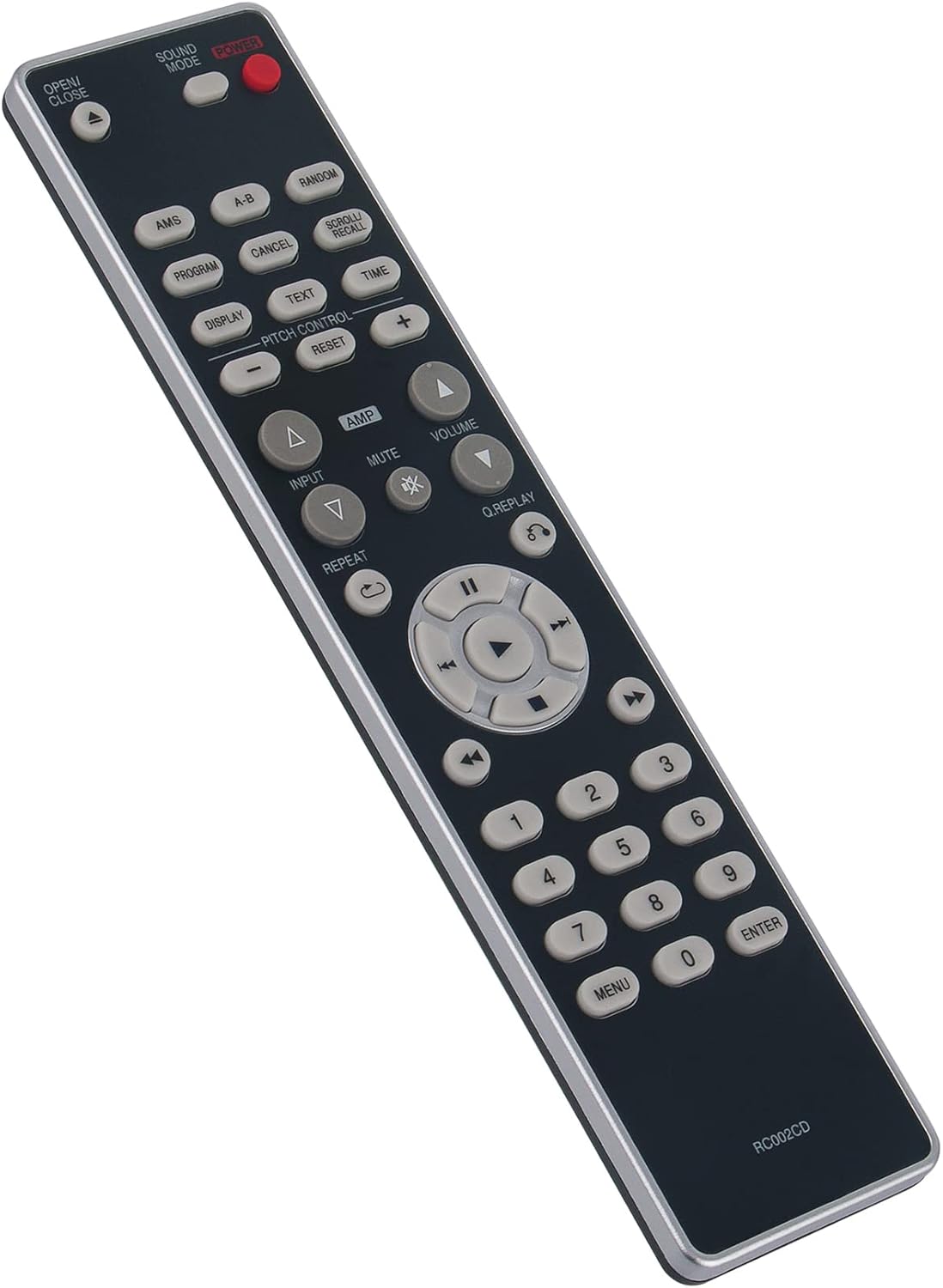
Figure 2: Front view of the RC002CD remote control with button layout.
2.1 Key Functions Overview
- POWER: Turns the CD player on or off.
- OPEN/CLOSE: Opens or closes the CD tray.
- SOUND MODE: Adjusts sound modes (if supported by your CD player).
- AMS (Automatic Music Scan): Scans tracks on the CD.
- A-B: Repeats a specific section between two points (A and B).
- RANDOM: Plays tracks in a random order.
- PROGRAM: Enters program mode to create a custom play order.
- CANCEL: Cancels a programmed track or function.
- SCROLL/RECALL: Scrolls through information or recalls settings.
- DISPLAY: Changes the information shown on the CD player's display.
- TEXT: Displays CD Text information (if available).
- TIME: Changes the time display mode (e.g., elapsed time, remaining time).
- PITCH CONTROL (+/-): Adjusts playback pitch (if supported).
- RESET: Resets pitch control or other settings.
- AMP: Switches control to an amplifier (if integrated).
- INPUT: Selects input source (if integrated with an amplifier).
- MUTE: Mutes the audio output.
- VOLUME (+/-): Adjusts the volume (if controlling an amplifier).
- REPEAT: Repeats the current track or entire CD.
- Q.REPLAY: Quick replay function.
- Navigation Buttons (Up, Down, Left, Right, Enter/Play): Used for menu navigation and playback control.
- Playback Controls (Play, Pause, Stop, Fast Forward, Rewind, Skip Track): Standard CD playback functions.
- Numeric Keypad (0-9): Direct track selection.
- MENU: Accesses menu options.
- ENTER: Confirms selections.
Refer to your Marantz CD Player's original manual for detailed information on specific functions and their availability.
3. Maintenance
3.1 Cleaning
To clean the remote control, use a soft, dry cloth. Do not use liquid cleaners, abrasive pads, or chemical solvents, as these may damage the remote's surface or internal components.
3.2 Battery Replacement
Replace the batteries when the remote control becomes unresponsive or its range decreases significantly. Always replace both batteries at the same time with new AAA alkaline batteries. Do not mix old and new batteries, or different types of batteries.
3.3 Storage
If the remote control will not be used for an extended period, remove the batteries to prevent leakage, which can cause damage to the remote. Store the remote in a cool, dry place away from direct sunlight and extreme temperatures.
4. Troubleshooting
If you experience issues with your AIDITIYMI RC002CD remote control, please refer to the following common solutions:
- Remote is unresponsive:
- Check if the batteries are installed correctly with the correct polarity (+/-).
- Replace the batteries with new AAA alkaline batteries.
- Ensure there is a clear line of sight between the remote's infrared emitter and the CD player's receiver. Remove any obstructions.
- Make sure you are within the effective operating range (typically up to 20 feet/6 meters).
- Certain buttons do not work:
- Verify that the function you are trying to use is supported by your specific Marantz CD Player model.
- Clean the remote control's surface, especially around the buttons, to ensure no debris is interfering.
- CD Player does not respond to remote:
- Confirm that your CD player is powered on.
- Ensure the remote control is compatible with your specific Marantz CD Player model (refer to the compatibility list in Section 1.2).
If the problem persists after trying these steps, contact the seller for further assistance.
5. Specifications
| Model: | RC002CD |
| Brand: | AIDITIYMI |
| Compatible Devices: | Marantz CD Players (CD6003, CD5003, CD5004, and variants) |
| Connectivity Technology: | Infrared (IR) |
| Power Source: | 2 x AAA Alkaline Batteries (not included) |
| Product Dimensions: | 8.86 x 1.97 x 0.59 inches (22.5 x 5.0 x 1.5 cm) |
| Item Weight: | 3.17 ounces (90 grams) |
| Special Feature: | Ergonomic design |
6. Warranty and Support
As a replacement remote control, specific warranty details may vary. Please refer to the purchase agreement or contact the seller directly for information regarding warranty coverage and customer support for your AIDITIYMI RC002CD remote control.