1. Introduction
Thank you for purchasing the FR-TEC Driving Stand Last Lap. This stand is designed to enhance your simulation racing experience by providing a stable and adjustable platform for your steering wheel and accelerator pedals. It is compatible with all FR-TEC steering wheels and most other simulation steering wheels available on the market. This manual provides essential information for the proper setup, operation, and maintenance of your driving stand.
2. Product Overview
The FR-TEC Driving Stand Last Lap features a robust design for durability and stability during intense gaming sessions.
- Designed for Comfort: Allows use of your own chair for a comfortable setup.
- Strong Construction: Made from carbon alloy metal for superior strength and stability.
- Steering Wheel Base: Features a double attachment point and triangular profile for secure mounting.
- Adjustable Height: The stand's height can be adjusted to suit various user preferences.
- Adjustable Pedal Base: Horizontal and adjustable pedal base with a position range from 10° to 28°. Distance is also adjustable.
- Non-slip Protection: Equipped with non-slip and anti-scratch pads on the base to protect your floors.
- Wide Compatibility: Works with all FR-TEC steering wheels and other simulation steering wheels on the market.
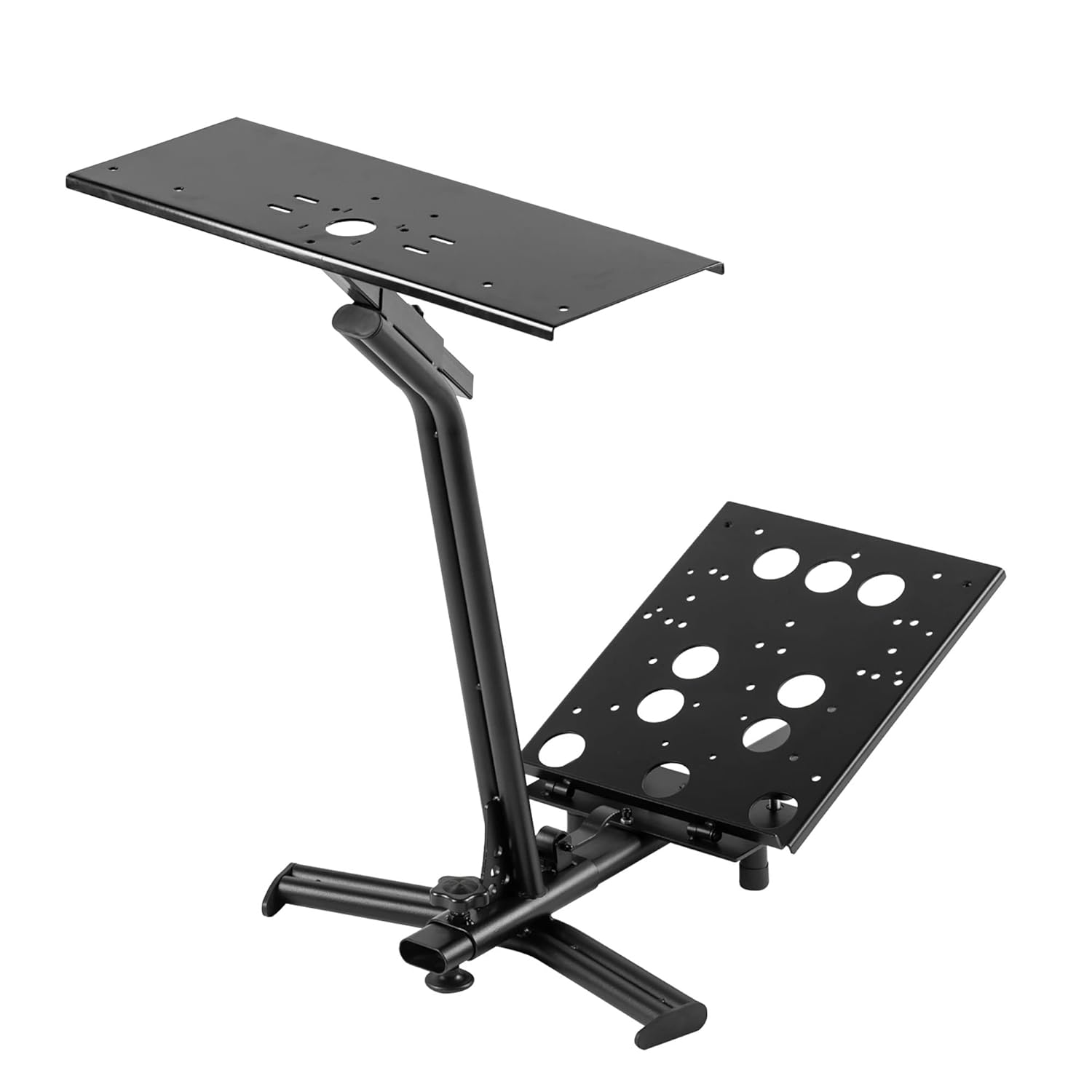
Figure 2.1: Front-side view of the FR-TEC Driving Stand Last Lap, showcasing its sturdy construction and adjustable components.
3. Setup
The FR-TEC Driving Stand Last Lap is designed for easy assembly. Follow these steps to set up your stand:
- Unpack Components: Carefully remove all components from the packaging. Verify that all parts are present according to the included parts list (not provided in this manual, refer to product packaging).
- Assemble Base: Connect the base components as instructed in the assembly diagram (refer to product packaging for detailed diagrams). Ensure all connections are secure.
- Attach Vertical Support: Secure the main vertical support to the assembled base.
- Install Steering Wheel Platform: Attach the steering wheel platform to the top of the vertical support. The platform has a double attachment point and triangular profile for secure mounting.
- Install Pedal Base: Attach the pedal base to the lower section of the stand. This base is horizontally adjustable and can be set from 10° to 28°.
- Mount Steering Wheel: Place your steering wheel onto the steering wheel platform. Use the provided screws or clamps (if applicable with your steering wheel model) to securely fasten it. The stand is ready to screw on ForceFeedback steering wheels.
- Mount Pedals: Secure your accelerator pedals to the pedal base. Adjust the distance of the pedal base to your preferred position.
- Adjust Height: Adjust the height of the steering wheel platform to a comfortable position for your seating arrangement.
- Position Stand: Place the assembled stand in front of your chair. Ensure the non-slip and anti-scratch pads on the base are properly positioned to prevent movement and protect your floor.

Figure 3.1: Side view of the stand, highlighting its adjustable height and pedal base angle.
4. Operating Instructions
Once the FR-TEC Driving Stand Last Lap is assembled and your steering wheel and pedals are mounted, you are ready to begin your simulation experience.
- Seating Position: Sit comfortably in your chair, ensuring you have easy access to both the steering wheel and pedals.
- Fine-tune Adjustments: Before starting your game, make any final adjustments to the stand's height and pedal base angle/distance to optimize your comfort and control.
- Stability Check: Ensure the stand is stable and does not wobble during use. The non-slip pads should keep it firmly in place.
- Cable Management: Route any steering wheel or pedal cables safely to prevent tripping hazards or entanglement.

Figure 4.1: The stand from another side angle, showing the FR-TEC branding on the vertical support.
5. Maintenance
To ensure the longevity and optimal performance of your FR-TEC Driving Stand Last Lap, follow these simple maintenance guidelines:
- Cleaning: Wipe the stand regularly with a soft, dry cloth to remove dust and dirt. For stubborn marks, a slightly damp cloth can be used, followed by drying. Avoid abrasive cleaners or solvents.
- Check Connections: Periodically inspect all screws and connections to ensure they remain tight. Re-tighten if necessary to maintain stability.
- Pad Inspection: Check the non-slip and anti-scratch pads on the base for wear or damage. Replace if they are no longer effective.
- Storage: If storing the stand for an extended period, ensure it is clean and dry. Store in a cool, dry place away from direct sunlight.
6. Troubleshooting
If you encounter any issues with your FR-TEC Driving Stand Last Lap, refer to the following common problems and solutions:
| Problem | Possible Cause | Solution |
|---|---|---|
| Stand is wobbly or unstable. | Loose connections; uneven surface; damaged pads. | Ensure all screws are tightened. Move stand to a flat, even surface. Check and replace non-slip pads if worn. |
| Steering wheel or pedals are not secure. | Improper mounting; incompatible hardware. | Verify that your steering wheel/pedals are correctly mounted and tightened according to their respective manuals. Ensure compatibility with the stand's mounting points. |
| Difficulty adjusting height or angle. | Adjustment knobs/levers are too tight or stiff. | Loosen adjustment knobs/levers before attempting to adjust. Apply a small amount of silicone lubricant if movement is stiff (avoiding contact with non-slip surfaces). |

Figure 6.1: Close-up view of the adjustable pedal base on the FR-TEC Driving Stand Last Lap.
7. Specifications
| Feature | Detail |
|---|---|
| Model Number | FT7008 |
| Product Dimensions | 4.72 x 0.31 x 0.31 inches (approximate, as per product data) |
| Item Weight | 24.3 pounds |
| Material | Carbon alloy metal structure |
| Pedal Base Adjustment | 10° to 28° (horizontal and distance adjustable) |
| Compatibility | All FR-TEC steering wheels and most other simulation steering wheels on the market |
8. Warranty and Support
For information regarding warranty coverage, technical support, or replacement parts for your FR-TEC Driving Stand Last Lap, please refer to the warranty card included with your product packaging or visit the official FR-TEC website.
Note: This manual provides general instructions. Specific assembly diagrams and detailed warranty terms are typically found within the product's original packaging or on the manufacturer's official support channels.