
1. Product Overview
The KOSCHEAL Q09 is a versatile 1-axis smartphone stabilizer designed to enhance your mobile photography and videography. It features a built-in fill light, a detachable wireless remote control, and can function as both a selfie stick and a tripod. Its compact and foldable design makes it highly portable.

Image 1: Overview of the KOSCHEAL Q09 Smartphone Stabilizer highlighting its key features.
2. Package Contents
- KOSCHEAL Q09 Smartphone Stabilizer
- Wireless Remote Control
- USB Charging Cable
- User Manual
3. Setup
3.1 Unfolding the Stabilizer
- Gently pull the phone clamp upwards to extend the selfie stick arm.
- Unfold the tripod legs at the base of the handle until they click into place, forming a stable base.
3.2 Mounting Your Smartphone
- Extend the phone clamp to its maximum width.
- Carefully place your smartphone into the clamp, ensuring it is centered and securely held. The phone should be balanced to prevent strain on the stabilizer motor.
3.3 Charging the Stabilizer and Remote
- Connect the provided USB charging cable to the charging port on the stabilizer and a suitable USB power source.
- The remote control typically uses a small button cell battery. If rechargeable, use its dedicated charging port.
- Charge until the indicator light shows a full charge.
3.4 Bluetooth Pairing
- Turn on the remote control by pressing and holding its power button until an indicator light flashes.
- On your smartphone, go to Bluetooth settings and search for available devices.
- Select the device named 'KOSCHEAL' or similar (refer to the remote for exact name).
- Once paired, the indicator light on the remote will stop flashing and remain solid.
4. Operating Instructions
4.1 Powering On/Off
- To power on the stabilizer, press and hold the power button on the handle until the indicator light illuminates.
- To power off, press and hold the power button again until the light turns off.
4.2 Switching Modes (Selfie Stick / Gimbal Stabilizer)

Image 2: Toggle key for switching between Selfie Stick Mode and Gimbal Stabilizer Mode.
- The KOSCHEAL Q09 features a toggle key to switch between two primary modes: Selfie Stick Mode (stabilization off) and Gimbal Stabilizer Mode (1-axis stabilization active).
- Locate the toggle key on the stabilizer handle and slide it to the desired mode. In Gimbal Stabilizer Mode, the device will actively counteract shakes and movements.
4.3 Using the Wireless Remote Control

Image 3: Wireless remote control for remote shooting.
- The remote control allows you to trigger your phone's camera remotely.
- Shutter Button: Press once to take a photo or start/stop video recording.
- Mode Switching: Some buttons may allow switching between horizontal and vertical shooting orientations or activating the 360-degree rotation for 'Dreamspace' effects. Refer to the remote's specific button functions.
4.4 Adjusting the Fill Light

Image 4: Detachable fill light for enhanced illumination.
- The Q09 features a detachable fill light with 3 color temperatures (white, natural, warm) and 9 brightness levels.
- Press the light button on the stabilizer to cycle through color temperatures.
- Press and hold the light button to adjust brightness.
- The fill light can be used both front and rear facing.
4.5 Using the Extension Rod and Tripod

Image 5: The KOSCHEAL Q09 extended to its full length and folded for portability.
- The stabilizer features an extendable aluminum alloy rod, reaching up to 700mm (28 inches). Pull the rod gently to extend it to your desired length.
- When using as a tripod, ensure the legs are fully extended and placed on a flat, stable surface.
4.6 App Integration and Creative Modes
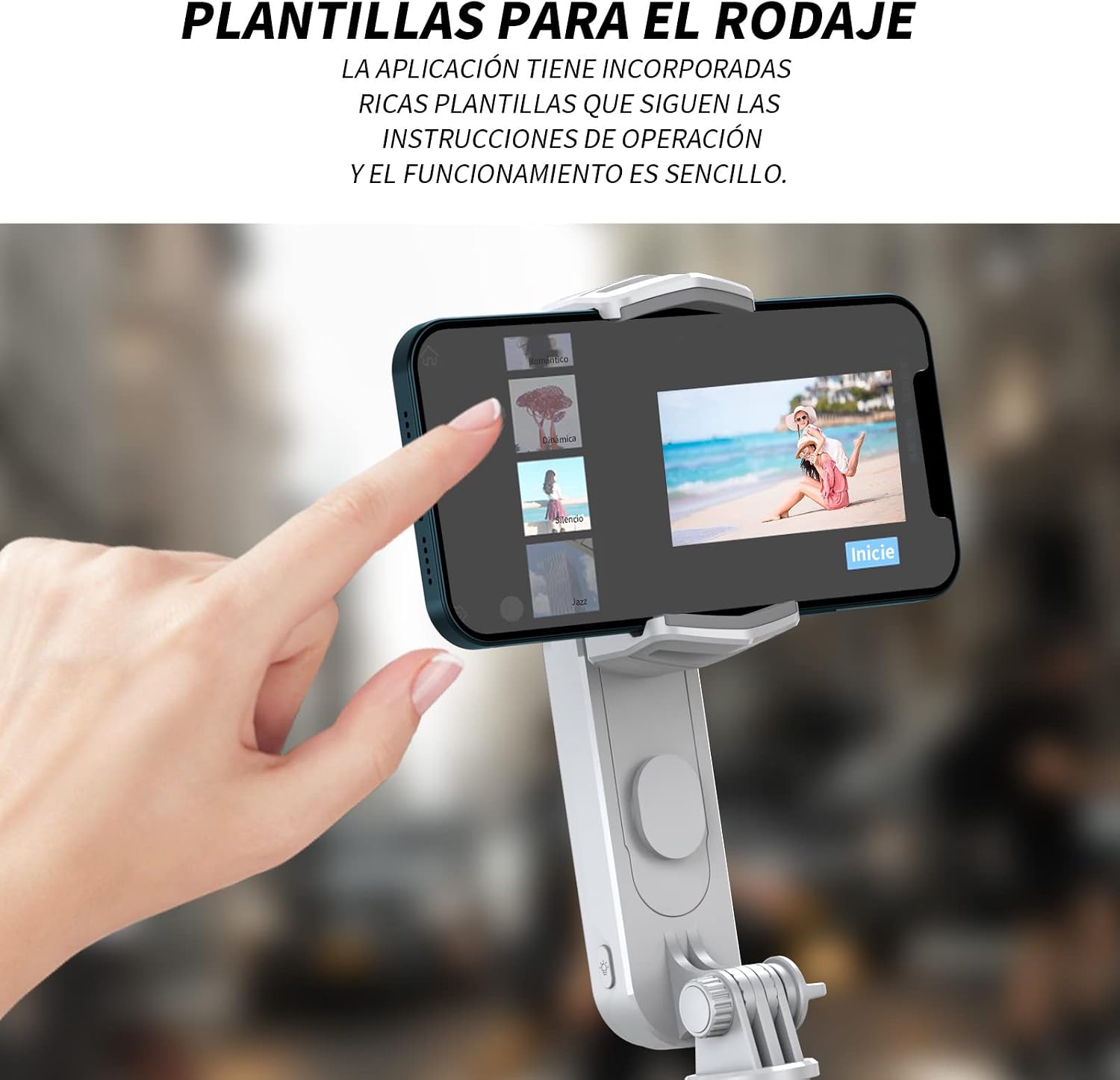
Image 6: Smartphone screen displaying app templates for creative shooting.
- Scan the QR code provided in the packaging to download the official KOSCHEAL app.
- The app offers various creative modes and shooting templates, including:
- Smart Hitchcock Zoom: A cinematic effect that changes the background perspective while the subject remains the same size.
- POV Mode: Captures dynamic first-person perspective shots.
- Dreamspace Mode: Allows for 360-degree rotation effects.
- Time-lapse: Compresses long events into short, sped-up videos.
- The app also supports tracking modes to keep subjects in focus and can integrate with third-party camera applications.
5. Maintenance
5.1 Cleaning
- Wipe the stabilizer with a soft, dry cloth.
- Avoid using harsh chemicals or abrasive materials that could damage the surface.
5.2 Storage
- Store the stabilizer in a cool, dry place away from direct sunlight and extreme temperatures.
- Ensure the device is powered off before storing.
- For long-term storage, charge the battery to about 50% every three months to prolong battery life.
6. Troubleshooting
6.1 Stabilizer Not Powering On
- Ensure the battery is charged. Connect to a power source and try again.
- Check the charging cable and adapter for damage.
6.2 Remote Control Not Connecting
- Ensure the remote control is powered on and its battery is not depleted.
- Verify Bluetooth is enabled on your smartphone.
- Forget the device in your phone's Bluetooth settings and attempt to re-pair.
- Ensure the remote is within operating range (typically 10 meters).
6.3 Phone Not Balancing Correctly in Gimbal Mode
- Ensure your smartphone is securely clamped and perfectly centered in the holder.
- Remove any bulky phone cases that might affect balance or weight distribution.
- The Q09 is a 1-axis stabilizer; while it reduces shake, it does not offer the full multi-axis stabilization of a 3-axis gimbal.
6.4 Fill Light Not Working
- Ensure the stabilizer has sufficient battery charge.
- Press the light button firmly to activate and cycle through modes.
7. Specifications
| Feature | Detail |
|---|---|
| Model Number | Q09 |
| Dimensions (Folded) | 18 x 4 x 7 cm |
| Weight | 265 g |
| Max Extension Length | 700 mm (28 inches) |
| Stabilization | 1-Axis Gimbal |
| Connectivity | Bluetooth Wireless Remote |
| Fill Light | 3 Color Temperatures, 9 Brightness Levels |
| Compatible Devices | Android and iPhone smartphones |
8. Warranty and Support
For warranty information, technical support, or service inquiries, please refer to the official KOSCHEAL website or contact their customer service directly. Details can typically be found on the product packaging or the manufacturer's official online channels.


