
Bestqool Redot L
Contents
Bestqool Red Light Therapy Mat User Manual
Model: Redot L
1. Introduction
This user manual provides comprehensive instructions for the safe and effective operation of your Bestqool Red Light Therapy Mat. This device is designed to deliver red and near-infrared light therapy for various wellness applications, including muscle recovery, pain relief, and skin health.
Please read this manual thoroughly before first use and retain it for future reference.
2. Important Safety Information
WARNING: Read all safety warnings and instructions before using this product. Failure to follow the warnings and instructions may result in electric shock, fire, or serious injury.
- Consult a healthcare professional before use if you have any medical conditions, are pregnant, or are taking medications.
- Do not use on broken skin, open wounds, or areas with active infections.
- Avoid direct eye exposure to the light. Protective eyewear is recommended.
- Do not immerse the device in water or other liquids. Clean only with a dry or slightly damp cloth.
- Keep out of reach of children and pets.
- Ensure the power adapter and cable are not damaged before each use.
- Do not use if the device shows any signs of damage or malfunction.
- The device may generate warmth. Monitor skin temperature during use to prevent overheating. The temperature range is between 95°F and 113°F (35°C and 45°C) from Power L1 to L5.
- Limit use to under 20 minutes for the highest setting to avoid burns.
3. Product Overview
The Bestqool Red Light Therapy Mat (Model: Redot L) is a large, flexible pad equipped with 400 high-power LEDs. It features both red light (660nm) and near-infrared (850nm) wavelengths, utilizing triple-chip technology for enhanced precision.
Components:
- Red Light Therapy Mat (Redot L)
- Controller with display
- Power Adapter
- Power Cable
- Connection Wire (for splicing two mats)
- Adhesion Tape
- User Manual
- Inflatable Pillow

Image: The Bestqool Red Light Therapy Mat, showing the main mat, controller, and included inflatable pillow.

Image: A visual representation of all included accessories: the Redot L mat, power adapter, controller, connection wire, power cable, user manual, and adhesion tape.
4. Setup
Initial Setup:
- Unpack all components from the packaging.
- Lay the Red Light Therapy Mat flat on a clean, dry surface.
- Connect the controller to the mat's input port.
- Connect the power cable to the power adapter, then connect the power adapter to the controller.
- Plug the power adapter into a suitable electrical outlet.
Splicing Two Redot L Mats (Optional):
For full-body coverage, two Redot L mats can be connected. The second mat is sold separately.
- Connect the two Redot L mats using the provided connection wire.
- Plug the controller into one of the mats.
- Connect the power cable to the power adapter.
- Connect the controller to the power adapter.
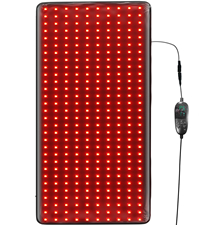
Image: Step-by-step diagram illustrating how to connect two Redot L mats for extended coverage.
5. Operating Instructions
Controller Functions:

Image: Detailed view of the controller, highlighting buttons for power, PWM adjustment, and time control.
- Power On/Off: Press once to turn on. A second press activates 10Hz pulse mode. A third press activates 40Hz pulse mode.
- PWM Adjust (+/-): Adjusts power intensity from P1 to P5. P1 is the lowest intensity, P5 is the highest.
- Time Control (+/-): Sets the session duration from 15 to 90 minutes in 15-minute increments.
Therapy Modes:

Image: Visual explanation of the three therapy modes: Constant, 10 Hz Pulse, and 40 Hz Pulse.
- Constant Mode: Provides continuous, stable red + NIR light. Ideal for easing fatigue and relaxing the body. Suitable for regular daily use.
- 10 Hz Pulse Mode: Delivers 10 cycles per second of gentle pulses. Calms inflammation, promotes skin renewal, and targets soothing the skin.
- 40 Hz Pulse Mode: Delivers 40 cycles per second, reaching deeper tissues. Boosts cell energy and ATP, eases pain, and supports healing.
Recommended Usage Guidelines:
The following table provides general guidelines. Individual results may vary.

Image: A table outlining recommended light intensity, temperature, duration, and pulse mode for various applications like muscle fatigue, wound healing, and pain relief.
| Application | Recommend Light Intensity | Temperature | Recommend Duration | Recommend Pulse Mode |
|---|---|---|---|---|
| Muscle Fatigue | P3-P4 | Low Heat | 40-50 mins | 40Hz |
| Wound Healing | P4-P5 | Low Heat | 30 mins | 40Hz |
| Back Pain | P5 | Low Heat | 50 mins or more | 40Hz |
| Joint Pain | P5 | Low Heat | 50 mins or more | 40Hz |
| Chronic Pain | P4-P5 | Low Heat | 40-50 mins | 40Hz |
| Skin Rejuvenation | P2-P3 | Low Heat | 30 mins | 10Hz |
| Hair Regrowth | P1-P2 | Low Heat | 20-30 mins | 10Hz |
Light Sensitivity Test:
Before first use, perform a light sensitivity test on a small area of skin.

Image: A four-step guide for performing a light sensitivity test on the arm.
- Step 1: Place the mat on your arm.
- Step 2: Leave for 5-10 minutes.
- Step 3: Remove and wait 30 minutes.
- Step 4: If no discomfort occurs, proceed with use.
6. Maintenance
Cleaning:
- Always unplug the device from the power outlet before cleaning.
- Wipe the surface of the mat with a soft, dry, or slightly damp cloth.
- Do not use abrasive cleaners, solvents, or harsh chemicals.
- Ensure the mat is completely dry before storing or next use.
- The light band itself is enclosed with a zipper, allowing it to be moved out of the way for handwashing the fabric cover.
Storage:
Store the mat in a dry, room-temperature place, away from direct sunlight and excessive moisture.
Video: Demonstrates how to properly store the Bestqool Red Light Therapy Mat by rolling it up.
7. Troubleshooting
| Problem | Possible Cause | Solution |
|---|---|---|
| Device does not turn on. | Not plugged in correctly; Power adapter or cable damaged; Controller malfunction. | Ensure all connections are secure. Check if the power outlet is working. Inspect power adapter and cable for damage. If issues persist, contact customer support. |
| Lights are dim or flickering. | Low power supply; Faulty connection; Device malfunction. | Ensure the power adapter is fully inserted. Try a different power outlet. If the problem continues, contact customer support. |
| Controller not responding. | Loose connection; Controller malfunction. | Check the connection between the controller and the mat. Unplug and replug the power. If unresponsive, contact customer support. |
| Mat feels too hot. | High intensity setting; Prolonged use. | Reduce the power intensity (PWM setting). Limit session duration, especially at higher settings. Ensure adequate ventilation around the mat. |
8. Specifications
| Feature | Detail |
|---|---|
| Model Number | Redot L |
| Product Dimensions | 38.2" x 24" x 0.39" (97cm x 60cm x 1cm) |
| Weight | 3.08 Pounds (1.4 KG) |
| LED Count | 400 high power LEDs |
| Wavelengths | Red (660nm), Near-Infrared (850nm) |
| Power Consumption | 63W |
| Irradiance | 56 mW/cm² @ 3 inches (as per product images) |
| Temperature Range | 95°F - 113°F (35°C - 45°C) |
| Timer Settings | 15, 30, 45, 60, 75, 90 minutes |
| Pulse Modes | Constant, 10Hz, 40Hz |
| Manufacturer | bestqool |
| Country of Origin | China |
9. Warranty and Support
Warranty Information:
Bestqool offers a 30-day return policy for this product. For specific warranty terms and conditions, please refer to the documentation included with your purchase or contact Bestqool customer service directly.
Customer Support:
For any questions, technical assistance, or warranty claims, please contact Bestqool customer service:
- Website: www.bestqool.com
- Text Message (USA): +1 6892070579 (Text ONLY)
- WhatsApp (Text + Pics): +1 3195123212
- Email: Refer to your product packaging or Bestqool website for the most current email address.
When contacting support, please have your product model number (Redot L) and purchase date available.
Documents and downloads
Ask a question about this manual
Ask about setup, troubleshooting, compatibility, parts, safety, or missing instructions. Manuals+ will review the question and use this page’s manual context to help answer it.