1. Introduction
This manual provides essential information for the safe and effective use of your BCXY replacement battery, model CS-KMK811PH. Please read these instructions carefully before use and retain them for future reference. This battery is designed to power various Kimo 20V cordless tools.
2. Important Safety Information
Failure to follow these safety instructions may result in fire, electric shock, or serious injury.
- Do not attempt to disassemble, open, or service the battery pack.
- Replace only with the battery pack designated for the compatible Kimo products.
- Do not crush, puncture, short external contacts, or dispose of in fire or water.
- Do not store above 60°C (140°F).
- The new battery pack must be fully charged before its first use.
- Always read the operating guide of your power tool before using the battery.
- The battery features built-in protection against overcharge, over discharge, over voltage, and short circuit for enhanced safety and battery life.

Image 1: Battery warning label with safety instructions and certifications.
3. Compatibility
This BCXY replacement battery (Model: CS-KMK811PH, Part No: K16811) is compatible with the following Kimo power tool models:
- QM-23802
- QM-6001
- QM-4A6001
- QM-3061B
- 6 Inch Cordless Chainsaw
- QM-13809S-T-20
- Leaf Blower 2-IN-1 20V
- QM-3602B
- QM-T20
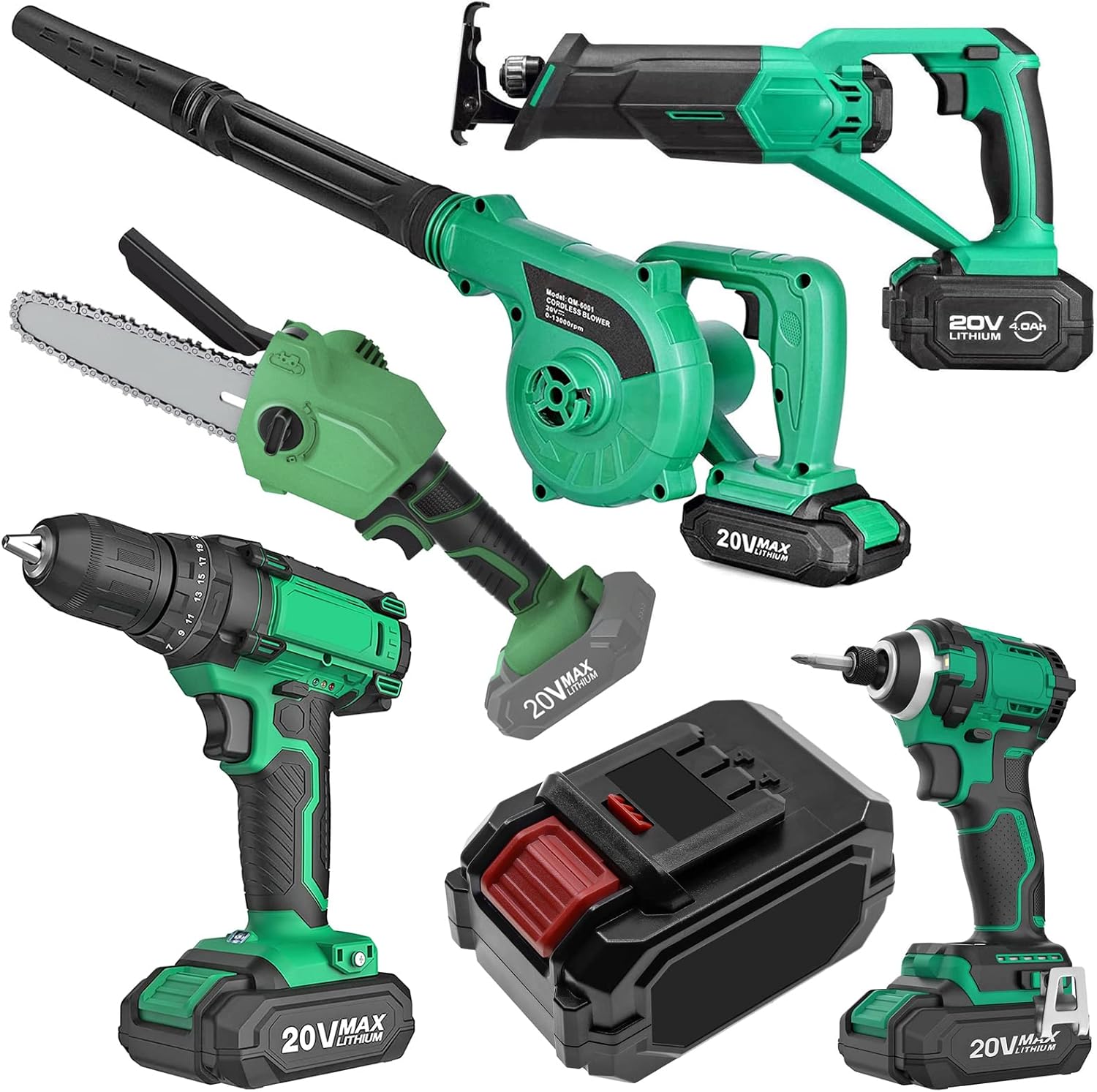
Image 2: The replacement battery shown with compatible Kimo power tools.
4. Setup and Installation
To install the battery into a compatible Kimo power tool:
- Ensure the power tool is switched off and disconnected from any power source.
- Align the battery with the battery slot on the tool.
- Slide the battery firmly into the slot until it clicks securely into place. Do not force the battery.
To remove the battery:
- Press and hold the battery release button, typically located on the side or front of the battery.
- Slide the battery out of the tool.

Image 3: The BCXY replacement battery, showing its design for tool integration.
5. Charging Instructions
Always use a charger specifically designed for 20V Lithium-Ion batteries compatible with Kimo power tools. Refer to your charger's manual for specific charging procedures.
- Insert the battery into the compatible charger.
- Connect the charger to a power outlet.
- Allow the battery to charge fully before its initial use and whenever its power is depleted.
- Monitor the charging process and disconnect the charger once the battery is fully charged to prevent overcharging.
- Do not charge batteries in extreme temperatures (below 0°C/32°F or above 40°C/104°F).
6. Operating Guidelines
- Ensure the battery is fully charged before starting any task to maximize performance and run time.
- Do not force the battery into the tool. If it does not slide in easily, check for obstructions or incorrect alignment.
- If the battery or tool becomes excessively hot during operation, stop use immediately and allow them to cool down before resuming.
- Avoid completely discharging the battery, as this can reduce its overall lifespan.
7. Maintenance and Storage
- Keep the battery clean and dry. Wipe off any dust or debris with a clean, dry cloth.
- Store the battery in a cool, dry place, away from direct sunlight, moisture, and extreme temperatures.
- For long-term storage (more than 30 days), it is recommended to charge the battery to approximately 50-60% capacity. Avoid storing fully discharged or fully charged for extended periods.
- Do not store the battery near metallic objects that could short the terminals.
8. Troubleshooting
- Battery not charging: Ensure the charger is properly connected to a working power outlet and the battery is correctly seated in the charger. Check if the battery or charger is too hot or too cold.
- Tool not operating with charged battery: Verify the battery is fully inserted and clicked into place. Ensure the tool itself is functional and not experiencing any other issues.
- Reduced run time: This can be normal for older batteries. Ensure the battery is fully charged before use. Operating in very cold conditions can also temporarily reduce run time.
- Battery indicator lights not working: Ensure the battery is charged. If the issue persists, contact support.
9. Specifications
| Feature | Specification |
|---|---|
| Model Number | CS-KMK811PH |
| Part Number | K16811 |
| Voltage | 20.0V |
| Capacity | 4000mAh |
| Watt-Hours (Wh) | 80.0Wh |
| Battery Cell Composition | Lithium Ion |
| Dimensions | 120.4 x 77.3 x 68.0mm (4.74 x 3.04 x 2.68 inches) |
| Weight | 836.0g (1.84 pounds) |
| Certifications | ISO9001, RoHS, CE, UN38.3, MSDS |
10. Warranty and Support
This BCXY replacement battery is manufactured to meet or exceed original specifications and is certified with ISO9001, RoHS, CE, UN38.3, and MSDS for quality assurance and safety.
For technical support or warranty inquiries, please contact your retailer or the manufacturer, BCXY. For information regarding the battery's internal components, you may refer to the manufacturer listed on the battery label, Cameron Sino, at their website: www.cameronsino.com.


