
Introduction
The 1Mii B06Pro+ is a high-fidelity Bluetooth 5.3 audio receiver designed to upgrade your existing home stereo system with wireless audio streaming capabilities. It supports advanced audio codecs like LDAC and aptX HD, ensuring high-resolution sound quality. The device features an LCD display for easy monitoring of status and track information, dual antennas for extended range, and intuitive controls for volume and track selection.
Package Contents
Verify that all items listed below are included in your package:
- 1Mii B06Pro+ Bluetooth Receiver
- Optical Cable
- 3.5mm Male to RCA Male Cable
- 3.5mm Male to Male Cable
- Power Cable + Power Adapter

Video: An unboxing demonstration of the 1Mii B06Pro+ Bluetooth Receiver, showing all included accessories and the device itself.
Product Overview
The 1Mii B06Pro+ receiver is designed for ease of use and high-quality audio. It features multiple audio output options and an informative LCD display.
Front Panel Controls and Display
- LCD Display: Shows current song name, volume level, active Bluetooth codec (e.g., LDAC, aptX HD), and connection status.
- Power Button: Turns the device on/off.
- Bluetooth Button: Initiates pairing mode.
- Volume Up/Next Track Button (+): Short press for volume up, long press for next track.
- Volume Down/Previous Track Button (-): Short press for volume down, long press for previous track.
- Play/Pause Button: Controls media playback.

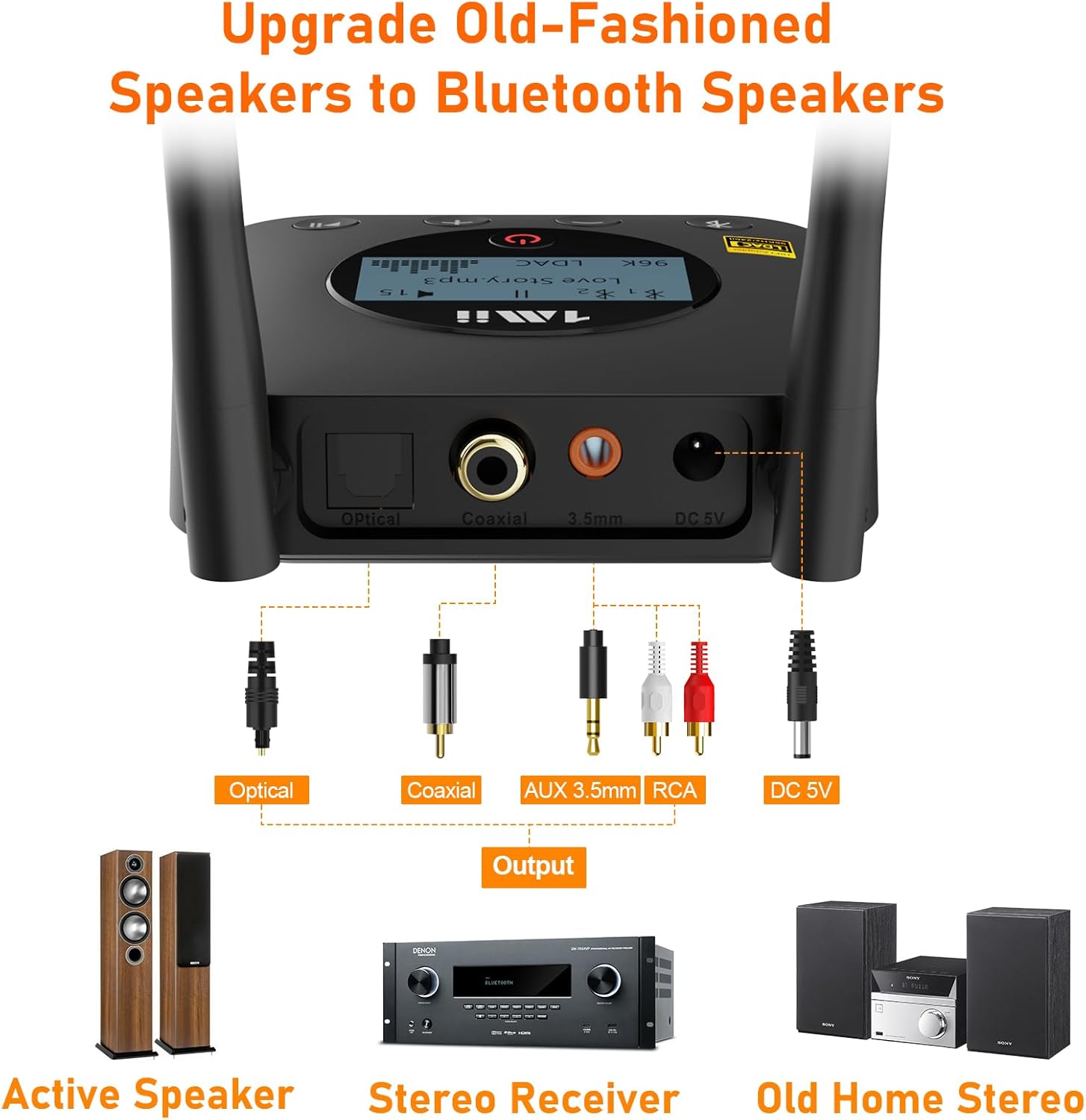
Rear Panel Connections
- Optical Output: For digital audio connection to compatible stereo systems.
- Coaxial Output: For digital audio connection to compatible stereo systems.
- 3.5mm AUX Output: For analog audio connection to stereo systems or powered speakers.
- DC 5V Power Input: Connects to the provided power adapter.
- Dual Antennas: For enhanced Bluetooth signal reception and range.
Setup and Connection
Follow these steps to connect your 1Mii B06Pro+ to your home stereo system and pair it with your Bluetooth device.
Step 1: Connect to Power
- Connect the provided power cable to the DC 5V input on the back of the B06Pro+.
- Plug the power adapter into a wall outlet. The device will power on automatically.
Step 2: Connect to Your Audio System
Choose one of the following connection methods based on your audio system's available inputs:
- Optical Connection: Use the optical cable to connect the B06Pro+'s Optical output to your stereo receiver's optical input.
- Coaxial Connection: Use a coaxial cable (not included) to connect the B06Pro+'s Coaxial output to your stereo receiver's coaxial input.
- 3.5mm AUX Connection: Use the 3.5mm male to male cable or the 3.5mm male to RCA male cable to connect the B06Pro+'s 3.5mm AUX output to your stereo system's AUX input.

Video: A demonstration of connecting the 1Mii B06Pro+ Bluetooth Receiver to a home stereo system.
Step 3: Bluetooth Pairing
- The B06Pro+ will automatically enter pairing mode when first powered on. The LCD display will show "Pairing" or a similar indicator.
- On your smartphone, tablet, or other Bluetooth audio device, enable Bluetooth and search for available devices.
- Select "1Mii B06Pro+" from the list of devices to connect.
- Once connected, the LCD display will show "Connected" and the name of the connected device.
- To pair a second device, press and hold the Bluetooth button on the B06Pro+ for 2 seconds to re-enter pairing mode. Connect the second device as described above. The B06Pro+ supports dual device connection.
Operating Instructions
Once connected, you can control your audio playback directly from the B06Pro+ receiver or your paired device.
Volume Control
- Press the + button to increase volume.
- Press the - button to decrease volume.
Track Selection
- Press and hold the + button for 2 seconds to skip to the next track.
- Press and hold the - button for 2 seconds to go to the previous track.
Play/Pause
- Press the Play/Pause button to pause or resume playback.
LCD Display Information
The LCD display provides real-time information about your audio stream:
- Song Name: Displays the title of the currently playing track.
- Volume Level: Indicates the current volume setting.
- Bluetooth Codec: Shows the active audio codec (e.g., LDAC, aptX HD, AAC, SBC).
- Connection Status: Indicates if a device is paired and connected.
Video: A guide demonstrating the operation and controls of the 1Mii B06Pro+ Bluetooth Receiver.
Key Features
The 1Mii B06Pro+ incorporates several features to enhance your wireless audio experience.
LDAC Hi-Res Wireless Audio
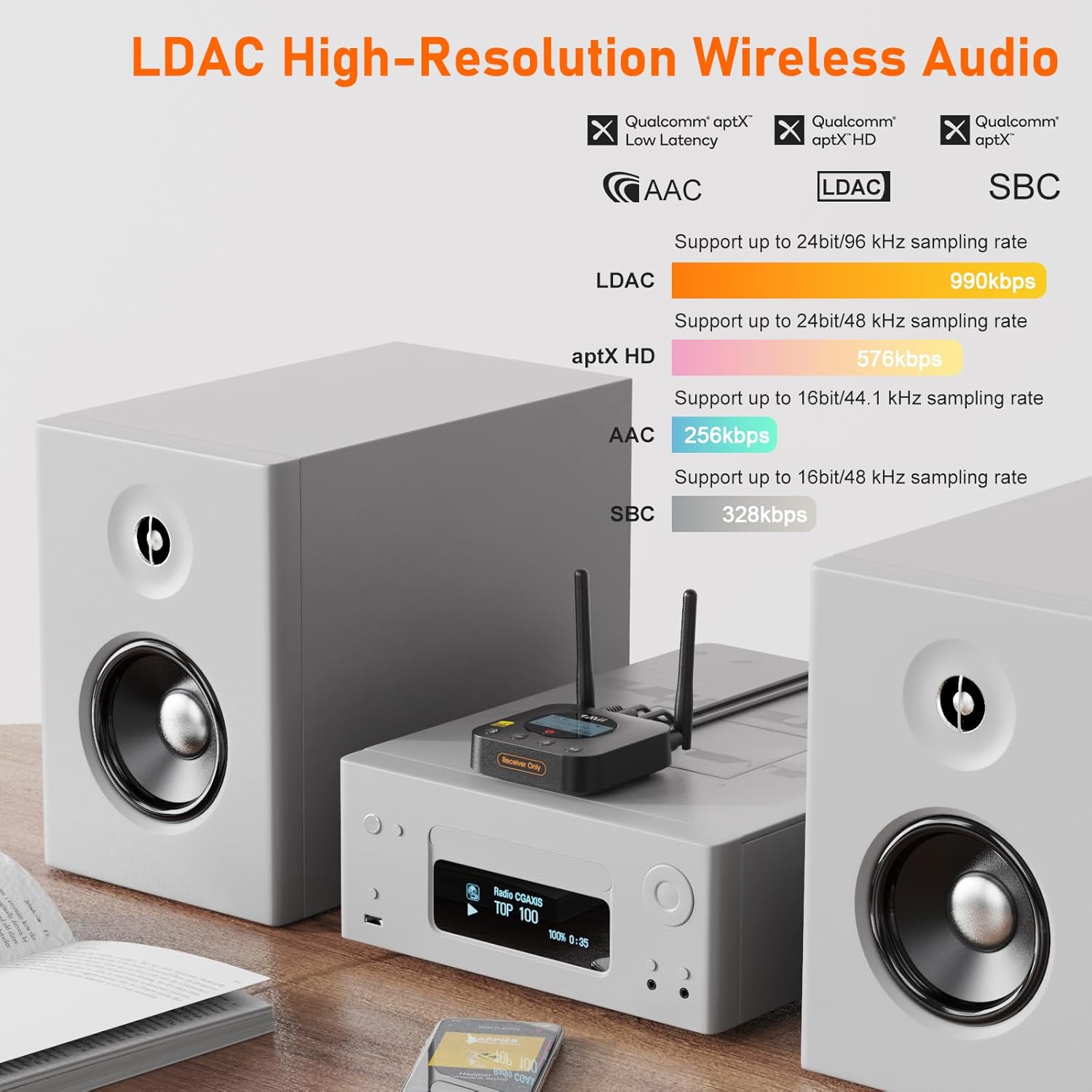
The B06Pro+ supports LDAC, a high-resolution audio coding technology that allows for the transmission of High-Resolution (Hi-Res) Audio content over Bluetooth connections. This enables near-lossless audio quality, supporting up to 24bit/96 kHz sampling rates at 990kbps, significantly surpassing standard Bluetooth audio.
Audiophile-grade ESS DAC
Equipped with an ESS Digital-to-Analog Converter (DAC) chip, the B06Pro+ efficiently decodes digital audio signals into analog sound. This high-performance DAC contributes to a lifelike listening experience, providing superior audio clarity and detail compared to standard audio processing.

Extended Wireless Range
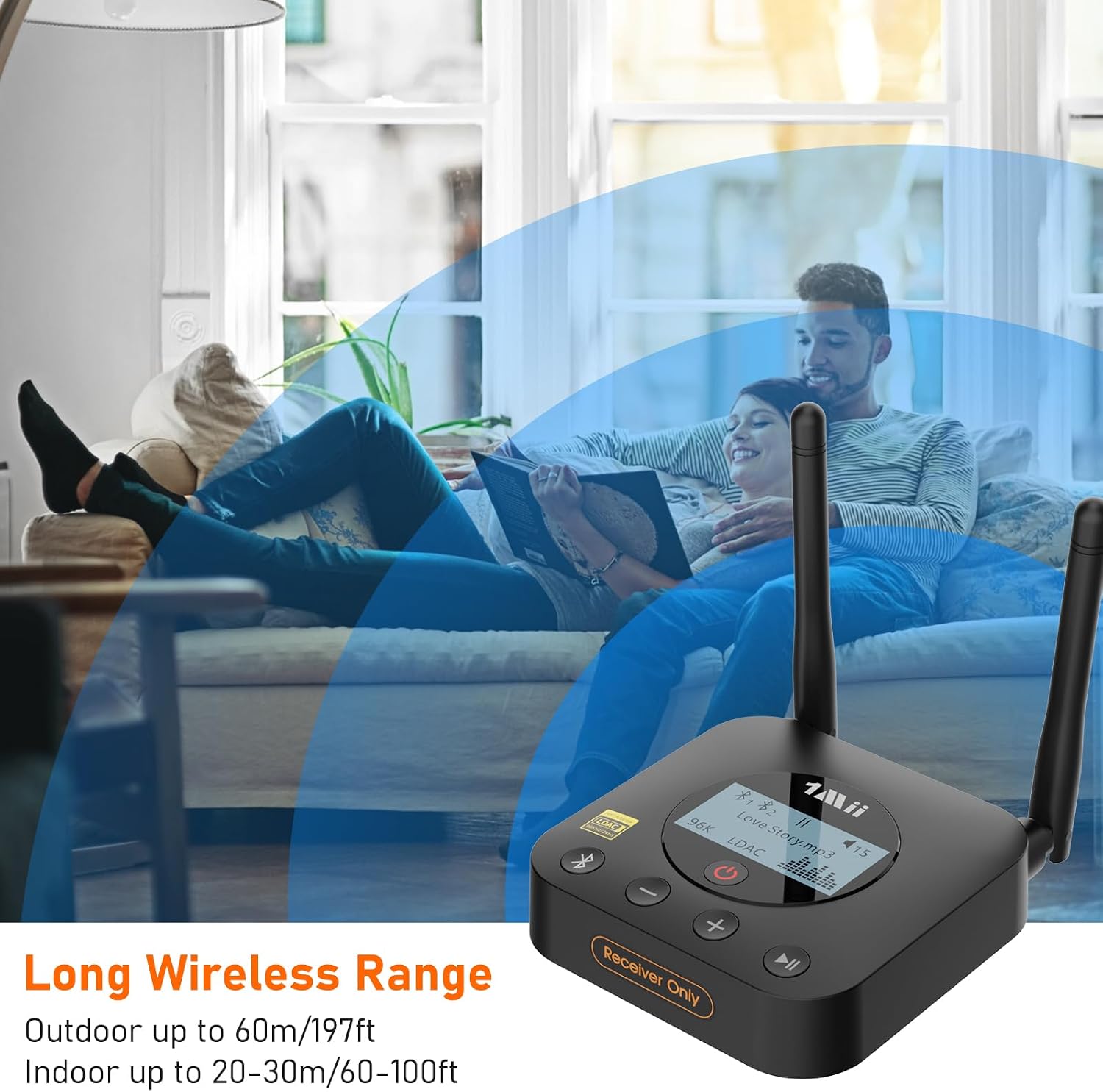
Featuring dual antennas and Class 1 Bluetooth technology, the B06Pro+ offers an extended wireless range. It can achieve up to 197 feet (60 meters) line-of-sight in open areas and typically 60-100 feet (20-30 meters) indoors without significant obstacles. Note that environmental factors such as Wi-Fi routers or other wireless devices can affect the actual range.
Troubleshooting
If you encounter issues with your 1Mii B06Pro+, refer to the following common problems and solutions:
- No Sound:
- Ensure the B06Pro+ is properly connected to your audio system via the chosen cable (optical, coaxial, or 3.5mm AUX).
- Verify that your audio system's input source is set correctly to the input where the B06Pro+ is connected.
- Check the volume levels on both the B06Pro+ and your connected audio device (smartphone/tablet) and your stereo system.
- Confirm that your Bluetooth device is successfully paired and playing audio.
- Cannot Pair Bluetooth Device:
- Ensure the B06Pro+ is in pairing mode (LCD displays "Pairing"). If not, press and hold the Bluetooth button for 2 seconds.
- Make sure your Bluetooth device is within range (ideally within 30 feet/10 meters during initial pairing).
- Try turning off and on Bluetooth on your source device.
- If previously paired, try "forgetting" the B06Pro+ from your device's Bluetooth settings and re-pairing.
- Automatic Reconnection Issues / Cannot Disconnect:
- The B06Pro+ is designed to automatically reconnect to the last paired device when in range. If you wish to connect to a different Bluetooth audio receiver, you may need to manually disconnect the B06Pro+ from your source device's Bluetooth settings first.
- To prevent automatic reconnection, power off the B06Pro+ when not in use, or manually disconnect it from your source device.
- Poor Audio Quality or Dropouts:
- Ensure your source device supports LDAC or aptX HD for the best audio quality. The LCD will indicate the active codec.
- Reduce the distance between the B06Pro+ and your Bluetooth source device.
- Minimize interference from other wireless devices (Wi-Fi routers, cordless phones, microwaves).
- Ensure the antennas on the B06Pro+ are positioned upright and unobstructed.
Specifications
| Feature | Specification |
|---|---|
| Model Name | B06Pro+ |
| Bluetooth Version | 5.3 |
| Supported Audio Codecs | LDAC, aptX HD, aptX Low Latency, aptX, AAC, SBC |
| DAC Chip | Audiophile-grade ESS DAC |
| Connectivity Technology | Bluetooth |
| Audio Outputs | Optical, Coaxial, 3.5mm AUX |
| Wireless Range (Outdoor) | Up to 197ft (60m) line-of-sight |
| Wireless Range (Indoor) | Up to 60-100ft (20-30m) without obstacles |
| Display Type | LCD |
| Control Type | Push Button (Volume, Track Selection) |
| Power Source | Corded Electric (DC 5V) |
| Item Weight | 90 g |
| Antenna Description | Dual Antennas |
| Compatible Devices | Home Stereo System, Powered Speaker, AV Receiver, Amplifier, Smartphone, Tablet, Laptop |
Maintenance
To ensure the longevity and optimal performance of your 1Mii B06Pro+ receiver, follow these maintenance guidelines:
- Cleaning: Use a soft, dry cloth to clean the exterior of the device. Avoid using abrasive cleaners, solvents, or strong chemicals, as these can damage the finish or internal components.
- Storage: When not in use for extended periods, store the device in a cool, dry place away from direct sunlight and extreme temperatures.
- Environment: Avoid exposing the device to moisture, dust, or excessive heat. Do not place it near heat sources such as radiators or stoves.
- Handling: Handle the device with care. Avoid dropping it or subjecting it to strong impacts.
Warranty and Support
Warranty Information
The 1Mii B06Pro+ Bluetooth Receiver comes with a 1-Year Warranty from the date of purchase. This warranty covers manufacturing defects and malfunctions under normal use. It does not cover damage caused by misuse, accidents, unauthorized modifications, or external factors.
Customer Support
For technical assistance, troubleshooting, or warranty claims, please contact 1Mii customer support. Refer to the contact information provided in your product packaging or visit the official 1Mii website for the most up-to-date support resources.


