
Introduction
This manual provides essential instructions for the safe and effective use, setup, operation, and maintenance of your BCXY CS-KMK811PW 20V 1500mAh Lithium-Ion battery. This battery is designed as a replacement for various Kimo 20V tools, including specific models of leaf blowers and cordless chainsaws.
Compatible models include: Kimo Leaf Blower 2-IN-1 20V 6 Inch Cordless Chainsaw QM-T20, QM-4A6001, QM-23802, QM-6001, QM-3061B, QM-13809S-T-20, and QM-3602B. The compatible battery part number is K16811.

Image: The BCXY CS-KMK811PW battery displayed alongside several Kimo 20V power tools, illustrating its compatibility and intended use.
Safety Instructions
Read all safety warnings and instructions before using the battery.
- DO NOT attempt to disassemble, open, or service the battery pack. Unauthorized servicing can lead to hazards.
- Replace only with the battery pack designated for this product. Using an incompatible battery may cause injury or damage.
- DO NOT crush, puncture, short external contacts, or dispose of in fire or water. These actions can cause fire, explosion, or chemical burns.
- DO NOT store above 60°C (140°F). High temperatures can degrade battery performance and pose safety risks.
- The battery pack must be fully charged before initial use to ensure optimal performance and longevity.
- To reduce the risk of fire or burns, always read and follow the instructions in the operating guide of the tool before using the battery.
- This battery features built-in overcharge, over-discharge, over-voltage, and short-circuit protection for enhanced safety and battery life.

Image: Detailed view of the battery's information label, highlighting critical safety warnings and product specifications.
Setup
Initial Charging
Before first use, ensure the battery is fully charged. Connect the battery to a compatible Kimo 20V battery charger. The charger's indicator lights will show the charging status. Once fully charged, disconnect the battery from the charger.
Battery Installation
- Ensure the power tool is turned off and disconnected from any power source.
- Align the battery pack with the battery port on the compatible Kimo 20V tool.
- Slide the battery into the port until it clicks securely into place. A firm click indicates proper installation.
- To remove the battery, press the release button(s) located on the sides of the battery pack and slide the battery out of the tool.

Image: Front view of the BCXY CS-KMK811PW battery, illustrating the battery release mechanism and charge indicator lights.
Operating Instructions
Checking Battery Charge Level
The battery pack features an LED indicator to display the remaining charge. Press the small button next to the LED lights to activate the indicator. The number of illuminated LEDs corresponds to the charge level:
- Three LEDs: Full charge
- Two LEDs: Medium charge
- One LED: Low charge, recharge soon
Using the Battery with Tools
Once the battery is securely installed in a compatible Kimo 20V tool, the tool is ready for operation according to its specific user manual. Always refer to the tool's manual for detailed operating procedures and safety guidelines.
If the tool's performance decreases or stops, check the battery charge level and recharge if necessary.
Maintenance
Charging
Always use the original or a compatible Kimo 20V charger for recharging the battery. Do not use chargers not specifically designed for this battery type. Overcharging or undercharging can reduce battery life. It is recommended to fully charge the battery before storing it for extended periods.
Storage
Store the battery in a cool, dry place, away from direct sunlight and extreme temperatures. Do not store the battery above 60°C (140°F). For long-term storage, it is advisable to store the battery with a partial charge (around 50%) to maintain its health.
Cleaning
Keep the battery contacts clean and free from dirt or debris. Use a dry, clean cloth to wipe the battery pack. Do not use liquids or solvents for cleaning.
Troubleshooting
| Problem | Possible Cause | Solution |
|---|---|---|
| Battery not charging | Charger not plugged in; faulty charger; battery too hot/cold; faulty battery. | Check charger connection; try a different charger; allow battery to reach room temperature; contact support if battery is suspected faulty. |
| Tool not powering on with battery | Battery not fully charged; battery not properly installed; faulty battery or tool. | Charge battery fully; ensure battery is clicked into place; test with another battery if available; contact tool manufacturer support. |
| Reduced run time | Battery not fully charged; battery nearing end of life; extreme operating conditions. | Ensure full charge; consider replacing battery if it's old; operate within recommended temperature ranges. |
Specifications
- Model Number: CS-KMK811PW
- Compatible Part Number: K16811
- Voltage: 20.0V
- Capacity: 1500mAh
- Watt-Hours (Wh): 30.0Wh
- Battery Cell Composition: Lithium Ion
- Dimensions: 116.8 x 77.3 x 47.0mm (4.6 x 3.04 x 1.85 inches)
- Weight: 543.0g
- Certifications: ISO9001, RoHS, CE, UN38.3, MSDS
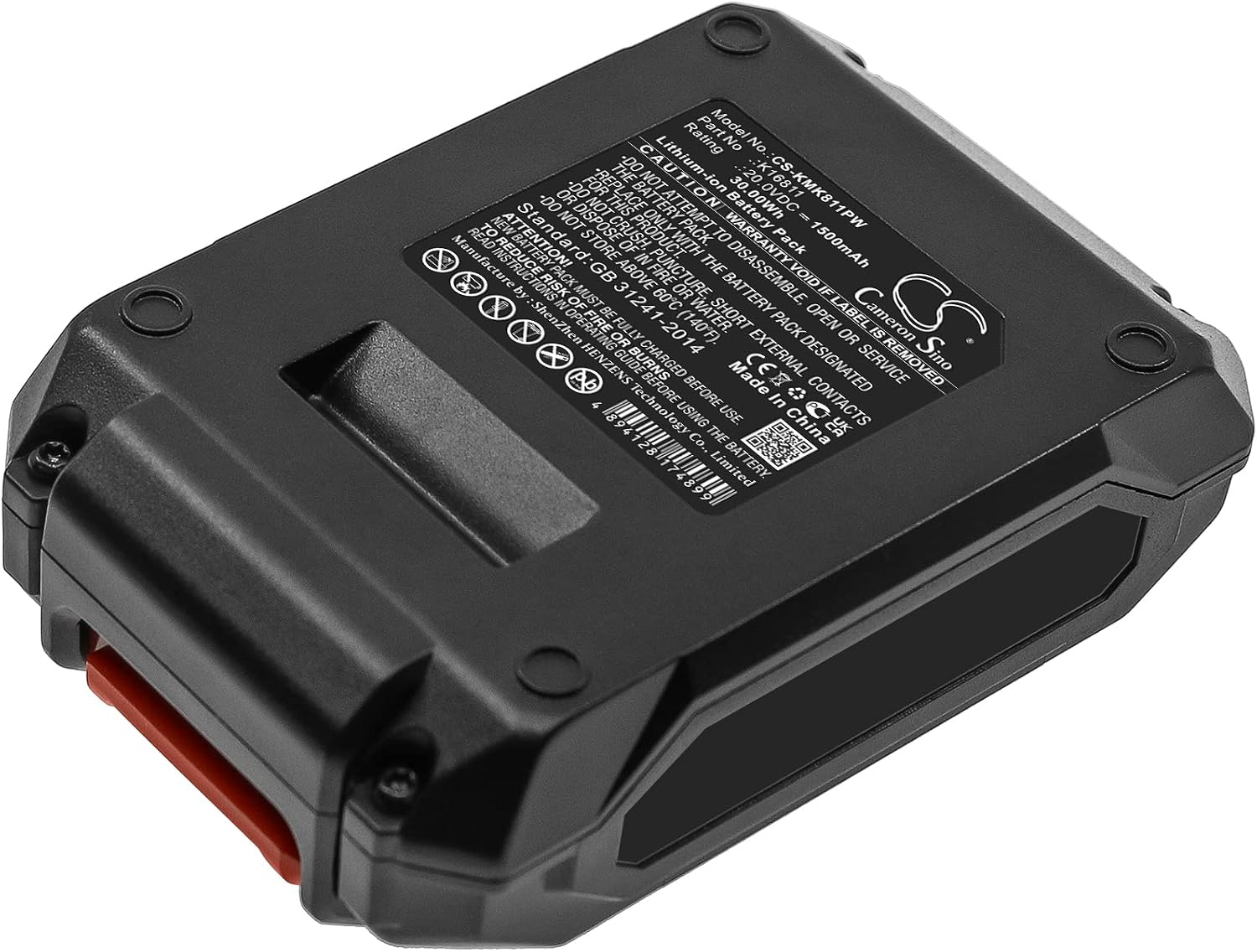
Image: Angled view of the battery, clearly displaying the model number and other technical specifications printed on its label.
Warranty and Support
This BCXY battery is manufactured to high standards and undergoes strict quality control. For specific warranty information, please refer to the documentation provided with your purchase or contact your retailer.
For technical support or inquiries, please visit the manufacturer's website or contact their customer service. You may find additional information and support resources at www.cameronsino.com.