
1. Introduction
This manual provides detailed instructions for the KOSCHEAL L7BPro 3-Axis Gimbal Stabilizer. Please read this manual carefully before use to ensure proper operation and to maximize the device's potential. This stabilizer is designed to enhance your smartphone videography and photography with smooth, stable footage and intelligent features.
2. What's in the Box
Verify that all the following items are included in your package:
- KOSCHEAL L7BPro 3-Axis Gimbal Stabilizer
- Mini Tripod
- Magnetic Fill Light
- Remote Control
- Carrying Case
- Storage Pouch
- USB Charging Cable
- User Manual

Image: KOSCHEAL L7BPro Gimbal Stabilizer with all included accessories, such as the gimbal unit, magnetic fill light, mini tripod, remote control, carrying case, and storage pouch.
3. Setup
- Unfolding the Gimbal: Gently unfold the gimbal until it locks into its operational position.
- Attaching the Smartphone: Securely place your smartphone into the phone clamp. Ensure the phone is centered to help with balance. The KOSCHEAL L7BPro does not require manual balancing before use, allowing for immediate operation after mounting the phone.
- Power On: Press and hold the power button located on the handle until the indicator lights illuminate.
- App Installation: Download and install the "Gimbal Pro" app from your smartphone's app store (iOS/Android).
- Bluetooth Connection: Open the "Gimbal Pro" app and follow the on-screen instructions to connect your smartphone to the gimbal via Bluetooth.
- Attaching the Tripod (Optional): Screw the mini tripod onto the 1/4-inch thread at the bottom of the gimbal handle for stable tabletop use or extended reach.
Video: This video demonstrates the quick setup process of the KOSCHEAL L7BPro, highlighting its immediate usability without the need for traditional balancing, unlike older gimbal models.

Image: The KOSCHEAL L7BPro gimbal shown in its folded, portable state, easily fitting into a pocket or bag.

Image: The gimbal in desktop mode, demonstrating its 360-degree automatic rotation with facial tracking for hands-free shooting.

Image: The KOSCHEAL L7BPro gimbal with its integrated tripod deployed, providing stability for various shooting scenarios.
4. Operating Instructions
4.1. Basic Controls
- Power Button: Press and hold to power on/off. Single press to check battery level.
- Joystick: Controls the pan and tilt movements of the gimbal.
- Shutter Button: Single press to take a photo or start/stop video recording in the app.
- Mode Button: Cycles through different gimbal modes (AF/HF/LF/FPV).
- Zoom Slider: Controls digital zoom within the app.
4.2. Gimbal Modes
The KOSCHEAL L7BPro features 4 operational modes:
- AF (All Follow): All three axes follow your movements, providing dynamic and immersive shots.
- HF (Half Follow): The pan and tilt axes follow, while the roll axis remains locked, ideal for smooth horizontal and vertical movements.
- LF (Lock Follow): All three axes are locked, keeping the camera pointed in a fixed direction.
- FPV (First Person View): All three axes follow your movements, allowing for a more immersive, first-person perspective.
4.3. Intelligent Tracking 3.0 & Gesture Control
Activate SmartFollow 3.0 via the app to enable AI-powered tracking. The gimbal can track faces, bodies, and objects, keeping your subject in frame automatically. Use simple hand gestures to start/stop recording or trigger tracking without touching the screen.

Image: The KOSCHEAL L7BPro demonstrating its Intelligent Tracking 3.0 capabilities, including face, body, and object tracking, along with gesture control for hands-free operation.

Image: A user demonstrating gesture control with the KOSCHEAL L7BPro, allowing for remote photo and video capture.

Image: The active tracking feature of the KOSCHEAL L7C (L7BPro) gimbal, showing its ability to follow faces, pets, and other subjects.
4.4. Magnetic Fill Light
The detachable magnetic fill light provides additional illumination for your shots. It offers 9 brightness modes and 3 color temperatures (Natural, Warm, Cold) to suit various lighting conditions. It can be rotated 180 degrees for front or rear lighting.

Image: Illustration of the magnetic fill light's features, including front and rear support, 9 brightness modes, long standby life, and magnetic design.
Video: This video demonstrates various features of the KOSCHEAL L7BPro, including quick start, face and object tracking, Inception mode, and the magnetic fill light with adjustable brightness and color temperatures.
4.5. Creative Shooting Modes
The "Gimbal Pro" app offers several creative shooting modes to enhance your content:
- Dreamstealer Mode: Creates a unique visual effect where the background appears to rotate around a static subject.
- Hitchcock Mode (Dolly Zoom): Achieves the classic cinematic effect of zooming in or out while simultaneously moving the camera in the opposite direction.
- Inception Mode: Rotates the phone 360 degrees to create a dynamic, spinning visual effect.
- Time-lapse: Compresses a long period of time into a short video, ideal for capturing slow-moving events.
- 360° Panorama: Captures a wide, immersive panoramic photo by automatically rotating the gimbal.
- Beauty Retouch: Enhances facial features and skin tones in real-time.

Image: The KOSCHEAL L7BPro showcasing its multiple scene switching capabilities, including Delay, Inception, Panorama, and Dolly Zoom modes.
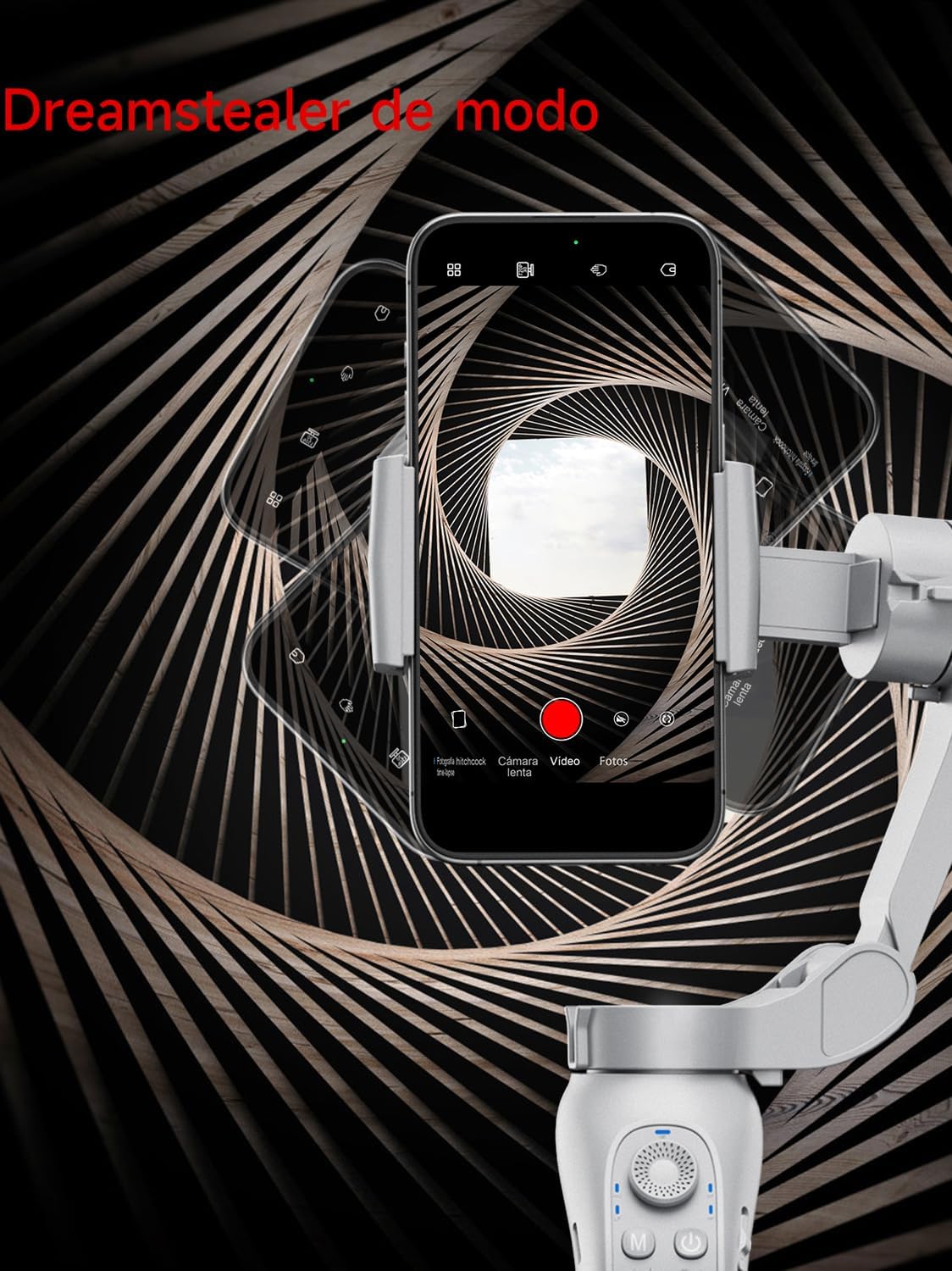
Image: A smartphone screen displaying the Dreamstealer mode effect, where the background appears to twist around the subject.

Image: The KOSCHEAL L7BPro demonstrating cinematic effects like Inception and Hitchcock (Dolly Zoom) modes, offering diverse video templates.

Image: The KOSCHEAL L7BPro in 'Inception' mode, showing the panoramic motor rotating 360 degrees to create a 3D effect.

Image: The Dolly Zoom effect being demonstrated with the KOSCHEAL L7BPro, creating a cinematic visual by adjusting zoom and camera distance simultaneously.

Image: The KOSCHEAL L7BPro capturing a 360-degree panoramic shot, ideal for expansive landscape photography.
5. Maintenance
- Cleaning: Use a soft, dry cloth to clean the gimbal. Avoid using liquid cleaners or solvents.
- Storage: Store the gimbal in its carrying case in a cool, dry place when not in use.
- Battery Care: Charge the battery regularly, even if not in use, to maintain its lifespan. Avoid fully discharging the battery for extended periods.
6. Troubleshooting
- Gimbal not powering on: Ensure the battery is charged. Connect the gimbal to a power source using the provided USB cable.
- Unstable footage: Ensure your smartphone is securely mounted and centered in the clamp. Check that the gimbal is not overloaded beyond its weight capacity.
- Bluetooth connection issues: Make sure Bluetooth is enabled on your smartphone and the gimbal. Restart both devices and try reconnecting through the "Gimbal Pro" app.
- App not responding: Close and restart the "Gimbal Pro" app. Ensure your app is updated to the latest version.
- Gimbal overheating: If the gimbal feels excessively hot, power it off and allow it to cool down. Prolonged use in high temperatures can affect performance.
7. Specifications
| Feature | Detail |
|---|---|
| Model Number | L7B |
| Brand | KOSCHEAL |
| Compatible Devices | Smartphone |
| Product Weight | 400 Grams |
| Folded Dimensions | 152.5 x 110 x 46.6 mm |
| Battery Type | 1 Lithium-metal battery (included) |
| Battery Capacity | 3000 mAh (up to 6 hours autonomy) |
| Charging | 10W Fast Charging (5 mins charge for 30 mins use) |
| Stabilization | 3-Axis |
| Fill Light | Magnetic, 9 Brightness Modes, 3 Color Temperatures |
| Tracking | AI Powered Facial, Body, Object Tracking |
| Country of Origin | China |
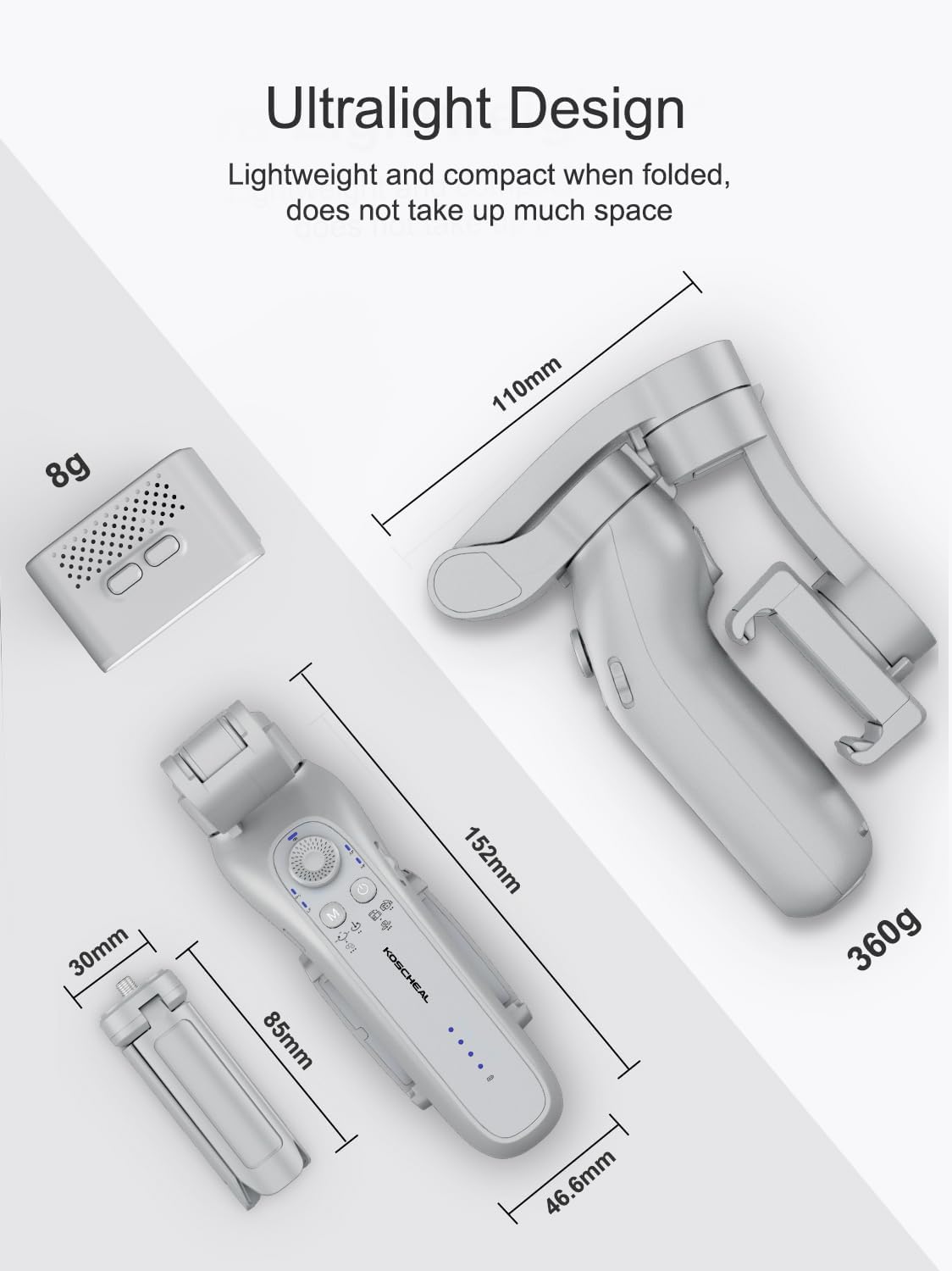
Image: The KOSCHEAL L7BPro highlighting its ultralight and compact design, with key dimensions shown for the folded state and the magnetic fill light.

Image: The KOSCHEAL L7BPro connected for super-fast charging, illustrating that 5 minutes of charge provides 30 minutes of usage.
8. Warranty and Support
KOSCHEAL products are manufactured to high-quality standards. For warranty information, technical support, or service inquiries, please refer to the contact details provided on the product packaging or visit the official KOSCHEAL website. Please retain your proof of purchase for warranty claims.

