
Midea MIWF6200
Midea MIWF6200 Refrigerator Water Filter User Manual
Model: MIWF6200
1. Product Overview
The Midea MIWF6200 Twist-in Refrigerator Water Filter is designed to provide clean, great-tasting water and ice from your compatible Midea side-by-side refrigerator. This filter is engineered to reduce various contaminants, ensuring high-quality drinking water.
Key Features:
- Compatibility: Specifically designed for Midea refrigerator models MRS26D7AST, MRS26D5AST, and MRQ22D7AST.
- Certified Filtration: NSF 53 and 42 certified to reduce chlorine, asbestos, cysts, lead, mercury, and other harmful contaminants.
- Capacity: Filters up to 200 gallons of water.
- Easy Replacement: Features a convenient twist-in design for tool-free installation.
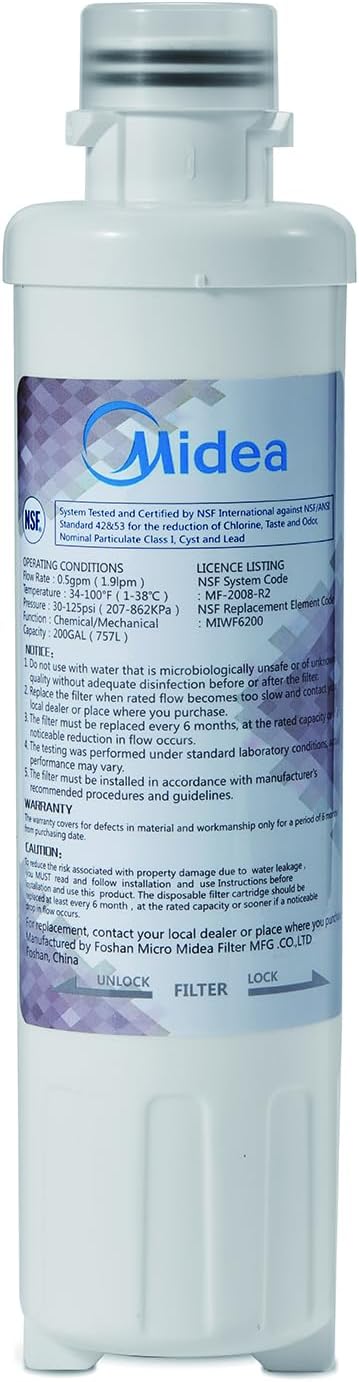
Image 1.1: Midea MIWF6200 Twist-in Refrigerator Water Filter
2. Installation Instructions (Setup)
Follow these steps to properly install or replace your Midea MIWF6200 water filter. No tools are required for this process.
- Locate Filter Compartment: Open your refrigerator door and locate the water filter compartment. This is typically found in the upper right corner of the fresh food compartment or in the base grille.
- Prepare for Removal (if replacing): If you are replacing an old filter, twist the old filter counter-clockwise until it unlocks and can be pulled straight out. A small amount of water may drip, which is normal. Have a towel ready to catch any spills.
- Remove Protective Cap: Take the new Midea MIWF6200 filter out of its packaging and remove the protective cap from the end of the filter.
- Insert New Filter: Align the new filter with the filter housing. Push the filter firmly into the housing.
- Twist to Lock: Twist the filter clockwise until it locks securely into place. You should feel it click or stop firmly. Ensure the filter is fully seated and no gaps are visible.
- Flush the System: After installation, dispense approximately 2-3 gallons of water through the dispenser to flush the system. This removes any air from the lines and clears carbon fines from the new filter.
- Reset Filter Indicator: If your refrigerator has a filter indicator light, consult your refrigerator's user manual for instructions on how to reset it. This usually involves pressing and holding a specific button for a few seconds.

Image 2.1: Close-up of the Midea MIWF6200 filter, showing the twist-in design.
3. Operation
Once installed, the Midea MIWF6200 water filter operates automatically. Water flowing to your refrigerator's dispenser and ice maker will pass through the filter, where contaminants are reduced, providing filtered water for drinking and ice production.
The filter is designed for continuous use and requires no manual activation after installation.
4. Maintenance and Replacement
Regular replacement of your water filter is crucial for maintaining optimal water quality and flow. The Midea MIWF6200 filter has a limited lifespan and capacity.
- Replacement Schedule: It is recommended to replace the filter every 6 months, or after filtering 200 gallons of water, whichever comes first.
- Indicators for Replacement:
- Most compatible Midea refrigerators have a filter indicator light that will turn red or amber when it's time to replace the filter.
- A noticeable decrease in water flow from the dispenser.
- A change in the taste or odor of the water.
- Disposal: Dispose of the old filter according to your local waste disposal guidelines.

Image 4.1: Midea MIWF6200 Refrigerator Water Filter with its retail packaging.
5. Troubleshooting
If you encounter issues with your water filter, consider the following common problems and solutions:
| Problem | Possible Cause | Solution |
|---|---|---|
| Slow water flow from dispenser | Clogged or old filter | Replace the water filter. Ensure the new filter is fully seated and locked. |
| Unusual taste or odor in water | Filter needs replacement; new filter not flushed properly | Replace the water filter. Flush 2-3 gallons of water through the dispenser after installation. |
| Water leaking from filter area | Filter not installed correctly; damaged O-rings | Remove and re-install the filter, ensuring it is twisted fully to the locked position. Check O-rings for damage. If leaking persists, contact Midea support. |
| Filter indicator light remains on after replacement | Indicator not reset | Refer to your refrigerator's user manual for specific instructions on how to reset the filter indicator light. |
6. Product Specifications
| Specification | Detail |
|---|---|
| Model Number | MIWF6200 |
| Brand | Midea |
| Material | Aluminum |
| Product Dimensions (D x W x H) | 2.4" x 2.4" x 8.9" |
| Item Weight | 8.8 ounces |
| Filter Capacity | 200 Gallons |
| Recommended Replacement | Every 6 months |
| External Testing Certification | NSF 53, NSF 42, CE |
| Product Benefits | Reduces harmful contaminants, providing clean and chemical taste-free water |
| Included Components | 1 x Water Filter |
| UPC | 810040943348 |
7. Warranty and Support
For warranty information or technical support regarding your Midea MIWF6200 Refrigerator Water Filter, please refer to the documentation provided with your Midea refrigerator or visit the official Midea website. You may also contact Midea customer service directly for assistance.
Please retain your proof of purchase for any warranty claims.
Related documentsMIWF6200


Ask a question about this manual
Ask about setup, troubleshooting, compatibility, parts, safety, or missing instructions. Manuals+ will review the question and use this page’s manual context to help answer it.