
1. Introduction
This manual provides comprehensive instructions for the installation, operation, and maintenance of your SCS Sentinel PVF0050 Prim' VisioFirst 4.3 Wired Video Intercom. This system allows you to visually identify and communicate with visitors at your entrance, and remotely control access to your property.
The VisioFirst 4.3 is a wired video intercom system designed for home access control. It features a 4.3-inch color monitor for indoor use and a robust outdoor station with night vision capabilities.
2. Product Components
The SCS Sentinel PVF0050 Prim' VisioFirst 4.3 package includes the following items:
- 1 x Indoor Monitor (4.3-inch screen)
- 1 x Outdoor Station (with camera and doorbell)
- 1 x Power Adapter for the monitor
- Mounting Screws and hardware
- 1 x Installation and User Manual (this document)

Image 2.1: Overview of the SCS Sentinel PVF0050 video intercom system, showing both the indoor monitor and the outdoor station.
3. Setup and Installation
The installation process for the SCS Sentinel PVF0050 is designed for simplicity. Ensure all power is disconnected before beginning installation.
3.1 Outdoor Station Installation
- Mount the outdoor station at an appropriate height, typically near your gate or door, ensuring the camera has a clear view of visitors.
- The outdoor station features a durable aluminum facade, a backlit nameplate, and an anti-vandal screw for security. It has an IP44 protection rating, making it suitable for outdoor use.
- The camera offers a 90° viewing angle and includes night vision for clear visibility in low-light conditions.

Image 3.1: Close-up view of the outdoor station, highlighting the camera, speaker, microphone, and backlit nameplate.
3.2 Indoor Monitor Installation
- Install the indoor monitor in a convenient location within your home, such as a hallway or living area.
- The monitor is powered by the included sector adapter (1.5V DC 0.8A).
- The 4.3-inch (11 cm) screen provides a clear display of your visitors.

Image 3.2: Close-up view of the indoor monitor, showing the 4.3-inch screen and touch-sensitive control buttons.
3.3 Wiring Connections
The connection between the monitor and the outdoor station is simplified and secure, utilizing a 2-wire non-polarized system. The maximum recommended cable length is 100 meters.
The system supports connection to an electric strike for gate or pedestrian gate opening. Up to two additional monitors (references PAP0011 and PAP0016) can be connected to expand your system.
4. Operating Instructions
The SCS Sentinel PVF0050 allows for easy control of your home access.
4.1 Answering a Call
- When a visitor presses the doorbell button on the outdoor station, the indoor monitor will ring with one of 5 available melodies.
- The monitor will automatically display the visitor's image.
- To communicate, press the 'Answer' button on the monitor. The system operates hands-free.
4.2 Opening Gates/Doors
- To open your gate or pedestrian gate (if connected to an electric strike), press the designated 'Open' button on the monitor during a call or when viewing the outdoor station.
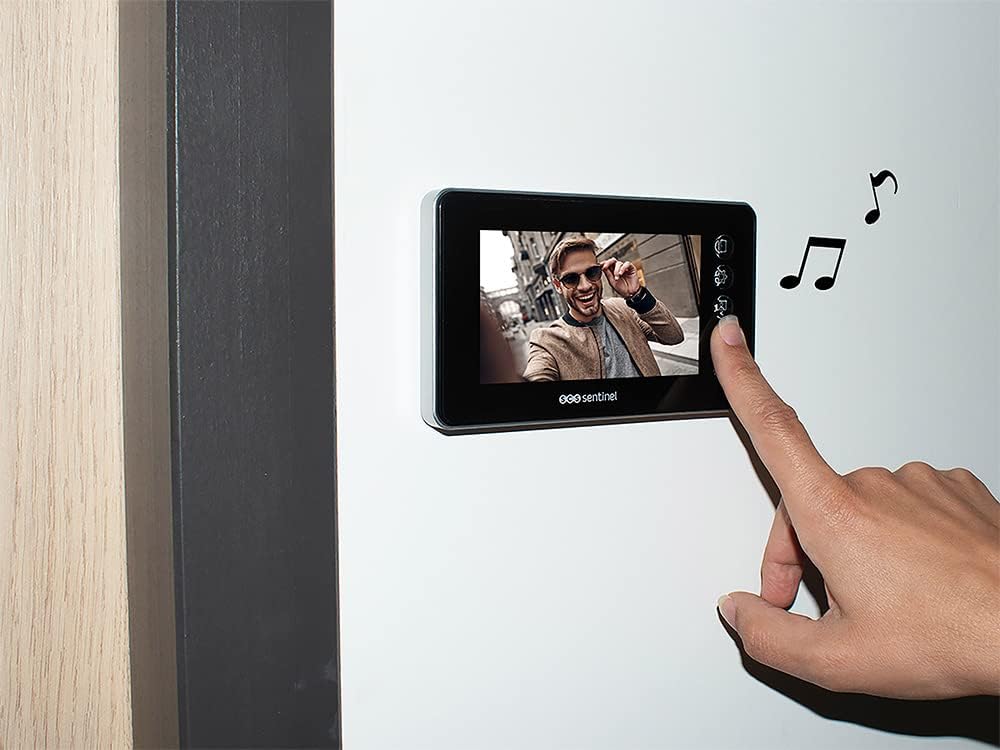
Image 4.1: A hand interacting with the touch-sensitive buttons on the indoor monitor to operate the intercom functions.
5. Maintenance
To ensure optimal performance and longevity of your SCS Sentinel PVF0050 video intercom, follow these general maintenance guidelines:
- Cleaning: Regularly wipe the indoor monitor and outdoor station with a soft, damp cloth. Avoid using abrasive cleaners or solvents that could damage the surfaces.
- Outdoor Station: Periodically check the outdoor station for any obstructions to the camera lens or microphone/speaker. Ensure the nameplate is clean and legible.
- Wiring: Inspect visible wiring periodically for any signs of wear or damage. If damage is found, contact a qualified technician for repair.
- Power Supply: Ensure the power adapter is securely connected and free from damage.
6. Troubleshooting
If you encounter issues with your SCS Sentinel PVF0050, consider the following basic troubleshooting steps:
- No Power to Monitor: Check if the power adapter is correctly plugged into both the monitor and a working power outlet. Ensure there are no power outages.
- No Image/Sound from Outdoor Station: Verify that the 2-wire connection between the outdoor station and the indoor monitor is secure and undamaged.
- Gate/Door Not Opening: Check the wiring to the electric strike. Ensure the strike itself is functioning correctly and receiving power.
- Poor Image Quality: Ensure the camera lens on the outdoor station is clean and free from dirt or condensation.
- Interference: Keep the intercom system away from strong electromagnetic fields if possible.
If problems persist after attempting these steps, please refer to the Warranty and Support section for further assistance.
7. Specifications
| Feature | Specification |
|---|---|
| Model Number | PVF0050 |
| Product Dimensions (L x W x H) | 4.5 x 9.4 x 15 cm |
| Weight | 1 Kilogram |
| Color | White |
| Installation Method | Screw-in |
| Number of Items | 1 (kit) |
| Electrical Plug Type | Wall Mount |
| Switch Style | Push Button |
| Usage | Surveillance / Access Control |
| Included Components | 1 outdoor station, 1 monitor, 1 power adapter, screws, manual |
| Batteries Required | No |
| Wiring | 2-wire, non-polarized (max 100m) |
| Monitor Screen Size | 4.3 inches (11 cm) |
| Melodies | 5 |
| Outdoor Station Protection Rating | IP44 |
| Outdoor Station Angle of View | 90° |
| Night Vision | Yes |
| Expandability | Up to 2 additional monitors (PAP0011, PAP0016) |
| Country of Origin | China |
8. Warranty and Support
8.1 Warranty Information
The SCS Sentinel PVF0050 model is covered by a 2-year warranty against any material or manufacturing defects. This warranty period begins from the date of delivery or product availability. To claim warranty service, proof of purchase is required.
The warranty is strictly limited to the replacement of parts with a clearly established manufacturing defect.
8.2 Technical Support
SCS Sentinel offers technical support based in France to assist you with product installation and any questions you may have. Our technicians are available to provide informed and personalized advice.
For support, please refer to the contact information provided with your product documentation or visit the official SCS Sentinel website.