
Kidzone B0B5SXJDB8
Kidzone Ride On Truck 12V Battery Powered Electric Kids Car Vehicle Toy
User Instruction Manual
1. Introduction
Thank you for choosing the Kidzone Ride On Truck. This 12V battery-powered electric vehicle is designed to provide an exciting and safe driving experience for children aged 37-95 months. It features LED headlights, stimulating engine acceleration sounds, a horn, and various entertainment options. This manual provides essential information for assembly, operation, maintenance, and troubleshooting to ensure safe and enjoyable use of your new ride-on truck.

Figure 1.1: Kidzone Ride On Truck, White Model.
This image displays the Kidzone Ride On Truck in white, showcasing its robust design, large wheels, and front grille. The vehicle is ready for adventure, highlighting its realistic appearance.
2. Important Safety Information
WARNING: To reduce the risk of injury, adult supervision is required. Never use in roadways, near motor vehicles, on or near steep inclines or steps, swimming pools or other bodies of water. Always wear shoes, and never allow more than one rider.
- This product is intended for children aged 37-95 months.
- Maximum weight capacity: 66 lbs (30 kg).
- Always ensure the child is securely fastened with the built-in seatbelt before operation.
- Operate the vehicle only on flat, dry surfaces. Avoid sand, loose dirt, gravel, or wet areas.
- Do not allow children to operate the vehicle near streets, swimming pools, or other hazardous areas.
- The remote control feature allows parents to override child control for added safety.
- Regularly inspect the vehicle for any loose parts, damaged wiring, or worn components before each use.
- Charging should only be performed by an adult.

Figure 2.1: Buckle Up For Safety.
This image emphasizes the importance of safety by showing a child securing their seatbelt in the ride-on truck, accompanied by a graphic of a shield with the word "Safety" on it.
3. What's in the Box
Please check the contents of the package to ensure all items are present and undamaged:
- Kids Ride On Truck (main vehicle body and components)
- Remote Control
- Charger
- Stickers (for DIY License Plate)
- User Manual (this document)
4. Setup and Assembly
Assembly of the Kidzone Ride On Truck is required before first use. Please follow these steps carefully. Adult assembly is required.
- Unpacking: Carefully remove all components from the packaging. Keep packaging materials away from children.
- Wheel Installation: Attach the four wear-resistant wheels to the vehicle chassis. Ensure they are securely fastened according to the diagrams in the separate assembly guide (if provided).
- Steering Wheel Assembly: Connect the steering wheel to the steering column. Ensure all connections are firm.
- Battery Connection: Connect the battery terminals. Refer to the battery compartment for specific instructions. Ensure the battery is fully charged before first use (see Charging section).
- Accessory Attachment: Install any additional accessories such as mirrors, roll bars, or decorative elements as per the assembly diagrams.
- DIY License Plate: Use the included stickers (numbers, alphabets, and symbols) to customize the license plate.

Figure 4.1: DIY License Plate Customization.
This image shows the Kidzone Ride On Truck alongside sheets of alphabet and number stickers, illustrating the DIY license plate feature that allows children to personalize their vehicle.
5. Operating Instructions
5.1. Vehicle Controls
The vehicle is equipped with intuitive controls for both child and parent operation.
- Power Button: Press to turn the vehicle on/off.
- Foot Pedal: Press to accelerate. Release to brake.
- Steering Wheel: Turn left or right to steer the vehicle.
- Gear Shift: Select Forward (D) or Reverse (R) mode.
- Speed Selection: Choose between High and Low speeds for varied driving experiences.
- Horn/Music Buttons: Activate the horn or play pre-loaded music/sounds.

Figure 5.1: Dashboard Controls.
This image provides a detailed view of the Kidzone Ride On Truck's dashboard, showing the power button, gear shift, speed selection, and multimedia controls including MP3, Bluetooth, Radio, LED, and USB functions.

Figure 5.2: Easy Controls For Kids.
This image highlights the user-friendly controls of the Kidzone Ride On Truck, showing a child's hand interacting with the dashboard buttons, making it easy for young drivers to operate.
5.2. Remote Control Operation
The included 2.4G remote control allows parents to safely guide the vehicle, especially for younger children. Ensure AAA batteries are installed (not included).
- Pairing: Turn on the vehicle. Press and hold the pairing button on the remote until the indicator light flashes, then release. The light will become solid when paired.
- Forward/Backward: Use the joystick or directional buttons to move the vehicle forward or backward.
- Left/Right: Use the joystick or directional buttons to steer left or right.
- Brake Button: Press to stop the vehicle immediately.
- Speed Selection: Adjust the speed settings (low, medium, high) directly from the remote.

Figure 5.3: Parental Remote Control.
This image shows a parent holding the white remote control for the Kidzone Ride On Truck, with a child seated in the green version of the truck in the background, demonstrating the parental control feature.
5.3. Multimedia Features
The truck includes an MP3 player, Bluetooth wireless technology, and a flash drive port for entertainment.
- MP3/USB: Insert a USB flash drive with MP3 audio files into the USB port on the dashboard. Use the dashboard controls to play, pause, and skip tracks.
- Bluetooth: Activate Bluetooth on the vehicle's dashboard. Search for the device name (e.g., "Kidzone Car") on your smartphone or other Bluetooth-enabled device and pair. You can then stream audio wirelessly.

Figure 5.4: Key Features Overview.
This image shows a side profile of the white Kidzone Ride On Truck, emphasizing its "Premium Version 12V" badge, "Gift for any Occasion" suitability, "Accelerated Speed Setting," and "Bluetooth Speaker" capabilities, indicating its advanced features.
6. Maintenance and Care
6.1. Charging the Battery
- Use only the charger provided with the vehicle.
- Plug the charger into the charging port on the vehicle.
- Plug the charger into a standard wall outlet.
- Charge the battery for 8-12 hours before first use, and for 8-12 hours after each use. Do not charge for more than 18 hours.
- The battery should be charged at least once a month, even if the vehicle is not in use, to prolong battery life.
6.2. General Care
- Clean the vehicle with a soft, damp cloth. Do not use abrasive cleaners or solvents.
- Store the vehicle indoors in a dry area when not in use.
- Protect the vehicle from direct sunlight and rain.
- Regularly check all screws, nuts, and bolts to ensure they are tight.
7. Troubleshooting
| Problem | Possible Cause | Solution |
|---|---|---|
| Vehicle does not move. | Battery is low or dead. | Charge the battery for 8-12 hours. |
| Vehicle moves slowly. | Overloaded or low battery. | Reduce weight or charge battery. |
| Remote control not working. | Batteries in remote are dead or not paired. | Replace remote batteries or re-pair the remote. |
| No sound from multimedia. | Volume too low or incorrect input. | Increase volume, check USB connection, or re-pair Bluetooth. |
8. Product Specifications
- Model: Kidzone Ride On Truck
- Battery: 12V Lead-acid rechargeable
- Recommended Age: 3 - 8 years (37-95 months)
- Maximum Weight Capacity: 66 lbs (30 kg)
- Product Dimensions (L x W x H): 39.4 x 25.6 x 28.4 inches
- Item Weight: 31 pounds
- Features: LED Headlights, Engine Sounds, Horn, MP3 Player, Bluetooth, USB Port, Parent Remote Control, DIY License Plate
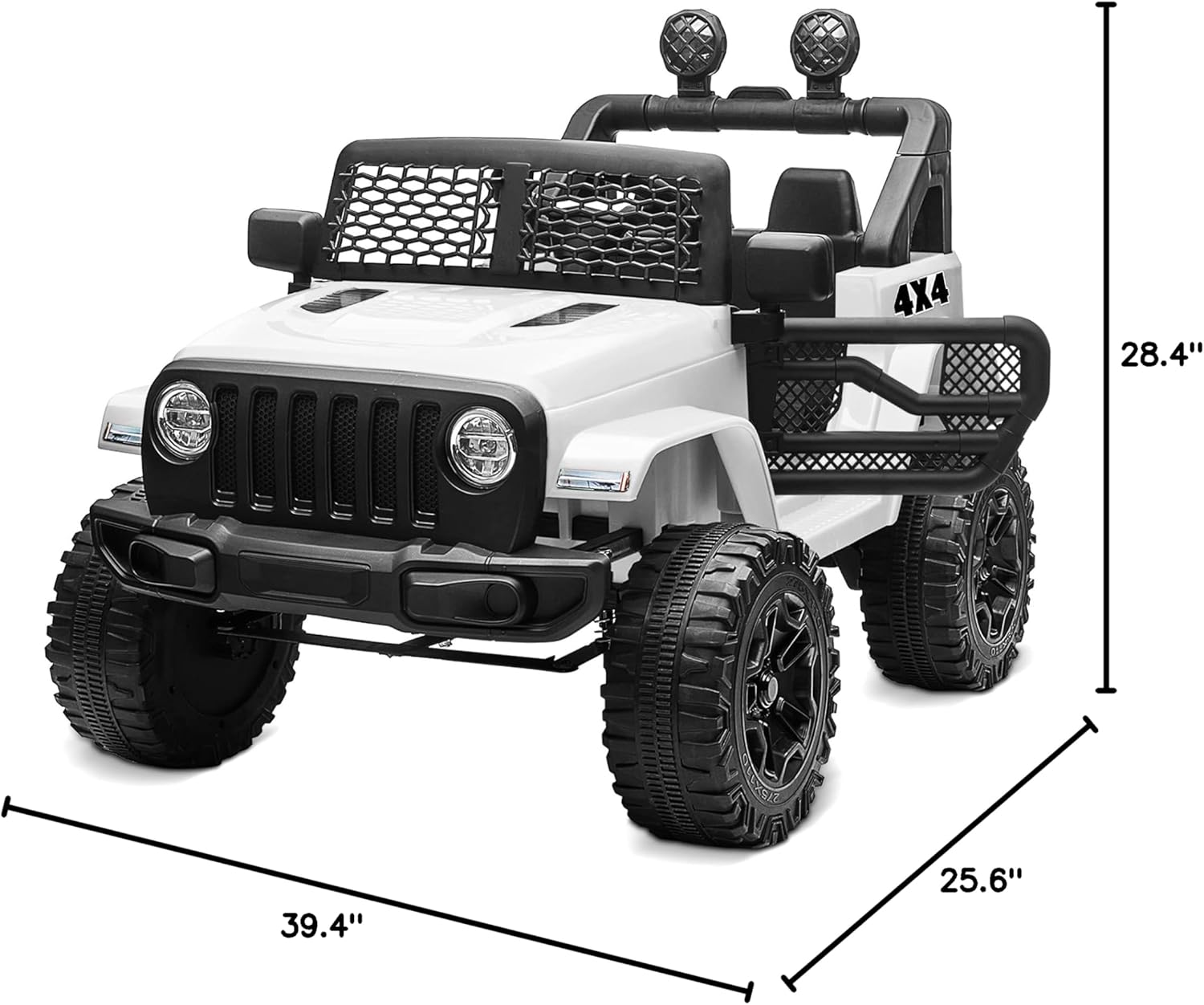
Figure 8.1: Product Dimensions.
This image illustrates the key dimensions of the Kidzone Ride On Truck, showing its length (39.4 inches), width (25.6 inches), and height (28.4 inches), providing a clear understanding of its size.

Figure 8.2: Recommended Age and Weight Capacity.
This image features a child happily seated on a green Kidzone Ride On Truck, with overlaid text indicating it's designed for ages 37 months & up to 8 years old, with a model age of 3, height 42", weight 41 lbs, and a weight capacity of 66 lbs.
9. Warranty and Support
Kidzone products are manufactured with high-quality materials and undergo strict quality control. For warranty information, please refer to the warranty card included with your product or visit the official Kidzone website. For technical support, replacement parts, or any inquiries, please contact Kidzone customer service through the contact information provided on the product packaging or their official website.
You can also visit the Kidzone Store on Amazon for more information and products.
Related documentsB0B5SXJDB8

Ask a question about this manual
Ask about setup, troubleshooting, compatibility, parts, safety, or missing instructions. Manuals+ will review the question and use this page’s manual context to help answer it.