
1. Important Safety Information
Always read and understand all safety warnings and instructions before operating the ARCCAPTAIN Plasma Cutter. Failure to follow these warnings may result in electric shock, fire, serious injury, or death.
- Electric Shock: Welding and plasma cutting can be hazardous. Do not touch live electrical parts. Wear dry insulating gloves and protective clothing.
- Fumes and Gases: Keep your head out of the fumes. Use enough ventilation and/or exhaust at the arc to keep fumes and gases away from the breathing zone.
- Arc Rays: Wear a welding helmet with a proper shade number to protect your eyes and face. Wear safety glasses with side shields under your helmet.
- Fire and Explosion: Remove all flammables from the cutting area. Have a fire extinguisher nearby.
- Noise: Wear ear protection.
- Hot Parts: Allow hot parts to cool before handling.
- Compressed Air: Ensure compressed air supply is clean, dry, and within specified pressure limits.
This product has passed 300+ authoritative laboratory tests, including vibration, drop, waterproof, metal dust, prolonged load, conducted interference, high-low temperature, water spray, and transportation simulation tests, ensuring reliable quality and safety.

Image: The ARCCAPTAIN Plasma Cutter undergoing rigorous testing, including vibration, drop, waterproof, and metal dust tests, highlighting its robust construction and adherence to safety standards.
2. Setup Guide
The ARCCAPTAIN CUT 50 Plasma Cutter features a plug-and-play design with a built-in air regulator for quick setup.
2.1 Unboxing and Components
- 1x ARCCAPTAIN Plasma Cutter (CUT50)
- 1x 16FT Cutting Torch (PT31)
- 1x 10FT Earth Clamp
- 1x 10FT Air Hose
- 1x 220V to 110V Power Adapter
- 1x Interface Protective Cover
- 1x Electrode
- 1x Nozzle
- 2x Hose Clamps
- 1x User Manual
- 1x Shoulder Strap

Image: The ARCCAPTAIN Plasma Cutter with all its accessories laid out, including the cutting torch, earth clamp, air hose, power adapter, and consumables.
2.2 Connecting the Torch and Earth Clamp
- Torch Assembly: Ensure the electrode, nozzle, and protective cover are correctly assembled on the PT31 cutting torch.
- Torch Connection: Insert the torch connector into the designated port on the front panel of the plasma cutter and twist to secure.
- Earth Clamp Connection: Connect the earth clamp cable to the corresponding port on the front panel.

Image: Detailed view of the PT31 cutting torch components: interface protective cover, hose clamp, electrode, and nozzle.

Image: The torch connector and earth clamp being securely attached to the front panel of the ARCCAPTAIN Plasma Cutter.
2.3 Air Supply Connection
The CUT 50 has a built-in air regulator. Connect the provided air hose to the air inlet on the back of the unit. Ensure the air hose is inserted into the deepest point and secured with a hose clamp. The unit requires compressed air (compressor sold separately) with a recommended flow rate of 150L/min (5.3CFM) and air pressure of 0.4mpa-0.6mpa (57.5psi).
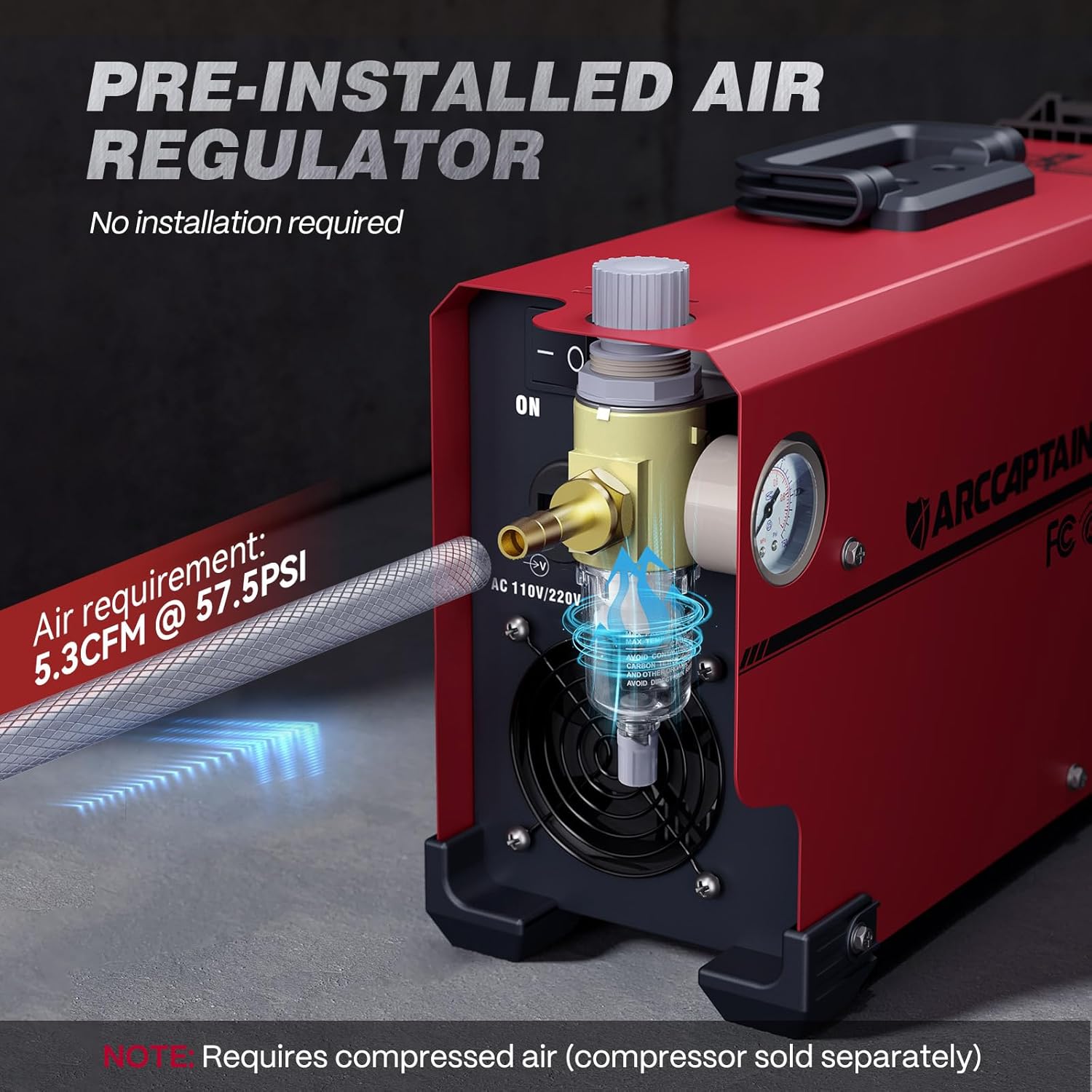
Image: A close-up of the pre-installed air regulator on the ARCCAPTAIN Plasma Cutter, showing the air inlet and pressure gauge.
2.4 Power Connection
The plasma cutter supports dual voltage (110V/220V). Use the appropriate power cord or the included 220V to 110V adapter. IMPORTANT: Do not switch voltages until the screen turns off and the fan stops.

Image: The 110V/220V power adapter and air hose, essential for connecting the plasma cutter to power and air supply.
2.5 Video Guide: Installation & Setup
For a visual guide on setting up your ARCCAPTAIN Plasma Cutter, watch the official installation video:
Video: Official ARCCAPTAIN "Installation & Setup Guide for CUT50 Plasma Cutter" demonstrating the unboxing, component assembly, and initial setup steps.
3. Operating Instructions
The ARCCAPTAIN CUT 50 Plasma Cutter is designed for efficient and precise cutting of various metals.
3.1 Panel Introduction

Image: An annotated diagram showing the control knob, LED display, 2T/4T mode adjust, current/post gas settings, earth clamp, torch switch, cutting torch, air filter, cooling fan, power cable, and power switch.
3.2 Adjusting Settings
The large LED display makes it easy to adjust and view real-time data without removing your safety helmet.
- Current Adjustment: Use the control knob to set the desired amperage (20-35A at 110V, 20-50A at 220V).
- Post-Flow Cooling: Customize post-flow cooling time (5-15s) to extend the service life of consumables. A recommended cooling time is 4-8 seconds.
- 2T/4T Modes: Switch between 2T (trigger-on/off) and 4T (latch-on/off) modes for seamless operation. 4T mode is ideal for extended use as it frees your fingers.

Image: The large LED screen of the plasma cutter displaying voltage, current, and post-gas settings for easy monitoring and adjustment.
3.3 Cutting Performance
The CUT 50 offers powerful cutting ability with advanced IGBT technology.
- Clean Cut: Achieves professional 1/2" clean cuts on steel, aluminum, and copper.
- Maximum Cut: Up to 12mm (1/2") @ 35A 110V, 50PSI; 18mm (2/3") @ 50A 220V, 60 PSI.

Image: Visual comparison of clean cut (3/10" @110V, 1/2" @220V) and max cut (1/2" @110V, 2/3" @220V) on metal plates.
3.4 Cutting Parameter Chart
| Material | Thickness (inch) | Optimum Cut Speed (IPM) | Optimum Cut Speed (mm/min) |
|---|---|---|---|
| Mild Steel (110V, 35A, 55PSI) | 0.02 | 295 | 7500 |
| 0.04 | 270 | 6850 | |
| 0.06 | 217 | 5500 | |
| 0.08 | 177 | 4500 | |
| 0.10 | 115 | 2920 | |
| 0.12 | 63 | 1600 | |
| Mild Steel (220V, 50A, 60PSI) | 0.06 | 274 | 6970 |
| 0.08 | 249 | 6335 | |
| 0.1 | 184 | 4640 | |
| 0.12 | 132 | 3360 | |
| 0.16 | 79 | 2015 | |
| 0.24 | 47 | 1200 | |
| Stainless Steel (110V, 35A, 55PSI) | 0.02 | 260 | 6600 |
| 0.04 | 234 | 5950 | |
| 0.06 | 181 | 4600 | |
| 0.08 | 142 | 3600 | |
| 0.10 | 80 | 2020 | |
| 0.12 | 28 | 700 | |
| Stainless Steel (220V, 50A, 60PSI) | 0.06 | 194 | 6970 |
| 0.08 | 150 | 6335 | |
| 0.1 | 114 | 4640 | |
| 0.12 | 94 | 3360 | |
| 0.16 | 75 | 2015 | |
| 0.24 | 39 | 1200 | |
| Aluminum (110V, 35A, 55PSI) | 0.02 | 264 | 6700 |
| 0.04 | 238 | 6050 | |
| 0.06 | 185 | 4700 | |
| 0.08 | 146 | 3700 | |
| 0.10 | 83 | 2120 | |
| 0.12 | 31 | 800 | |
| Aluminum (220V, 50A, 60PSI) | 0.06 | 274 | 5050 |
| 0.08 | 249 | 3900 | |
| 0.1 | 184 | 3000 | |
| 0.12 | 132 | 2500 | |
| 0.16 | 79 | 2000 | |
| 0.24 | 47 | 1000 |
Table: Recommended cutting parameters for various materials and thicknesses at different voltage and amperage settings.
3.5 Video Guide: Operation Demonstration
See the plasma cutter in action and learn how to adjust settings for optimal performance:
Video: Official ARCCAPTAIN video demonstrating the plasma cutter's features, including the LED display, 2T/4T function, and cutting various materials.
4. Maintenance
Regular maintenance ensures the longevity and optimal performance of your plasma cutter.
- Consumables: Regularly inspect and replace the torch electrode and nozzle as they wear out. The post-flow cooling feature helps extend their lifespan.
- Air Filter: Periodically check and clean the built-in air filter to ensure a clean and dry air supply, which is crucial for cut quality and consumable life.
- General Cleaning: Keep the unit clean and free from metal dust and debris. Use a dry cloth to wipe down surfaces.
- Storage: Store the plasma cutter in a dry, clean environment when not in use.
5. Troubleshooting
If you encounter issues with your ARCCAPTAIN Plasma Cutter, refer to the following common troubleshooting steps:
- Error Codes: The LED screen displays error codes if the plasma cutter cannot work, making it easy to identify problems. Consult the user manual for specific error code meanings.
- No Arc/Weak Arc:
- Check power supply voltage and amperage settings.
- Ensure earth clamp is securely connected to the workpiece and has good contact.
- Verify air pressure is within the recommended range (0.4mpa-0.6mpa / 57.5psi).
- Inspect torch consumables (electrode, nozzle) for wear and replace if necessary.
- Poor Cut Quality:
- Adjust cutting speed according to the material thickness (refer to cutting parameter chart).
- Check air pressure and ensure the air filter is clean and dry.
- Replace worn torch consumables.
- Overheating Protection: The unit has over-heating protection. If it stops working due to overheating, allow it to cool down. The fan will continue to run until the unit is sufficiently cooled.
6. Specifications
| Feature | Detail |
|---|---|
| Manufacturer | ARCCAPTAIN |
| Model Number | CUT50 |
| Item Weight | 13 pounds |
| Product Dimensions | 13 x 6 x 8 inches |
| Country of Origin | China |
| Style | CUT 50 110V/220V |
| Material | Iron |
| Power Source | DC |
| Voltage | 110/220 Volts (DC) |
| Amperage Capacity | 50 Amps |
| Maximum Power | 11000 Watts |
| Air Flow Capacity | 150 LPM |
| Sound Level | 60 dB |
| Hose Length | 3 Feet |
| Special Features | Portable, Built-in regulator and gauge, Set up within 1 min, Easy to use, Powerful performance |
| Included Components | Filters |
| Date First Available | July 2, 2022 |
7. Warranty and Support
For detailed warranty information and customer support, please refer to the official ARCCAPTAIN user manual or contact ARCCAPTAIN directly.
- User Manual (PDF): Download User Manual
- Protection Plans: Additional protection plans are available for purchase, including 3-Year and 4-Year plans.
- Manufacturer Support: Contact ARCCAPTAIN for any technical assistance or service inquiries.


