
1. Introduction
The MiLESEEY MG-10 is a portable 4-in-1 gas detector designed to continuously monitor the concentration of four critical gases: Hydrogen Sulfide (H2S), Oxygen (O2), Carbon Monoxide (CO), and combustible gases (EX). This device is equipped with high-quality sensors to provide accurate and reliable readings, ensuring safety in various environments. This manual provides essential information for the proper use, maintenance, and understanding of your MG-10 gas detector.

Figure 1: The MiLESEEY MG-10 Gas Detector is an ideal safety solution for various professional and home environments, including kitchens, industrial settings, and emergency situations.
2. Safety Information
Please read and understand all safety instructions before operating the MG-10 gas detector. Failure to follow these instructions may result in injury, damage to the device, or inaccurate readings.
- Professional Use: This device is intended for professional use in environments where gas monitoring is required.
- Calibration: While factory calibrated, professional recalibration and zero adjustment are supported and recommended periodically to maintain accuracy.
- Battery Safety: Use only the provided charging accessories. Do not attempt to open or replace the internal lithium-ion battery.
- Environmental Conditions: Operate the device within specified temperature (up to 50°C) and humidity (up to 95%) ranges.
- Alarm Response: Always respond immediately to any alarm indications (audible, visual, or vibration) and follow established safety protocols.
- Avoid Damage: Protect the device from severe impacts, extreme temperatures, and exposure to water or corrosive substances.
3. Product Overview
3.1 Components
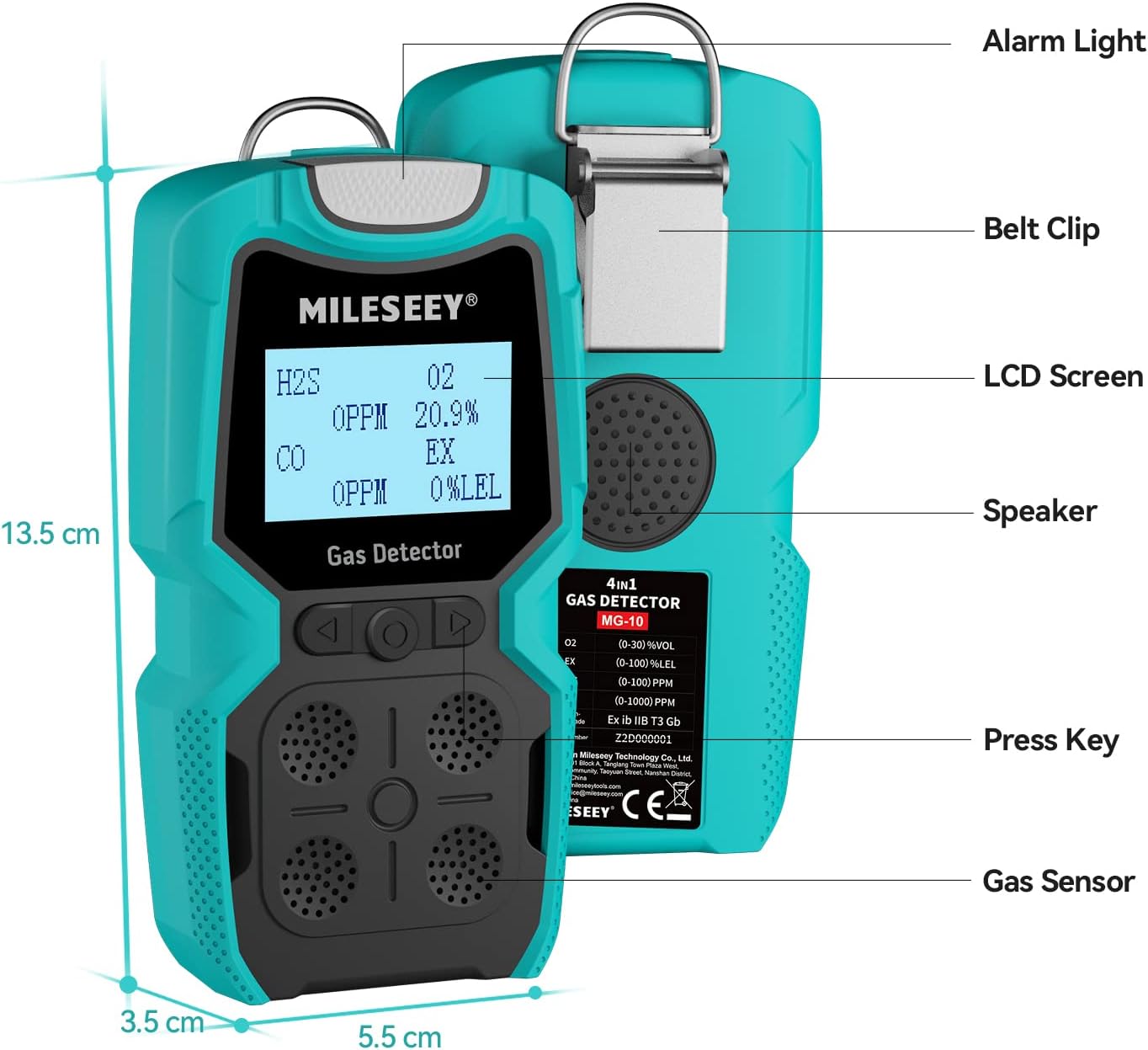
Figure 2: Key components and dimensions of the MG-10 Gas Detector.
The MG-10 gas detector features a robust design with clearly labeled components:
- Alarm Light: Visual indicator for gas detection alarms.
- Belt Clip: For easy attachment to clothing or a belt, enhancing portability.
- LCD Screen: Displays real-time gas concentrations, battery status, and menu options.
- Speaker: Emits audible alarms and voice broadcasts.
- Press Keys: Used for navigation and selection within the device's menu.
- Gas Sensor: Located at the bottom, responsible for detecting gas concentrations.
3.2 Display Interface
The large backlit LCD screen provides clear readings for each monitored gas:
- H2S: Hydrogen Sulfide concentration in parts per million (PPM).
- O2: Oxygen concentration as a percentage (%).
- CO: Carbon Monoxide concentration in parts per million (PPM).
- EX: Combustible gas concentration as a percentage of Lower Explosive Limit (%LEL).
4. Setup
4.1 Charging the Device
The MG-10 is powered by an 1800mAh rechargeable lithium-ion battery. Before first use, ensure the device is fully charged.
- Connect the provided charging cable to the device's charging port.
- Connect the other end of the cable to a compatible USB power adapter (not included) or a computer USB port.
- The charging indicator on the screen will show the charging status.
- A full charge typically provides over 8 hours of continuous operation.
4.2 Initial Power On
The MG-10 gas detector comes factory calibrated and is ready for immediate use upon power-on.
- Press and hold the power button until the device powers on.
- The device will perform a self-test and display current gas readings.
- Allow a brief warm-up period for sensor stabilization before relying on readings.
5. Operating Instructions
5.1 Gas Detection
The MG-10 continuously monitors the ambient air for the presence and concentration of H2S, O2, CO, and EX gases. Real-time readings are displayed on the LCD screen.

Figure 3: The MG-10 is built with high sensitivity and stability sensors for quick response.
5.2 Alarm System
The MG-10 features a comprehensive multi-alarm system to alert users to dangerous gas levels. Alarms are triggered when gas concentrations exceed preset levels.
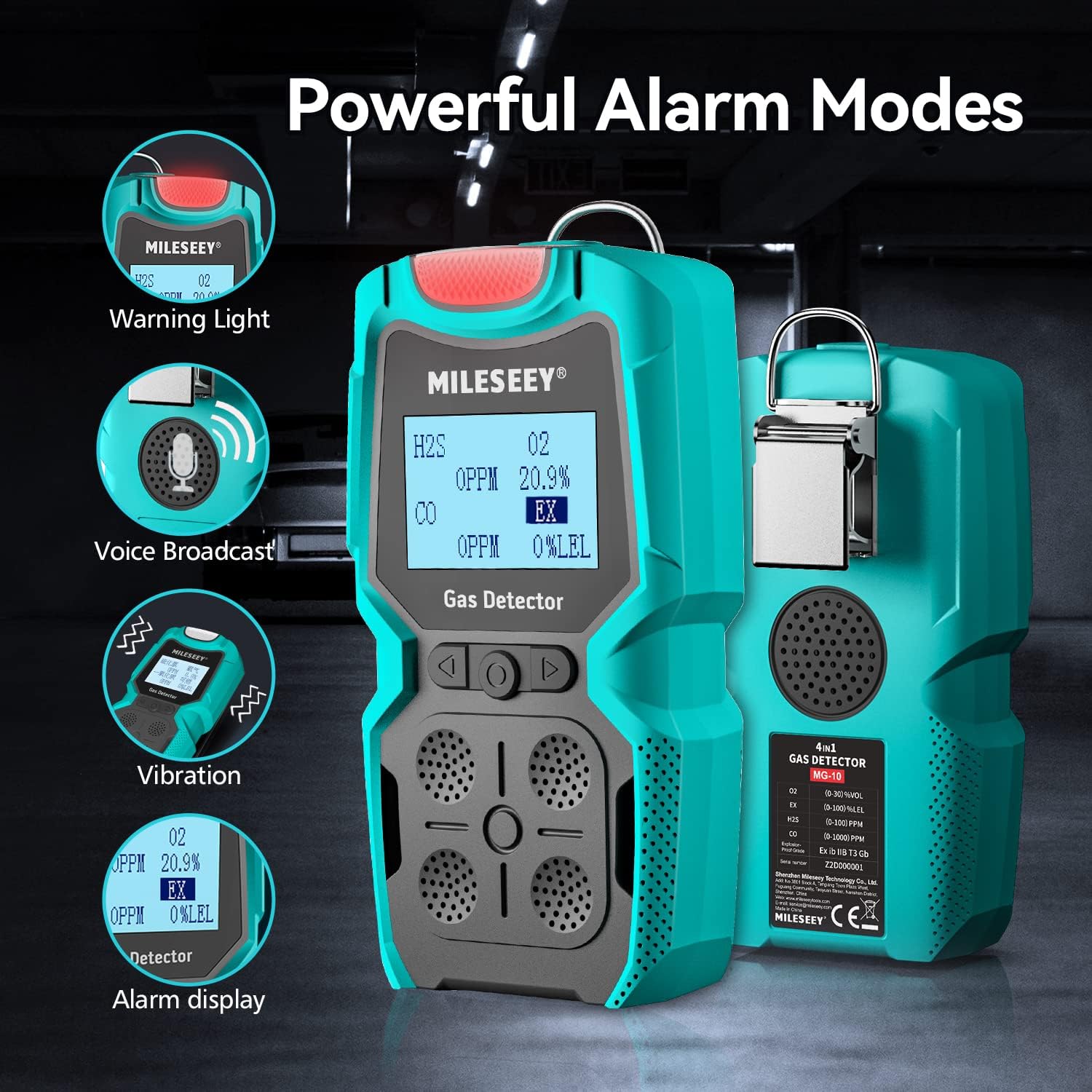
Figure 4: The MG-10 features powerful alarm modes including warning light, voice broadcast, vibration, and alarm display.
- Visual Alarm: Flashing LEDs indicate an alarm condition.
- Audible Alarm: A loud sound from the speaker alerts users. The device also supports voice broadcasts.
- Vibration Alarm: An internal vibrating alarm provides a tactile alert, useful in noisy environments.
- Alarm Data Storage: The device stores alarm records with digital time stamps, allowing users to review historical alarm events through the menu.
5.3 Menu Functions
The MG-10 features a user-friendly interface for accessing various settings and information.

Figure 5: The MG-10's menu functions provide a humanized operation interface for easy use.
Navigate through the menu using the press keys to access functions such as:
- Alarm Record: View past alarm events.
- Set L Alarm / Set H Alarm: Adjust low and high alarm thresholds for each gas.
- Zero Adjust: Calibrate the zero point for sensors (professional use recommended).
- Cali Gas: Perform gas calibration (professional use recommended).
- Set Time: Adjust the device's internal clock.
- Set Backlight: Configure backlight settings.
- Set Password: Manage device access password.
- Channel Info: View information about sensor channels.
6. Maintenance
6.1 Calibration
While the MG-10 is factory calibrated, regular calibration is crucial for maintaining accuracy, especially for professional applications. Gas recalibration and zero adjustment should be performed by qualified professionals.
6.2 Cleaning
To ensure optimal performance and longevity, keep the device clean.
- Wipe the exterior with a soft, damp cloth.
- Do not use abrasive cleaners or solvents.
- Ensure the gas sensor area is free from dust and debris.
7. Troubleshooting
If you encounter issues with your MG-10 gas detector, consider the following general troubleshooting steps:
- No Power: Ensure the battery is fully charged. If the issue persists, contact support.
- Inaccurate Readings: Check if the sensor area is obstructed. Consider professional recalibration if readings remain inconsistent.
- Alarms Not Functioning: Verify alarm settings in the menu. Ensure volume and vibration are enabled.
- Device Unresponsive: Try restarting the device. If it remains unresponsive, contact customer support.
8. Specifications
| Feature | Specification |
|---|---|
| Model Number | MG-10 |
| Detected Gases | H2S, O2, CO, EX (Combustible Gas) |
| Sensor Type | Electrochemical (for H2S, O2, CO) |
| Item Weight | 260 g |
| Product Dimensions | 13.97 x 7.62 x 3.81 cm |
| Battery | 1 Lithium Ion battery (included), 1800mAh |
| Operating Time | Over 8 hours (on full charge) |
| Power Source | Battery Powered (USB Recharge) |
| Color | Blue |
| Alarm Types | Sound, Light (LED), Vibration |
| Operating Humidity | Up to 95% (non-condensing) |
| Upper Temperature Rating | 50 Degrees Celsius |
| Specific Uses | Professional gas monitoring |
9. Warranty and Support
MiLESEEY provides a 12-month warranty for the MG-10 Gas Detector from the date of purchase. This warranty covers manufacturing defects and malfunctions under normal use.
For warranty claims, technical support, or any inquiries regarding your device, please contact MiLESEEY customer service. Please have your product model number (MG-10) and purchase details ready when contacting support.
Note: The warranty does not cover damage caused by misuse, unauthorized modifications, or improper maintenance.