
1. Introduction
Thank you for choosing the Candy HRARIASET0004 Smart Dualsplit Air Conditioner. This system provides efficient cooling and heating for your home, featuring smart control, self-cleaning functions, and a dehumidifier. This manual provides essential information for the safe installation, operation, and maintenance of your air conditioning unit. Please read it thoroughly before use and keep it for future reference.

Image: The Candy Smart Dualsplit Air Conditioner seamlessly integrated into a living space, ensuring comfort.
2. Safety Information
Always follow basic safety precautions when using electrical appliances to reduce the risk of fire, electric shock, and injury. This appliance contains R-32 refrigerant, which is flammable. Installation, maintenance, and repair must be performed by qualified personnel only.
- Ensure the power supply matches the unit's specifications.
- Do not insert objects into the air outlet or inlet.
- Keep the area around the outdoor unit clear of obstructions.
- Do not attempt to repair or modify the unit yourself. Contact qualified service personnel.
- Ensure proper grounding to prevent electric shock.
3. Product Overview
The Candy HRARIASET0004 is a dualsplit air conditioning system designed for multi-room climate control. It includes one outdoor unit and two indoor units, with capacities of 9000 BTU and 12000 BTU respectively. It features a heat pump for year-round comfort, a dehumidifier function, and smart connectivity via the HOn app.
Components Included:
- 1 x Outdoor Unit
- 1 x Indoor Unit (9000 BTU)
- 1 x Indoor Unit (12000 BTU)
- 1 x Remote Control
- Antimicrobial Air Filter (pre-installed in indoor units)

Image: The two indoor units and the remote control for the Candy Dualsplit Air Conditioner.

Image: The outdoor unit of the Candy Dualsplit Air Conditioner.
4. Setup and Installation
The Candy HRARIASET0004 is a split system air conditioner, requiring professional installation. Installation involves connecting the indoor units to the outdoor unit via refrigerant lines and electrical wiring. Improper installation can lead to refrigerant leakage, electric shock, or fire.
Key Installation Considerations:
- Professional Installation Required: Due to the complexity of refrigerant handling and electrical connections, installation must be carried out by a certified HVAC technician.
- Location: Choose locations for indoor units that allow for optimal airflow and distribution within the designated rooms (9000 BTU for approx. 20 m², 12000 BTU for approx. 40 m²). The outdoor unit should be placed in a well-ventilated area, away from direct sunlight and obstructions.
- Power Supply: Ensure a dedicated power circuit with appropriate voltage and amperage is available.
- Drainage: Proper drainage for condensate water from the indoor units must be established.
- Refrigerant: This unit uses R-32 refrigerant. Technicians must follow all safety guidelines for handling this refrigerant.

Image: A diagram illustrating the placement of indoor and outdoor units in a multisplit air conditioning system within a home layout.
5. Operating Instructions
Your Candy air conditioner can be operated using the included remote control or via the HOn smart app.
5.1. Remote Control Operation
The remote control allows you to adjust temperature, select operating modes, fan speed, and other functions. Point the remote control directly at the indoor unit when operating.

Image: A user operating the Candy air conditioner with the remote control.
5.2. Operating Modes
- Cooling Mode: For cooling the room. Set your desired temperature.
- Heating Mode: Utilizes the heat pump for warming the room.
- Dehumidifier Mode: Reduces humidity in the air without significant cooling.
- Fan Mode: Circulates air without cooling or heating.
- Auto Mode: Automatically selects the appropriate mode based on the ambient temperature.
- Sleep Mode: Adjusts temperature and fan speed for comfortable sleep and energy saving.
5.3. HOn Smart App Control
The HOn app allows you to control your air conditioner remotely from your smartphone or tablet. Download the HOn app from your device's app store and follow the in-app instructions to connect your unit.
- Adjust temperature and settings from anywhere.
- Schedule on/off times.
- Monitor energy consumption.
- Access additional smart features.
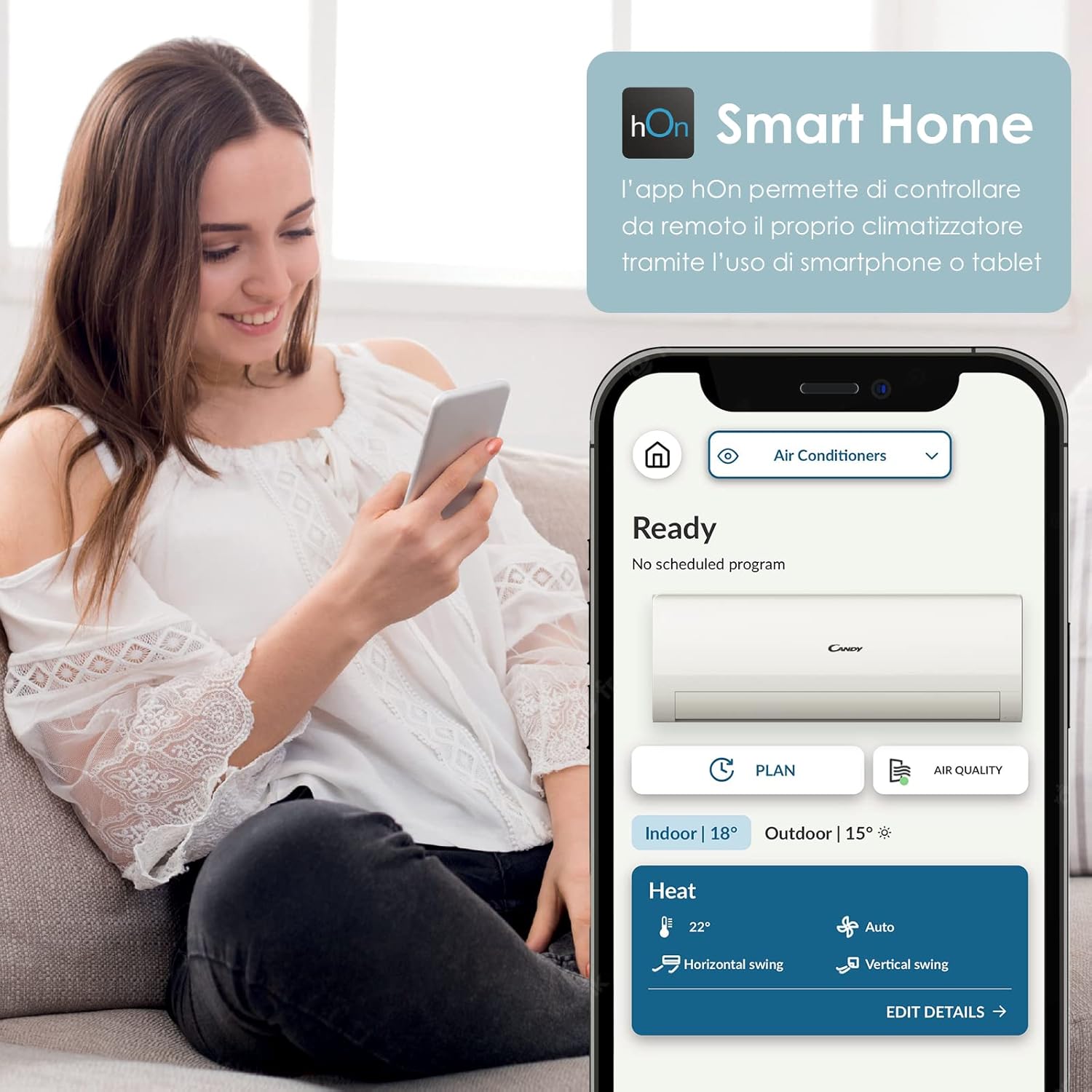
Image: A user interacting with the HOn Smart Home app on a smartphone to manage their air conditioner settings.

Image: A detailed view of the HOn app interface, displaying various controls and settings for the air conditioner.
6. Maintenance
Regular maintenance ensures optimal performance and longevity of your air conditioner. Always disconnect power before performing any maintenance.
6.1. Self-Clean Function
The Self-Clean function helps maintain the evaporator's cleanliness by eliminating bacteria. This system heats the evaporator to 56°C for 30 minutes to sterilize it. Activate this function periodically to ensure clean air and efficient operation.

Image: An illustration demonstrating the Self-Clean function, which eliminates bacteria and keeps the evaporator clean.

Image: Icon indicating the Steri-Clean function, which heats to 56°C for sterilization.
6.2. Filter Cleaning
The antimicrobial air filter should be cleaned regularly (e.g., every two weeks or as needed) to maintain air quality and unit efficiency. Refer to the detailed instructions in the full product manual for filter removal and cleaning procedures.
6.3. Professional Servicing
Annual professional servicing is recommended to check refrigerant levels, clean coils, and ensure all components are functioning correctly.
7. Troubleshooting
If you encounter issues with your air conditioner, refer to the following common problems and solutions. For more complex issues, contact customer support or a qualified technician.
| Problem | Possible Cause | Solution |
|---|---|---|
| Unit does not turn on | No power, remote control batteries low, circuit breaker tripped. | Check power supply, replace remote batteries, reset circuit breaker. |
| Insufficient cooling/heating | Dirty air filter, blocked outdoor unit, wrong mode selected, room size too large. | Clean air filter, clear obstructions, select correct mode, ensure unit capacity matches room size. |
| Unusual noise | Loose parts, fan obstruction, refrigerant issues. | Check for loose parts, clear obstructions, contact technician for refrigerant check. |
| Water leakage from indoor unit | Blocked drain pipe, improper installation. | Clear drain pipe, contact technician for inspection. |
8. Specifications
Detailed technical specifications for the Candy HRARIASET0004 Dualsplit Air Conditioner.
| Feature | Specification |
|---|---|
| Model Number | HRARIASET0004 |
| Indoor Unit Capacity | 9000 BTU + 12000 BTU |
| Cooling Power | 12000 British Thermal Units (Total for one unit, system capacity varies) |
| Power (Total) | 3412 watts |
| Energy Efficiency (Cooling) | A++ |
| Energy Efficiency (Heating) | A+ |
| SEER (Seasonal Energy Efficiency Ratio) | 16 |
| Noise Level | 30 Decibels (Indoor unit, lowest setting) |
| Refrigerant Type | R-32 |
| Special Functions | Dehumidifier, Self-Clean, Steri-Clean 56° |
| Control Method | Remote Control, HOn App |
| Installation Type | Split System |
| Filter Type | Antimicrobial Air Filter |

Image: The energy efficiency label, highlighting the A++ rating for cooling and A+ for heating.

Image: Icon representing the quiet operation of the unit, as low as 19 dB(A).
9. Warranty and Support
Your Candy HRARIASET0004 Air Conditioner comes with a limited warranty. Please refer to the warranty card included with your product for specific terms and conditions, including coverage duration and what is covered. Keep your proof of purchase for warranty claims.
Customer Support:
For technical assistance, troubleshooting beyond this manual, or warranty service, please contact Candy customer support. You can find contact information on the official Candy website or in your product documentation.
Online Resources: Visit the official Candy Brand Store for additional product information and support.