
Introduction
This manual provides detailed instructions for the installation, setup, operation, and maintenance of your FLIPSKY 75100 FOC 75V 200A Dual Electronic Speed Controller (ESC). The FLIPSKY 75100 Dual ESC is designed for high-performance electric skateboards, scooters, and ebikes, offering robust power delivery and flexible control options.
Product Features
- Supports BLDC square wave mode control and FOC sine wave mode.
- Voltage range: 14-84V (4-20S battery safe operation).
- Continuous maximum current: 100A per single ESC, 200A for dual ESC (values depend on mounting and ambient temperature).
- Integrated BEC: 5V@1A.
- Firmware: Latest version, with support for firmware updates.
- ERPM: Up to 150,000.
- Control Interface Ports: USB, CAN, UART.
- Supported Sensors: ABI, HALL, AS5047, AS5048A.
- Input Set Support: PPM, ADC, NRF, UART.
- Wire Size: 12AWG.
- Programmable: Yes.
- Regenerative Capacity: Yes.
Package Contents
Verify that all items are present in your package:
- FLIPSKY 75100 Dual ESC with Aluminum PCB
- USB Cable
- Sensor Wires
- Instruction Sheet (may include basic wiring diagram)

Specifications
| Specification | Value |
|---|---|
| Brand | FLIPSKY |
| Model Name | FLIPSKY 75100 |
| Voltage Range | 14-84V (4-20S) |
| Max Continuous Current | 100A (single), 200A (dual) |
| BEC Output | 5V@1A |
| ERPM | 150,000 |
| Control Interface Ports | USB, CAN, UART |
| Supported Sensors | ABI, HALL, AS5047, AS5048A |
| Input Set Support | PPM, ADC, NRF, UART |
| Wire Size | 12AWG |
| Dimensions (L x W x H) | 107mm x 103mm x 18.5mm (4.21"L x 4.05"W x 0.73"H) |
| Item Weight | 0.32 Kilograms |
| Material | Aluminum (PCB, Frame) |

Setup & Installation
Proper installation is crucial for the performance and longevity of your ESC. Ensure all connections are secure and correctly oriented.
Wiring Connections
Connect the ESC to your motors, battery, and control peripherals according to the wiring diagrams provided. Pay close attention to polarity for battery connections and pin assignments for sensor and communication ports.
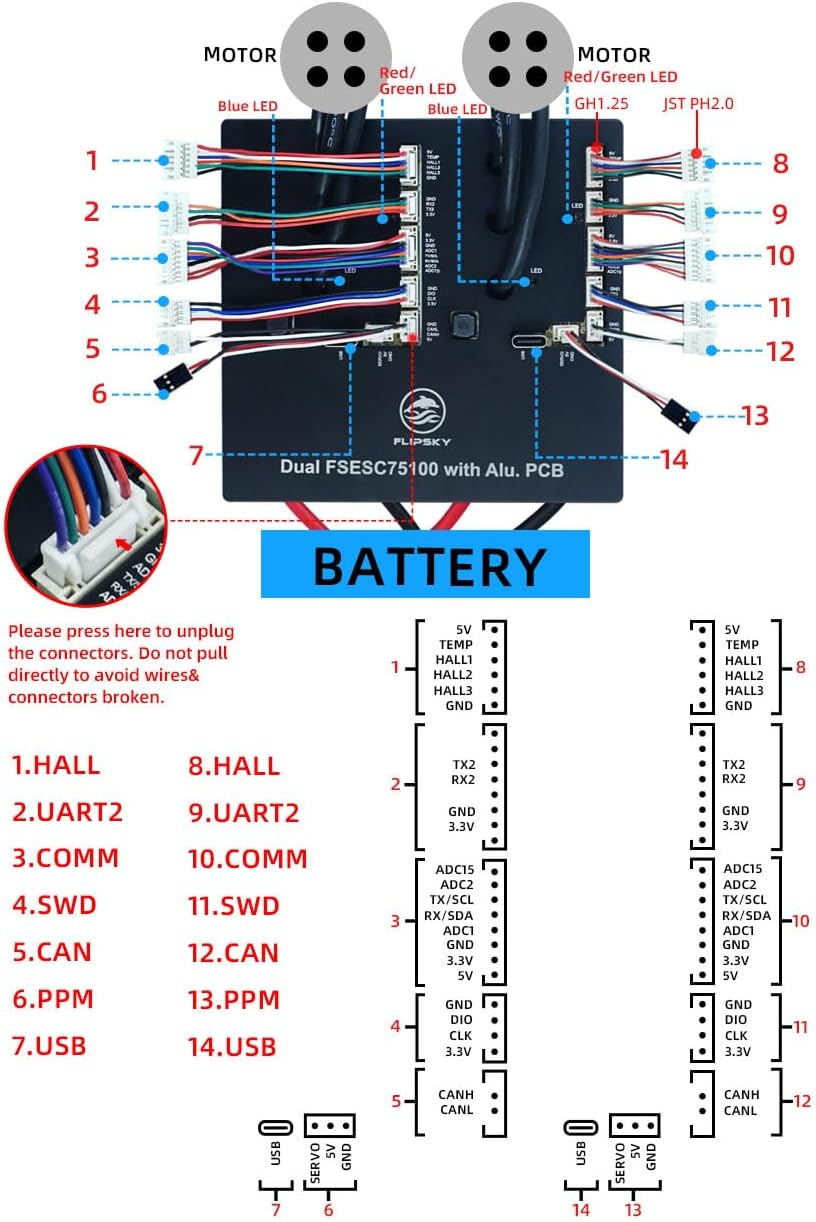

- Motor Connections: Connect the three phase wires from each motor to the corresponding outputs on the ESC. If using sensored motors, connect the sensor cable to the HALL port.
- Battery Connection: Connect your battery to the main power input (red for positive, black for negative). Ensure the battery voltage is within the 14-84V range (4-20S).
- Control Input: Depending on your remote control or throttle, connect to the PPM, ADC, or UART port.
- Communication: Use the USB port for connecting to VESC_TOOL for configuration. The CAN port allows communication between multiple ESCs or other CAN-enabled devices.
Firmware and Configuration
The FLIPSKY 75100 ESC is programmable via VESC_TOOL. It is recommended to use the firmware version 5.2 as shipped from the factory. Newer firmware versions (on or above 5.3, VESC_TOOL 3.01) require a critical setting adjustment:
- Important: If upgrading to firmware version 5.3 or higher, you must turn off the phase filter function and choose "false" in VESC_TOOL. Failure to do so will result in ESC damage.
- Avoid restoring default parameters when using the wizard interface if you have made specific configurations, especially regarding the phase filter.
- Limit the Absolute Maximum Current below 250A during configuration to prevent damage.
Operating Instructions
Once installed and configured, the ESC controls the speed and direction of your electric vehicle's motors based on the input from your throttle or remote control.
- Power On: Connect your battery to the ESC. The ESC will typically emit a series of beeps indicating it has powered on and is ready.
- Motor Detection: Perform motor detection using VESC_TOOL during initial setup to calibrate the ESC to your specific motors. This ensures optimal performance and efficiency.
- Throttle Control: Use your connected remote control or throttle to accelerate and decelerate. The ESC translates these inputs into motor commands.
- Regenerative Braking: The ESC supports regenerative braking, which recharges your battery during braking, extending range and providing smooth stopping power.
Maintenance
Regular maintenance helps ensure the longevity and reliable operation of your FLIPSKY 75100 Dual ESC.
- Keep Clean: Periodically inspect the ESC for dust, dirt, or debris. Clean with a soft, dry brush or compressed air. Avoid using liquids.
- Check Connections: Ensure all wires and connectors are securely attached and free from corrosion or damage. Loose connections can lead to intermittent operation or component failure.
- Thermal Management: Ensure the ESC has adequate airflow for cooling. Overheating can reduce performance and lifespan. The aluminum PCB aids in heat dissipation.
- Firmware Updates: While firmware updates can offer new features or improvements, always exercise caution. Refer to the "Firmware and Configuration" section and official FLIPSKY documentation before updating.
Troubleshooting
If you encounter issues with your FLIPSKY 75100 Dual ESC, refer to the following common troubleshooting steps:
- No Power:
- Check battery connections and ensure the battery is charged.
- Verify main power switch (if applicable) is on.
- Motor Not Spinning / Irregular Operation:
- Re-run motor detection in VESC_TOOL.
- Check all motor phase wire connections and sensor wire connections.
- Ensure the remote control is paired and functioning correctly.
- Verify the phase filter setting in VESC_TOOL, especially if firmware was updated (must be "false" for firmware 5.3+).
- Overheating:
- Ensure adequate ventilation around the ESC.
- Check motor current limits in VESC_TOOL; they might be set too high for your application or cooling setup.
- Reduce load or operating duration if consistently overheating.
- ESC Damage after Firmware Update:
- This often occurs if the phase filter was not disabled (set to "false") when updating to firmware 5.3 or higher. This type of damage is typically irreversible.
For further assistance, contact FLIPSKY customer support.
Important Safety Information
- Always disconnect the battery before performing any maintenance or wiring changes to the ESC or motors.
- Ensure all electrical connections are properly insulated to prevent short circuits.
- Operate the ESC within its specified voltage and current limits. Exceeding these limits can cause permanent damage.
- Keep the ESC away from water and moisture.
- Do not attempt to open or modify the ESC casing, as this may void the warranty and could lead to damage or injury.
- Be aware of the high power output of this device. Always use appropriate safety gear when operating electric vehicles.
Warranty & Support
FLIPSKY offers a limited warranty for this product. The warranty period is typically 2 months from the date of purchase. For warranty claims or technical support, please contact the seller or FLIPSKY directly. Be prepared to provide your purchase details and a description of the issue.
Contact Information:
- Seller: Shenzhen Flipsky Technology Company Limited
- For support, refer to the contact information provided at the point of purchase or on the official FLIPSKY website.


