
1. Introduction
This instruction manual provides guidance for the proper installation, operation, and care of your iMoshion Car Phone Holder. Designed for universal smartphone compatibility, this holder securely attaches to your vehicle's air vent, offering a stable and adjustable platform for your device. Please read this manual thoroughly before use to ensure optimal performance and safety.

Figure 1.1: Front view of the iMoshion Car Phone Holder, showcasing its carbon-patterned grip and air vent attachment mechanism.
2. Safety Information
- Always ensure the phone holder is securely attached to the air vent before placing your smartphone.
- Position the holder in a location that does not obstruct your view of the road, mirrors, or vehicle controls.
- Avoid adjusting the holder or your phone while driving. Perform all adjustments when safely parked.
- Do not expose the product to extreme temperatures or direct sunlight for prolonged periods, as this may affect its material integrity.
3. Setup and Installation
The iMoshion Car Phone Holder is designed for easy attachment to most vehicle air vents. Follow these steps for installation:
- Identify a Suitable Air Vent: Choose an air vent that is sturdy and provides a clear line of sight without obstructing driving. Refer to Figure 3.1 for examples of compatible and incompatible vent types.
- Attach the Holder: Gently push the air vent clip onto one of the horizontal or vertical slats of your chosen air vent. Ensure the clip is fully engaged and feels secure. The clip features a tightening knob to further secure its position.
- Adjust Orientation: The holder features a ball joint that allows for 360-degree rotation. Loosen the nut behind the holder, adjust the viewing angle to your preference (portrait or landscape), and then tighten the nut to lock it in place.

Figure 3.1: Examples of air vent designs. Green checkmarks indicate compatible vents, while red crosses indicate incompatible vents.
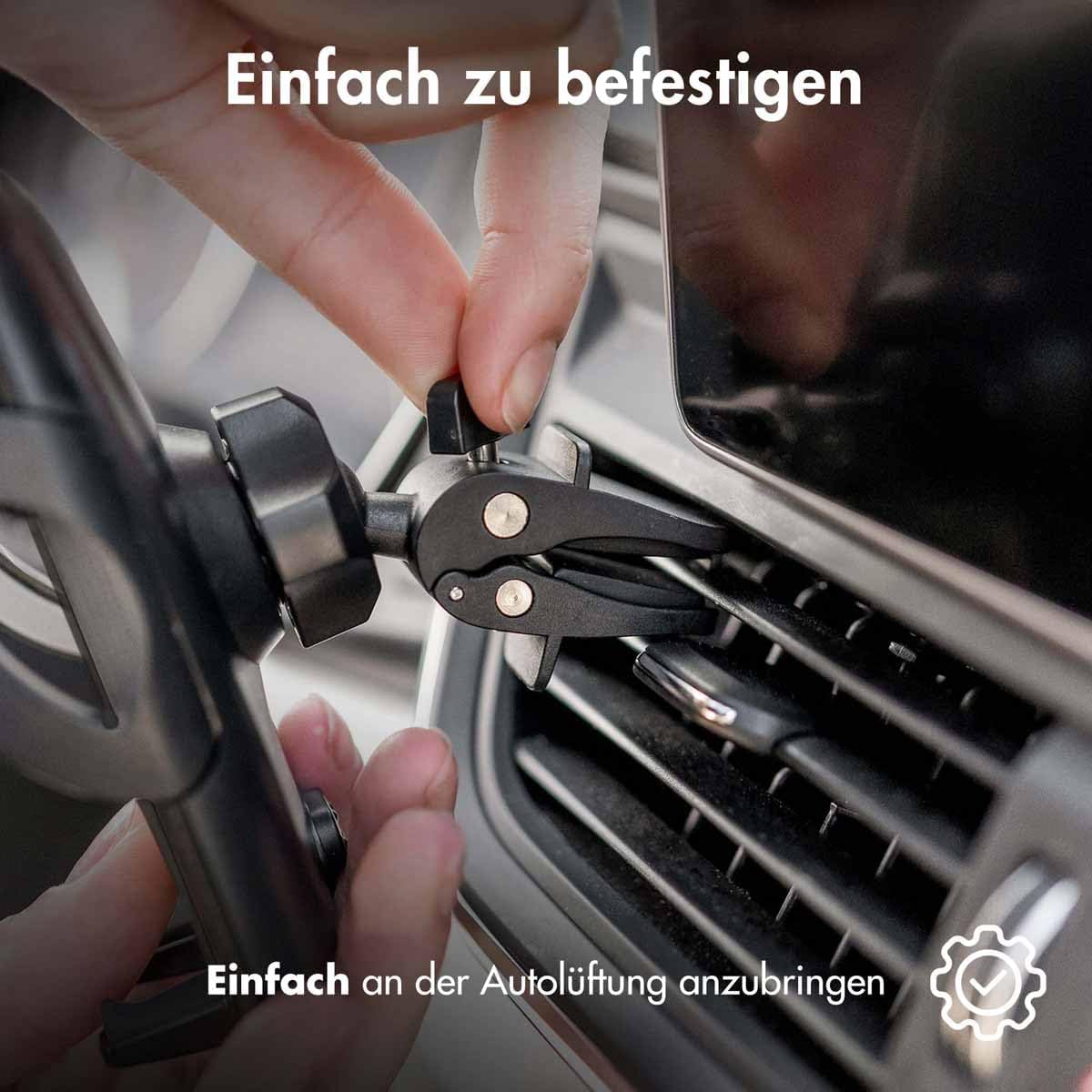
Figure 3.2: Demonstrating the simple attachment process of the holder to a car's air vent.

Figure 3.3: The holder's 360-degree rotation capability, allowing for both landscape and portrait viewing angles.
4. Operating Instructions
Using your iMoshion Car Phone Holder is designed to be straightforward and convenient.
- Inserting Your Smartphone: With one hand, gently push your smartphone into the holder. The automatic closing system will engage, and the side clamps will securely grip your device.
- Secure Grip: Once inserted, the holder's robust clamps will maintain a stable grip on your phone, minimizing movement during your drive.
- Accessing Charging Port: The design of the holder ensures that the charging port of your smartphone remains accessible, allowing you to charge your device while it is mounted.
- Removing Your Smartphone: To remove your smartphone, locate the release button on the side or back of the holder (refer to Figure 4.4). Press the button, and the clamps will release, allowing you to safely retrieve your device.

Figure 4.1: Demonstrating the one-hand operation for inserting a smartphone into the holder, which automatically closes to secure the device.

Figure 4.2: The phone holder providing a stable grip on a smartphone, suitable for hands-free calls or navigation.

Figure 4.3: The holder's design allows for easy access to the smartphone's charging port while the device is mounted.

Figure 4.4: A hand pressing the release button, indicating how to easily remove the phone from the holder.
5. Maintenance
To ensure the longevity and proper functioning of your iMoshion Car Phone Holder, follow these simple maintenance guidelines:
- Cleaning: Wipe the holder with a soft, dry, or slightly damp cloth. Avoid using abrasive cleaners, solvents, or harsh chemicals, as these can damage the material.
- Inspection: Periodically check the air vent clip and the phone gripping mechanism for any signs of wear or damage. Ensure all moving parts operate smoothly.
- Storage: If not in use for an extended period, store the holder in a cool, dry place away from direct sunlight.
6. Troubleshooting
If you encounter any issues with your iMoshion Car Phone Holder, please refer to the following common problems and solutions:
- Problem: The holder feels loose or unstable on the air vent.
Solution: Ensure the air vent clip is fully inserted into a sturdy vent slat. Tighten the knob on the clip to secure it firmly. Verify that your air vent type is compatible (refer to Figure 3.1). - Problem: The smartphone is not held securely or falls out.
Solution: Ensure the smartphone is pushed fully into the holder so that the automatic closing mechanism engages properly. Check that your phone's dimensions are within the universal compatibility range of the holder. - Problem: The holder's rotation is stiff or does not hold its position.
Solution: Loosen the tightening nut behind the holder, adjust to the desired angle, and then firmly tighten the nut to lock the position.
7. Specifications
| Model Number | SH00049690 |
| Brand | iMoshion |
| Mounting Type | Air Vent |
| Compatible Devices | Smartphones (Universal) |
| Special Features | Adjustable, 360-degree Rotation, Automatic Closing System, One-Hand Operation |
| Material | Robust Carbon-patterned Material (Note: Product specifications also list 'Magnet' which may refer to internal components or be a general categorization.) |
| Color | Black |
| Item Weight | 140 g |
| Package Dimensions | 18.5 x 11.2 x 6.4 cm |
8. Warranty and Support
For warranty information, technical support, or any inquiries regarding your iMoshion Car Phone Holder, please contact your original retailer or visit the official iMoshion website. Please have your model number (SH00049690) available when seeking support.