
WAVLINK N300
Contents
WAVLINK Outdoor N300 Wi-Fi Repeater User Manual
Model: N300 Outdoor CPE/Access Point/Repeater/Range Extender
1. Introduction
This manual provides instructions for the installation, configuration, and operation of your WAVLINK Outdoor N300 Wi-Fi Repeater. This device is designed to provide a robust and cost-effective solution for extending wireless network coverage in outdoor environments.
Key features include:
- High-performance long-range link capability.
- Maximum 1000mW power output and enhanced receiver design.
- 15KV ESD and 4000V lightning protection for adverse weather conditions.
- Durable weatherproof casing for harsh outdoor environments.
- IEEE 802.11b/g/n compliance with wireless link speeds up to 300Mbps.
- Supports WPA-PSK/WPA2-PSK encryption for secure connections.
- 3 LED indicators for wireless signal strength.
2. Package Contents
Please verify that all items are present and in good condition. If any items are missing or damaged, please contact your retailer.
- WAVLINK Outdoor N300 Wi-Fi Repeater Unit
- Passive PoE Converter
- AC Power Adapter
- LAN Cable
- Mounting Kit (Antenna and bracket plate, pole mount accessories)
- Quick Installation Guide

Image: The WAVLINK Outdoor N300 Wi-Fi Repeater unit and its accompanying Passive PoE injector.
3. Setup and Installation
3.1. Powering the Device (Passive PoE)
The WAVLINK Outdoor N300 Wi-Fi Repeater is powered using Passive Power over Ethernet (PoE). This allows both power and data to be transmitted over a single Ethernet cable, simplifying outdoor installation.
- Connect the AC Power Adapter to the PoE converter.
- Connect one end of an Ethernet cable to the "PoE" port on the PoE converter.
- Connect the other end of this Ethernet cable to the WAN/LAN (PoE) port on the WAVLINK Outdoor N300 unit.
- The PoE converter also has a "LAN" port. This port can be connected to your main router or network switch for data access, depending on the operating mode.

Image: Illustration of how to connect the PoE converter to the WAVLINK device and the network.
3.2. Mounting Options
The device supports various mounting methods suitable for outdoor deployment.
- Pole Mount: Use the provided mounting straps and bracket to secure the device to a pole. Ensure the device is positioned for optimal signal coverage.
- Wall Mount: Use screws and wall anchors (not always included, check package) to attach the device to a wall.

Image: Examples of pole mounting and wall mounting for the WAVLINK Outdoor N300 device.

Image: A close-up view of the WAVLINK Outdoor N300 device securely mounted on a pole with its cables connected.
4. Operating Modes
The WAVLINK Outdoor N300 supports multiple operating modes to suit various network requirements:
- Access Point (AP) Mode: Connects to a wired network and broadcasts a wireless signal, allowing wireless clients to connect.
- Repeater Mode (Range Extender): Extends the coverage of an existing wireless network by receiving and re-transmitting the signal.
- Router Mode: Functions as a primary router, providing network access and DHCP services.

Image: Visual representation of the Access Point, Repeater, and Router operating modes and their typical network configurations.
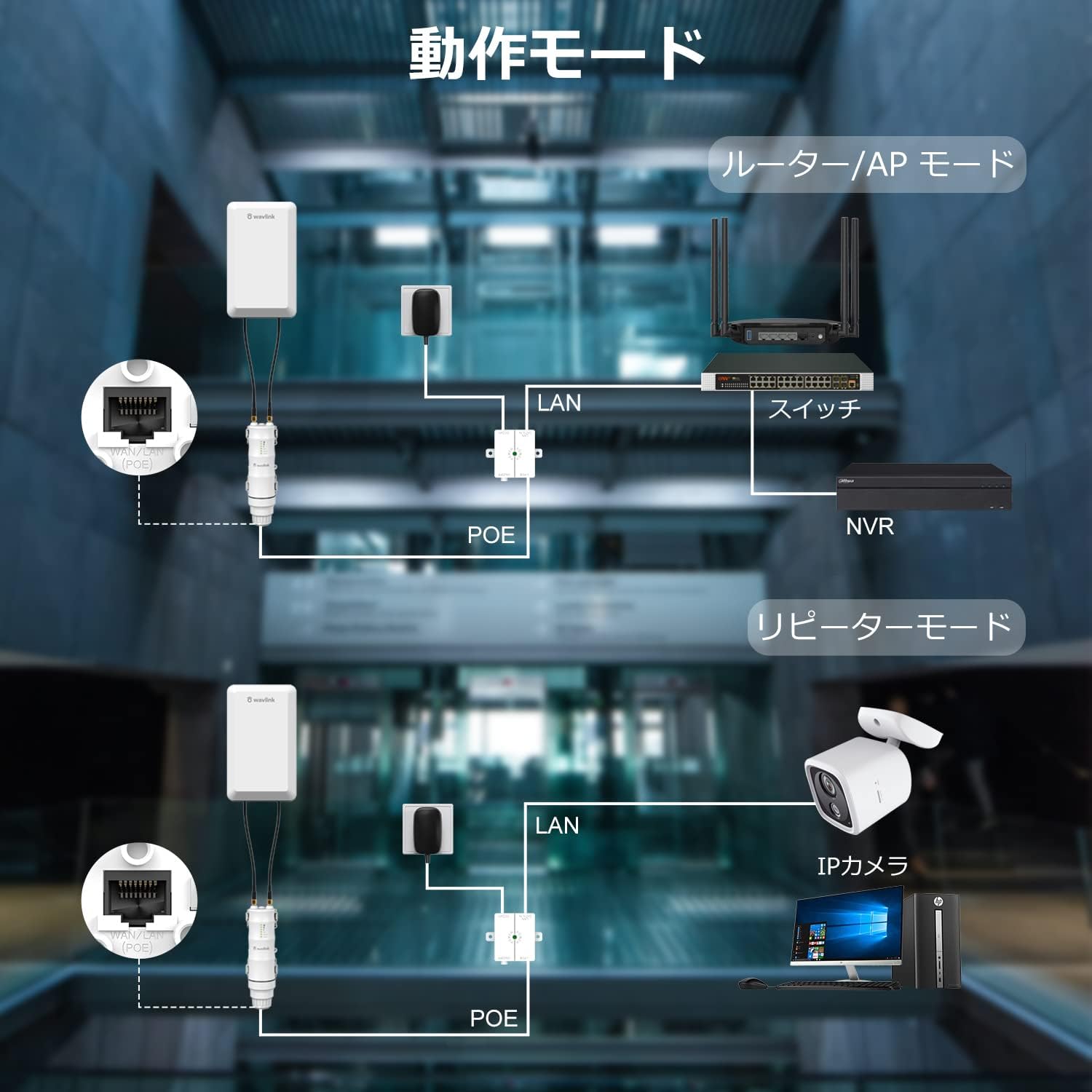
Image: Detailed connection diagrams for Router/AP mode and Repeater mode, including connections to switches, NVRs, and IP cameras.
5. Initial Configuration
To configure the device, you will need to access its web-based management interface. The initial setup is crucial for securing your network.
- Connect to the Device: Initially, the device broadcasts an open Wi-Fi network (SSID) without a password. Connect your computer or mobile device to this network. Alternatively, connect your computer directly to the LAN port of the PoE converter using an Ethernet cable.
- Access the Management Interface: Open a web browser and enter the default IP address or URL provided in the Quick Installation Guide (e.g.,
wifi.wavlink.comor a specific IP address). - Login: Enter the default username and password (usually
adminfor both, refer to the guide). - Select Operating Mode: Choose your desired operating mode (Router, Access Point, or Repeater) based on your network setup.
- Configure Wireless Settings:
- Change the default SSID to a unique name.
- Set a strong WPA2-PSK password for your wireless network.
- Ensure the authentication mode is set to WPA2-PSK for optimal security.
- Save Settings and Reboot: Apply the changes and allow the device to reboot.
Important Note:
- If you encounter issues accessing the management interface, clear your browser's cache and cookies, then try again.
- It is highly recommended to configure security settings (SSID, password, authentication mode) immediately after initial connection to prevent unauthorized access.
- Some users have reported instability during initial wireless configuration. If this occurs, try connecting your computer directly via Ethernet to the PoE converter's LAN port for a more stable configuration process.
6. Performance Characteristics
The WAVLINK Outdoor N300 is designed for extended range and stable outdoor connectivity.
- Wireless Speed: Supports up to 300Mbps on the 2.4GHz band, utilizing MIMO technology. This speed is suitable for general internet browsing, email, and streaming standard-definition video.
- Range: Equipped with a 1000mW power amplifier and high-gain omnidirectional antennas, the device offers significant signal penetration and coverage, with an outdoor range of up to 500 meters under ideal conditions. Actual range may vary based on environmental factors.
- Capacity: Capable of supporting up to 64 devices simultaneously at 300Mbps.

Image: Visual representation of the device's 300Mbps speed capability and extended outdoor range, connecting multiple devices.
7. Maintenance
To ensure optimal performance and longevity of your WAVLINK Outdoor N300 Wi-Fi Repeater, follow these maintenance guidelines:
- Firmware Updates: Regularly check the official WAVLINK website for firmware updates. Updating the firmware can improve performance, add new features, and fix security vulnerabilities. Refer to the website for specific instructions on how to perform a firmware update.
- Physical Inspection: Periodically inspect the device and its cables for any signs of damage, corrosion, or wear, especially after severe weather conditions.
- Cleaning: Keep the device free from dust and debris. Use a soft, dry cloth for cleaning. Do not use liquid cleaners or aerosols.
- Environmental Protection: The device is designed for outdoor use with a weatherproof casing, 15KV ESD, and 4KV lightning protection. However, ensure it is installed in a location that minimizes direct exposure to extreme conditions where possible.

Image: The WAVLINK Outdoor N300 device highlighting its robust weatherproof design, including lightning protection, anti-freezing capabilities, and water resistance.
8. Troubleshooting
If you encounter issues with your WAVLINK Outdoor N300, refer to the following common problems and solutions:
| Problem | Possible Cause | Solution |
|---|---|---|
| Cannot access the web management interface. | Incorrect IP address/URL, browser cache issues, network connectivity problem. |
|
| No internet connection after setup. | Incorrect operating mode configuration, wrong network settings (IP, DNS), upstream network issue. |
|
| Poor Wi-Fi signal or slow speeds. | Obstructions, interference, suboptimal placement, outdated firmware. |
|
| Device frequently disconnects. | Power instability, firmware issues, environmental factors. |
|
8.1. Factory Reset
If the device is not functioning correctly or you have forgotten your login credentials, you can perform a factory reset. This will revert all settings to their default values.
- With the device powered on, locate the reset button (usually a small pinhole).
- Use a paperclip or a thin object to press and hold the reset button for approximately 10-15 seconds.
- Release the button when the LED indicators flash or change behavior.
- The device will reboot with factory default settings. You will then need to reconfigure it from scratch.
9. Specifications
| Feature | Detail |
|---|---|
| Brand | WAVLINK |
| Model | N300 Outdoor CPE/Access Point/Repeater/Range Extender |
| Wireless Standard | IEEE 802.11b/g/n |
| Frequency Band | 2.4 GHz |
| Wireless Speed | Up to 300Mbps |
| Antenna | Omnidirectional Antenna (High-gain) |
| Power Output | Max 1000mW |
| Power Supply | Passive PoE (100-240V AC input for adapter) |
| Security | WPA-PSK/WPA2-PSK, WEP (128/64) |
| ESD Protection | 15KV |
| Lightning Protection | 4KV |
| Operating Temperature | -30°C to 70°C (-22°F to 158°F) |
| Storage Temperature | -40°C to 70°C (-40°F to 158°F) |
| Outdoor Range | Up to 500m (environment dependent) |
| Dimensions | 28.8 x 12.5 x 6 cm |
| Weight | 480 g |
10. Warranty and Support
WAVLINK provides a 1-year warranty for this product. Additionally, lifetime friendly customer service and technical support are available.
For further assistance, please refer to the FAQ section on the official WAVLINK website or contact customer support via email at julia@wavlink.com or supportjp@wavlink.com.
Documents and downloads
Ask a question about this manual
Ask about setup, troubleshooting, compatibility, parts, safety, or missing instructions. Manuals+ will review the question and use this page’s manual context to help answer it.