
1. Introduction
Thank you for choosing the Sovmiku Wireless Security Camera System. This system provides comprehensive surveillance for your home or business, featuring high-resolution 5MP cameras, a 10-inch integrated NVR, and advanced functionalities like AI motion detection and two-way audio. This manual will guide you through the setup, operation, and maintenance of your new security system.
For optimal performance and safety, please read this manual thoroughly before installation and retain it for future reference.

Figure 1.1: Sovmiku Wireless Security Camera System components including the NVR, four cameras, and 1TB HDD.
2. Product Overview
2.1 High Resolution and Expandability
The system features 5-megapixel cameras, providing clear and detailed images. The 10-inch integrated NVR supports up to 10 channels, allowing for expansion with additional cameras (sold separately) beyond the initial four included in this set. This ensures comprehensive coverage for larger areas.

Figure 2.1: Visual comparison demonstrating the superior clarity of 5MP resolution over 1.3MP.
2.2 AI Motion Detection and App Support
Equipped with advanced AI motion detection, the system optimizes recording content by focusing on human movement. When motion is detected, you will receive instant notifications via the mobile app (EseeCloud) or email. The system utilizes a stable 7DB antenna design for reliable Wi-Fi communication, allowing remote viewing and control from your smartphone, tablet, or PC anywhere.

Figure 2.2: AI detection capabilities with app notifications for human and pet activity.
2.3 24/7 Continuous Recording and H.265 Compression
The NVR includes a 1TB HDD, enabling 24/7 continuous recording. To maximize storage efficiency, the system employs H.265 video compression technology, which offers approximately twice the compression performance of traditional H.264. This allows for extended recording times without requiring additional storage infrastructure. When the storage is full, the system automatically overwrites the oldest data, ensuring continuous recording without manual intervention.

Figure 2.3: H.265 compression technology significantly reduces file size while maintaining video quality.
2.4 Two-Way Audio and Remote Access
Each camera is equipped with a built-in microphone and speaker, enabling two-way communication. This feature allows you to speak with visitors or deter intruders directly through the camera from your mobile device. Utilizing P2P technology, the system provides seamless remote monitoring and operation from anywhere with an internet connection.

Figure 2.4: Two-way audio allows for direct communication via the camera.
2.5 IP66 Waterproof Rating
The cameras are rated IP66 waterproof, making them suitable for both indoor and outdoor installation. They are designed to withstand various weather conditions, including rain, snow, and extreme temperatures ranging from -10°C to 50°C.
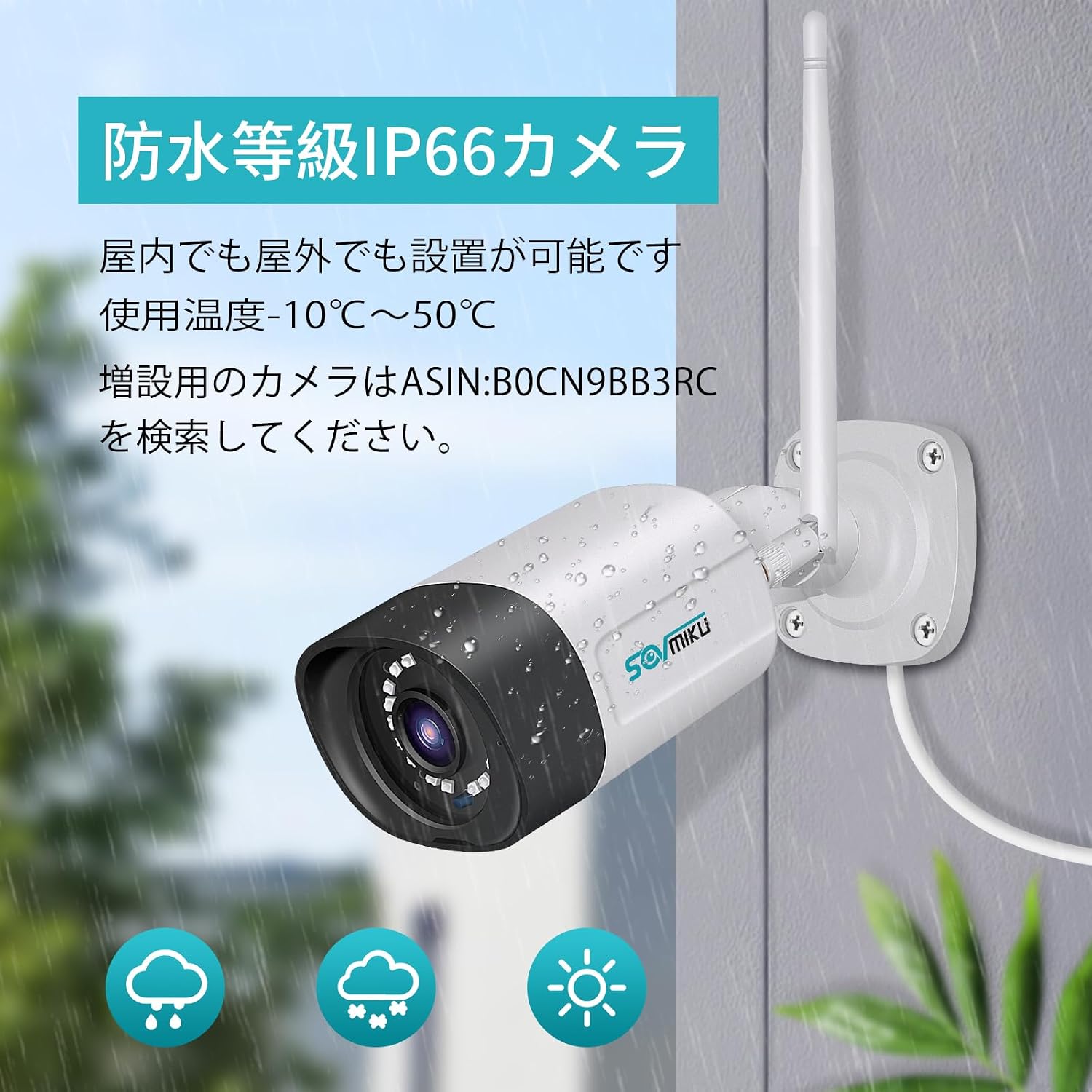
Figure 2.5: The IP66 rating ensures the cameras are protected against dust and water jets.
3. Package Contents
Please check the package contents upon arrival to ensure all items are present and in good condition:
- NVR Main Unit (with 1TB HDD pre-installed)
- 5MP IP66 Waterproof Cameras (4 units)
- Power Adapters for Cameras (4 units, PSE standard)
- Power Adapter for NVR Main Unit
- USB Mouse
- LAN Cable
- HDMI Cable
- Japanese Instruction Manual
- Mounting Screws and Anti-theft Stickers
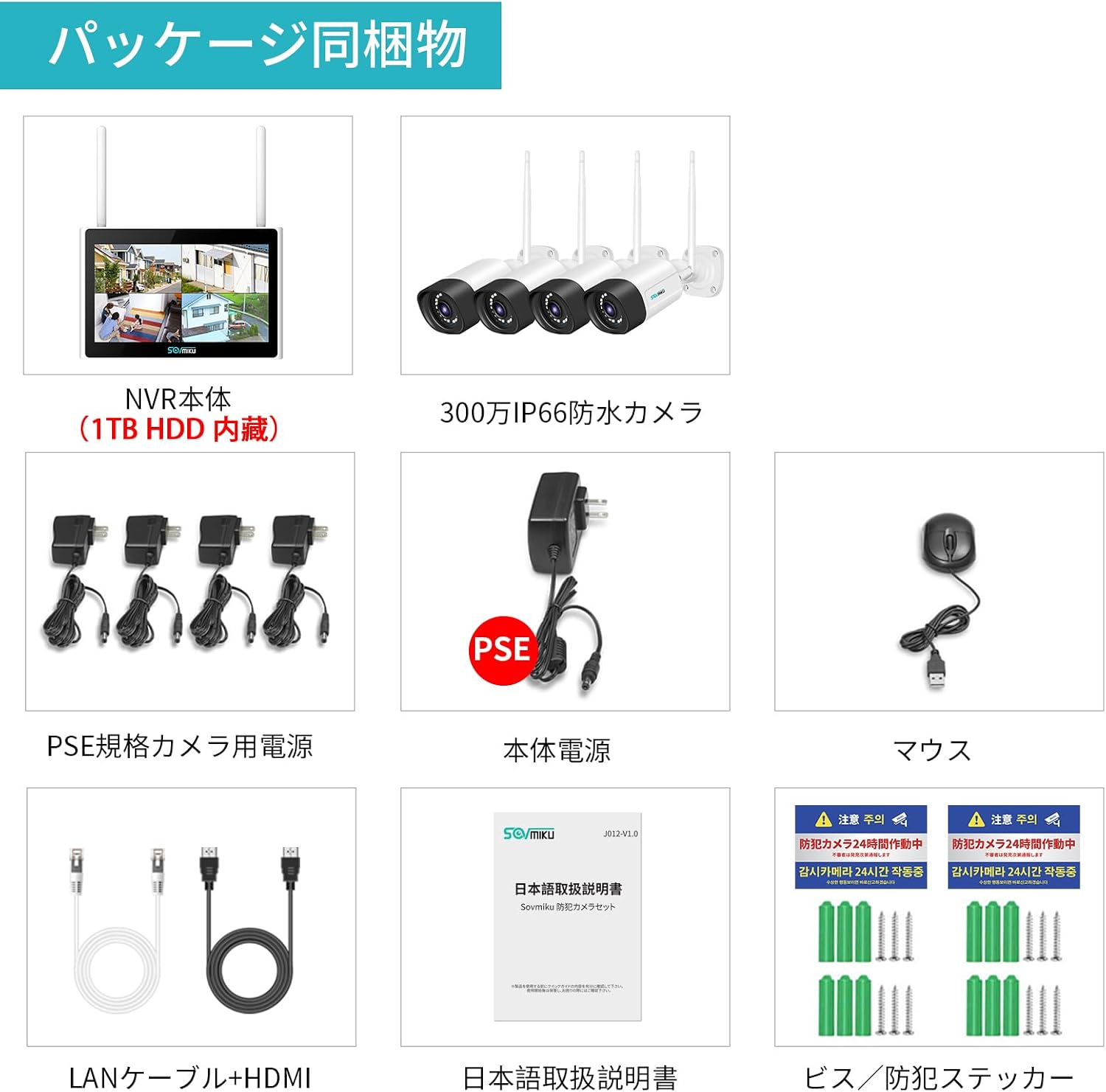
Figure 3.1: All components included in the Sovmiku Wireless Security Camera System package.
4. Setup
4.1 Initial Connection
The cameras and NVR are pre-paired at the factory. Simply connect the power adapters to the NVR and each camera. The system will automatically establish a connection, and surveillance will begin immediately without requiring network configuration.

Figure 4.1: Simple setup by connecting power to the NVR and cameras.
4.2 Network Connection Options
While the system operates wirelessly without an internet connection for local viewing, connecting it to your network enables remote monitoring and advanced features. You have three primary connection methods:
- Direct Wireless Connection to WiFi Router: The NVR connects wirelessly to your home or office WiFi router.
- Wired Connection to WiFi Router (LAN Cable): For enhanced stability, connect the NVR to your WiFi router using a LAN cable.
- Sovmiku NVR Main Unit Operation: Operate the system directly through the NVR unit, which can also be connected to the internet for remote access.

Figure 4.2: Various network connection methods for the NVR.
4.3 Expanding Your System
The NVR supports up to 10 cameras. If you wish to expand your surveillance coverage, you can purchase additional Sovmiku 5MP wireless cameras and easily add them to your existing system. Search for ASIN: B0CN9BB3RC for compatible cameras.
Figure 4.3: The system can be expanded to include up to 10 cameras.
5. Operating Your System
5.1 Recording Modes
The system offers flexible recording options to suit your needs:
- Continuous Recording: Records 24/7 without interruption.
- Scheduled Recording: Set specific times for recording to occur.
- Motion Detection Recording: Records only when motion is detected, saving storage space and making event review more efficient.

Figure 5.1: Different recording modes available for your surveillance system.
5.2 Remote Monitoring and Two-Way Audio
Once connected to the internet, you can monitor your property remotely using the EseeCloud app on your smartphone or tablet, or the EseeCloud software on your PC. The two-way audio feature allows you to communicate through the camera's built-in speaker and microphone.

Figure 5.2: Remote monitoring allows you to view your cameras from anywhere in the world.
5.3 Night Vision Modes
The cameras offer multiple night vision modes to adapt to different lighting conditions:
- Smart Mode: Automatically switches between infrared and full-color based on detected motion.
- Full Color Mode: Provides color images even in low light conditions using built-in spotlights.
- Infrared Mode: Traditional black and white night vision using infrared LEDs.

Figure 5.3: Different night vision modes for optimal visibility in various low-light scenarios.
5.4 Smart Home Integration (Alexa)
The system is compatible with Alexa, allowing you to view camera feeds on compatible smart displays using voice commands. For example, you can say, "Alexa, show me the garage."

Figure 5.4: Seamless integration with Alexa for convenient voice control and viewing.
6. Maintenance
6.1 Hard Drive Management
The 1TB HDD automatically overwrites the oldest recordings when it reaches full capacity. No manual intervention is required for continuous recording. Regularly back up important footage to an external device if needed.
6.2 Camera Cleaning
Periodically clean the camera lenses with a soft, damp cloth to ensure clear image quality. Avoid using harsh chemicals or abrasive materials that could scratch the lens.
7. Troubleshooting
If you encounter any issues with your Sovmiku Wireless Security Camera System, please refer to the following common troubleshooting steps:
- No Image Display: Ensure all power adapters are securely connected to the NVR and cameras. Check if the NVR is connected to a display via HDMI.
- No Recording: Verify that the 1TB HDD is properly installed and functioning. Check recording settings (continuous, scheduled, motion detection) on the NVR.
- Remote Access Issues: Confirm the NVR is connected to the internet (wired or wireless). Ensure your mobile device has a stable internet connection. Check firewall settings on your router.
- Poor Image Quality: Clean camera lenses. Ensure cameras are within optimal range of the NVR for strong wireless signal.
- Two-Way Audio Problems: Check microphone and speaker settings on the NVR and in the EseeCloud app. Ensure volume levels are adequate.
For further assistance, please contact Sovmiku customer support using the details provided in the 'Warranty and Support' section.
8. Specifications
| Feature | Specification |
|---|---|
| Brand | SOVMIKU |
| Product Model Number | SFWK-10V-4HB312-1T |
| Product Dimensions | 29 x 17 x 21 cm |
| Item Weight | 3.9 kg |
| Color | Four Camera Set |
| Power Source | Corded Electric |
| Special Features | Wireless, Waterproof (IP66) |
| Included Components | NVR Main Unit, Cameras |
| Connectivity Technology | Wireless |
| Video Capture Resolution | 1536p (5MP) |
| Number of Channels | 8 (Expandable to 10) |

Figure 8.1: Detailed view of camera and NVR interfaces.
9. Warranty and Support
9.1 12-Month Warranty
Sovmiku provides a 12-month warranty from the date of product delivery. We are committed to providing sincere service and dedicated support to our customers. If you encounter any issues with the product, please do not hesitate to contact us.

Figure 9.1: Sovmiku offers a 12-month warranty and dedicated customer support.
9.2 Contact Information
For product inquiries, troubleshooting, expansion, or installation consultations, our professional staff will provide thorough support.
- Email Support: sovmiku_JP@163.com
- LINE Service: Scan the QR code below to easily access Sovmiku's official LINE account for support.

Figure 9.2: Scan this QR code to connect with Sovmiku's official LINE support.
Alternatively, access via link: https://line.me/ti/p/wsh_rWFDVy


