
1. Introduction
Thank you for choosing the Alecto FR-175BW Two Way Radios. This manual provides comprehensive instructions for the safe and efficient use of your device. Please read this manual thoroughly before operating the radios and retain it for future reference. These two-way radios are designed for reliable communication over distances up to 7 kilometers, featuring a built-in flashlight and a user-friendly interface, making them suitable for various outdoor activities and general communication needs.
2. Package Contents
Ensure all items listed below are present in your package:
- 2x Alecto FR-175BW Two Way Radios
- 1x Charging Station
- 2x Rechargeable Battery Packs
- 2x Belt Clips
- 1x Power Adapter (for charging station)
- 1x User Manual (this document)

Image 1: Alecto FR-175BW Two Way Radios with Charging Station. This image shows the two blue and black radios docked in their charging base, ready for use or charging.
3. Product Features
- Extended Range: Communicate up to 7 kilometers in optimal conditions.
- Integrated Flashlight: A built-in torch for illumination in low-light environments.
- Rechargeable System: Includes a charging station and rechargeable batteries for convenience.
- User-Friendly Operation: Simple controls suitable for various age groups.
- Durable Design: Robust construction for outdoor use.
- Multiple Channels: 8 available channels for clear communication.
- Long Standby Time: Up to 24 hours of standby time.

Image 2: Integrated Flashlight. This image highlights the flashlight feature of the Alecto FR-175BW radio, showing it emitting light in a dark environment.
4. Setup
4.1 Battery Installation
- Locate the battery compartment cover on the back of the radio.
- Slide or unclip the cover to open the compartment.
- Insert the rechargeable battery pack, ensuring correct polarity (+/-).
- Replace the battery compartment cover and secure it.
4.2 Charging the Radios
- Connect the power adapter to the charging station and plug it into a wall outlet.
- Place the radios into the charging slots of the charging station. Ensure they are seated correctly.
- The charging indicator light on the radio or charging station will illuminate, indicating that charging has begun.
- Allow approximately 8-10 hours for a full charge.
- Once fully charged, the indicator light may change color or turn off.

Image 3: Radios in Charging Station. This image shows both Alecto FR-175BW radios securely placed in their dedicated charging station.
4.3 Attaching the Belt Clip
- Align the belt clip with the designated slots on the back of the radio.
- Slide the clip downwards until it locks into place.
- To remove, lift the tab on the belt clip and slide it upwards.
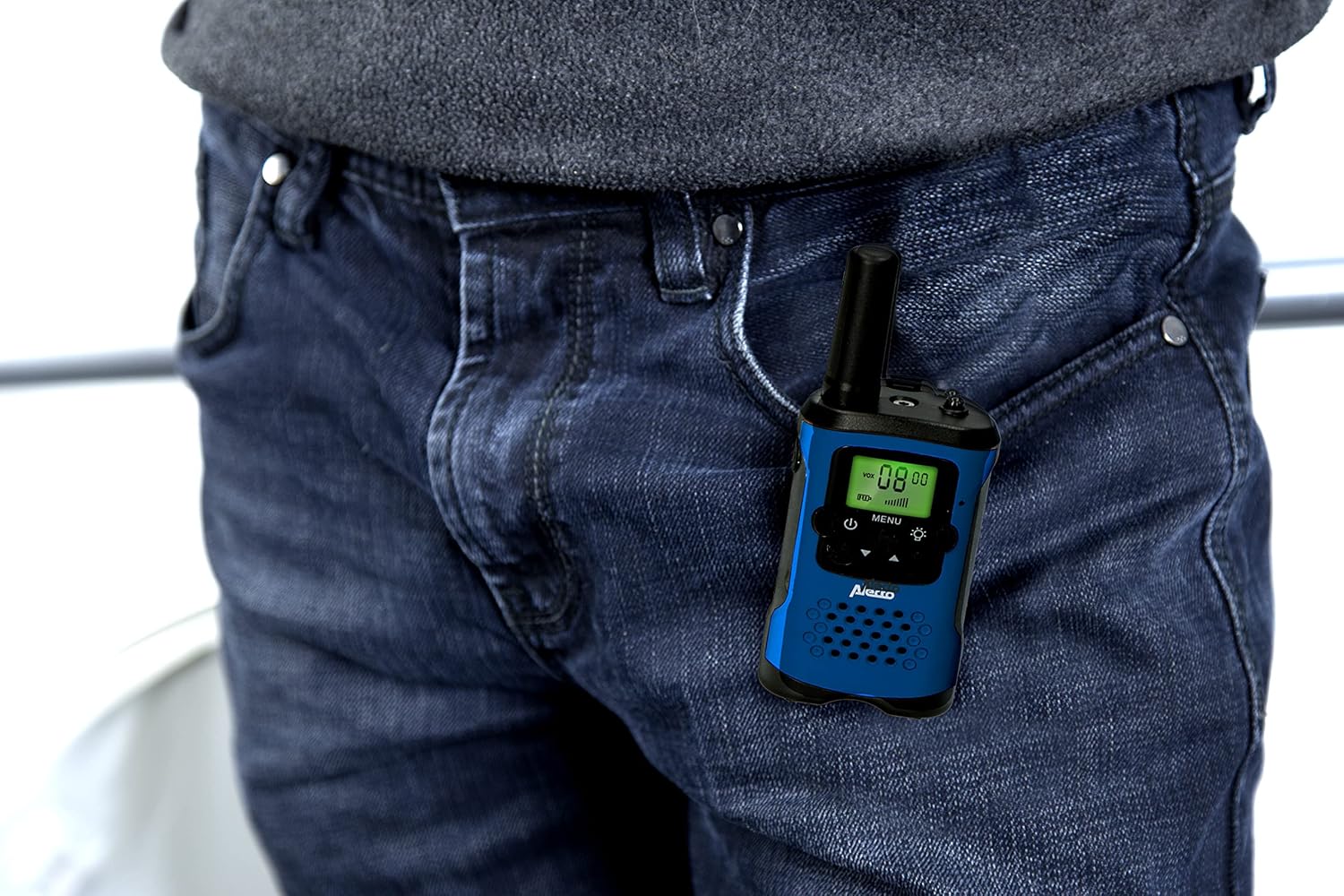
Image 4: Radio with Belt Clip. This image demonstrates how the Alecto FR-175BW radio can be conveniently clipped to clothing using its belt clip.
5. Operating Instructions

Image 5: Front View of Radio. This image provides a clear view of the radio's display, power button, menu button, and flashlight button.
5.1 Powering On/Off
- To power on, press and hold the Power button (usually marked with a circle and vertical line) until the display illuminates.
- To power off, press and hold the Power button again until the display turns off.
5.2 Adjusting Volume
- Use the Up/Down buttons (often integrated with channel selection) to increase or decrease the listening volume.
5.3 Selecting a Channel
- Press the MENU button once. The channel number on the display will flash.
- Use the Up/Down buttons to select your desired channel (1-8).
- Press the MENU button again or wait a few seconds for the selection to be confirmed.
- Important: Both radios must be on the same channel to communicate.
5.4 Transmitting and Receiving
- To transmit, press and hold the Push-To-Talk (PTT) button (usually located on the side of the radio). Speak clearly into the microphone.
- Release the PTT button to stop transmitting and listen for a response.
- When receiving, the radio will automatically play the incoming transmission.

Image 6: Using the Radio. This image shows an individual using the Alecto FR-175BW radio for communication, demonstrating a typical use case.
5.5 Using the Flashlight
- Press the Flashlight button (often marked with a light bulb icon) to turn the flashlight on.
- Press the button again to turn the flashlight off.
6. Maintenance
- Cleaning: Wipe the radios with a soft, damp cloth. Do not use abrasive cleaners or solvents.
- Storage: When not in use for extended periods, remove the batteries and store the radios in a cool, dry place.
- Battery Care: Fully charge batteries before first use. Avoid overcharging or completely draining batteries to prolong their lifespan.
- Water Resistance: These radios are not water resistant. Avoid exposure to rain, splashes, or immersion in water.
7. Troubleshooting
| Problem | Possible Cause | Solution |
|---|---|---|
| No power | Batteries are dead or incorrectly installed. | Ensure batteries are correctly installed and fully charged. |
| Cannot communicate with other radios | Radios are on different channels. Out of range. | Verify both radios are set to the same channel. Move closer to the other radio. |
| Poor sound quality / Static | Out of range. Obstructions (buildings, hills). Low battery. | Move to an open area. Recharge batteries. |
| Flashlight not working | Low battery. Faulty LED. | Recharge batteries. If problem persists, contact support. |
8. Specifications
| Feature | Detail |
|---|---|
| Model | FR175BW |
| Brand | Alecto |
| Tuner Technology | UHF |
| Number of Channels | 8 |
| Frequency Range | 446MHz |
| Maximum Talking Range | 7 km (7000 Meters) |
| Voltage | 7.5 Volts |
| Standby Time | Up to 24 hours |
| Product Dimensions | 3.5 x 4.9 x 12.8 cm |
| Item Weight | 0.22 Kilograms (218 g) |
| Water Resistance Level | Not Water Resistant |
| Colour | Blue / Black |
9. Warranty and Support
For warranty information and customer support, please refer to the warranty card included in your package or visit the official Alecto website. Keep your proof of purchase for any warranty claims.


