
1. Introduction
Thank you for choosing the Freshmeo SF-202 PC202 Digital Temperature Controller. This device is designed for precise temperature management in cold-room environments, offering reliable performance and user-friendly operation. This manual provides detailed instructions for installation, operation, maintenance, and troubleshooting to ensure optimal use of your controller.
2. Safety Information
Please read all safety warnings and instructions carefully before installing or operating the controller. Failure to follow these instructions may result in electric shock, fire, or damage to the product.
- Electrical Safety: Ensure all wiring is performed by a qualified electrician and complies with local electrical codes. Disconnect power before making any connections or performing maintenance.
- Voltage Compatibility: Verify that the power supply (230VAC or 120VAC, 50/60Hz) matches the controller's requirements.
- Proper Grounding: Always ensure the device is properly grounded to prevent electrical hazards.
- Environmental Conditions: Install the controller in an environment free from excessive moisture, dust, and corrosive gases. The unit is waterproof and hermetic, but proper installation is still crucial.
- Compressor Load: Do not exceed the maximum compressor load of 30A / 250VAC.
3. Product Overview
3.1 Key Features
- Waterproof and hermetic design.
- Direct control of 1HP compressor.
- Defrost function by turning off the compressor.
- High/low temperature overrun alarm.
- Compressor start delay function.
- Parameter locking for secure settings.
- Temperature range: -45°C to 99°C.
- Accuracy: ±1°C.
- Sensor type: NTC, 1pc included.
3.2 Controller Components
The SF-202 PC202 controller typically consists of a main display unit, control buttons, and a temperature sensor (NTC probe).
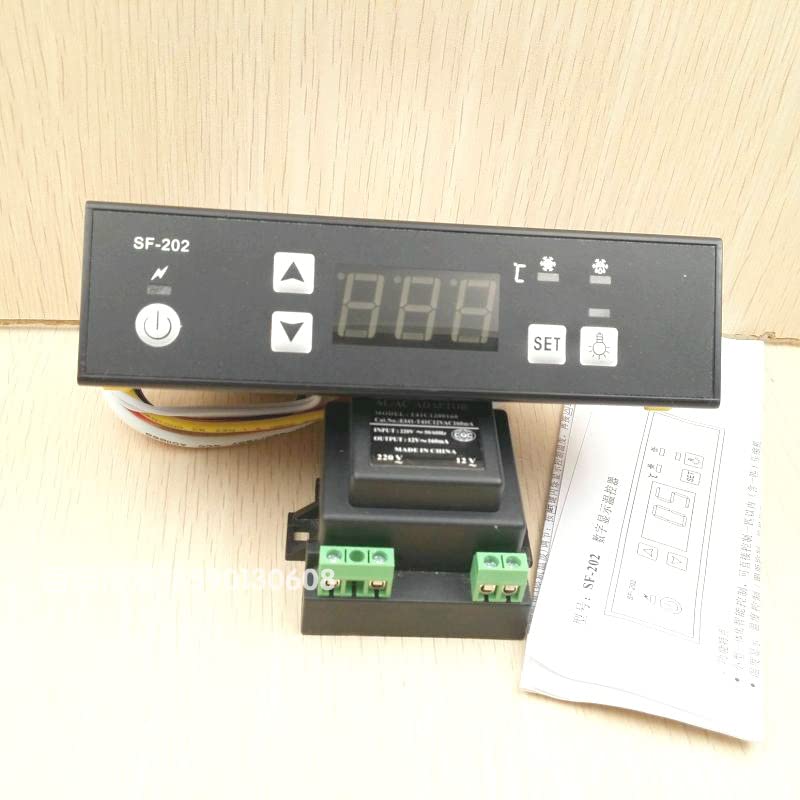
Figure 1: Front view of the Freshmeo SF-202 PC202 Digital Temperature Controller, showing the digital display and control buttons.
4. Setup and Installation
4.1 Mounting
The controller is designed for panel mounting. Ensure the cutout dimensions are appropriate for the unit (142mm L × 38mm W × 35mm D). Secure the controller firmly in place using the provided clips or mounting hardware.
4.2 Wiring Diagram
(A detailed wiring diagram would typically be provided here. Please refer to the diagram included with your product packaging for specific connection points.)
General Wiring Guidelines:
- Connect the power supply to the designated terminals (230VAC or 120VAC).
- Connect the NTC temperature sensor to its dedicated input terminals. Ensure the sensor is placed in the area where temperature needs to be controlled.
- Connect the compressor load to the compressor output terminals. Ensure the load does not exceed 30A / 250VAC.
- Ensure all connections are tight and secure to prevent loose contacts and potential hazards.
5. Operating Instructions
5.1 Basic Operation
Once powered on, the controller will display the current temperature measured by the NTC sensor. The display will indicate when the compressor is active.
5.2 Parameter Settings
To access and modify parameters, refer to the specific button sequence outlined in your product's quick start guide. The following table details the available parameters and their functions:
| Parameter | Function | Set Range | Default |
|---|---|---|---|
| E1 | Lower setpoint limit | -40°C to Set temp. | -30°C |
| E2 | Higher setpoint limit | Set temp. + 40°C | 30°C |
| E3 | Temperature hysteresis | 1 to 10°C | 4°C |
| E4 | Compressor start delay time | 0 to 10 Min | 2 Min |
| E5 | Offset on room temperature | -5 to 5°C | 0 |
| F1 | Max. Defrost duration | 1 to 60 Min | 20 Min |
| F2 | Defrost interval time | 0 to 24 Hr | 6 Hr |
| F4 | Display during defrost | 0=Normal display, 1=Last value before defrost | 0 |
| C2 | High temperature alarm | 0 to 40°C above setpoint | 20 |
| C3 | Low temperature alarm | Below setpoint -40°C to 0 | -20 |
| C4 | Alarm delay time | 1 to 90 Min | 60 Min |
Parameter Locking: The controller features a parameter locking function to prevent accidental changes to settings. Refer to your product's specific instructions on how to enable and disable this feature.
6. Maintenance
Regular maintenance ensures the longevity and optimal performance of your temperature controller.
- Cleaning: Periodically wipe the display and casing with a soft, damp cloth. Do not use abrasive cleaners or solvents.
- Sensor Inspection: Regularly check the NTC sensor for any physical damage or corrosion. Ensure it is securely placed in the desired temperature monitoring location.
- Connection Check: Occasionally inspect all electrical connections to ensure they remain tight and free from corrosion.
- Software Updates: Check the manufacturer's website for any available firmware updates, if applicable.
7. Troubleshooting
If you encounter issues with your SF-202 PC202 controller, refer to the following common problems and solutions:
| Problem | Possible Cause | Solution |
|---|---|---|
| Controller not powering on | No power supply; incorrect wiring; blown fuse. | Check power connections; verify voltage; inspect fuses. |
| Inaccurate temperature reading | Faulty sensor; sensor not properly placed; incorrect offset (E5). | Check sensor connection and placement; replace sensor if damaged; adjust E5 parameter. |
| Compressor not turning on/off as expected | Incorrect setpoint or hysteresis (E1, E2, E3); compressor delay (E4); wiring issue. | Verify setpoint and hysteresis settings; check E4 parameter; inspect compressor wiring. |
| Alarm constantly active | Temperature outside alarm limits (C2, C3); alarm delay (C4) too short. | Adjust C2/C3 parameters; increase C4 delay; check actual temperature. |
If the problem persists after attempting these solutions, please contact customer support.
8. Technical Specifications
- Model: SF-202 PC202
- Temperature Range: -45°C to 99°C
- Accuracy: ±1°C
- Sensor: NTC, 1pc
- Power Supply: 230VAC or 120VAC, 50/60Hz
- Compressor Output: 30A / 250VAC (Max 1HP)
- Dimensions (L×W×D): 142mm × 38mm × 35mm
- Switch Type: Temperature Switch
- Material: Plastic
- Unit Count: 1.0 Count
9. Warranty and Support
Freshmeo products are manufactured to high-quality standards. For warranty information, please refer to the warranty card included with your purchase or visit the official Freshmeo website. If you require technical assistance or have questions not covered in this manual, please contact Freshmeo customer support through the contact information provided on our website or your purchase platform.