
1. Introduction
The Novastar TB40 is a next-generation multimedia player designed for LED displays. It integrates playback and sending functions, allowing users to manage programs and control LED screens via various terminals such as PCs, mobile phones, and tablets. The TB40 also supports cloud publishing and monitoring platforms for efficient cross-regional cluster management of LED displays. This device is engineered for safety, stability, simplicity, and intelligent control, making it suitable for a wide range of commercial LED display applications.
2. Safety Information
Please read and understand all safety instructions before operating the device. Failure to follow these instructions may result in electric shock, fire, or damage to the product.
- Ensure the power supply voltage matches the device's requirements (100-240V, 50/60Hz).
- Do not expose the device to water or excessive moisture.
- Avoid placing the device near heat sources or in direct sunlight.
- Do not open the device casing. Refer all servicing to qualified personnel.
- Use only accessories specified by the manufacturer.
- Disconnect power during lightning storms or when unused for long periods.
3. Package Contents
Verify that all items are present in the package:
- Novastar TB40 Multimedia Player Unit
- Power Adapter
- User Manual (this document)

Figure 3.1: Contents of the Novastar TB40 package, showing the main unit, power adapter, and documentation.
4. Product Overview
4.1 Front Panel
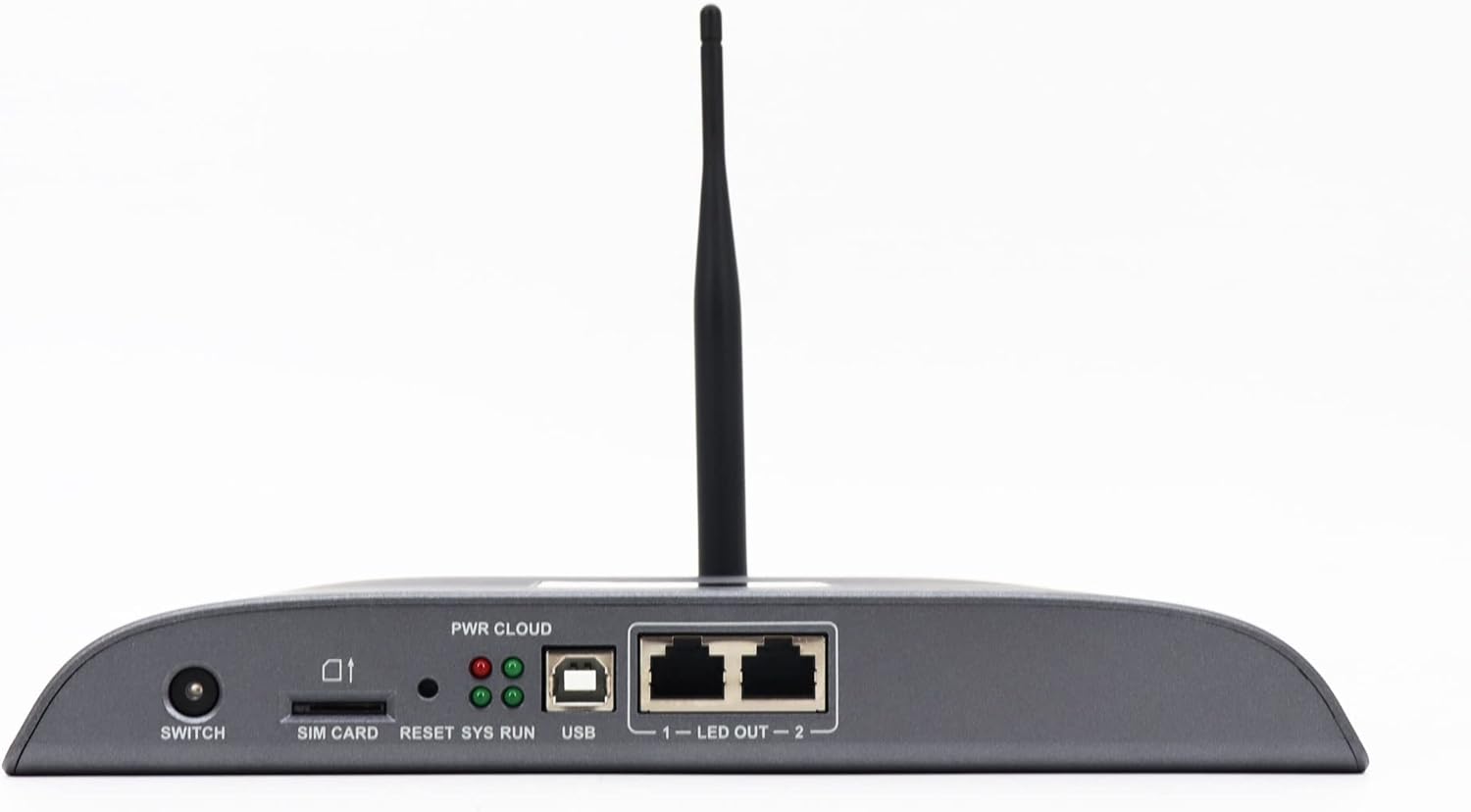
Figure 4.1: Front panel of the Novastar TB40, detailing the various ports and indicator lights.
- SWITCH: Power switch for the device.
- SIM CARD: Slot for inserting a 4G SIM card (if 4G module is installed).
- RESET: Button to reset the device.
- SYS RUN: System running indicator light.
- PWR CLOUD: Power and Cloud connection indicator light.
- USB: USB port for connecting external devices or for system updates.
- LED OUT 1-2: Two Gigabit Ethernet output ports for connecting to LED display receiving cards.
4.2 Rear Panel

Figure 4.2: Rear panel of the Novastar TB40, showing the power input, audio, USB, and network ports.
- 12V 2A: Power input port.
- AUDIO OUT: 3.5mm audio output jack.
- COM 1, COM 2: Serial communication ports.
- USB 3.0: High-speed USB 3.0 port.
- ETHERNET: Gigabit Ethernet input port for network connection.
- HDMI IN: HDMI input port.
- HDMI OUT: HDMI output port.
- OUT: Additional output ports (likely for specific control signals).
5. Setup
5.1 Connecting Power
- Connect the provided power adapter to the 12V 2A power input port on the rear panel of the TB40.
- Plug the power adapter into a suitable electrical outlet.
- Press the SWITCH button on the front panel to power on the device. The PWR CLOUD indicator should light up.
5.2 Network Connection
The TB40 supports both wired Ethernet and optional 4G connectivity.
- Wired Ethernet: Connect an Ethernet cable from your network router or switch to the ETHERNET port on the rear panel.
- 4G (Optional): If a 4G module is installed, insert a valid SIM card into the SIM CARD slot on the front panel. Ensure the antenna is securely attached.
5.3 Connecting to LED Display
- Connect one or two Ethernet cables from the LED OUT 1 and LED OUT 2 ports on the front panel to the receiving cards of your LED display.
- Ensure the LED display is powered on and configured correctly to receive signals from the TB40.
5.4 Connecting Peripherals
- Audio: Connect speakers or an audio system to the AUDIO OUT port.
- USB Devices: Connect USB storage devices or other peripherals to the USB or USB 3.0 ports.
- HDMI Input: If using an external video source, connect it to the HDMI IN port.
6. Operating Instructions
The Novastar TB40 can be controlled and managed through various user terminals and cloud platforms.
6.1 Initial Configuration
Upon first power-on or after a factory reset, the device may require initial network and display configuration. Refer to the Novastar software documentation (e.g., NovaLCT-Mars or ViPlex Express) for detailed steps on setting up network parameters, screen resolution, and display mapping.
6.2 Program Release and Playback
Content for your LED display can be created and scheduled using Novastar's dedicated software applications. These applications allow you to upload videos, images, text, and other media to the TB40 for playback.
- Local Control: Connect a PC to the same network as the TB40 or directly via USB for local program management and updates.
- Mobile/Tablet Control: Use the Novastar mobile application (e.g., ViPlex Handy) to manage content and settings wirelessly.
- Cloud Platform: For cross-regional management, connect the TB40 to the Novastar cloud publishing and monitoring platform. This enables remote content updates, scheduling, and device status monitoring.
The TB40 supports 1080P video hardware decoding and 4K*2 output, ensuring high-quality content delivery to your LED display.
6.3 Brightness Adjustment
The device includes a brightness sensor interface, supporting automatic and timed dual-mode intelligent brightness adjustment. This feature helps optimize display visibility and power consumption based on ambient light conditions or predefined schedules.
7. Maintenance
- Cleaning: Use a soft, dry cloth to clean the exterior of the device. Do not use liquid cleaners or aerosols.
- Ventilation: Ensure adequate ventilation around the device to prevent overheating. Do not block ventilation openings.
- Firmware Updates: Periodically check the Novastar official website for firmware updates to ensure optimal performance and access to new features. Follow the provided instructions carefully during updates.
- Storage: If storing the device for an extended period, disconnect power and store it in a cool, dry place away from direct sunlight.
8. Troubleshooting
| Problem | Possible Cause | Solution |
|---|---|---|
| Device does not power on. | Power adapter not connected or faulty; power outlet issue. | Check power adapter connection. Try a different power outlet. Ensure the power switch is ON. |
| No display on LED screen. | LED OUT cables disconnected; incorrect display configuration; LED screen not powered. | Verify Ethernet cable connections to LED display. Check display settings in Novastar software. Ensure LED screen is powered and functional. |
| Network connection drops frequently (Wi-Fi/4G). | Weak signal; interference; incorrect network settings; faulty module. | Ensure the device is within range of the Wi-Fi router or has good 4G signal. Check network settings. If using 4G, verify SIM card is active. Consider a wired Ethernet connection for stability. |
| Content not playing or updating. | Network connectivity issue; incorrect content schedule; insufficient storage. | Verify network connection. Check content schedule and upload status in the control software. Ensure sufficient storage space on the device. |
If the problem persists after attempting these solutions, please contact Novastar technical support.
9. Specifications
| Model Name | TB40 |
| Processor | 1.8GHz A55 Four-core Processor |
| Video Decoding | Support for 1080P Video Hardware decoding |
| Operating Memory | 1GB |
| Storage Memory | 16GB |
| Output Resolution | 4K*2 output |
| Loading Capacity | 1,300,000 pixels (max width 4096, max height 4096) |
| Network Ports | 2 x 1000M Ethernet output, 1 x 1000M Ethernet input |
| Connectivity Technology | USB, Ethernet, 4G (optional module) |
| Power Input | 100-240V AC, 50/60Hz |
| Max Power Consumption | 18W |
| Dimensions (L*W*H) | 274mm * 139mm * 40mm |
| Weight | 1250g |
| Special Features | Brightness sensor interface, automatic/timed brightness adjustment, multi-screen synchronous playback |
10. Warranty and Support
For warranty information and technical support, please refer to the official Novastar website or contact your authorized reseller. Keep your purchase receipt as proof of purchase for warranty claims.
Novastar Official Website: www.novastar.tech


