1. Introduction
Thank you for choosing the LumiCharge 4-in-1 Wireless Charging Station. This device is designed to provide a convenient and clutter-free charging solution for your compatible electronic devices, including smartphones, smartwatches, and wireless earbuds. It also features an integrated LED night light for added functionality.
Please read this manual thoroughly before using the product to ensure proper operation and to maximize its lifespan.
2. Safety Information
- Do not disassemble or modify the device.
- Avoid exposing the device to water, moisture, or extreme temperatures.
- Use only the provided power adapter and USB-C cable.
- Keep the device away from heat sources and direct sunlight.
- Ensure proper ventilation during use to prevent overheating.
- Do not place metal objects or magnetic cards on the charging pads, as this may interfere with charging or damage the device.
- This device incorporates an intelligent chip with multiple protections, including short-circuit, over-current, over-voltage, over-temperature, and foreign object detection, to ensure safe charging.
3. Package Contents
Verify that all items are present in your package:
- LumiCharge 4-in-1 Wireless Charging Station
- Charging Adaptor
- USB-C Cable
- Instruction Manual (this document)
4. Product Overview
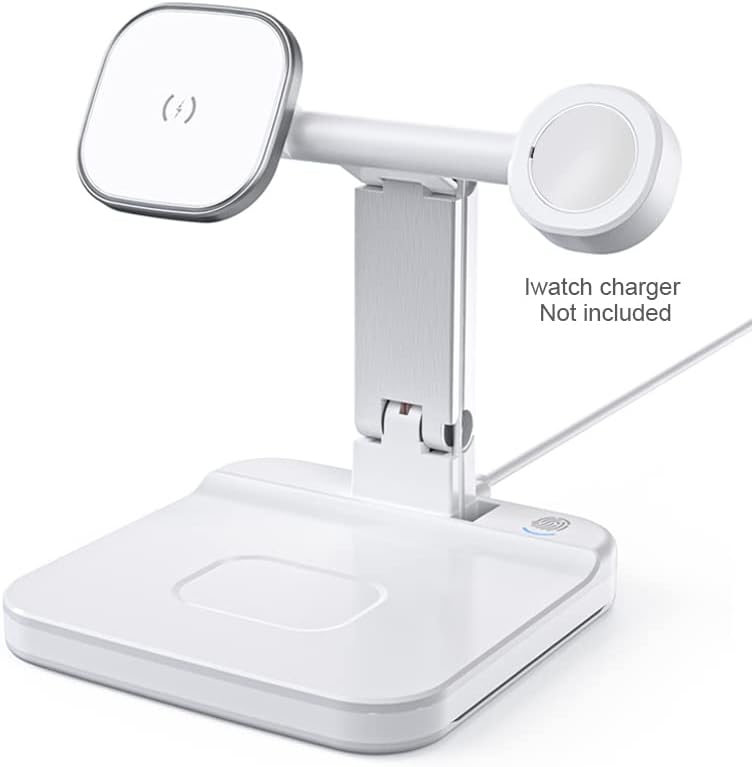
The LumiCharge 4-in-1 Wireless Charging Station features dedicated areas for charging your smartphone, smartwatch, and wireless earbuds, along with an additional USB-C port for other devices. It also includes an integrated LED night light.

5. Setup
- Connect Power: Plug the provided USB-C cable into the charging station's input port and connect the other end to the included power adapter. Plug the power adapter into a wall outlet.
- Install Apple Watch Charger (Not Included): The charging station provides a dedicated slot for your existing Apple Watch magnetic charging cable. Route your Apple Watch charging cable through the designated channel in the stand and connect it to the internal USB port. Ensure the magnetic charging puck is securely seated in its holder.
- Placement: Place the charging station on a stable, flat surface. The non-slip silicone base helps prevent accidental movement.
6. Operating Instructions
6.1. Charging Devices
- Smartphone Charging: Place your Qi-compatible smartphone on the magnetic charging pad. The phone can be charged in both portrait and landscape orientations. The strong magnetic connection ensures secure placement and efficient charging. The device supports charging through phone cases up to 0.2 inches (5mm) thick.
- Smartwatch Charging: Place your Apple Watch on the magnetic charging puck installed in the dedicated holder. Ensure it aligns correctly for charging to begin.
- Earbuds Charging: Place your Qi-compatible wireless earbuds case on the flat charging area at the base of the station.
- Additional Device Charging: An extra USB port is located at the back of the base for charging other devices via a cable (not included).


6.2. Night Light Operation
The charging station features an integrated LED night light. To operate the night light, gently touch the designated touch sensor on the base. The light offers two brightness settings (low and high) and can be turned off with subsequent touches.
6.3. Adjustable Angles
The smartphone charging pad and the overall stand structure are designed with adjustable hinges. This allows you to adjust the viewing angle of your smartphone for optimal comfort during video calls, media streaming, or general use. The support plate can be adjusted to two different angles, and the large charging coils support both vertical and horizontal phone charging.
7. Maintenance
- Clean the charging station regularly with a soft, dry cloth.
- Do not use abrasive cleaners or solvents.
- Ensure the device is unplugged before cleaning.
8. Troubleshooting
| Problem | Possible Solution |
|---|---|
| Device not charging |
|
| Night light not working |
|
| Slow charging speed |
|
9. Specifications
| Feature | Detail |
|---|---|
| Model | B0B5F6D923 |
| Product Dimensions | 5 x 2 x 5 inches |
| Item Weight | 0.634 ounces |
| Input Voltage | 120 Volts |
| Amperage | 2 Amps |
| Total USB Ports | 1 (for Apple Watch charger or other devices) |
| Wireless Charging Output | Up to 15W (Phone), 3W (Apple Watch), 3W (AirPods) |
| Case Compatibility | Charges through cases up to 0.2 inches (5mm) thick |
| Special Features | LED Night Light (2 settings), Adjustable Viewing Angles, Foldable Design, Intelligent Protection Chip |
10. Warranty and Support
LumiCharge products are designed for reliability and performance. For warranty information, technical support, or customer service inquiries, please refer to the contact details provided on the product packaging or visit the official LumiCharge website. Keep your purchase receipt for warranty claims.
11. Product Videos
Watch these official videos for a visual guide on using your LumiCharge 4-in-1 Wireless Charging Station:
Charging Station Overview
This video provides a comprehensive overview of the LumiCharge 4-in-1 Wireless Charging Station, demonstrating its features for charging phones, smartwatches, and earbuds, along with its LED night light functionality.
Magnetic Wireless Charger Features
Explore the magnetic wireless charging capabilities of the LumiCharge station, showcasing how it securely holds and charges your smartphone, smartwatch, and AirPods.
Clutter-Free Charging Solution
This video highlights how the LumiCharge station helps organize your charging space, making it ideal for student desks or office environments by consolidating multiple devices.
