
1. Introduction
This manual provides comprehensive instructions for the installation, operation, and maintenance of your TOUCH TCH-23104 Undermount Soft-Close Drawer Slides. These slides are designed for concealed installation beneath the drawer, offering a clean aesthetic and smooth, silent operation. Each pair supports up to 75 lbs and features a 3D adjustable lock device for precise drawer alignment.

Image 1.1: Overview of TOUCH Undermount Soft-Close Drawer Slides and included components.
2. What's in the Box
Please verify that all components are present before beginning installation:
- Undermount Drawer Slides (5 pairs for a 5-pack)
- Lock Devices (10 units for a 5-pack)
- Mounting Screws (various sizes)
- Instruction Manual (this document)
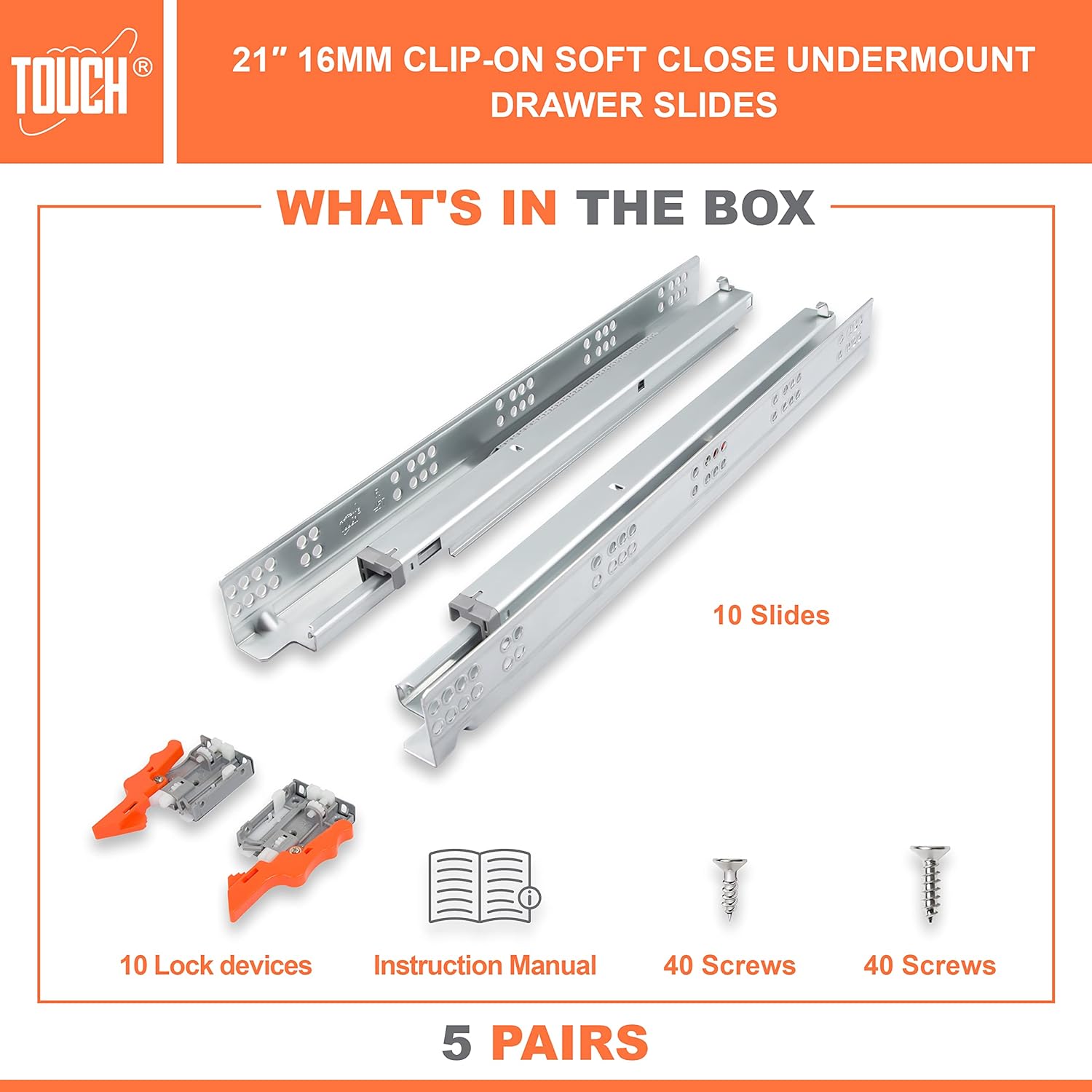
Image 2.1: Visual representation of the package contents, including slides, lock devices, screws, and manual.
3. Specifications
- Model Number: TCH-23104
- Mounting Type: Undermount
- Length: 21 inches (533mm)
- Weight Capacity: 75 pounds
- Material: Alloy Steel (Galvanized finish)
- Features: Self-Soft Close, 3D Adjustable Lock Device
- Compatibility: Fits 1/2" to 5/8" drawer side panel thickness
For detailed dimensions and mounting hole distances, refer to the table below:

Image 3.1: Detailed specifications table for various slide lengths, including cabinet depth and mounting hole measurements.
4. Setup and Installation
4.1. Pre-Installation Considerations
Accurate measurements are crucial for optimal performance. Please review the following:
- Drawer Width: The inside drawer width must equal the cabinet opening width minus 1-5/8 inches (41.3mm) for proper alignment and function.
- Drawer Side Panel Thickness: These slides are compatible with drawer side panels between 1/2 inch (12.7mm) and 5/8 inch (15.9mm) thick.
- Cabinet Type: For face frame cabinet applications, rear mounting sockets are required and sold separately. They are not required for frameless cabinets.

Image 4.1: Important dimensional guidelines for drawer and cabinet preparation, including clearances and side panel thickness.

Image 4.2: Comparison of face frame and frameless cabinet types, indicating when rear mounting sockets are necessary.
4.2. Installation Steps
- Prepare the Cabinet: Ensure the cabinet opening is clean and clear. Mark the desired height for the drawer slides inside the cabinet.
- Install Cabinet Slides: Attach the cabinet portion of the slides to the cabinet sides using the provided screws. It is recommended to pre-drill pilot holes to prevent screw stripping. Initially, secure with one screw at the front, leaving the rear loose for adjustment.
- Prepare the Drawer: Attach the lock devices to the underside of the drawer box, ensuring they are correctly oriented.
- Insert Drawer: Carefully align the drawer with the cabinet slides and push it in until the lock devices engage with the slides.
- Adjust and Secure: With the drawer inserted, test its movement. Adjust the position of the cabinet slides as needed to achieve smooth operation. Once optimal movement is achieved, fully secure all screws, including the rear mounting points.
- Fine-Tune with 3D Adjustment: Use the 3D adjustable lock device (refer to Section 5.2) to make minor adjustments to the drawer front's height, tilt, and side-to-side alignment.
5. Operating the Drawer Slides
5.1. Soft-Close Functionality
The TOUCH TCH-23104 drawer slides feature an integrated soft-close mechanism. This system ensures that the drawer closes gently and silently, preventing slamming and extending the lifespan of your cabinetry. Simply push the drawer towards the closed position, and the mechanism will engage to complete the closing action smoothly.
5.2. 3D Adjustable Lock Device
The 3D adjustable lock device allows for precise alignment of the drawer front after installation. This mechanism provides adjustments for height, front panel tilt, and left-to-right positioning, ensuring a perfect fit and consistent gaps between drawer fronts.

Image 5.1: Close-up view of the 3D lock device, highlighting height, tilt, and lateral adjustment points, along with the soft-closing mechanism.

Image 5.2: An installed drawer demonstrating the concealed nature of the undermount slides.
6. Maintenance
The TOUCH TCH-23104 drawer slides are designed for durability and require minimal maintenance. To ensure continued smooth operation:
- Cleaning: Periodically wipe down the visible parts of the slides with a clean, dry cloth to remove dust and debris. Avoid using abrasive cleaners or solvents.
- Lubrication: The slides are pre-lubricated and generally do not require additional lubrication. If movement becomes stiff over time, a small amount of silicone-based lubricant can be applied to the moving parts, avoiding excessive application.
- Inspection: Occasionally check all mounting screws to ensure they are tight. Re-tighten if necessary.
7. Troubleshooting
- Drawer does not close smoothly or jams:
- Check for obstructions in the slide mechanism or drawer path.
- Verify that the drawer and cabinet slides are properly aligned. Use the 3D adjustable lock device for fine-tuning.
- Ensure all mounting screws are securely fastened. Loose screws can cause misalignment.
- Soft-close mechanism is not engaging:
- Confirm that the drawer is fully engaging with the soft-close mechanism at the end of its travel. Adjust alignment if needed.
- Check for any debris obstructing the soft-close piston.
- Screws stripping during installation:
- Always pre-drill pilot holes before driving screws into wood. The pilot hole should be slightly smaller than the screw's diameter.
- Use appropriate screwdriver bits and apply steady pressure.
- Drawer front is not level or flush:
- Utilize the 3D adjustable lock device to correct height, tilt, and side-to-side positioning of the drawer front.
- Plastic components (e.g., rear mounts) breaking:
- Ensure the drawer is not overloaded beyond the 75 lb capacity.
- Verify correct installation and alignment to prevent undue stress on plastic parts.
- Contact customer support for replacement parts if necessary.
8. Warranty and Support
For any questions, suggestions, or assistance with your TOUCH Undermount Drawer Slides, please contact TOUCH Cabinets Hardware customer support. We are committed to providing high-quality products and support to ensure your satisfaction.
Manufacturer: TOUCH Cabinets Hardware
Contact: Refer to your purchase documentation or the seller's information for direct contact methods.
