
1. Introduction
The Siglent SPD3303X-E is a high-performance triple output programmable DC power supply designed for various electronic testing and development applications. It features three independent, isolated outputs, excellent regulation, and low noise. This manual provides essential information for the safe and efficient use of your SPD3303X-E power supply, including setup, operation, maintenance, and troubleshooting.
Please read this manual thoroughly before operating the device to ensure proper functionality and to prevent damage to the unit or connected equipment.
2. Key Features
- Three independent controlled and isolated outputs.
- Output configurations: 32V/3.2A x 2, and 2.5V/3.3V/5V/3.2A x 1.
- Total power output: 220W.
- Supports various output modes: Independent, Series, and Parallel.
- Equipped with a timing output function for automated testing.
- Features a 4.3-inch TFT LCD display for clear voltage and current readings.
- Voltage resolution: 10mV / 10mA.
- Intelligent temperature-controlled fan for reduced noise.
- Includes Easy Power PC software and supports SCPI commands for remote control.
3. Safety Information
Always observe the following safety precautions to prevent injury and damage to the instrument:
- Connect the power supply to a grounded AC outlet.
- Do not operate the device in wet or damp conditions.
- Ensure proper ventilation to prevent overheating.
- Do not exceed the maximum voltage and current ratings of the device or the connected load.
- Disconnect power before making or changing connections.
- Refer servicing to qualified personnel only.
4. Product Overview
The SPD3303X-E features a user-friendly interface with a clear display and intuitive controls.

Figure 4.1: Front view of the Siglent SPD3303X-E Triple Output Power Supply.
4.1 Front Panel and Display
The front panel includes the main display, control knobs, function buttons, and output terminals.

Figure 4.2: Detailed view of the SPD3303X-E front panel display, showing Channel 1 and Channel 2 output readings.

Figure 4.3: Close-up of the SPD3303X-E display, illustrating precise voltage, current, and power readings for each channel.
The 4.3-inch TFT LCD provides real-time monitoring of voltage, current, and power for all three channels. Dedicated buttons and rotary encoders allow for precise adjustment of output parameters and selection of operating modes.
4.2 Output Terminals
The front panel features clearly labeled output terminals for Channels 1, 2, and 3, along with a ground (GND) terminal. Channels 1 and 2 are capable of independent, series, or parallel operation, while Channel 3 offers fixed voltage outputs.
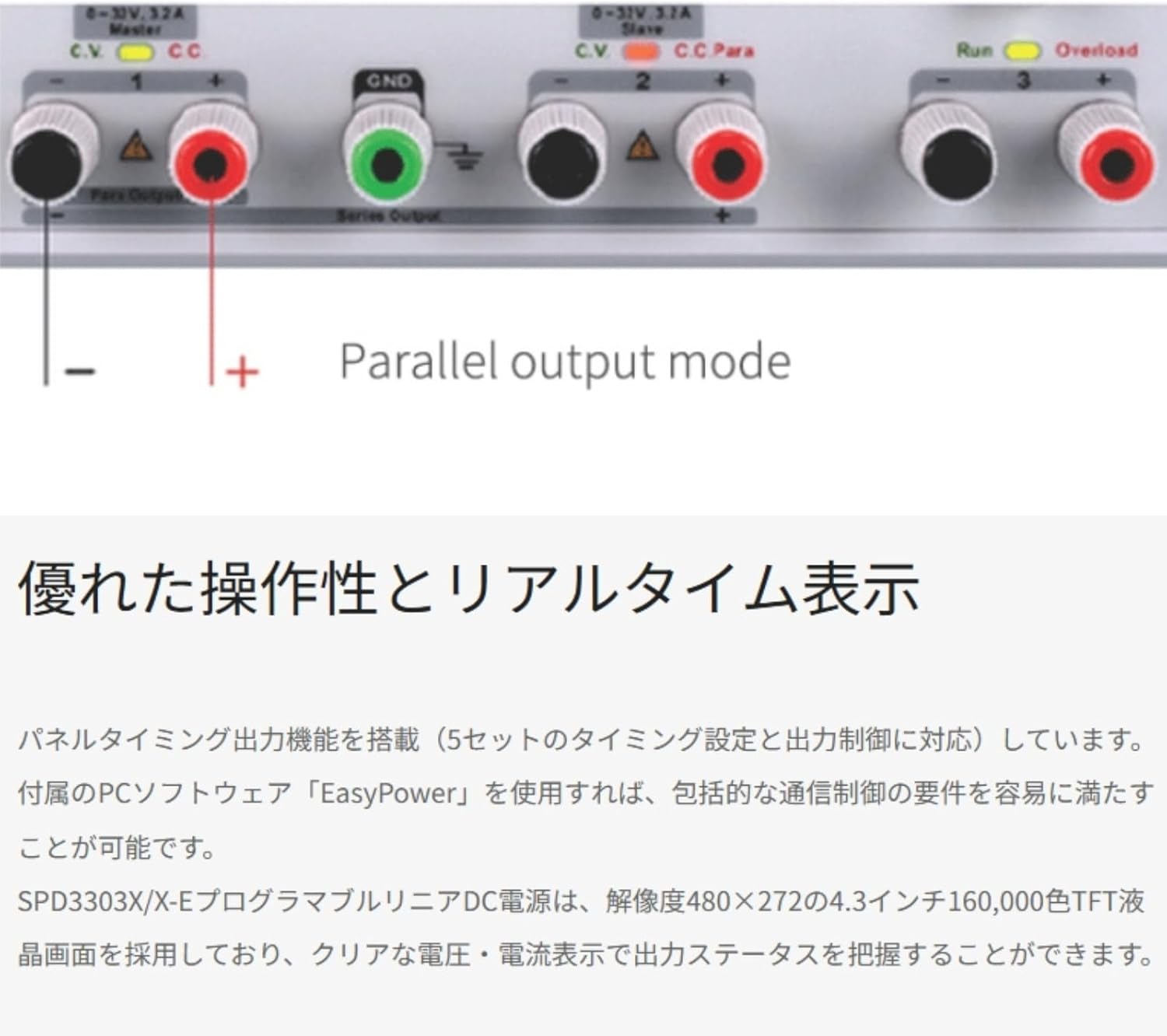
Figure 4.4: Output terminals and indication for Parallel output mode on the SPD3303X-E.
5. Setup
- Unpacking and Inspection: Carefully remove the power supply from its packaging. Inspect the unit for any signs of physical damage. Report any damage to your supplier immediately.
- Power Connection: Connect the supplied AC power cord to the power input on the rear panel of the SPD3303X-E and then to a grounded AC power outlet. Ensure the voltage selector (if present) is set correctly for your region.
- Initial Power On: Press the power switch located on the front panel. The display should illuminate, and the unit will perform a self-test.
- Ventilation: Ensure adequate space around the unit for proper airflow to prevent overheating. Do not block the ventilation openings.
6. Operation
6.1 Setting Voltage and Current
To set the desired voltage and current for a channel:
- Select the desired channel (CH1, CH2, or CH3) using the corresponding button.
- Use the rotary encoder to adjust the voltage value. Press the encoder to switch between digits for fine adjustment.
- Press the current setting button (usually labeled 'A' or 'I') and use the rotary encoder to set the current limit.
- Press the output ON/OFF button for the selected channel to enable or disable the output.
6.2 Output Modes
The SPD3303X-E supports three primary output modes for Channels 1 and 2:
- Independent Mode: Channels 1 and 2 operate as two separate power supplies, each with its own voltage and current settings.
- Series Mode: Channels 1 and 2 are connected in series to provide a higher output voltage (up to 64V). The current limit is determined by the lower of the two channel's current settings.
- Parallel Mode: Channels 1 and 2 are connected in parallel to provide a higher output current (up to 6.4A). The voltage is determined by the master channel, and the total current limit is the sum of both channels' current settings.
Use the dedicated mode buttons on the front panel to switch between these configurations.
6.3 Timing Output Function
The timing output function allows you to program a sequence of voltage and current changes over time, useful for automated testing and characterization.

Figure 6.1: Display showing the Panel Timing Output settings, allowing users to program voltage and current sequences.
To use the timing output function, navigate to the timing menu on the display and configure the desired steps, including voltage, current, and duration for each step. Once programmed, activate the timing output to execute the sequence.
7. Maintenance
- Cleaning: Use a soft, dry cloth to clean the exterior of the power supply. Do not use abrasive cleaners or solvents.
- Ventilation: Regularly check that the ventilation openings are clear of dust and debris. Blocked vents can lead to overheating and damage.
- Storage: When not in use for extended periods, store the power supply in a dry, dust-free environment.
- Calibration: Periodic calibration by qualified personnel is recommended to maintain measurement accuracy.
8. Troubleshooting
If you encounter issues with your SPD3303X-E, refer to the following common troubleshooting steps:
- No Power:
- Check the power cord connection to both the unit and the AC outlet.
- Verify that the AC outlet is functional.
- Check the fuse on the rear panel (if accessible and user-replaceable).
- No Output Voltage/Current:
- Ensure the output for the selected channel is turned ON.
- Check the voltage and current limit settings; they might be set too low.
- Verify connections to the load.
- If in Constant Current (CC) mode, the voltage will drop to maintain the set current. If in Constant Voltage (CV) mode, the current will drop if the load resistance is too high.
- Overload Indication:
- Reduce the load or increase the current limit setting.
- Check for short circuits in the connected load.
If the problem persists after attempting these steps, contact Siglent customer support or a qualified service technician.
9. Specifications
The following table outlines the key specifications for the Siglent SPD3303X-E Triple Output Power Supply:
| Feature | SPD3303X-E |
|---|---|
| Output Channels | CH1: 0-32V / 0-3.2A CH2: 0-32V / 0-3.2A CH3: 2.5V/3.3V/5V / 3.2A |
| Maximum Output Power | 220W |
| Display | 4.3-inch Color LCD (480x272) |
| Voltage Resolution | 10 mV |
| Current Resolution | 10 mA |
| Voltage Setting Accuracy | V: ±(0.5% setting + 2 LSB) |
| Current Setting Accuracy | I: ±(0.5% setting + 2 LSB) |
| Voltage Readback Accuracy | V: ±(0.5% reading + 2 LSB) |
| Current Readback Accuracy | I: ±(0.5% reading + 2 LSB) |
| Communication Interface | USB Device, LAN |
| Dimensions (W×H×D) | 225 × 143 × 278 mm (8.86 x 5.63 x 10.94 inches) |
| Weight | Approx. 8 kg (17.6 lbs) |
Note: Specifications are subject to change without notice. For the most current specifications, please refer to the official Siglent website.
10. Warranty and Support
The Siglent SPD3303X-E comes with a standard manufacturer's warranty. Please refer to the warranty card included with your product or visit the official Siglent website for detailed warranty terms and conditions.
For technical support, service, or inquiries, please contact Siglent Technologies customer service. Contact information can typically be found on the Siglent website or in the product documentation.
What's in the Box: The standard configuration includes the SPD3303X-E power supply and necessary accessories for basic operation.


